Android | Display Multiplication Table of a Number (original) (raw)
Last Updated : 30 Apr, 2024
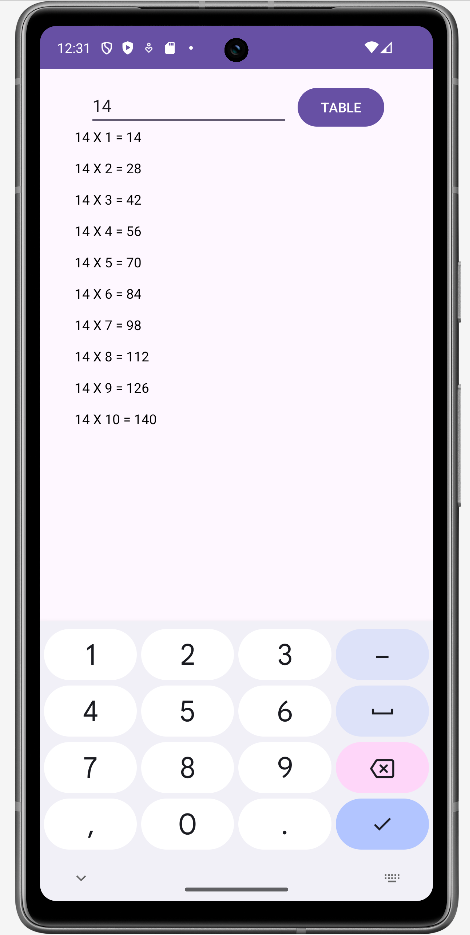
Given a number, the task is to display the multiplication table of this number using the Android App.
**Steps to Build an Android Application for Multiplication Table
We will follow the Steps in the order they are mentioned below to create the application.
**Step 1: Create a new Android Application and Name it Program_Multiplication_Table with the Empty layout.
**Note: We have used the name of the Program_Multiplication_Table as the Name of the Application. Please change the package name if you are using different name.
**Step 2: Open the activity_main.xml (values>layout>activity_main.xml) file where we will be creating the layout of the application.
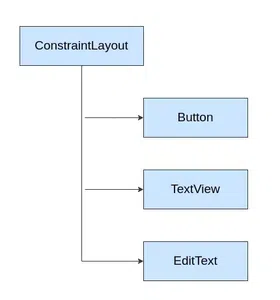
**Step 3: In **activity_main.xml file add TextView, EditText, and a Button.
The Component Tree will look like this :
**Step 4: Assign ID to each component
**Step 5: Now, open up the MainActivity file and declare the variables.
**Step 6: Read the values entered in the EditText boxes using an ID that has been set in the XML code above.
**Step 7: Add a click listener to the Add button
**Step 8: When the Add button has been clicked we need to Multiply the values and store it in Buffer
**Step 9: Then show the resultant output in the TextView by setting the buffer in the TextView.
**Implementation to Build Display Multiplication Table of a Number
Below are the codes for MainActivity.java and activity_main.xml to build android application which displays the multiplication table of a number:
MainActivity.java `
// Build the java logic for multiplication table // using button, text view, edit text package com.example.program_multiplication_table;
import androidx.appcompat.app.AppCompatActivity; import android.os.Bundle; import android.view.View; import android.widget.Button; import android.widget.EditText; import android.widget.TextView;
public class MainActivity extends AppCompatActivity implements View.OnClickListener {
// define the global variable

// variable number1, number2 for input input number
// Add_button, result textView

EditText editText;
Button button;
TextView result;
int ans = 0;

@Override
protected void onCreate(Bundle savedInstanceState)
{
    super.onCreate(savedInstanceState);
    setContentView(R.layout.activity_main);

    // by ID we can use each component
    // whose id is assigned in the XML file

    editText = (EditText)findViewById(R.id.editText);
    button = (Button)findViewById(R.id.button);
    result = (TextView)findViewById(R.id.textView);

    // set clickListener on button
    button.setOnClickListener(this);
}

@Override
public void onClick(View v)
{
    if(v.getId()==R.id.button) {
        StringBuffer buffer = new StringBuffer();

        // get the input number from editText
        String fs = editText.getText().toString();

        // convert it to integer
        int n = Integer.parseInt(fs);

        // build the logic for table
        for (int i = 1; i <= 10; i++) {
            ans = (i * n);
            buffer.append(n + " X " +
                    i + " = " + ans + "\n\n");
        }

        // set the buffer textview
        result.setText(buffer);
    }
}
}
activity\_main.xml
<androidx.constraintlayout.widget.ConstraintLayout xmlns:android="http://schemas.android.com/apk/res/android" xmlns:app="http://schemas.android.com/apk/res-auto" xmlns:tools="http://schemas.android.com/tools" android:layout_width="match_parent" android:layout_height="match_parent" tools:context=".MainActivity" tools:layout_editor_absoluteY="25dp">
<!-- Add the button for run table logic and print result-->
<!-- give id "button"-->
<Button
    android:id="@+id/button"
    android:layout_width="wrap_content"
    android:layout_height="wrap_content"
    android:layout_marginTop="16dp"
    android:text="TABLE"
    app:layout_constraintEnd_toEndOf="parent"
    app:layout_constraintStart_toEndOf="@+id/editText"
    app:layout_constraintTop_toTopOf="parent" />

<!-- Text view for result view-->
<!-- give the id TextView-->
<TextView
    android:id="@+id/textView"
    android:layout_width="0dp"
    android:layout_height="0dp"
    android:layout_marginStart="36dp"
    android:layout_marginEnd="36dp"
    android:layout_marginBottom="18dp"
    android:textColor="@color/black"
    app:layout_constraintBottom_toBottomOf="parent"
    app:layout_constraintEnd_toEndOf="parent"
    app:layout_constraintStart_toStartOf="parent"
    app:layout_constraintTop_toBottomOf="@+id/editText" />

<!-- edit Text for take input from user-->
<!-- give the id editText-->
<EditText
    android:id="@+id/editText"
    android:layout_width="wrap_content"
    android:layout_height="wrap_content"
    android:layout_marginBottom="20dp"
    android:layout_marginEnd="9dp"
    android:layout_marginRight="9dp"
    android:layout_marginTop="16dp"
    android:ems="10"
    android:inputType="number"
    app:layout_constraintBottom_toTopOf="@+id/textView2"
    app:layout_constraintEnd_toStartOf="@+id/button"
    app:layout_constraintHorizontal_chainStyle="packed"
    app:layout_constraintStart_toStartOf="parent"
    app:layout_constraintTop_toTopOf="parent"
    tools:ignore="UnknownId" />
</androidx.constraintlayout.widget.ConstraintLayout>
`
**Application Look: