How to Add Radio Buttons in an Android Application? (original) (raw)
Last Updated : 1 Jun, 2026
RadioButton is a UI component in Android that allows users to select one option from multiple choices. Multiple RadioButtons are placed inside a RadioGroup, which ensures that only one option can be selected at a time. RadioButtons are commonly used in forms, quizzes, settings, and selection-based interfaces.
- Allows users to select only one option at a time.
- RadioButtons are grouped together using RadioGroup.
- Helps create user-friendly and organized selection interfaces.
Example:

This image shows 4 options of the subjects for a question. In this, each mentioned subject is a Radio Button and all the 4 subjects together are enclosed in a Radio Group.
How to Create an Android App to Use Radio Buttons?
This example demonstrates how to create an Android application using RadioButtons and RadioGroup.
Step 1: Create a New Android Project
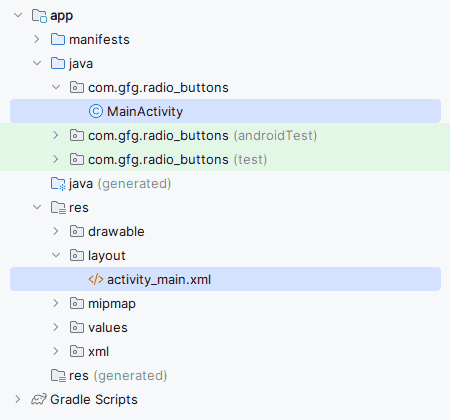
Create a new Android project in Android Studio. This will automatically generate:
activity_main.xmlMainActivity.java
Step 2: Add UI Components in activity_main.xml
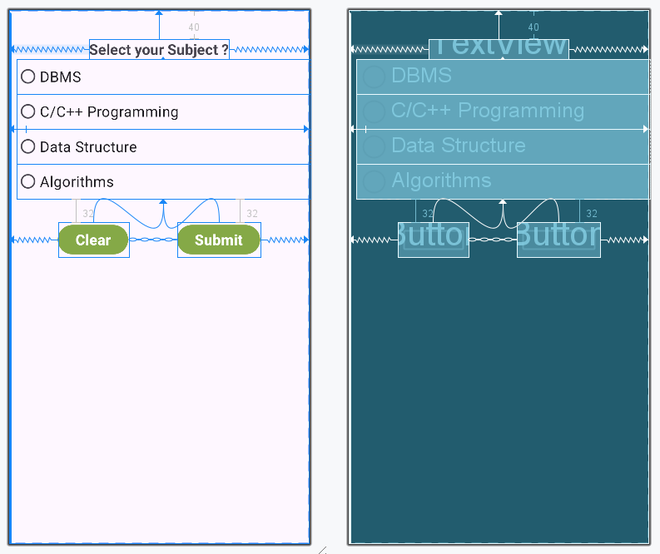
Open the activity_main.xml file and add the following components inside a ConstraintLayout.
**Components Used
- TextView for displaying the question
- RadioGroup to hold RadioButtons
- Four RadioButtons for options
- Submit Button
- Clear Button
**activity_main.xml: (Using Constraint Layout)
XML `
<androidx.constraintlayout.widget.ConstraintLayout xmlns:android="http://schemas.android.com/apk/res/android" xmlns:app="http://schemas.android.com/apk/res-auto" xmlns:tools="http://schemas.android.com/tools" android:layout_width="match_parent" android:layout_height="match_parent" tools:context=".MainActivity">
<TextView
    android:id="@+id/text_view1"
    android:layout_width="wrap_content"
    android:layout_height="wrap_content"
    android:text="Select your Subject?"
    android:textSize="20sp"
    android:textStyle="bold"
    android:layout_marginTop="40dp"
    app:layout_constraintTop_toTopOf="parent"
    app:layout_constraintStart_toStartOf="parent"
    app:layout_constraintEnd_toEndOf="parent" />

<RadioGroup
    android:id="@+id/groupradio"
    android:layout_width="0dp"
    android:layout_height="wrap_content"
    android:layout_margin="16dp"
    android:orientation="vertical"
    app:layout_constraintTop_toBottomOf="@id/text_view1"
    app:layout_constraintStart_toStartOf="parent"
    app:layout_constraintEnd_toEndOf="parent">

    <RadioButton
        android:id="@+id/radia_id1"
        android:layout_width="match_parent"
        android:layout_height="wrap_content"
        android:text="DBMS"
        android:textSize="18sp" />

    <RadioButton
        android:id="@+id/radia_id2"
        android:layout_width="match_parent"
        android:layout_height="wrap_content"
        android:text="C/C++ Programming"
        android:textSize="18sp" />

    <RadioButton
        android:id="@+id/radia_id3"
        android:layout_width="match_parent"
        android:layout_height="wrap_content"
        android:text="Data Structure"
        android:textSize="18sp" />

    <RadioButton
        android:id="@+id/radia_id4"
        android:layout_width="match_parent"
        android:layout_height="wrap_content"
        android:text="Algorithms"
        android:textSize="18sp" />

</RadioGroup>

<Button
    android:id="@+id/submit"
    android:layout_width="wrap_content"
    android:layout_height="wrap_content"
    android:text="Submit"
    app:layout_constraintTop_toBottomOf="@id/groupradio"
    app:layout_constraintStart_toStartOf="parent"
    app:layout_constraintEnd_toStartOf="@id/clear"
    app:layout_constraintHorizontal_bias="0.5" />

<Button
    android:id="@+id/clear"
    android:layout_width="wrap_content"
    android:layout_height="wrap_content"
    android:text="Clear"
    app:layout_constraintTop_toBottomOf="@id/groupradio"
    app:layout_constraintStart_toEndOf="@id/submit"
    app:layout_constraintEnd_toEndOf="parent"
    app:layout_constraintHorizontal_bias="0.5" />
</androidx.constraintlayout.widget.ConstraintLayout> Step 3: Create Backend Logic in MainActivity.java
Open the MainActivity.java file and initialize the components using findViewById().
MainActivity.java package com.gfg.radio_buttons;
import android.os.Bundle; import android.widget.Button; import android.widget.RadioButton; import android.widget.RadioGroup; import android.widget.Toast;
import androidx.appcompat.app.AppCompatActivity;
public class MainActivity extends AppCompatActivity {
private RadioGroup radioGroup;
Button submit, clear;

@Override
protected void onCreate(Bundle savedInstanceState) {
    super.onCreate(savedInstanceState);
    setContentView(R.layout.activity_main);

    submit = findViewById(R.id.submit);
    clear = findViewById(R.id.clear);
    radioGroup = findViewById(R.id.groupradio);

    // Reset RadioButtons initially
    radioGroup.clearCheck();

    // RadioGroup Listener
    radioGroup.setOnCheckedChangeListener(
            (group, checkedId) -> {

                RadioButton radioButton =
                        group.findViewById(checkedId);
            });

    // Submit Button Listener
    submit.setOnClickListener(v -> {

        int selectedId =
                radioGroup.getCheckedRadioButtonId();

        if (selectedId == -1) {

            Toast.makeText(
                    MainActivity.this,
                    "Please select an option",
                    Toast.LENGTH_SHORT
            ).show();

        } else {

            RadioButton radioButton =
                    findViewById(selectedId);

            Toast.makeText(
                    MainActivity.this,
                    "Selected: " + radioButton.getText(),
                    Toast.LENGTH_SHORT
            ).show();
        }
    });

    // Clear Button Listener
    clear.setOnClickListener(v ->
            radioGroup.clearCheck()
    );
}
}
`
Layout:
Step 3: Create Backend Logic in MainActivity.java
Open the MainActivity.java file and initialize the components using findViewById().
Java `
package com.gfg.radio_buttons;
import android.os.Bundle; import android.widget.RadioButton; import android.widget.Toast;
import androidx.appcompat.app.AppCompatActivity;
import com.gfg.radio_buttons.databinding.ActivityMainBinding;
public class MainActivity extends AppCompatActivity {
private ActivityMainBinding binding;

@Override
protected void onCreate(Bundle savedInstanceState) {
    super.onCreate(savedInstanceState);

    binding = ActivityMainBinding.inflate(getLayoutInflater());
    setContentView(binding.getRoot());

    // Reset radio buttons initially
    binding.groupradio.clearCheck();

    // Submit Button
    binding.submit.setOnClickListener(v -> {

        int selectedId =
                binding.groupradio.getCheckedRadioButtonId();

        if (selectedId == -1) {

            Toast.makeText(
                    MainActivity.this,
                    "Please select an option",
                    Toast.LENGTH_SHORT
            ).show();

        } else {

            RadioButton radioButton =
                    findViewById(selectedId);

            Toast.makeText(
                    MainActivity.this,
                    "Selected: " + radioButton.getText(),
                    Toast.LENGTH_SHORT
            ).show();
        }
    });

    // Clear Button
    binding.clear.setOnClickListener(v ->
            binding.groupradio.clearCheck()
    );
}
}
`
Step 4: Add Functionality
- Use radioGroup.clearCheck() to reset all RadioButtons initially.
- Add OnCheckedChangeListener to detect the selected RadioButton.
- Add OnClickListener on the Submit button to display the selected option using Toast.
- Add OnClickListener on the Clear button to reset all RadioButtons.
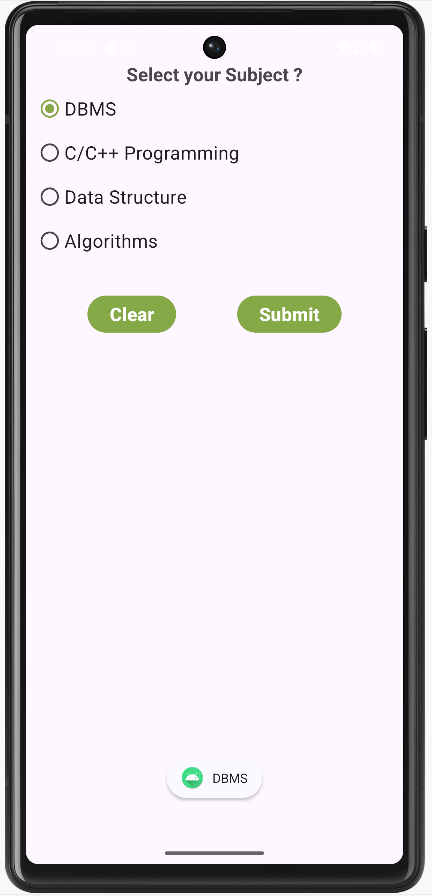
**Output:
- The app displays four subject options.
- Users can select one option at a time.
- The selected option is displayed when Submit is clicked.
- All options are cleared when Clear is clicked.
Working of the Application
- The application displays multiple RadioButtons inside a RadioGroup.
- Only one RadioButton can be selected at a time.
- Clicking the Submit button displays the selected option using Toast.
- Clicking the Clear button resets all RadioButtons.
Advantages of RadioButton
- Allows single-option selection from multiple choices.
- Improves user interaction and form handling.
- Easy to implement using RadioGroup.
- Commonly used in quizzes, surveys, and settings.
- Provides a clean and organized UI.