Audio Recorder in Android with Example (original) (raw)
Last Updated : 23 Jul, 2025
In Android for recording audio or video, there is a built-in class called **MediaRecorder. This class in Android helps to easily record video and audio files. The Android multimedia framework provides built-in support for capturing and encoding common audio and video formats. In android for recording audio, we will use a device microphone along with **MediaRecorder Class and for recording video, we will use the user's device Camera and **MediaRecorder Class. Now in this article, we will see the implementation of an audio recorder in Android.
| Method | Description |
|---|---|
| setAudioSource() | This method will specify the source of the audio to be recorded. |
| setAudioEncoder() | This method is used to specify the audio encoder. |
| setOutputFormat() | This method is used to specify the output format of our audio. |
| setOutputFile() | This method is used to specify the path of recorded audio files that are to be stored. |
| stop() | This method is used to stop the recording process. |
| start() | This method is used to start the recording process. |
| release() | This method is used to release the resource that is associated with the Media recorder class. |
Step by Step Implementation
Step 1: Create a New Project
To create a new project in Android Studio please refer to How to Create/Start a New Project in Android Studio.
Step 2: Working with manifest file
Navigate to app > manifests > AndroidManifest.xml and add the following permission under the ****** tag.
In the same file, under the ****** tag add the following lines of code for FileProvider.
Navigate to **app > res > xml, right click and select **New > XML Resource File and set the name as **file_paths.xml and add the following code to the file.
Step 3: Adding dependencies
Navigate to **Gradle Scripts > build.gradle.kts (Module :app) and add the following dependencies
dependencies { ... implementation ("com.github.massoudss:waveformSeekBar:5.0.2") implementation ("com.github.lincollincol:amplituda:2.2.2") }
Refer to the this repo to read the documentation for the dependencies.
Navigate to **Gradle Scripts > settings.gradle.kts and add the following line under **repositories {}
dependencyResolutionManagement { ... repositories { ... maven { setUrl("https://jitpack.io/") } } }
Step 4: Adding drawable
Navigate to **app > res > drawables, right click on the folder and select New Drawable Resource file and add the following drawables.
play.xml `
pause.xml
play\_square.xml
pause\_square.xml
mic\_open.xml
mic\_close.xml
delete.xml
share.xml
`
Step 5: Working with the activity_main.xml file
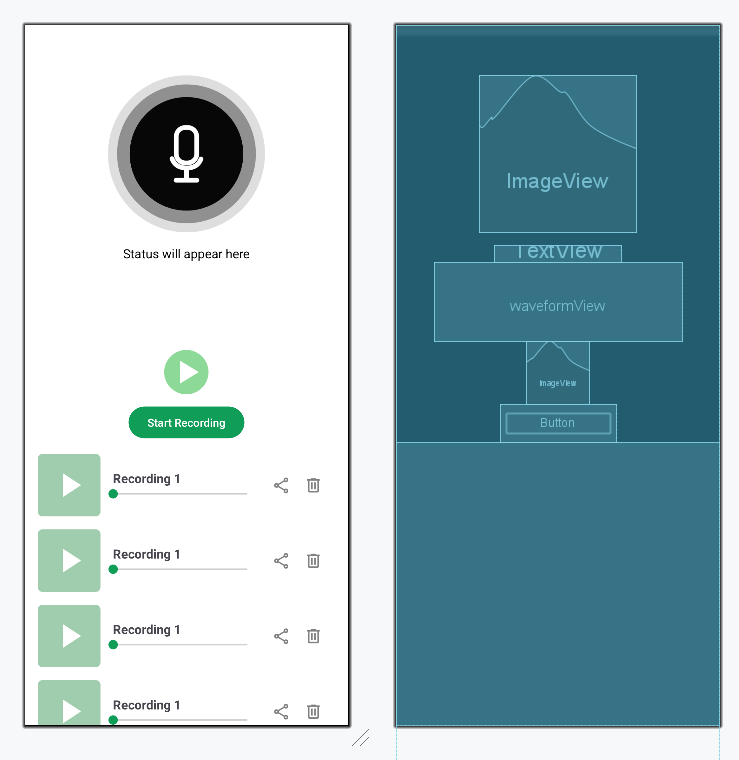
Navigate to the **app > res > layout > activity_main.xml. Comments are added inside the code to understand the code in more detail. Create a new layout for each item of the recycler view and name it **item_audio_recording.xml.
activity_main.xml `
<androidx.core.widget.NestedScrollView xmlns:android="http://schemas.android.com/apk/res/android" xmlns:app="http://schemas.android.com/apk/res-auto" xmlns:tools="http://schemas.android.com/tools" android:layout_width="match_parent" android:layout_height="match_parent" android:orientation="vertical" android:background="@color/white" tools:context=".MainActivity">
<!--  main layout  -->
<LinearLayout
    android:layout_width="match_parent"
    android:layout_height="wrap_content"
    android:orientation="vertical"
    android:gravity="center_horizontal">

    <!--  Mic image that updates on recording status  -->
    <ImageView
        android:id="@+id/micImage"
        android:layout_width="200dp"
        android:layout_height="200dp"
        android:layout_marginTop="64dp"
        android:src="@drawable/mic_close" />

    <!--  Status text that updates on recording/Playing  -->
    <TextView
        android:id="@+id/statusText"
        android:layout_width="wrap_content"
        android:layout_height="wrap_content"
        android:layout_marginTop="16dp"
        android:text="Status will appear here"
        android:textColor="@android:color/black"
        android:textSize="16sp" />

    <!-- to display audio progress -->
    <com.masoudss.lib.WaveformSeekBar
        android:id="@+id/waveformView"
        android:layout_width="wrap_content"
        android:layout_height="100dp"
        android:layout_marginHorizontal="48dp"
        app:wave_padding_top="2dp"
        app:wave_padding_Bottom="2dp"
        app:wave_padding_left="2dp"
        app:wave_padding_right="2dp"
        app:wave_gap="4dp"
        app:wave_width="3dp"
        app:wave_gravity="center"
        app:wave_corner_radius="2dp"
        app:wave_background_color="@color/grey"
        app:wave_progress_color="@color/colorPrimary" />

    <!--  Play/Stop saved recording button  -->
    <ImageView
        android:id="@+id/playStopButton"
        android:layout_width="80dp"
        android:layout_height="80dp"
        android:src="@drawable/play"
        app:layout_constraintEnd_toEndOf="parent"
        app:layout_constraintStart_toStartOf="parent"
        app:layout_constraintTop_toBottomOf="@+id/waveformView" />


    <!--  Start/Stop recording button  -->
    <Button
        android:id="@+id/startStopRecordingButton"
        android:layout_width="wrap_content"
        android:layout_height="wrap_content"
        android:text="Start Recording"
        app:layout_constraintEnd_toEndOf="parent"
        app:layout_constraintStart_toStartOf="parent"
        app:layout_constraintTop_toBottomOf="@+id/playStopButton" />

    <!-- to display list of saved recordings -->
    <androidx.recyclerview.widget.RecyclerView
        android:id="@+id/recordingsRecyclerView"
        android:layout_width="match_parent"
        android:layout_height="0dp"
        android:layout_weight="1"
        android:padding="8dp"
        tools:listitem="@layout/item_audio_recording"
        android:clipToPadding="false" />

</LinearLayout>
</androidx.core.widget.NestedScrollView>
item\_audio\_recording.xml
<androidx.constraintlayout.widget.ConstraintLayout xmlns:android="http://schemas.android.com/apk/res/android" xmlns:app="http://schemas.android.com/apk/res-auto" android:layout_width="match_parent" android:layout_height="wrap_content" android:orientation="vertical" android:padding="8dp">
<!--  Play pause button  -->
<ImageView
    android:id="@+id/playPauseButton"
    android:layout_width="80dp"
    android:layout_height="80dp"
    android:src="@drawable/play_square"
    app:layout_constraintBottom_toBottomOf="parent"
    app:layout_constraintStart_toStartOf="parent"
    app:layout_constraintTop_toTopOf="parent"
    app:layout_constraintVertical_bias="0.5" />

<!-- to display file name -->
<TextView
    android:id="@+id/fileName"
    android:layout_width="0dp"
    android:layout_height="wrap_content"
    android:layout_marginStart="16dp"
    android:layout_marginEnd="16dp"
    android:ellipsize="end"
    android:maxLines="1"
    android:text="Recording 1"
    android:textSize="16sp"
    android:textStyle="bold"
    app:layout_constraintBottom_toTopOf="@+id/seekBar"
    app:layout_constraintEnd_toEndOf="@+id/seekBar"
    app:layout_constraintStart_toEndOf="@+id/playPauseButton"
    app:layout_constraintTop_toTopOf="parent"
    app:layout_constraintVertical_chainStyle="packed" />

<!--  to show audio progress  -->
<SeekBar
    android:id="@+id/seekBar"
    android:layout_width="0dp"
    android:layout_height="wrap_content"
    android:layout_marginEnd="16dp"
    android:max="100"
    android:progressTint="@color/colorPrimary"
    android:thumbTint="@color/colorPrimary"
    app:layout_constraintBottom_toBottomOf="parent"
    app:layout_constraintEnd_toStartOf="@+id/share"
    app:layout_constraintStart_toEndOf="@+id/playPauseButton"
    app:layout_constraintTop_toBottomOf="@+id/fileName" />

<!--  to delete a file  -->
<ImageView
    android:id="@+id/delete"
    android:layout_width="24dp"
    android:layout_height="24dp"
    android:layout_marginEnd="16dp"
    android:src="@drawable/delete"
    app:layout_constraintBottom_toBottomOf="parent"
    app:layout_constraintEnd_toEndOf="parent"
    app:layout_constraintTop_toTopOf="parent"
    app:tint="@color/darker_grey" />

<!--  to share a file  -->
<ImageView
    android:id="@+id/share"
    android:layout_width="24dp"
    android:layout_height="24dp"
    android:layout_marginEnd="16dp"
    android:src="@drawable/share"
    app:layout_constraintBottom_toBottomOf="parent"
    app:layout_constraintEnd_toStartOf="@+id/delete"
    app:layout_constraintTop_toTopOf="parent"
    app:tint="@color/darker_grey" />
</androidx.constraintlayout.widget.ConstraintLayout>
`
**Design UI:
Step 6: Creating a Model class
Navigate to **app > java > {package-name}, right click and select **New Java/Kotlin Class and set the name as **AudioRecording and add the following code.
**AudioRecording **File:
AudioRecording.java `
package org.geeksforgeeks.demo;
// Model class representing an audio recording public class AudioRecording {
// path where the file is located
private final String filePath;

// name of the audio file
private final String fileName;

// to check whether the audio is playing or not
private boolean isPlaying;

public AudioRecording(String filePath, String fileName) {
    this.filePath = filePath;
    this.fileName = fileName;
    this.isPlaying = false;
}

public String getFilePath() {
    return filePath;
}

public String getFileName() {
    return fileName;
}

public boolean isPlaying() {
    return isPlaying;
}

public void setPlaying(boolean playing) {
    isPlaying = playing;
}
}
AudioRecording.kt
package org.geeksforgeeks.demo
// Model class representing an audio recording data class AudioRecording( // path where the file is located val filePath: String, // name of the audio file val fileName: String, // to check whether the audio is playing or not var isPlaying: Boolean = false )
`
Step 7: Creating an Adapter
Navigate to **app > java > {package-name}, right click and select **New Java/Kotlin Class and set the name as **AudioRecordingAdapter and add the following code.
**AudioRecordingAdapter **File:
AudioRecordingAdapter.java `
package org.geeksforgeeks.demo;
import android.view.LayoutInflater; import android.view.View; import android.view.ViewGroup; import android.widget.ImageView; import android.widget.SeekBar; import android.widget.TextView;
import androidx.annotation.NonNull; import androidx.recyclerview.widget.RecyclerView;
import java.util.List;
// Adapter to display and manage a list of audio recordings public class AudioRecordingAdapter extends RecyclerView.Adapter<AudioRecordingAdapter.AudioViewHolder> {
private final List<AudioRecording> recordings;
private final OnPlayClickListener onPlayClick;
private final OnDeleteClickListener onDeleteClick;
private final OnShareClickListener onShareClick;

public AudioRecordingAdapter(List<AudioRecording> recordings,
                             OnPlayClickListener onPlayClick,
                             OnDeleteClickListener onDeleteClick,
                             OnShareClickListener onShareClick) {
    this.recordings = recordings;
    this.onPlayClick = onPlayClick;
    this.onDeleteClick = onDeleteClick;
    this.onShareClick = onShareClick;
}

// ViewHolder class holds the views for each list item
public static class AudioViewHolder extends RecyclerView.ViewHolder {
    ImageView playButton;
    TextView fileNameText;
    SeekBar seekBar;
    ImageView deleteButton;
    ImageView shareButton;

    public AudioViewHolder(@NonNull View itemView) {
        super(itemView);
        playButton = itemView.findViewById(R.id.playPauseButton);
        fileNameText = itemView.findViewById(R.id.fileName);
        seekBar = itemView.findViewById(R.id.seekBar);
        deleteButton = itemView.findViewById(R.id.delete);
        shareButton = itemView.findViewById(R.id.share);
    }
}

// Inflates the layout for each item in the list
@NonNull
@Override
public AudioViewHolder onCreateViewHolder(@NonNull ViewGroup parent, int viewType) {
    View view = LayoutInflater.from(parent.getContext()).inflate(R.layout.item_audio_recording, parent, false);
    return new AudioViewHolder(view);
}

// Binds data to each item and sets up click listeners
@Override
public void onBindViewHolder(@NonNull AudioViewHolder holder, int position) {
    AudioRecording recording = recordings.get(position);

    holder.fileNameText.setText(recording.getFileName());

    // Update play button based on playback state
    holder.playButton.setImageResource(
            recording.isPlaying() ? R.drawable.pause_square : R.drawable.play_square
    );

    // Play button click triggers callback
    holder.playButton.setOnClickListener(v -> onPlayClick.onPlayClick(recording, holder.getAdapterPosition()));

    // Delete button click triggers callback
    holder.deleteButton.setOnClickListener(v -> onDeleteClick.onDeleteClick(recording, holder.getAdapterPosition()));

    // Share button click triggers callback
    holder.shareButton.setOnClickListener(v -> onShareClick.onShareClick(recording));

    // Reset seekBar to the beginning for now
    holder.seekBar.setProgress(0);
}

// Returns the size of the dataset
@Override
public int getItemCount() {
    return recordings.size();
}

// Interfaces for click callbacks
public interface OnPlayClickListener {
    void onPlayClick(AudioRecording recording, int position);
}

public interface OnDeleteClickListener {
    void onDeleteClick(AudioRecording recording, int position);
}

public interface OnShareClickListener {
    void onShareClick(AudioRecording recording);
}
}
AudioRecordingAdapter.kt
package org.geeksforgeeks.demo
import android.view.LayoutInflater import android.view.View import android.view.ViewGroup import android.widget.ImageView import android.widget.SeekBar import android.widget.TextView import androidx.recyclerview.widget.RecyclerView
// Adapter to display and manage a list of audio recordings class AudioRecordingAdapter( private val recordings: MutableList, private val onPlayClick: (AudioRecording, Int) -> Unit, private val onDeleteClick: (AudioRecording, Int) -> Unit, private val onShareClick: (AudioRecording) -> Unit ) : RecyclerView.Adapter<AudioRecordingAdapter.AudioViewHolder>() {
// ViewHolder class holds the views for each list item
inner class AudioViewHolder(itemView: View) : RecyclerView.ViewHolder(itemView) {
    val playButton: ImageView = itemView.findViewById(R.id.playPauseButton)
    val fileNameText: TextView = itemView.findViewById(R.id.fileName)
    val seekBar: SeekBar = itemView.findViewById(R.id.seekBar)
    val deleteButton: ImageView = itemView.findViewById(R.id.delete)
    val shareButton: ImageView = itemView.findViewById(R.id.share)
}

// Inflates the layout for each item in the list
override fun onCreateViewHolder(parent: ViewGroup, viewType: Int): AudioViewHolder {
    val view = LayoutInflater.from(parent.context).inflate(R.layout.item_audio_recording, parent, false)
    return AudioViewHolder(view)
}

// Binds data to each item and sets up click listeners
override fun onBindViewHolder(holder: AudioViewHolder, position: Int) {
    val recording = recordings[position]

    holder.fileNameText.text = recording.fileName

    // Update play button based on playback state
    holder.playButton.setImageResource(
        if (recording.isPlaying) R.drawable.pause_square else R.drawable.play_square
    )

    // Play button click triggers callback
    holder.playButton.setOnClickListener {
        onPlayClick(recording, holder.adapterPosition)
    }

    // Delete button click triggers callback
    holder.deleteButton.setOnClickListener {
        onDeleteClick(recording, holder.adapterPosition)
    }

    // Share button click triggers callback
    holder.shareButton.setOnClickListener {
        onShareClick(recording)
    }

    // Reset seekBar to the beginning for now
    holder.seekBar.progress = 0
}

// Returns the size of the dataset
override fun getItemCount(): Int = recordings.size
}
`
Step 8: Working with the MainActivity file
Navigate to the **app > java > Your app's package name > MainActivity. Below is the code for the MainActivity file. Comments are added inside the code to understand the code in more detail.
MainActivity.java `
package org.geeksforgeeks.demo;
import android.Manifest; import android.content.Intent; import android.content.pm.PackageManager; import android.media.MediaPlayer; import android.media.MediaRecorder; import android.net.Uri; import android.os.Bundle; import android.os.Handler; import android.util.Log; import android.widget.*;
import androidx.annotation.NonNull; import androidx.appcompat.app.AppCompatActivity; import androidx.core.app.ActivityCompat; import androidx.core.content.ContextCompat; import androidx.core.content.FileProvider; import androidx.recyclerview.widget.LinearLayoutManager; import androidx.recyclerview.widget.RecyclerView; import com.masoudss.lib.WaveformSeekBar; import java.io.File; import java.io.IOException; import java.text.SimpleDateFormat; import java.util.ArrayList; import java.util.Date; import java.util.List; import java.util.Locale;
public class MainActivity extends AppCompatActivity {
// UI components
private Button startStopRecordingButton;
private ImageView playStopButton;
private ImageView micImage;
private TextView statusText;
private WaveformSeekBar waveformView;
private RecyclerView recyclerView;

// Media components
private MediaRecorder mRecorder;
private MediaPlayer mPlayer;
private String audioFilePath;

// Flags
private boolean isRecording = false;
private boolean isPlaying = false;

// List of saved recordings
private final List<AudioRecording> recordings = new ArrayList<>();
private AudioRecordingAdapter adapter;

// State for currently playing item in the list
private MediaPlayer playingPlayer = null;
private int playingIndex = -1;
private final Handler seekHandler = new Handler();

// Called when the activity is first created
@Override
protected void onCreate(Bundle savedInstanceState) {
    super.onCreate(savedInstanceState);
    setContentView(R.layout.activity_main);

    // Initialize UI components
    micImage = findViewById(R.id.micImage);
    playStopButton = findViewById(R.id.playStopButton);
    startStopRecordingButton = findViewById(R.id.startStopRecordingButton);
    statusText = findViewById(R.id.statusText);
    waveformView = findViewById(R.id.waveformView);
    recyclerView = findViewById(R.id.recordingsRecyclerView);

    // Set up RecyclerView with linear layout and adapter
    recyclerView.setLayoutManager(new LinearLayoutManager(this));
    adapter = new AudioRecordingAdapter(
            recordings,
            this::playRecording,
            this::deleteRecording,
            this::shareRecording
    );
    recyclerView.setAdapter(adapter);

    // Load any saved recordings from storage
    loadRecordings();

    // Ask for mic permission if not already granted
    if (!checkPermissions()) requestPermissions();

    // Set click listener to start or stop recording
    startStopRecordingButton.setOnClickListener(v -> {
        if (!isRecording) startRecording();
        else stopRecording();
    });

    // Set click listener to play or stop last recorded file
    playStopButton.setOnClickListener(v -> {
        if (!isPlaying) playAudio();
        else stopAudio();
    });
}

// Generate a unique file path for each new recording
private String getNewFilePath() {
    File dir = getExternalFilesDir(null);
    SimpleDateFormat formatter = new SimpleDateFormat("yyyy-MM-dd_HH-mm-ss", Locale.getDefault());
    String timeStamp = formatter.format(new Date());
    return new File(dir, "Recording_" + timeStamp + ".3gp").getAbsolutePath();
}

// Start recording using the MediaRecorder API
private void startRecording() {
    if (!checkPermissions()) {
        requestPermissions();
        return;
    }

    audioFilePath = getNewFilePath();

    mRecorder = new MediaRecorder();
    mRecorder.setAudioSource(MediaRecorder.AudioSource.MIC);
    mRecorder.setOutputFormat(MediaRecorder.OutputFormat.THREE_GPP);
    mRecorder.setAudioEncoder(MediaRecorder.AudioEncoder.AMR_NB);
    mRecorder.setOutputFile(audioFilePath);

    try {
        mRecorder.prepare();
        mRecorder.start();
        isRecording = true;
        startStopRecordingButton.setText("Stop Recording");
        micImage.setImageResource(R.drawable.mic_open);
        statusText.setText("Recording started");
    } catch (IOException e) {
        Log.e("MainActivity", "Recording failed: " + e.getLocalizedMessage());
        statusText.setText("Recording failed");
    }
}

// Stop recording and save the file to list
private void stopRecording() {
    if (mRecorder != null) {
        mRecorder.stop();
        mRecorder.release();
    }
    mRecorder = null;
    isRecording = false;
    startStopRecordingButton.setText("Start Recording");
    micImage.setImageResource(R.drawable.mic_close);
    statusText.setText("Recording saved");

    String fileName = new File(audioFilePath).getName();
    recordings.add(new AudioRecording(audioFilePath, fileName));
    adapter.notifyItemInserted(recordings.size() - 1);
}

// Play the most recent audio and show waveform animation
private void playAudio() {
    if (audioFilePath == null || !new File(audioFilePath).exists()) {
        Toast.makeText(this, "No recording found to play", Toast.LENGTH_SHORT).show();
        return;
    }

    mPlayer = new MediaPlayer();
    try {
        mPlayer.setDataSource(audioFilePath);
        mPlayer.prepare();
        mPlayer.start();
        waveformView.setSampleFrom(audioFilePath);
        isPlaying = true;
        playStopButton.setImageResource(R.drawable.pause);
        statusText.setText("Playing...");
        seekHandler.post(updateWaveformRunnable);

        mPlayer.setOnCompletionListener(mp -> {
            stopAudio();
            statusText.setText("Playback complete");
        });
    } catch (IOException e) {
        Log.e("MainActivity", "Playback failed: " + e.getLocalizedMessage());
        statusText.setText("Playback failed");
    }
}

// Stop current audio playback
private void stopAudio() {
    if (mPlayer != null) {
        mPlayer.release();
        mPlayer = null;
    }
    isPlaying = false;
    playStopButton.setImageResource(R.drawable.play);
    statusText.setText("Playback stopped");
    seekHandler.removeCallbacks(updateWaveformRunnable);
    waveformView.setProgress(0f);
}

// Periodically updates waveform progress while audio plays
private final Runnable updateWaveformRunnable = new Runnable() {
    @Override
    public void run() {
        if (mPlayer != null && mPlayer.isPlaying()) {
            float progress = (mPlayer.getCurrentPosition() * 100f) / mPlayer.getDuration();
            waveformView.setProgress(progress);
            seekHandler.postDelayed(this, 100);
        }
    }
};

// Play audio from a recording in the list (by index)
private void playRecording(AudioRecording recording, int index) {
    // Stop previously playing audio if different
    if (playingPlayer != null && playingIndex != index) stopPlaying();

    if (recording.isPlaying()) {
        stopPlaying();
    } else {
        playingPlayer = new MediaPlayer();
        try {
            playingPlayer.setDataSource(recording.getFilePath());
            playingPlayer.prepare();
            playingPlayer.start();
            recording.setPlaying(true);
            playingIndex = index;
            adapter.notifyItemChanged(index);

            playingPlayer.setOnCompletionListener(mp -> {
                recording.setPlaying(false);
                adapter.notifyItemChanged(index);
                playingPlayer = null;
                playingIndex = -1;
            });

            updateSeekBar(index);

        } catch (IOException e) {
            Log.e("MainActivity", "Playback failed: " + e.getLocalizedMessage());
        }
    }
}

// Stops currently playing list item
private void stopPlaying() {
    if (playingPlayer != null) {
        playingPlayer.release();
        playingPlayer = null;
    }
    if (playingIndex >= 0 && playingIndex < recordings.size()) {
        recordings.get(playingIndex).setPlaying(false);
        adapter.notifyItemChanged(playingIndex);
        playingIndex = -1;
    }
}

// Updates the progress bar (seek bar) for the item being played
private void updateSeekBar(int index) {
    Runnable runnable = new Runnable() {
        @Override
        public void run() {
            if (playingPlayer != null && playingPlayer.isPlaying() && index == playingIndex) {
                int percent = (100 * playingPlayer.getCurrentPosition()) / playingPlayer.getDuration();
                AudioRecordingAdapter.AudioViewHolder holder = (AudioRecordingAdapter.AudioViewHolder) recyclerView.findViewHolderForAdapterPosition(index);
                if (holder != null) {
                    holder.seekBar.setProgress(percent);
                }
                seekHandler.postDelayed(this, 500);
            }
        }
    };
    seekHandler.post(runnable);
}

// Loads all previously recorded .3gp files from app storage
private void loadRecordings() {
    File dir = getExternalFilesDir(null);
    if (dir != null) {
        File[] files = dir.listFiles();
        if (files != null) {
            for (File file : files) {
                if (file.getName().endsWith(".3gp")) {
                    recordings.add(new AudioRecording(file.getAbsolutePath(), file.getName()));
                }
            }
        }
    }
    adapter.notifyDataSetChanged();
}

// Deletes the selected recording from list and file system
private void deleteRecording(AudioRecording recording, int index) {
    File file = new File(recording.getFilePath());
    if (file.exists()) file.delete();

    recordings.remove(index);
    adapter.notifyItemRemoved(index);
    Toast.makeText(this, "Recording deleted", Toast.LENGTH_SHORT).show();
}

// Shares the selected audio file using external apps
private void shareRecording(AudioRecording recording) {
    File file = new File(recording.getFilePath());
    if (!file.exists()) return;

    Uri uri = FileProvider.getUriForFile(
            this,
            getPackageName() + ".provider",
            file
    );

    Intent shareIntent = new Intent(Intent.ACTION_SEND);
    shareIntent.setType("audio/*");
    shareIntent.putExtra(Intent.EXTRA_STREAM, uri);
    shareIntent.addFlags(Intent.FLAG_GRANT_READ_URI_PERMISSION);

    startActivity(Intent.createChooser(shareIntent, "Share recording via"));
}

// Checks if microphone permission is granted
private boolean checkPermissions() {
    return ContextCompat.checkSelfPermission(this, Manifest.permission.RECORD_AUDIO) == PackageManager.PERMISSION_GRANTED;
}

// Requests microphone permission
private void requestPermissions() {
    ActivityCompat.requestPermissions(this, new String[]{Manifest.permission.RECORD_AUDIO}, REQUEST_AUDIO_PERMISSION_CODE);
}

// Handles result from permission request dialog
@Override
public void onRequestPermissionsResult(int requestCode, @NonNull String[] permissions, @NonNull int[] grantResults) {
    super.onRequestPermissionsResult(requestCode, permissions, grantResults);
    if (requestCode == REQUEST_AUDIO_PERMISSION_CODE) {
        statusText.setText(grantResults.length > 0 && grantResults[0] == PackageManager.PERMISSION_GRANTED ? "Permission granted" : "Permission denied");
    }
}

// Constant for permission request code
public static final int REQUEST_AUDIO_PERMISSION_CODE = 200;
}
MainActivity.kt
package org.geeksforgeeks.demo
import android.Manifest import android.content.Intent import android.content.pm.PackageManager import android.media.MediaPlayer import android.media.MediaRecorder import android.net.Uri import android.os.Bundle import android.os.Handler import android.util.Log import android.widget.* import androidx.appcompat.app.AppCompatActivity import androidx.core.app.ActivityCompat import androidx.core.content.ContextCompat import androidx.core.content.FileProvider import androidx.recyclerview.widget.LinearLayoutManager import androidx.recyclerview.widget.RecyclerView import com.masoudss.lib.WaveformSeekBar import java.io.File import java.io.IOException import java.text.SimpleDateFormat import java.util.Date import java.util.Locale
class MainActivity : AppCompatActivity() {
// UI components
private lateinit var startStopRecordingButton: Button
private lateinit var playStopButton: ImageView
private lateinit var micImage: ImageView
private lateinit var statusText: TextView
private lateinit var waveformView: WaveformSeekBar
private lateinit var recyclerView: RecyclerView

// Media components
private var mRecorder: MediaRecorder? = null
private var mPlayer: MediaPlayer? = null
private lateinit var audioFilePath: String

// Flags
private var isRecording = false
private var isPlaying = false

// List of saved recordings
private val recordings = mutableListOf<AudioRecording>()
private lateinit var adapter: AudioRecordingAdapter

// State for currently playing item in the list
private var playingPlayer: MediaPlayer? = null
private var playingIndex = -1
private val seekHandler = Handler()

// Called when the activity is first created
override fun onCreate(savedInstanceState: Bundle?) {
    super.onCreate(savedInstanceState)
    setContentView(R.layout.activity_main)

    // Initialize UI components
    micImage = findViewById(R.id.micImage)
    playStopButton = findViewById(R.id.playStopButton)
    startStopRecordingButton = findViewById(R.id.startStopRecordingButton)
    statusText = findViewById(R.id.statusText)
    waveformView = findViewById(R.id.waveformView)
    recyclerView = findViewById(R.id.recordingsRecyclerView)

    // Set up RecyclerView with linear layout and adapter
    recyclerView.layoutManager = LinearLayoutManager(this)
    adapter = AudioRecordingAdapter(
        recordings,
        onPlayClick = { recording, index -> playRecording(recording, index) },
        onDeleteClick = { recording, index -> deleteRecording(recording, index) },
        onShareClick = { recording -> shareRecording(recording) }
    )
    recyclerView.adapter = adapter

    // Load any saved recordings from storage
    loadRecordings()

    // Ask for mic permission if not already granted
    if (!checkPermissions()) requestPermissions()

    // Set click listener to start or stop recording
    startStopRecordingButton.setOnClickListener {
        if (!isRecording) startRecording() else stopRecording()
    }

    // Set click listener to play or stop last recorded file
    playStopButton.setOnClickListener {
        if (!isPlaying) playAudio() else stopAudio()
    }
}

// Generate a unique file path for each new recording
private fun getNewFilePath(): String {
    val dir = getExternalFilesDir(null)
    val formatter = SimpleDateFormat("yyyy-MM-dd_HH-mm-ss", Locale.getDefault())
    val timeStamp = formatter.format(Date())
    return File(dir, "Recording_$timeStamp.3gp").absolutePath
}

// Start recording using the MediaRecorder API
private fun startRecording() {
    if (!checkPermissions()) {
        requestPermissions()
        return
    }

    audioFilePath = getNewFilePath()

    mRecorder = MediaRecorder().apply {
        setAudioSource(MediaRecorder.AudioSource.MIC)
        setOutputFormat(MediaRecorder.OutputFormat.THREE_GPP)
        setAudioEncoder(MediaRecorder.AudioEncoder.AMR_NB)
        setOutputFile(audioFilePath)

        try {
            prepare()
            start()
            isRecording = true
            startStopRecordingButton.text = "Stop Recording"
            micImage.setImageResource(R.drawable.mic_open)
            statusText.text = "Recording started"
        } catch (e: IOException) {
            Log.e("MainActivity", "Recording failed: ${e.localizedMessage}")
            statusText.text = "Recording failed"
        }
    }
}

// Stop recording and save the file to list
private fun stopRecording() {
    mRecorder?.apply {
        stop()
        release()
    }

    mRecorder = null
    isRecording = false
    startStopRecordingButton.text = "Start Recording"
    micImage.setImageResource(R.drawable.mic_close)
    statusText.text = "Recording saved"

    val fileName = File(audioFilePath).name
    recordings.add(AudioRecording(audioFilePath, fileName))
    adapter.notifyItemInserted(recordings.size - 1)
}

// Play the most recent audio and show waveform animation
private fun playAudio() {
    if (!::audioFilePath.isInitialized || !File(audioFilePath).exists()) {
        Toast.makeText(this, "No recording found to play", Toast.LENGTH_SHORT).show()
        return
    }

    mPlayer = MediaPlayer().apply {
        try {
            setDataSource(audioFilePath)
            prepare()
            start()
            waveformView.setSampleFrom(audioFilePath)
            this@MainActivity.isPlaying = true
            playStopButton.setImageResource(R.drawable.pause)
            statusText.text = "Playing..."
            handler.post(updateWaveformRunnable)

            setOnCompletionListener {
                stopAudio()
                statusText.text = "Playback complete"
            }

        } catch (e: IOException) {
            Log.e("MainActivity", "Playback failed: ${e.localizedMessage}")
            statusText.text = "Playback failed"
        }
    }
}

// Stop current audio playback
private fun stopAudio() {
    mPlayer?.release()
    mPlayer = null
    isPlaying = false
    playStopButton.setImageResource(R.drawable.play)
    statusText.text = "Playback stopped"
    handler.removeCallbacks(updateWaveformRunnable)
    waveformView.progress = 0f
}

// Periodically updates waveform progress while audio plays
private val handler = Handler()
private val updateWaveformRunnable = object : Runnable {
    override fun run() {
        mPlayer?.let {
            if (it.isPlaying) {
                val progress = (it.currentPosition.toFloat() / it.duration) * 100
                waveformView.progress = progress
                handler.postDelayed(this, 100)
            }
        }
    }
}

// Play audio from a recording in the list (by index)
private fun playRecording(recording: AudioRecording, index: Int) {
    // Stop previously playing audio if different
    if (playingPlayer != null && playingIndex != index) stopPlaying()

    if (recording.isPlaying) {
        stopPlaying()
    } else {
        playingPlayer = MediaPlayer().apply {
            try {
                setDataSource(recording.filePath)
                prepare()
                start()
                recording.isPlaying = true
                playingIndex = index
                adapter.notifyItemChanged(index)

                setOnCompletionListener {
                    recording.isPlaying = false
                    adapter.notifyItemChanged(index)
                    playingPlayer = null
                    playingIndex = -1
                }

                updateSeekBar(index)

            } catch (e: IOException) {
                Log.e("MainActivity", "Playback failed: ${e.localizedMessage}")
            }
        }
    }
}

// Stops currently playing list item
private fun stopPlaying() {
    playingPlayer?.release()
    playingPlayer = null
    if (playingIndex >= 0 && playingIndex < recordings.size) {
        recordings[playingIndex].isPlaying = false
        adapter.notifyItemChanged(playingIndex)
        playingIndex = -1
    }
}

// Updates the progress bar (seek bar) for the item being played
private fun updateSeekBar(index: Int) {
    val runnable = object : Runnable {
        override fun run() {
            val player = playingPlayer ?: return
            if (player.isPlaying && index == playingIndex) {
                val percent = (100 * player.currentPosition) / player.duration
                val holder = recyclerView.findViewHolderForAdapterPosition(index)
                        as? AudioRecordingAdapter.AudioViewHolder
                holder?.seekBar?.progress = percent
                seekHandler.postDelayed(this, 500)
            }
        }
    }
    seekHandler.post(runnable)
}

// Loads all previously recorded .3gp files from app storage
private fun loadRecordings() {
    val dir = getExternalFilesDir(null)
    dir?.listFiles()?.filter { it.name.endsWith(".3gp") }?.sortedBy { it.name }?.forEach {
        recordings.add(AudioRecording(it.absolutePath, it.name))
    }
    adapter.notifyDataSetChanged()
}

// Deletes the selected recording from list and file system
private fun deleteRecording(recording: AudioRecording, index: Int) {
    val file = File(recording.filePath)
    if (file.exists()) file.delete()

    recordings.removeAt(index)
    adapter.notifyItemRemoved(index)
    Toast.makeText(this, "Recording deleted", Toast.LENGTH_SHORT).show()
}

// Shares the selected audio file using external apps
private fun shareRecording(recording: AudioRecording) {
    val file = File(recording.filePath)
    if (!file.exists()) return

    val uri: Uri = FileProvider.getUriForFile(
        this,
        "${packageName}.provider",
        file
    )

    val shareIntent = Intent(Intent.ACTION_SEND).apply {
        type = "audio/*"
        putExtra(Intent.EXTRA_STREAM, uri)
        addFlags(Intent.FLAG_GRANT_READ_URI_PERMISSION)
    }

    startActivity(Intent.createChooser(shareIntent, "Share recording via"))
}

// Checks if microphone permission is granted
private fun checkPermissions(): Boolean {
    return ContextCompat.checkSelfPermission(
        this,
        Manifest.permission.RECORD_AUDIO
    ) == PackageManager.PERMISSION_GRANTED
}

// Requests microphone permission
private fun requestPermissions() {
    ActivityCompat.requestPermissions(
        this,
        arrayOf(Manifest.permission.RECORD_AUDIO),
        REQUEST_AUDIO_PERMISSION_CODE
    )
}

// Handles result from permission request dialog
override fun onRequestPermissionsResult(
    requestCode: Int,
    permissions: Array<out String>,
    grantResults: IntArray
) {
    super.onRequestPermissionsResult(requestCode, permissions, grantResults)
    if (requestCode == REQUEST_AUDIO_PERMISSION_CODE) {
        statusText.text = if (grantResults.isNotEmpty() && grantResults[0] == PackageManager.PERMISSION_GRANTED)
            "Permission granted" else "Permission denied"
    }
}

// Constant for permission request code
companion object {
    const val REQUEST_AUDIO_PERMISSION_CODE = 200
}
}
`
**Refer to the following github repo to get the entire code: Audio-Recorder-in-Android