How to Build a Simple Augmented Reality Android App? (original) (raw)
Last Updated : 27 Sep, 2025
Augmented Reality has crossed a long way from Sci-fi Stories to Scientific reality. With this speed of technical advancement, it's probably not very far when we can also manipulate digital data in this real physical world as Tony Stark did in his lab. When we superimpose information like sound, text, image to our real-world and also can interact with it through a special medium, that is Augmented Reality. The world-famous "Pokemon GO" app is just another example of an Augmented Reality Application. Let's make a very simple Augmented Reality App in **Android Studio using JAVA. This app shows a custom made or downloaded 3d model using the phone camera. A sample GIF is given below to get an idea about what we are going to do in this article.
**Terminologies
- **ARCore: According to Google, ARCore is a platform for Augmented Reality. ARCore actually helps the phone to sense its environment and interact with the world. ARCore mainly uses 3 key principles - Motion Tracking, Understanding Environment, and Light Estimation. Here is a list provided by Google, of the phones that supports ARCore.
- **Sceneform: According to Google, Sceneform is a 3d framework, that helps the developers to build ARCore apps without knowing a lot about OpenGL. Sceneform comes with a lot of features like checking for camera permission, manipulating 3d assets, and a lot more.
**Step by Step Implementation
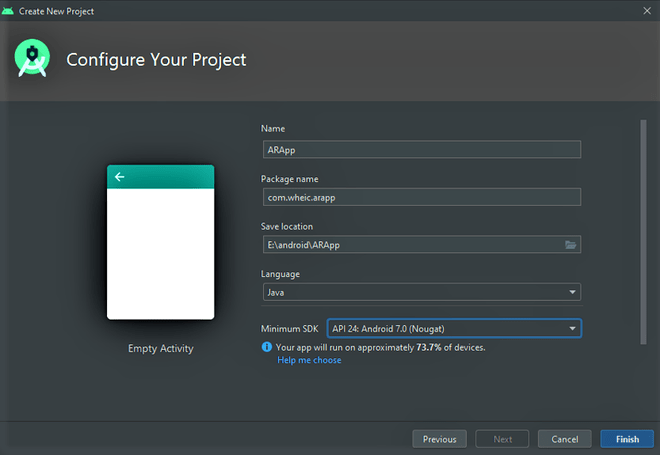
**Step 1: Create a New Project
To create a new project in Android Studio please refer to How to Create/Start a New Project in Android Studio.
**Note:
- Select **Java as the programming language.
- Note the location where the app is getting saved because we need that path later.
- Choose '**Minimum SDK' as '**API 24: Android 7.0(Nougat)'
**Step 2: Getting the 3D Model
Sceneform 1.16.0 supports only **glTF files. glTF means GL Transmission Format. Now ****.glb** files are a binary version of the GL Transmission Format. These types of 3d model files are used in VR, AR because it supports motion and animation.
- For the 3d model, you have to get a ****.glb** file.
- There are two ways, you can grab a 3d model, download from the web, or **make one yourself.
- If you want to download it from the web, go to this awesome 3d models repository by Google, poly, and search for any **glb file. Download any one of them for your project.
- OR, get a 3D computer graphics software and make a 3d model yourself.
- I used **Blender which is completely free to download and made a 3d model of GEEKS FOR GEEKS text. Get this file from here.
- Export the model as a ****.glb** file to a specific folder and the filename must contain **small_letters or **numbers.

- Come back to Android Studio.
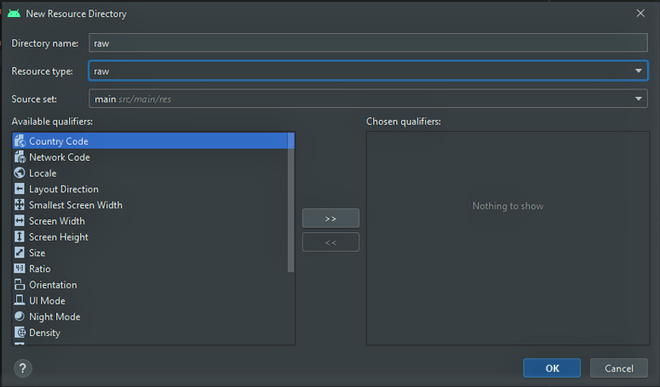
- On the left panel, Right-Click on **res directory. Go to the **New > Android Resource Directory. A window will pop up.
-300.png)
- Change the **Resource Type: to **Raw. Click **OK. A raw folder is generated, under the res directory.
- Copy the ****.**glb file from that directory where you saved it and paste it under the raw folder.
**Step 3: Downloading and Setting up SceneForm 1.16.0
Well, for AR apps we need Sceneform SDK. SceneForm 1.15.0 is very famous but recently, there are some plugin errors I faced while getting the "Google Sceneform Tools (Beta)" plugin in the latest Android Studio 4.1. So here I am, using the Sceneform 1.16.0 SDK and setting it up manually.
- Go to this **GitHub **link.
- Download the "**sceneform-android-sdk-1.16.0.zip" file.
- Extract the '**sceneformsrc' and '**sceneformux' folders, where you created your project. ("E:\android\ARApp" for me)
- Go the Android Studio
- Go to **Gradle Scripts > settings.gradle(Project Settings)
- Add these lines:
// this will add sceneformsrc folder into your project
include ':sceneform'
project(':sceneform').projectDir = new File('sceneformsrc/sceneform')
// this will add sceneformux folder into your project
include ':sceneformux'
project(':sceneformux').projectDir = new File('sceneformux/ux')
- After that go to **Gradle Scripts > build.gradle(Module:app)
- Add this line **inside the **dependencies block.
api project(":sceneformux")
- Also add the latest ARCore library as a dependency in your **app's _build.gradle file:
dependencies {
…
implementation 'com.google.ar:core:1.32.0'
}
- Then in the same file inside the "android" block and just after "buildTypes" block add these lines (if it's not already there):
// to support java 8 in your project
compileOptions {
sourceCompatibility JavaVersion.VERSION_1_8
targetCompatibility JavaVersion.VERSION_1_8
}
- After all, these changes click '**Sync Now' on the pop-up above. Now the Android file structure will look like this.

- Then go to the **app > manifests > AndroidManifest.xml
- Add these lines before the "**application" block: XML `
`
After that add this line before the "**activity" block.
XML `
`
Below is the complete code for the **AndroidManifest.xml file.
XML `
<!--This helps to permit the user to access Camera-->
<uses-permission android:name="android.permission.CAMERA" />

<!--This helps to check a specific feature in the phone's hardware,
    here it is OpenGl ES version 3-->
<uses-feature
    android:glEsVersion="0x00030000"
    android:required="true" />

<!--Here it is checking for AR feature in phone camera-->
<uses-feature
    android:name="android.hardware.camera.ar"
    android:required="true" />

<application
    android:allowBackup="true"
    android:icon="@mipmap/ic_launcher"
    android:label="@string/app_name"
    android:roundIcon="@mipmap/ic_launcher_round"
    android:supportsRtl="true"
    android:theme="@style/Theme.ARApp">

    <meta-data
        android:name="com.google.ar.core"
        android:value="required" />

    <activity android:name=".MainActivity">
        <intent-filter>
            <action android:name="android.intent.action.MAIN" />

            <category android:name="android.intent.category.LAUNCHER" />
        </intent-filter>
    </activity>
</application>
`
**Step 4: Error Correction
Now comes a little boring part. The downloaded folders **sceneformsrc and **sceneformux contains some java file, that imports the java classes from an older android.support. So, now if you build the project you will see a lot of errors because of that. What you can do now is to migrate your project to the new **Androidx. Now, you can find a way to migrate your whole project to **Androidx or you can change the imports manually one by one. I know this is boring, but good things come to those who wait, right?
- Go to **Build > Rebuild Project
- You'll find loads of errors. So down in the 'Build' section double-click on the package import error. A code will open with the error section highlighted.
- You need to change only three types of import path, given below, whenever you see the first-one change it to second-one:
- **android.support.annotation. -> androidx.annotation.
- **androidx.core.app -> androidx.fragment.app.
-300.png)
-300.png)
- **android.support.v7.widget. -> androidx.appcompat.widget.
- You have to continue this till there are no more errors.
**Step 5: Working with the activity_main.xml **file
- Go to the **res > layout > activity_main.xml file.
- Here is the code of that XML file: XML `
<androidx.constraintlayout.widget.ConstraintLayout xmlns:android="http://schemas.android.com/apk/res/android" xmlns:app="http://schemas.android.com/apk/res-auto" xmlns:tools="http://schemas.android.com/tools" android:layout_width="match_parent" android:layout_height="match_parent" tools:context=".MainActivity">
<!--This is the fragment that will be used as AR camera-->
<fragment
    android:id="@+id/arCameraArea"
    android:name="com.google.ar.sceneform.ux.ArFragment"
    android:layout_width="match_parent"
    android:layout_height="match_parent"
    app:layout_constraintBottom_toBottomOf="parent"
    app:layout_constraintEnd_toEndOf="parent"
    app:layout_constraintStart_toStartOf="parent"
    app:layout_constraintTop_toTopOf="parent" />
</androidx.constraintlayout.widget.ConstraintLayout>
`
- ArFragment contains a lot of features itself like it asks you to download ARCore if it's already not installed in your phone or like it asks for the camera permission if it's not already granted. So **ArFragment is the best thing to use here.
- After writing this code, the App UI will look like this:
-300.png)
**Step 6: Working with MainActivity.java file
- Go to **java > com.wheic.arapp(your's may differ) **> MainActivity.java
- In the MainActivity class, first, we have to make an object of ArFragment. Java `
// object of ArFragment Class private ArFragment arCam;
`
- Now, let's create a **hardware check function outside the **onCreate() function. This function will check whether your phone's hardware meets all the systemic requirements to run this AR App. It's going to check:
- Is the API version of the running Android >= 24 that means Android Nougat 7.0
- Is the OpenGL version >= 3.0
- Having these is mandatory to run AR Applications using ARCore and Sceneform. Here is the code of that function: Java `
public static boolean checkSystemSupport(Activity activity) {
// checking whether the API version of the running Android >= 24
  // that means Android Nougat 7.0
if (Build.VERSION.SDK_INT >= Build.VERSION_CODES.N) {

    String openGlVersion = ((ActivityManager) Objects.requireNonNull(activity.getSystemService(Context.ACTIVITY_SERVICE))).getDeviceConfigurationInfo().getGlEsVersion();

    // checking whether the OpenGL version >= 3.0
    if (Double.parseDouble(openGlVersion) >= 3.0) {
        return true;
    } else {
        Toast.makeText(activity, "App needs OpenGl Version 3.0 or later", Toast.LENGTH_SHORT).show();
        activity.finish();
        return false;
    }
} else {
    Toast.makeText(activity, "App does not support required Build Version", Toast.LENGTH_SHORT).show();
    activity.finish();
    return false;
}
}
`
- Inside the **onCreate() function first, we need to check the phone's hardware. If it returns true, then the rest of the function will execute.
- Now the **ArFragment is linked up with its respective id used in the **activity_main.xml. Java `
// ArFragment is linked up with its respective id used in the activity_main.xml arCam = (ArFragment) getSupportFragmentManager().findFragmentById(R.id.arCameraArea);
`
- An **onTapListener is called, to show the 3d model, when we tap on the screen.
- Inside the **setOnTapArPlaneListener, an Anchor object is created. Anchor actually helps to bring virtual objects on the screen and make them stay at the same position and orientation in the space.
- Now a ModelRenderable class is used with a bunch of functions. This class is used to render the downloaded or created 3d model by attaching it to an AnchorNode.
- **setSource() function helps to get the source of the 3d model.
- **setIsFilamentGltf() function checks whether it is a glb file.
- **build() function renders the model.
- A function is called inside **thenAccept() function to receive the model by attaching an AnchorNode with the ModelRenderable.
- **exceptionally() function throws an exception if something goes wrong while building the model. Java `
arCam.setOnTapArPlaneListener((hitResult, plane, motionEvent) -> {
  clickNo++;

// the 3d model comes to the scene only the first time we tap the screen
if (clickNo == 1) {

    Anchor anchor = hitResult.createAnchor();
    ModelRenderable.builder()
            .setSource(this, R.raw.gfg_gold_text_stand_2)
            .setIsFilamentGltf(true)
            .build()
            .thenAccept(modelRenderable -> addModel(anchor, modelRenderable))
            .exceptionally(throwable -> {
                AlertDialog.Builder builder = new AlertDialog.Builder(this);
                builder.setMessage("Something is not right" + throwable.getMessage()).show();
                return null;
            });
}
});
`
- **Now, let's see what's in the addModel() function:
- It takes two parameters, the first one is Anchor and the other one is ModelRenderable.
- An **AnchorNode object is created. It is the root node of the scene. AnchorNode automatically positioned in the world, based on the Anchor.
- **TransformableNode helps the user to interact with the 3d model, like changing position, resize, rotate, etc. Java `
private void addModel(Anchor anchor, ModelRenderable modelRenderable) {
  // Creating a AnchorNode with a specific anchor
AnchorNode anchorNode = new AnchorNode(anchor);

  // attaching the anchorNode with the ArFragment
anchorNode.setParent(arCam.getArSceneView().getScene());
TransformableNode transform = new TransformableNode(arCam.getTransformationSystem());

  // attaching the anchorNode with the TransformableNode
transform.setParent(anchorNode);

  // attaching the 3d model with the TransformableNode that is
  // already attached with the node
transform.setRenderable(modelRenderable);
transform.select();
}
`
Here is the complete code of the **MainActivity.java file. Comments are added inside the code to understand the code in more detail.
Java `
import android.app.Activity; import android.app.ActivityManager; import android.app.AlertDialog; import android.content.Context; import android.os.Build; import android.os.Bundle; import android.widget.Toast; import androidx.appcompat.app.AppCompatActivity; import com.google.ar.core.Anchor; import com.google.ar.sceneform.AnchorNode; import com.google.ar.sceneform.rendering.ModelRenderable; import com.google.ar.sceneform.ux.ArFragment; import com.google.ar.sceneform.ux.TransformableNode; import java.util.Objects;
public class MainActivity extends AppCompatActivity {
// object of ArFragment Class
private ArFragment arCam;

// helps to render the 3d model
// only once when we tap the screen
private int clickNo = 0;

public static boolean checkSystemSupport(Activity activity) {

    // checking whether the API version of the running Android >= 24
    // that means Android Nougat 7.0
    if (Build.VERSION.SDK_INT >= Build.VERSION_CODES.N) {
        String openGlVersion = ((ActivityManager) Objects.requireNonNull(activity.getSystemService(Context.ACTIVITY_SERVICE))).getDeviceConfigurationInfo().getGlEsVersion();

        // checking whether the OpenGL version >= 3.0
        if (Double.parseDouble(openGlVersion) >= 3.0) {
            return true;
        } else {
            Toast.makeText(activity, "App needs OpenGl Version 3.0 or later", Toast.LENGTH_SHORT).show();
            activity.finish();
            return false;
        }
    } else {
        Toast.makeText(activity, "App does not support required Build Version", Toast.LENGTH_SHORT).show();
        activity.finish();
        return false;
    }
}

@Override
protected void onCreate(Bundle savedInstanceState) {
    super.onCreate(savedInstanceState);
    setContentView(R.layout.activity_main);

    if (checkSystemSupport(this)) {

        // ArFragment is linked up with its respective id used in the activity_main.xml
        arCam = (ArFragment) getSupportFragmentManager().findFragmentById(R.id.arCameraArea);
        arCam.setOnTapArPlaneListener((hitResult, plane, motionEvent) -> {
            clickNo++;
            // the 3d model comes to the scene only
            // when clickNo is one that means once
            if (clickNo == 1) {
                Anchor anchor = hitResult.createAnchor();
                ModelRenderable.builder()
                        .setSource(this, R.raw.gfg_gold_text_stand_2)
                        .setIsFilamentGltf(true)
                        .build()
                        .thenAccept(modelRenderable -> addModel(anchor, modelRenderable))
                        .exceptionally(throwable -> {
                            AlertDialog.Builder builder = new AlertDialog.Builder(this);
                            builder.setMessage("Something is not right" + throwable.getMessage()).show();
                            return null;
                        });
            }
        });
    } else {
        return;
    }
}

private void addModel(Anchor anchor, ModelRenderable modelRenderable) {

    // Creating a AnchorNode with a specific anchor
    AnchorNode anchorNode = new AnchorNode(anchor);

    // attaching the anchorNode with the ArFragment
    anchorNode.setParent(arCam.getArSceneView().getScene());

    // attaching the anchorNode with the TransformableNode
    TransformableNode model = new TransformableNode(arCam.getTransformationSystem());
    model.setParent(anchorNode);

    // attaching the 3d model with the TransformableNode
    // that is already attached with the node
    model.setRenderable(modelRenderable);
    model.select();
}
}
`
**Output: Run on a Physical Device
Finally, we built a simple Augmented Reality app using Android Studio. You can check this project in this **GitHub link.