How to Build a Tic Tac Toe Game with Both Offline and Online Mode in Android? (original) (raw)
Last Updated : 23 Jul, 2025
In this article, we are going to make a tic-tac-toe game that has both online and offline modes. So for this project, we are going to use **Kotlin and **XML. **Tic-Tac-Toe is a two-player game. Each player has **X or **O. Both the player plays one by one simultaneously. In one move, players need to select one position in the 3x3 grid and put their mark at that place. The game runs continuously until one may wins.
In the previous article, we have built a simple Tic Tac Toe Game in Android but in this article, we have the following additional features inside the app:
- **Multiplayer
- **Online Game
* **Create and Join by Entering the Game Code - **Offline Game
- **Online Game
Basic Terminologies
- **XML: Its full form is an extensible markup language and it is a set of codes and tags.
- **Kotlin: It is a free and open-source programming language that is developed by JetBrains.
- **Android Studio: Android Studio is the official Integrated Development Environment for Android app development.
- **Firebase: It is a backend service provided by Google.
Step by Step Implementation: Offline Mode
Step 1: Create a New Project
To create a new project in Android Studio please refer to How to Create/Start a New Project in Android Studio.
**Note: that select Kotlin as the programming language.
Step 2: Add View Binding
Navigate **Gradle Scripts > build.gradle.kts (Module :app) and the add the following code anywhere under the android tag.
android {
...
buildFeatures {
viewBinding = true
}
...
}
Step 3: Working with the MainActivity file and it's layout
Navigate to **MainActivity.kt and **activity_main.xml and make the following changes.
MainActivity.kt `
package org.geeksforgeeks.tictactoe
import android.content.Intent import android.os.Bundle import androidx.activity.enableEdgeToEdge import androidx.appcompat.app.AppCompatActivity import androidx.core.view.ViewCompat import androidx.core.view.WindowInsetsCompat import org.geeksforgeeks.tictactoe.databinding.ActivityMainBinding
class MainActivity : AppCompatActivity() {
private val binding : ActivityMainBinding by lazy {
    ActivityMainBinding.inflate(layoutInflater)
}

override fun onCreate(savedInstanceState: Bundle?) {
    super.onCreate(savedInstanceState)
    enableEdgeToEdge()
    setContentView(binding.root)
    ViewCompat.setOnApplyWindowInsetsListener(findViewById(R.id.main)) { v, insets ->
        val systemBars = insets.getInsets(WindowInsetsCompat.Type.systemBars())
        v.setPadding(systemBars.left, systemBars.top, systemBars.right, systemBars.bottom)
        insets
    }

    binding.playOfflineBtn.setOnClickListener {
        createOfflineGame()
    }
}

private fun createOfflineGame(){
    GameData.saveGameModel(
        GameModel(
            gameStatus = GameStatus.JOINED
        )
    )
    startGame()
}

private fun startGame(){
    startActivity(Intent(this,GameActivity::class.java))
}
}
activity\_main.xml
<androidx.constraintlayout.widget.ConstraintLayout xmlns:android="http://schemas.android.com/apk/res/android" xmlns:app="http://schemas.android.com/apk/res-auto" xmlns:tools="http://schemas.android.com/tools" android:id="@+id/main" android:layout_width="match_parent" android:layout_height="match_parent" tools:context=".MainActivity">
<TextView
    android:id="@+id/textView"
    android:layout_width="wrap_content"
    android:layout_height="wrap_content"
    android:text="TicTacToe"
    android:textSize="32sp"
    android:textColor="@color/black"
    android:textStyle="bold"
    app:layout_constraintBottom_toTopOf="@+id/play_offline_btn"
    app:layout_constraintEnd_toEndOf="parent"
    app:layout_constraintStart_toStartOf="parent"
    app:layout_constraintTop_toTopOf="parent"
    app:layout_constraintVertical_chainStyle="packed" />

<Button
    android:id="@+id/play_offline_btn"
    android:layout_width="wrap_content"
    android:layout_height="wrap_content"
    android:layout_marginTop="32dp"
    android:text="Play Offline"
    app:layout_constraintBottom_toBottomOf="parent"
    app:layout_constraintEnd_toEndOf="parent"
    app:layout_constraintStart_toStartOf="parent"
    app:layout_constraintTop_toBottomOf="@+id/textView" />
</androidx.constraintlayout.widget.ConstraintLayout>
`
**Design UI:
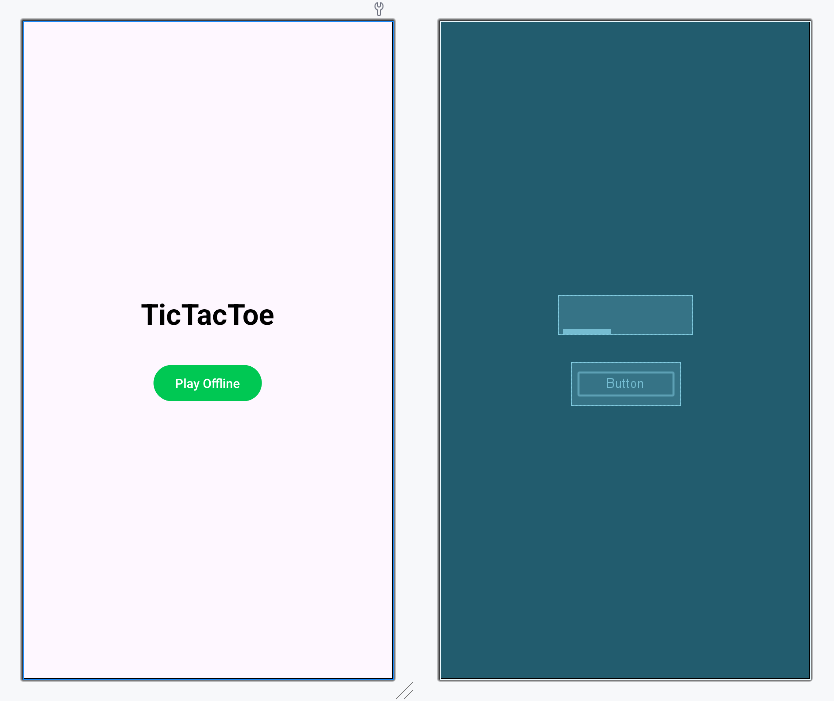
Step 4: Create a new Game Model and Object
Navigate **app > kotlin+java > {package-name} right click on it and create two new Koltin class files with the names **GameModel.kt and **GameData.kt. Below is the code for both the files.
GameData.kt `
package org.geeksforgeeks.tictactoe
import androidx.lifecycle.LiveData import androidx.lifecycle.MutableLiveData
object GameData { private var _gameModel : MutableLiveData = MutableLiveData() var gameModel : LiveData = _gameModel
fun saveGameModel(model : GameModel){
    _gameModel.postValue(model)
}
}
GameModel.kt
package org.geeksforgeeks.tictactoe
import kotlin.random.Random
data class GameModel ( var gameId : String = "-1", var filledPos : MutableList = mutableListOf("","","","","","","","",""), var winner : String ="", var gameStatus : GameStatus = GameStatus.CREATED, var currentPlayer : String = (arrayOf("X","O"))[Random.nextInt(2)] )
enum class GameStatus{ CREATED, JOINED, INPROGRESS, FINISHED }
`
Step 5: Create a new activity for Offline Mode
Navigate **app > kotlin+java > {package-name} right click on it and select **New > Activity > Empty Views Activity and save the name as **GameActivity.kt. Now, navigate to the kotlin and xml file of the activity and make the following changes.
GameActivity.kt `
package org.geeksforgeeks.tictactoe
import android.os.Bundle import android.view.View import android.widget.Toast import androidx.activity.enableEdgeToEdge import androidx.appcompat.app.AppCompatActivity import androidx.core.view.ViewCompat import androidx.core.view.WindowInsetsCompat import org.geeksforgeeks.tictactoe.databinding.ActivityGameBinding
class GameActivity : AppCompatActivity(), View.OnClickListener {
private val binding: ActivityGameBinding by lazy {
    ActivityGameBinding.inflate(layoutInflater)
}
private var gameModel : GameModel? = null

override fun onCreate(savedInstanceState: Bundle?) {
    super.onCreate(savedInstanceState)
    enableEdgeToEdge()
    setContentView(binding.root)
    ViewCompat.setOnApplyWindowInsetsListener(findViewById(R.id.main)) { v, insets ->
        val systemBars = insets.getInsets(WindowInsetsCompat.Type.systemBars())
        v.setPadding(systemBars.left, systemBars.top, systemBars.right, systemBars.bottom)
        insets
    }

    binding.btn0.setOnClickListener(this)
    binding.btn1.setOnClickListener(this)
    binding.btn2.setOnClickListener(this)
    binding.btn3.setOnClickListener(this)
    binding.btn4.setOnClickListener(this)
    binding.btn5.setOnClickListener(this)
    binding.btn6.setOnClickListener(this)
    binding.btn7.setOnClickListener(this)
    binding.btn8.setOnClickListener(this)

    binding.startGameBtn.setOnClickListener {
        startGame()
    }

    GameData.gameModel.observe(this){
        gameModel = it
        setUI()
    }
}

private fun setUI(){
    gameModel?.apply {
        binding.btn0.text = filledPos[0]
        binding.btn1.text = filledPos[1]
        binding.btn2.text = filledPos[2]
        binding.btn3.text = filledPos[3]
        binding.btn4.text = filledPos[4]
        binding.btn5.text = filledPos[5]
        binding.btn6.text = filledPos[6]
        binding.btn7.text = filledPos[7]
        binding.btn8.text = filledPos[8]

        binding.startGameBtn.visibility = View.VISIBLE

        binding.gameStatusText.text =
            when(gameStatus){
                GameStatus.CREATED -> {
                    binding.startGameBtn.visibility = View.INVISIBLE
                    "Game ID :"+ gameId
                }
                GameStatus.JOINED ->{
                    "Click on start game"
                }
                GameStatus.INPROGRESS ->{
                    binding.startGameBtn.visibility = View.INVISIBLE
                    currentPlayer + " turn"
                }
                GameStatus.FINISHED ->{
                    if(winner.isNotEmpty()) winner + " Won"
                    else "DRAW"
                }
            }

    }
}


private fun startGame(){
    gameModel?.apply {
        updateGameData(
            GameModel(
                gameId = gameId,
                gameStatus = GameStatus.INPROGRESS
            )
        )
    }
}

private fun updateGameData(model : GameModel){
    GameData.saveGameModel(model)
}

private fun checkForWinner(){
    val winningPos = arrayOf(
        intArrayOf(0,1,2),
        intArrayOf(3,4,5),
        intArrayOf(6,7,8),
        intArrayOf(0,3,6),
        intArrayOf(1,4,7),
        intArrayOf(2,5,8),
        intArrayOf(0,4,8),
        intArrayOf(2,4,6),
    )

    gameModel?.apply {
        for ( i in winningPos){
            //012
            if(
                filledPos[i[0]] == filledPos[i[1]] &&
                filledPos[i[1]]== filledPos[i[2]] &&
                filledPos[i[0]].isNotEmpty()
            ){
                gameStatus = GameStatus.FINISHED
                winner = filledPos[i[0]]
            }
        }

        if( filledPos.none(){ it.isEmpty() }){
            gameStatus = GameStatus.FINISHED
        }


        updateGameData(this)

    }
}

override fun onClick(v: View?) {
    gameModel?.apply {
        if(gameStatus!= GameStatus.INPROGRESS){
            Toast.makeText(applicationContext,"Game not started", Toast.LENGTH_SHORT).show()
            return
        }
        //game is in progress
        val clickedPos =(v?.tag  as String).toInt()
        if(filledPos[clickedPos].isEmpty()){
            filledPos[clickedPos] = currentPlayer
            currentPlayer = if(currentPlayer=="X") "O" else "X"
            checkForWinner()
            updateGameData(this)
        }
    }
}
}
activity\_game.xml
<TextView
    android:layout_width="match_parent"
    android:layout_height="wrap_content"
    android:id="@+id/game_status_text"
    android:gravity="center"
    android:textSize="16sp"
    android:layout_margin="10dp"
    android:textStyle="bold"
    android:text="Game not started"/>


<GridLayout
    android:layout_width="wrap_content"
    android:layout_height="wrap_content"
    android:layout_gravity="center"
    android:columnCount="3">

    <Button
        android:id="@+id/btn_0"
        android:layout_width="match_parent"
        android:layout_height="wrap_content"
        android:layout_margin="8dp"
        android:background="@color/black"
        android:tag="0"
        android:textSize="60sp"
        tools:text="X" />

    <Button
        android:id="@+id/btn_1"
        android:layout_width="match_parent"
        android:layout_height="wrap_content"
        android:layout_margin="8dp"
        android:background="@color/black"
        android:tag="1"
        android:textSize="60sp"
        tools:text="X" />

    <Button
        android:id="@+id/btn_2"
        android:layout_width="match_parent"
        android:layout_height="wrap_content"
        android:layout_margin="8dp"
        android:background="@color/black"
        android:tag="2"
        android:textSize="60sp"
        tools:text="X" />

    <Button
        android:id="@+id/btn_3"
        android:layout_width="match_parent"
        android:layout_height="wrap_content"
        android:layout_margin="8dp"
        android:background="@color/black"
        android:tag="3"
        android:textSize="60sp"
        tools:text="X" />

    <Button
        android:id="@+id/btn_4"
        android:layout_width="match_parent"
        android:layout_height="wrap_content"
        android:layout_margin="8dp"
        android:background="@color/black"
        android:tag="4"
        android:textSize="60sp"
        tools:text="X" />

    <Button
        android:id="@+id/btn_5"
        android:layout_width="match_parent"
        android:layout_height="wrap_content"
        android:layout_margin="8dp"
        android:background="@color/black"
        android:tag="5"
        android:textSize="60sp"
        tools:text="X" />

    <Button
        android:id="@+id/btn_6"
        android:layout_width="match_parent"
        android:layout_height="wrap_content"
        android:layout_margin="8dp"
        android:background="@color/black"
        android:tag="6"
        android:textSize="60sp"
        tools:text="X" />

    <Button
        android:id="@+id/btn_7"
        android:layout_width="match_parent"
        android:layout_height="wrap_content"
        android:layout_margin="8dp"
        android:background="@color/black"
        android:tag="7"
        android:textSize="60sp"
        tools:text="X" />

    <Button
        android:id="@+id/btn_8"
        android:layout_width="match_parent"
        android:layout_height="wrap_content"
        android:layout_margin="8dp"
        android:background="@color/black"
        android:tag="8"
        android:textSize="60sp"
        tools:text="X" />
</GridLayout>

<Button
    android:layout_width="wrap_content"
    android:layout_height="wrap_content"
    android:layout_gravity="center"
    android:layout_margin="20dp"
    android:text="Start game"
    android:id="@+id/start_game_btn"/>
`
**Design UI:
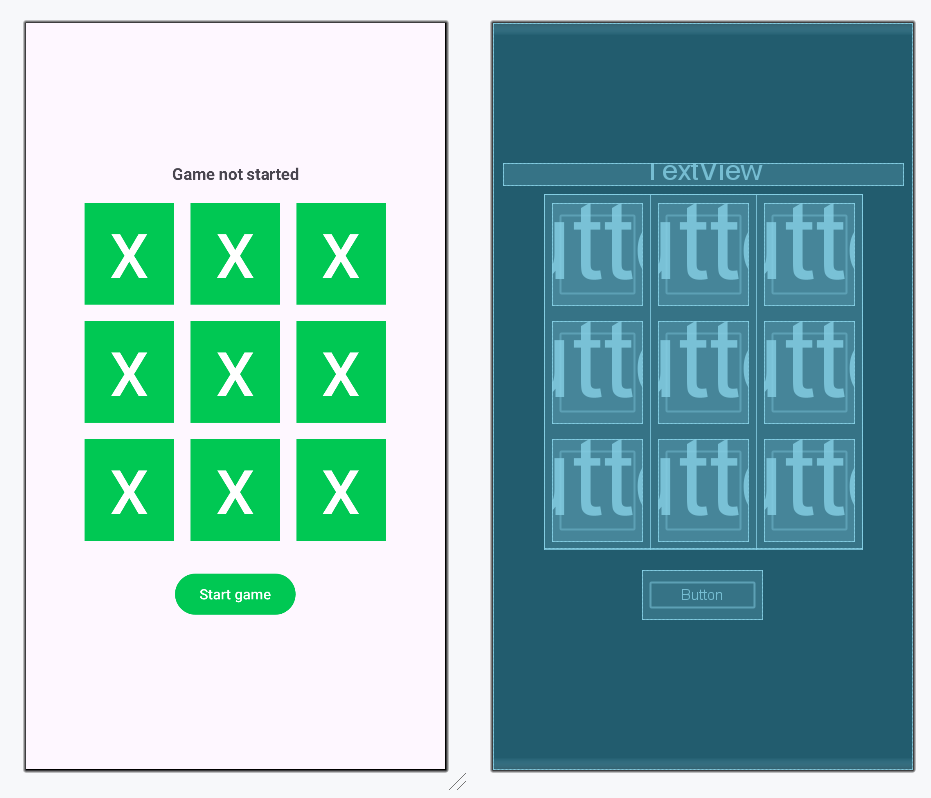
Output:
Let's try to play in offline-mode:
Online Mode
Step 1: Integrate Firebase and add Firestore support
Here we are going to use firebase for our backend functionality. So what we are doing here is listening on a particular codes database and if got any change in the database, then running an event on the client-side to update the move made by the opponent.
To add firebase and firestore to your application, refer to How to Use Firebase Firestore as a Realtime Database in Android?
Step 2: Working with MainActivity and it's layout file
Navigate to **MainActivity.kt and **activity_main.xml and make the following changes.
MainActivity.kt `
package org.geeksforgeeks.tictactoe
import android.content.Intent import android.os.Bundle import androidx.activity.enableEdgeToEdge import androidx.appcompat.app.AppCompatActivity import androidx.core.view.ViewCompat import androidx.core.view.WindowInsetsCompat import com.google.firebase.Firebase import com.google.firebase.firestore.firestore import org.geeksforgeeks.tictactoe.databinding.ActivityMainBinding import kotlin.random.Random import kotlin.random.nextInt
class MainActivity : AppCompatActivity() {
private val binding : ActivityMainBinding by lazy {
    ActivityMainBinding.inflate(layoutInflater)
}

override fun onCreate(savedInstanceState: Bundle?) {
    super.onCreate(savedInstanceState)
    enableEdgeToEdge()
    setContentView(binding.root)
    ViewCompat.setOnApplyWindowInsetsListener(findViewById(R.id.main)) { v, insets ->
        val systemBars = insets.getInsets(WindowInsetsCompat.Type.systemBars())
        v.setPadding(systemBars.left, systemBars.top, systemBars.right, systemBars.bottom)
        insets
    }

    binding.playOfflineBtn.setOnClickListener {
        createOfflineGame()
    }

    binding.createOnlineGameBtn.setOnClickListener {
        createOnlineGame()
    }

    binding.joinOnlineGameBtn.setOnClickListener {
        joinOnlineGame()
    }
}

private fun createOfflineGame(){
    GameData.saveGameModel(
        GameModel(
            gameStatus = GameStatus.JOINED
        )
    )
    startGame()
}

private fun createOnlineGame(){
    GameData.myID = "X"
    GameData.saveGameModel(
        GameModel(
            gameStatus = GameStatus.CREATED,
            gameId = Random.nextInt(1000..9999).toString()
        )
    )
    startGame()
}

private fun joinOnlineGame(){
    val gameId = binding.gameIdInput.text.toString()
    if(gameId.isEmpty()){
        binding.gameIdInput.error = "Please enter game ID"
        return
    }
    GameData.myID = "O"
    Firebase.firestore.collection("games")
        .document(gameId)
        .get()
        .addOnSuccessListener {
            val model = it?.toObject(GameModel::class.java)
            if(model==null){
                binding.gameIdInput.error = "Please enter valid game ID"
            }else{
                model.gameStatus = GameStatus.JOINED
                GameData.saveGameModel(model)
                startGame()
            }
        }

}

private fun startGame(){
    startActivity(Intent(this,GameActivity::class.java))
}
}
activity\_main.xml
<androidx.constraintlayout.widget.ConstraintLayout xmlns:android="http://schemas.android.com/apk/res/android" xmlns:app="http://schemas.android.com/apk/res-auto" xmlns:tools="http://schemas.android.com/tools" android:id="@+id/main" android:layout_width="match_parent" android:layout_height="match_parent" tools:context=".MainActivity">
<TextView
    android:id="@+id/textView"
    android:layout_width="wrap_content"
    android:layout_height="wrap_content"
    android:text="TicTacToe"
    android:textColor="@color/black"
    android:textSize="32sp"
    android:textStyle="bold"
    app:layout_constraintBottom_toTopOf="@+id/play_offline_btn"
    app:layout_constraintEnd_toEndOf="parent"
    app:layout_constraintStart_toStartOf="parent"
    app:layout_constraintTop_toTopOf="parent"
    app:layout_constraintVertical_chainStyle="packed" />

<Button
    android:id="@+id/play_offline_btn"
    android:layout_width="wrap_content"
    android:layout_height="wrap_content"
    android:layout_marginTop="16dp"
    android:layout_marginBottom="16dp"
    android:text="Play Offline"
    app:layout_constraintBottom_toTopOf="@+id/textView2"
    app:layout_constraintEnd_toEndOf="parent"
    app:layout_constraintStart_toStartOf="parent"
    app:layout_constraintTop_toBottomOf="@+id/textView" />

<TextView
    android:id="@+id/textView2"
    android:layout_width="wrap_content"
    android:layout_height="wrap_content"
    android:text="Or"
    android:textSize="20sp"
    android:textStyle="bold"
    app:layout_constraintBottom_toTopOf="@+id/create_online_game_btn"
    app:layout_constraintEnd_toEndOf="parent"
    app:layout_constraintStart_toStartOf="parent"
    app:layout_constraintTop_toBottomOf="@+id/play_offline_btn" />

<Button
    android:id="@+id/create_online_game_btn"
    android:layout_width="wrap_content"
    android:layout_height="wrap_content"
    android:layout_marginTop="16dp"
    android:layout_marginBottom="16dp"
    android:text="Create Game Online"
    app:layout_constraintBottom_toTopOf="@+id/textView3"
    app:layout_constraintEnd_toEndOf="parent"
    app:layout_constraintStart_toStartOf="parent"
    app:layout_constraintTop_toBottomOf="@+id/textView2" />

<TextView
    android:id="@+id/textView3"
    android:layout_width="wrap_content"
    android:layout_height="wrap_content"
    android:text="Or"
    android:textSize="20sp"
    android:textStyle="bold"
    app:layout_constraintBottom_toTopOf="@+id/game_id_input"
    app:layout_constraintEnd_toEndOf="parent"
    app:layout_constraintStart_toStartOf="parent"
    app:layout_constraintTop_toBottomOf="@+id/create_online_game_btn" />

<EditText
    android:id="@+id/game_id_input"
    android:layout_width="wrap_content"
    android:layout_height="wrap_content"
    android:layout_marginTop="16dp"
    android:layout_marginBottom="8dp"
    android:hint="Enter game Id"
    android:inputType="number"
    android:textSize="24sp"
    android:textStyle="bold"
    app:layout_constraintBottom_toTopOf="@+id/join_online_game_btn"
    app:layout_constraintEnd_toEndOf="parent"
    app:layout_constraintStart_toStartOf="parent"
    app:layout_constraintTop_toBottomOf="@+id/textView3" />

<Button
    android:id="@+id/join_online_game_btn"
    android:layout_width="wrap_content"
    android:layout_height="wrap_content"
    android:text="Join Game Online"
    app:layout_constraintBottom_toBottomOf="parent"
    app:layout_constraintEnd_toEndOf="parent"
    app:layout_constraintStart_toStartOf="parent"
    app:layout_constraintTop_toBottomOf="@+id/game_id_input" />
</androidx.constraintlayout.widget.ConstraintLayout>
`
**Design UI:
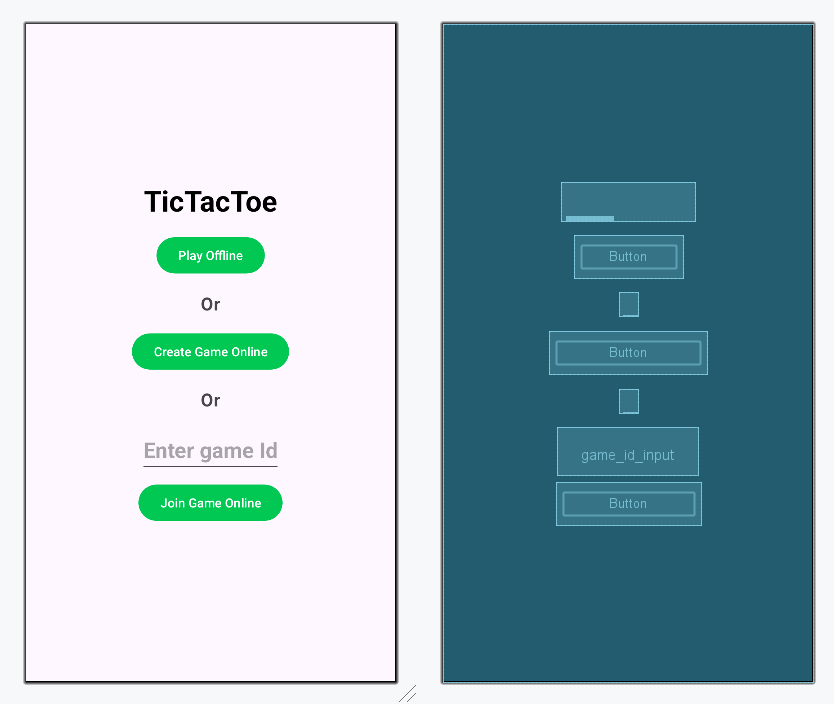
Step 2: Make changes in GameData.kt
Navigate to GameData.kt and make the following changes
**GameData.kt:
Kotlin `
package org.geeksforgeeks.tictactoe
import androidx.lifecycle.LiveData import androidx.lifecycle.MutableLiveData import com.google.firebase.firestore.ktx.firestore import com.google.firebase.ktx.Firebase
object GameData { private var _gameModel : MutableLiveData = MutableLiveData() var gameModel : LiveData = _gameModel var myID = ""
fun saveGameModel(model : GameModel){
    _gameModel.postValue(model)
    if(model.gameId!="-1"){
        Firebase.firestore.collection("games")
            .document(model.gameId)
            .set(model)
    }

}

fun fetchGameModel(){
    gameModel.value?.apply {
        if(gameId!="-1"){
            Firebase.firestore.collection("games")
                .document(gameId)
                .addSnapshotListener { value, error ->
                    val model = value?.toObject(GameModel::class.java)
                    _gameModel.postValue(model)
                }
        }
    }
}
}
`
Step 3: Make changes in GameActivity.kt
Navigate to **GameActivity.kt and make the following changes
**GameActivity.kt:
Kotlin `
package org.geeksforgeeks.tictactoe
import android.os.Bundle import android.view.View import android.widget.Toast import androidx.activity.enableEdgeToEdge import androidx.appcompat.app.AppCompatActivity import androidx.core.view.ViewCompat import androidx.core.view.WindowInsetsCompat import org.geeksforgeeks.tictactoe.databinding.ActivityGameBinding
class GameActivity : AppCompatActivity(), View.OnClickListener {
private val binding: ActivityGameBinding by lazy {
    ActivityGameBinding.inflate(layoutInflater)
}
private var gameModel : GameModel? = null

override fun onCreate(savedInstanceState: Bundle?) {
    super.onCreate(savedInstanceState)
    enableEdgeToEdge()
    setContentView(binding.root)
    ViewCompat.setOnApplyWindowInsetsListener(findViewById(R.id.main)) { v, insets ->
        val systemBars = insets.getInsets(WindowInsetsCompat.Type.systemBars())
        v.setPadding(systemBars.left, systemBars.top, systemBars.right, systemBars.bottom)
        insets
    }

    GameData.fetchGameModel()

    binding.btn0.setOnClickListener(this)
    binding.btn1.setOnClickListener(this)
    binding.btn2.setOnClickListener(this)
    binding.btn3.setOnClickListener(this)
    binding.btn4.setOnClickListener(this)
    binding.btn5.setOnClickListener(this)
    binding.btn6.setOnClickListener(this)
    binding.btn7.setOnClickListener(this)
    binding.btn8.setOnClickListener(this)

    binding.startGameBtn.setOnClickListener {
        startGame()
    }

    GameData.gameModel.observe(this){
        gameModel = it
        setUI()
    }
}

private fun setUI(){
    gameModel?.apply {
        binding.btn0.text = filledPos[0]
        binding.btn1.text = filledPos[1]
        binding.btn2.text = filledPos[2]
        binding.btn3.text = filledPos[3]
        binding.btn4.text = filledPos[4]
        binding.btn5.text = filledPos[5]
        binding.btn6.text = filledPos[6]
        binding.btn7.text = filledPos[7]
        binding.btn8.text = filledPos[8]

        binding.startGameBtn.visibility = View.VISIBLE

        binding.gameStatusText.text =
            when(gameStatus){
                GameStatus.CREATED -> {
                    binding.startGameBtn.visibility = View.INVISIBLE
                    "Game ID :"+ gameId
                }
                GameStatus.JOINED ->{
                    "Click on start game"
                }
                GameStatus.INPROGRESS ->{
                    binding.startGameBtn.visibility = View.INVISIBLE
                    when(GameData.myID){
                        currentPlayer -> "Your turn"
                        else ->  currentPlayer + " turn"
                    }

                }
                GameStatus.FINISHED ->{
                    if(winner.isNotEmpty()) {
                        when(GameData.myID){
                            winner -> "You won"
                            else ->   winner + " Won"
                        }

                    }
                    else "DRAW"
                }
            }

    }
}


private fun startGame(){
    gameModel?.apply {
        updateGameData(
            GameModel(
                gameId = gameId,
                gameStatus = GameStatus.INPROGRESS
            )
        )
    }
}

private fun updateGameData(model : GameModel){
    GameData.saveGameModel(model)
}

private fun checkForWinner(){
    val winningPos = arrayOf(
        intArrayOf(0,1,2),
        intArrayOf(3,4,5),
        intArrayOf(6,7,8),
        intArrayOf(0,3,6),
        intArrayOf(1,4,7),
        intArrayOf(2,5,8),
        intArrayOf(0,4,8),
        intArrayOf(2,4,6),
    )

    gameModel?.apply {
        for ( i in winningPos){
            //012
            if(
                filledPos[i[0]] == filledPos[i[1]] &&
                filledPos[i[1]]== filledPos[i[2]] &&
                filledPos[i[0]].isNotEmpty()
            ){
                gameStatus = GameStatus.FINISHED
                winner = filledPos[i[0]]
            }
        }

        if( filledPos.none(){ it.isEmpty() }){
            gameStatus = GameStatus.FINISHED
        }


        updateGameData(this)

    }
}

override fun onClick(v: View?) {
    gameModel?.apply {
        if(gameStatus!= GameStatus.INPROGRESS){
            Toast.makeText(applicationContext,"Game not started", Toast.LENGTH_SHORT).show()
            return
        }

        if(gameId!="-1" && currentPlayer!=GameData.myID ){
            Toast.makeText(applicationContext,"Not your turn",Toast.LENGTH_SHORT).show()
            return
        }

        val clickedPos =(v?.tag  as String).toInt()
        if(filledPos[clickedPos].isEmpty()){
            filledPos[clickedPos] = currentPlayer
            currentPlayer = if(currentPlayer=="X") "O" else "X"
            checkForWinner()
            updateGameData(this)
        }
    }
}
}
`
Output:
Let's try to play in offline-mode: