How to create a Stopwatch App using Android Studio (original) (raw)
Last Updated : 27 Sep, 2025
In this article, an Android app is created to display a basic Stopwatch. The layout for Stopwatch includes:
- **A **TextView: showing how much time has passed
- **Three Buttons:
- Start: To start the stopwatch
- Stop: To stop the stopwatch
- Reset: To reset the stopwatch to 00:00:00
Step-by-Step Implementation of Stopwatch Application in Android Studio
**Step 1: Create a new project for the Stopwatch App
- Create a new Android project for an application named "Stopwatch" with a company domain of "geeksforgeeks.org", making the package name **org.geeksforgeeks.stopwatch.
- The minimum SDK should be API 14 so it can run on almost all devices.
- An empty activity called "StopwatchActivity" and a layout called "activity_stopwatch" will be created.
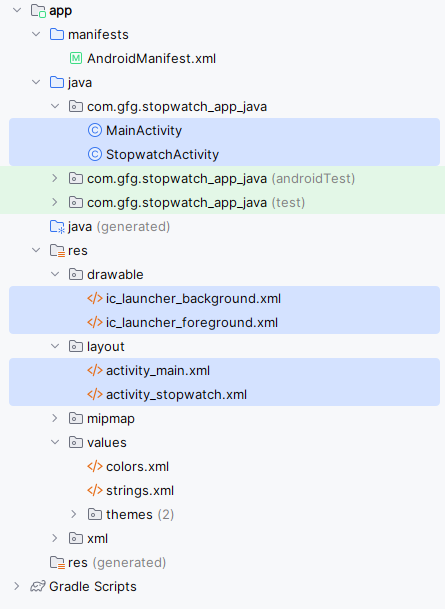
Step 2: Android Manifest
Step 3: Using Resource Files
**Add String resources We are going to use three String values in our stopwatch layout, one for the text value of each button. These values are String resources, so they need to be added to **strings.xml.
Add the String values below to your version of **strings.xml:
XML `
GFG|Stopwatch Start Stop Reset Update the Stopwatch layout code Here is the XML for the layout. It describes a single text view that's used to display the timer, and three buttons to control the stopwatch. Replace the XML currently in activity_stopwatch.xml with the XML shown here: activity_main.xml`
<LinearLayout xmlns:android="http://schemas.android.com/apk/res/android"
android:layout_width="match_parent"
android:layout_height="match_parent"
android:orientation="vertical"
android:padding="16dp">
<TextView
android:id="@+id/tvMainTitle"
android:layout_width="wrap_content"
android:layout_height="wrap_content"
android:text="Welcome to MainActivity"
android:textSize="18sp"
android:layout_gravity="center_horizontal"
android:paddingBottom="20dp"/>
<Button
android:id="@+id/btnGoToStopwatch"
android:layout_width="wrap_content"
android:layout_height="wrap_content"
android:text="Go to Stopwatch"
android:layout_gravity="center_horizontal"/>
</LinearLayout>
activity_stopwatch.xml
<?xml version="1.0" encoding="utf-8"?>
<LinearLayout
xmlns:android="http://schemas.android.com/apk/res/android"
xmlns:app="http://schemas.android.com/apk/res-auto"
xmlns:tools="http://schemas.android.com/tools"
android:layout_width="match_parent"
android:layout_height="match_parent"
android:orientation="vertical"
android:background="#0F9D58"
android:padding="16dp"
tools:context=".MainActivity">
<TextView
android:id="@+id/time_view"
android:layout_width="wrap_content"
android:layout_height="wrap_content"
android:layout_gravity="center_horizontal"
android:textAppearance="@android:style/TextAppearance.Large"
android:textSize="56sp" />
<Button
android:id="@+id/start_button"
android:layout_width="wrap_content"
android:layout_height="wrap_content"
android:layout_gravity="center_horizontal"
android:layout_marginTop="20dp"
android:onClick="onClickStart"
android:text="@string/start" />
<Button
android:id="@+id/stop_button"
android:layout_width="wrap_content"
android:layout_height="wrap_content"
android:layout_gravity="center_horizontal"
android:layout_marginTop="8dp"
android:onClick="onClickStop"
android:text="@string/stop" />
<Button
android:id="@+id/reset_button"
android:layout_width="wrap_content"
android:layout_height="wrap_content"
android:layout_gravity="center_horizontal"
android:layout_marginTop="8dp"
android:onClick="onClickReset"
android:text="@string/reset" />
</LinearLayout>
**Step 4: How the activity code will work
The layout defines three buttons that we will use to control the stopwatch. Each button uses its onClick attribute to specify which method in the activity should run when the button is clicked. When the Start button is clicked, the **onClickStart() method gets called, when the Stop button is clicked the **onClickStop() method gets called, and when the Reset button is clicked the **onClickReset() method gets called. We will use these methods to start, stop and reset the stopwatch.
We will update the stopwatch using a method we will create called **runTimer(). The **runTimer() method will run code every second to check whether the stopwatch is running, and, if it is, increment the number of seconds and display the number of seconds in the text view.
To help us with this, we will use two private variables to record the state of the stopwatch. We will use an **int called **seconds to track how many seconds have passed since the stopwatch started running, and a **boolean called **running to record whether the stopwatch is currently running.
We will start by writing the code for the buttons, and then we will look at the **runTimer() method.
- **Add code for the buttons When the user clicks on the Start button, we will set the **running variable to **true so that the stopwatch will start. When the user clicks on the Stop button, we will set **running to **false so that the stopwatch stops running. If the user clicks on the Reset button, we will set **running to **false and **seconds to **0 so that the stopwatch is reset and stops running.
- **The runTimer() method The next thing we need to do is to create the **runTimer() method. This method will get a reference to the text view in the layout; format the contents of the **seconds variable into hours, minutes, and seconds; and then display the results in the text view. If the **running variable is set to **true, it will increment the **seconds variable.
- **Handlers allow you to schedule code A **Handler is an Android class you can use to schedule code that should be run at some point in the future. You can also use it to post code that needs to run on a different thread than the main Android thread. In our case, we are going to use a **Handler to schedule the stopwatch code to run every second. To use the **Handler, you wrap the code you wish to schedule in a **Runnable object, and then use the **Handle post() and **postDelayed() methods to specify when you want the code to run.
- **The post() method The **post() method posts code that needs to be run as soon as possible(which is usually immediately). This method takes one parameter, an object of type **Runnable. A **Runnable object in Androidville is just like a **Runnable in plain old Java: a job you want to run. You put the code you want to run in the **Runnable's run() method, and the **Handler will make sure the code is run as soon as possible.
- **The postDelayed() method The **postDelayed() method works in a similar way to the **post() method except that you use it to post code that should be run in the future. The **postDelayed() method takes two parameters: a **Runnable and a **long. The **Runnable contains the code you want to run in its **run() method, and the **long specifies the number of milliseconds you wish to delay the code by. The code will run as soon as possible after the delay.
Below is the following code to **StopwatchActivity.java:
Java `
package com.gfg.stopwatch_app_java;
import android.content.Intent; import android.os.Bundle; import android.view.View; import android.widget.Button; import androidx.appcompat.app.AppCompatActivity; import androidx.core.graphics.Insets; import androidx.core.view.ViewCompat; import androidx.core.view.WindowInsetsCompat;
public class MainActivity extends AppCompatActivity {
@Override
protected void onCreate(Bundle savedInstanceState) {
    super.onCreate(savedInstanceState);
    setContentView(R.layout.activity_main);

    Button btnGoToStopwatch = findViewById(R.id.btnGoToStopwatch);
    btnGoToStopwatch.setOnClickListener(new View.OnClickListener() {
        @Override
        public void onClick(View v) {
            // Create an Intent to start StopwatchActivity
            Intent intent = new Intent(MainActivity.this, StopwatchActivity.class);
            startActivity(intent);
        }
    });
}
}StopwatchActivity.javapackage com.gfg.stopwatch_app_java;
import android.app.Activity; import android.os.Handler; import android.view.View; import android.os.Bundle; import java.util.Locale; import android.widget.TextView;
public class StopwatchActivity extends Activity {
// Use seconds, running and wasRunning respectively
// to record the number of seconds passed,
// whether the stopwatch is running and
// whether the stopwatch was running
// before the activity was paused.

// Number of seconds displayed
// on the stopwatch.
private int seconds = 0;

// Is the stopwatch running?
private boolean running;

private boolean wasRunning;

@Override
protected void onCreate(Bundle savedInstanceState)
{
    super.onCreate(savedInstanceState);
    setContentView(R.layout.activity_stopwatch);
    if (savedInstanceState != null) {

        // Get the previous state of the stopwatch
        // if the activity has been
        // destroyed and recreated.
        seconds
                = savedInstanceState
                .getInt("seconds");
        running
                = savedInstanceState
                .getBoolean("running");
        wasRunning
                = savedInstanceState
                .getBoolean("wasRunning");
    }
    runTimer();
}

// Save the state of the stopwatch
// if it's about to be destroyed.
@Override
public void onSaveInstanceState(
        Bundle savedInstanceState)
{
    savedInstanceState
            .putInt("seconds", seconds);
    savedInstanceState
            .putBoolean("running", running);
    savedInstanceState
            .putBoolean("wasRunning", wasRunning);
}

// If the activity is paused,
// stop the stopwatch.
@Override
protected void onPause()
{
    super.onPause();
    wasRunning = running;
    running = false;
}

// If the activity is resumed,
// start the stopwatch
// again if it was running previously.
@Override
protected void onResume()
{
    super.onResume();
    if (wasRunning) {
        running = true;
    }
}

// Start the stopwatch running
// when the Start button is clicked.
// Below method gets called
// when the Start button is clicked.
public void onClickStart(View view)
{
    running = true;
}

// Stop the stopwatch running
// when the Stop button is clicked.
// Below method gets called
// when the Stop button is clicked.
public void onClickStop(View view)
{
    running = false;
}

// Reset the stopwatch when
// the Reset button is clicked.
// Below method gets called
// when the Reset button is clicked.
public void onClickReset(View view)
{
    running = false;
    seconds = 0;
}

// Sets the NUmber of seconds on the timer.
// The runTimer() method uses a Handler
// to increment the seconds and
// update the text view.
private void runTimer()
{

    // Get the text view.
    final TextView timeView
            = (TextView)findViewById(
            R.id.time_view);

    // Creates a new Handler
    final Handler handler
            = new Handler();

    // Call the post() method,
    // passing in a new Runnable.
    // The post() method processes
    // code without a delay,
    // so the code in the Runnable
    // will run almost immediately.
    handler.post(new Runnable() {
        @Override

        public void run()
        {
            int hours = seconds / 3600;
            int minutes = (seconds % 3600) / 60;
            int secs = seconds % 60;

            // Format the seconds into hours, minutes,
            // and seconds.
            String time
                    = String
                    .format(Locale.getDefault(),
                            "%d:%02d:%02d", hours,
                            minutes, secs);

            // Set the text view text.
            timeView.setText(time);

            // If running is true, increment the
            // seconds variable.
            if (running) {
                seconds++;
            }

            // Post the code again
            // with a delay of 1 second.
            handler.postDelayed(this, 1000);
        }
    });
}
}
`
**Output:

Output of Stopwatch App.