How to Encrypt and Decrypt Text in Android Using Cryptography? (original) (raw)
Last Updated : 23 Jul, 2025
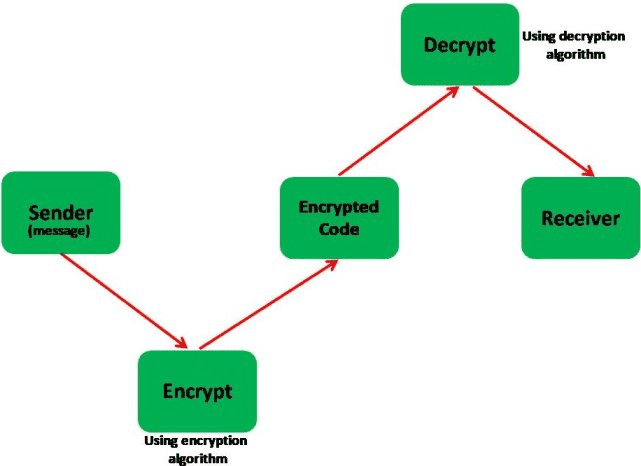
**Cryptography is a technique of securing information and communications through the use of codes so that only those people for whom the information is intended can understand it and process it. Thus preventing unauthorized access to information. The prefix “crypt” means “hidden” and suffix graphy means “writing”.
Project Overview
In this article, we will be building an **Android Application that can **Encrypt and **Decrypt a message using the Encoding and Decoding algorithm respectively. The app's homepage will give the user two option:
- **Encryption: It is the process of transforming a readable message into an unreadable one. To do so we use encoding algorithms.
- **Decryption: It is the process of transforming data or information from an unreadable to readable form. To do so we use decoding algorithms.
Step by Step Implementation
Step 1: Create a New Project
To create a new project in Android Studio please refer to How to Create/Start a New Project in Android Studio.
**Note: Select Java/Kotlin as the programming language.
Step 2: Working with MainActivity and activity_main.xml file
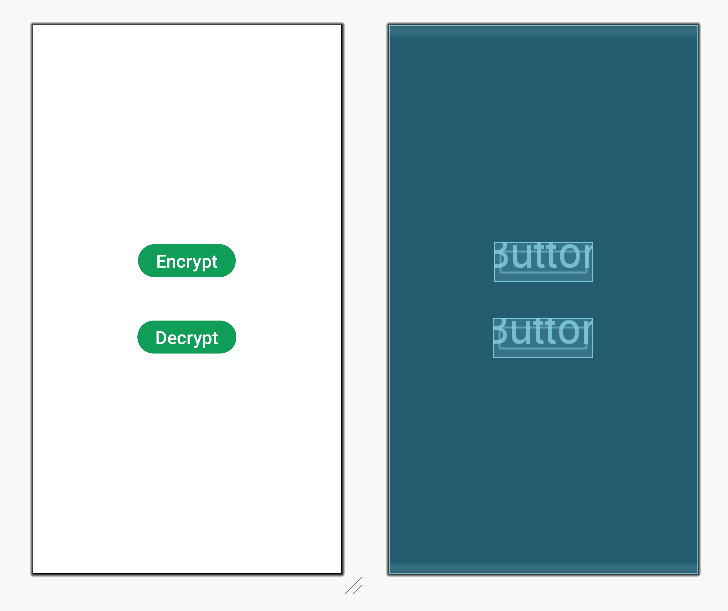
In the **MainActivity file, we will make the two buttons work in order to open the new activities. To do so we will use an **Intentfunction that allows us to move from one activity to another. The two parameters of the Intent function are the current activity's class and the next activity's class. We will call this function inside **onClickListener of the two buttons
The XML codes are used to build the structure of the activity as well as its styling part. On the homepage, we will have two buttons for Encryption and Decryption in the center of the activity. At the top, we will have a **TextView for the title of the app.
MainActivity.java `
package org.geeksforgeeks.demo;
import android.content.Intent; import android.os.Bundle; import android.widget.Button; import androidx.appcompat.app.AppCompatActivity;
public class MainActivity extends AppCompatActivity { private Button encodeButton; private Button decodeButton;
@Override
protected void onCreate(Bundle savedInstanceState) {
    super.onCreate(savedInstanceState);
    setContentView(R.layout.activity_main);

    encodeButton = findViewById(R.id.btVar1);
    decodeButton = findViewById(R.id.btVar2);

    encodeButton.setOnClickListener(v -> {
        Intent intent = new Intent(MainActivity.this, Encoder.class);
        startActivity(intent);
    });

    decodeButton.setOnClickListener(v -> {
        Intent intent = new Intent(MainActivity.this, Decoder.class);
        startActivity(intent);
    });
}
}
MainActivity.kt
package org.geeksforgeeks.demo
import android.content.Intent import android.os.Bundle import android.widget.Button import androidx.appcompat.app.AppCompatActivity
class MainActivity : AppCompatActivity() { private lateinit var encodeButton: Button private lateinit var decodeButton: Button
override fun onCreate(savedInstanceState: Bundle?) {
    super.onCreate(savedInstanceState)
    setContentView(R.layout.activity_main)

    encodeButton = findViewById<Button>(R.id.btVar1)
    decodeButton = findViewById<Button>(R.id.btVar2)

    encodeButton.setOnClickListener {
        val intent = Intent(
            this,
            Encoder::class.java
        )
        startActivity(intent)
    }

    decodeButton.setOnClickListener {
        val intent = Intent(
            this,
            Decoder::class.java
        )
        startActivity(intent)
    }
}
}
activity\_main.xml
<Button
    android:id="@+id/btVar1"
    android:layout_width="wrap_content"
    android:layout_height="wrap_content"
    android:layout_gravity="center"
    android:text="Encrypt"
    android:textSize="24sp" />

<Button
    android:id="@+id/btVar2"
    android:layout_width="wrap_content"
    android:layout_height="wrap_content"
    android:layout_gravity="center"
    android:layout_marginTop="50dp"
    android:text="Decrypt"
    android:textSize="24sp" />
`
**Design UI:
Step 3: Add Encode and Decode Algorithms
Create two Kotlin/Java file for encode and decode algorithms. **Encoding algorithms are used to convert the text into an unreadable form, whereas **Decoding algorithms are used to convert an encoded text into readable form. There are many algorithms that can be used to perform encryption and decryption. In this algorithm, we will be converting the text into a binary number using an Encryption algorithm. For this project, we will be using a customized algorithm. You can also use **Base Type Encoding and Decoding Algorithms in Java.
Encode.java `
public class Encode { public static String encode(String s) { // create a string to add in the initial // binary code for extra security String ini = "11111111"; int cu = 0;
    // create an array
    int arr[] = new int[11111111];

    // iterate through the string
    for (int i = 0; i < s.length(); i++) {
        // put the ascii value of
        // each character in the array
        arr[i] = (int) s.charAt(i);
        cu++;
    }
    String res = "";

    // create another array
    int bin[] = new int[111];
    int idx = 0;

    // run a loop of the size of string
    for (int i1 = 0; i1 < cu; i1++) {

        // get the ascii value at position
        // i1 from the first array
        int temp = arr[i1];

        // run the second nested loop of same size
        // and set 0 value in the second array
        for (int j = 0; j < cu; j++) bin[j] = 0;
        idx = 0;

        // run a while for temp > 0
        while (temp > 0) {
            // store the temp module
            // of 2 in the 2nd array
            bin[idx++] = temp % 2;
            temp = temp / 2;
        }
        String dig = "";
        String temps;

        // run a loop of size 7
        for (int j = 0; j < 7; j++) {

            // convert the integer to string
            temps = Integer.toString(bin[j]);

            // add the string using
            // concatenation function
            dig = dig.concat(temps);
        }
        String revs = "";

        // reverse the string
        for (int j = dig.length() - 1; j >= 0; j--) {
            char ca = dig.charAt(j);
            revs = revs.concat(String.valueOf(ca));
        }
        res = res.concat(revs);
    }
    // add the extra string to the binary code
    res = ini.concat(res);

    // return the encrypted code
    return res;
}
}
Decode.java
import android.util.Log;
public class Decode { public static String decode(String s) { String invalid = "Invalid Code";
    // create the same initial
    // string as in encode class
    String ini = "11111111";
    Boolean flag = true;

    // run a loop of size 8
    for (int i = 0; i < 8; i++) {
        // check if the initial value is same
        if (ini.charAt(i) != s.charAt(i)) {
            flag = false;
            break;
        }
    }
    String val = "";

    // reverse the encrypted code
    for (int i = 8; i < s.length(); i++) {
        char ch = s.charAt(i);
        val = val.concat(String.valueOf(ch));
    }

    // create a 2 dimensional array
    int arr[][] = new int[11101][8];
    int ind1 = -1;
    int ind2 = 0;

    // run a loop of size of the encrypted code
    for (int i = 0; i < val.length(); i++) {

        // check if the position of the
        // string if divisible by 7
        if (i % 7 == 0) {
            // start the value in other
            // column of the 2D array
            ind1++;
            ind2 = 0;
            char ch = val.charAt(i);
            arr[ind1][ind2] = ch - '0';
            ind2++;
        } else {
            // otherwise store the value
            // in the same column
            char ch = val.charAt(i);
            arr[ind1][ind2] = ch - '0';
            ind2++;
        }
    }
    // create an array
    int num[] = new int[11111];
    int nind = 0;
    int tem = 0;
    int cu = 0;

    // run a loop of size of the column
    for (int i = 0; i <= ind1; i++) {
        cu = 0;
        tem = 0;
        // convert binary to decimal and add them
        // from each column and store in the array
        for (int j = 6; j >= 0; j--) {
            int tem1 = (int) Math.pow(2, cu);
            tem += (arr[i][j] * tem1);
            cu++;
        }
        num[nind++] = tem;
    }
    String ret = "";
    char ch;
    // convert the decimal ascii number to its
    // char value and add them to form a decrypted
    // string using conception function
    for (int i = 0; i < nind; i++) {
        ch = (char) num[i];
        ret = ret.concat(String.valueOf(ch));
    }
    Log.e("dec", "text 11 - " + ret);

    // check if the encrypted code was
    // generated for this algorithm
    if (val.length() % 7 == 0 && flag == true) {
        // return the decrypted code
        return ret;
    } else {
        // otherwise return an invalid message
        return invalid;
    }
}
}
Encode.kt
package org.geeksforgeeks.demo
object Encode { fun encode(s: String): String { // create a string to add in the initial // binary code for extra security val ini = "11111111" var cu = 0
    // create an array
    val arr = IntArray(11111111)

    // iterate through the string
    for (i in s.indices) {
        // put the ascii value of
        // each character in the array
        arr[i] = s[i].code
        cu++
    }
    var res = ""

    // create another array
    val bin = IntArray(111)
    var idx = 0

    // run a loop of the size of string
    for (i1 in 0 until cu) {
        // get the ascii value at position
        // i1 from the first array

        var temp = arr[i1]

        // run the second nested loop of same size
        // and set 0 value in the second array
        for (j in 0 until cu) bin[j] = 0
        idx = 0

        // run a while for temp > 0
        while (temp > 0) {
            // store the temp module
            // of 2 in the 2nd array
            bin[idx++] = temp % 2
            temp /= 2
        }
        var dig = ""
        var temps: String

        // run a loop of size 7
        for (j in 0..6) {
            // convert the integer to string
            temps = bin[j].toString()

            // add the string using
            // concatenation function
            dig += temps
        }
        var revs = ""

        // reverse the string
        for (j in dig.length - 1 downTo 0) {
            val ca = dig[j]
            revs += ca.toString()
        }
        res += revs
    }
    // add the extra string to the binary code
    res = ini + res

    // return the encrypted code
    return res
}
}
Decode.kt
package org.geeksforgeeks.demo
import android.util.Log import kotlin.math.pow
object Decode { fun decode(s: String): String { val invalid = "Invalid Code"
    // create the same initial
    // string as in encode class
    val ini = "11111111"
    var flag = true

    // run a loop of size 8
    for (i in 0..7) {
        // check if the initial value is same
        if (ini[i] != s[i]) {
            flag = false
            break
        }
    }
    var value = ""

    // reverse the encrypted code
    for (i in 8 until s.length) {
        val ch = s[i]
        value += ch.toString()
    }

    // create a 2 dimensional array
    val arr = Array(11101) { IntArray(8) }
    var ind1 = -1
    var ind2 = 0

    // run a loop of size of the encrypted code
    for (i in value.indices) {
        // check if the position of the
        // string if divisible by 7

        if (i % 7 == 0) {
            // start the value in other
            // column of the 2D array
            ind1++
            ind2 = 0
            val ch = value[i]
            arr[ind1][ind2] = ch.code - '0'.code
            ind2++
        } else {
            // otherwise store the value
            // in the same column
            val ch = value[i]
            arr[ind1][ind2] = ch.code - '0'.code
            ind2++
        }
    }
    // create an array
    val num = IntArray(11111)
    var nind = 0
    var tem = 0
    var cu = 0

    // run a loop of size of the column
    for (i in 0..ind1) {
        cu = 0
        tem = 0
        // convert binary to decimal and add them
        // from each column and store in the array
        for (j in 6 downTo 0) {
            val tem1 = 2.toDouble().pow(cu.toDouble()).toInt()
            tem += (arr[i][j] * tem1)
            cu++
        }
        num[nind++] = tem
    }
    var ret = ""
    var ch: Char
    // convert the decimal ascii number to its
    // char value and add them to form a decrypted
    // string using conception function
    for (i in 0 until nind) {
        ch = num[i].toChar()
        ret += ch.toString()
    }
    Log.e("dec", "text 11 - $ret")

    // check if the encrypted code was
    // generated for this algorithm
    return if (value.length % 7 == 0 && flag) {
        // return the decrypted code
        ret
    } else {
        // otherwise return an invalid message
        invalid
    }
}
}
`
Step 4: Create the Encryption Layout
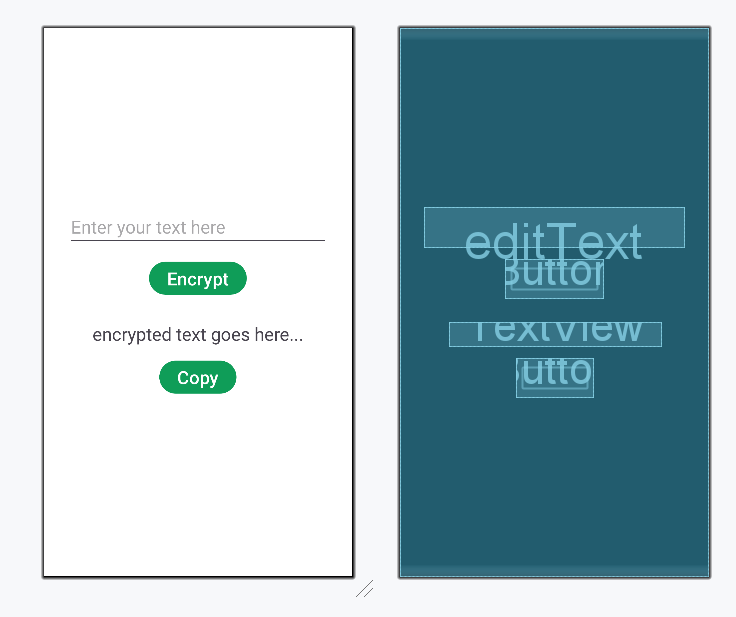
In the **Encoder.java file, we will call the function that we created in the Step 5 (**Encode.java) file. First, we will get the String from the **EditText and then pass the value in the encode function. That will return us the encrypted code of the string. After that, we will set the code to a **TextView and if it's not empty we will allow the user to copy the code in the clipboard. To perform the Encryption function **onClick method is used in the button. Similarly, we have also set the **onClick() function for copying the code in the clipboard for the button. Below is the code for the **Encoder.java file. Comments are added inside the code to understand the code in more detail.
In the Encryption layout, we will have a **TextView at top of the activity to display its title. Next, we will have a **View to create a margin line. Next, there will be TextView and an **EditText to input the text that is to be encrypted. Below that we will have a **Button to encrypt the text. To display the encrypted code we have another TextView with a Button to copy it. Below is the XML code for the **activity_encoder.xml file.
Encoder.java `
package org.geeksforgeeks.demo;
import android.content.ClipData; import android.content.ClipboardManager; import android.os.Bundle; import android.widget.Button; import android.widget.EditText; import android.widget.TextView; import android.widget.Toast; import androidx.appcompat.app.AppCompatActivity;
public class Encoder extends AppCompatActivity { private EditText editText; private TextView textView; private Button encryptButton, copyButton; private ClipboardManager clipboardManager;
@Override
protected void onCreate(Bundle savedInstanceState) {
    super.onCreate(savedInstanceState);
    setContentView(R.layout.activity_encoder);

    // Link the UI components with their respective IDs
    editText = findViewById(R.id.editText);
    textView = findViewById(R.id.encryptedTextView);
    encryptButton = findViewById(R.id.encryptButton);
    copyButton = findViewById(R.id.copyButton);

    // Initialize clipboard manager
    clipboardManager = (ClipboardManager) getSystemService(CLIPBOARD_SERVICE);

    encryptButton.setOnClickListener(v -> {

        // Get user input
        String inputText = editText.getText().toString();

        // Call the encode function from the Encode class
        String encodedText = Encode.encode(inputText);

        // Display the encrypted text
        textView.setText(encodedText);
    });

    copyButton.setOnClickListener(v -> {

        // Get the text from the TextView
        String data = textView.getText().toString().trim();

        // Check if the TextView is not empty
        if (!data.isEmpty()) {

            // Copy the text to the clipboard
            ClipData copiedTextClip = ClipData.newPlainText("text", data);
            clipboardManager.setPrimaryClip(copiedTextClip);

            // Display a toast message that the text has been copied
            Toast.makeText(this, "Copied", Toast.LENGTH_SHORT).show();
        }
    });
}
}
Encoder.kt
package org.geeksforgeeks.demo
import android.content.ClipData import android.content.ClipboardManager import android.os.Bundle import android.widget.Button import android.widget.EditText import android.widget.TextView import android.widget.Toast import androidx.appcompat.app.AppCompatActivity import org.geeksforgeeks.demo.Encode.encode
class Encoder : AppCompatActivity() { private lateinit var editText: EditText private lateinit var textView: TextView private lateinit var encryptButton: Button private lateinit var copyButton: Button
private lateinit var clipboardManager: ClipboardManager

override fun onCreate(savedInstanceState: Bundle?) {
    super.onCreate(savedInstanceState)
    setContentView(R.layout.activity_encoder)

    // link the edittext and textview with its id
    editText = findViewById(R.id.editText)
    textView = findViewById(R.id.encryptedTextView)
    encryptButton = findViewById(R.id.encryptButton)
    copyButton = findViewById(R.id.copyButton)


    // create a clipboard manager variable to copy text
    clipboardManager = getSystemService(CLIPBOARD_SERVICE) as ClipboardManager

    encryptButton.setOnClickListener {

        // get user input
        val inputText = editText.text.toString()

        // call the encode function from the Encode class
        val encodedText = encode(inputText)

        // display the encrypted text
        textView.text = encodedText
    }

    copyButton.setOnClickListener {
        // get the text from the textview
        val data = textView.text.toString().trim { it <= ' ' }

        // check if the textview is not empty
        if (data.isNotEmpty()) {

            // copy the text in the clip board
            val copiedTextClip = ClipData.newPlainText("text", data)
            clipboardManager.setPrimaryClip(copiedTextClip)

            // display message that the text has been copied
            Toast.makeText(this, "Copied", Toast.LENGTH_SHORT).show()
        }
    }
}
}
activity\_encoder.xml
<EditText
    android:id="@+id/editText"
    android:layout_width="match_parent"
    android:layout_height="wrap_content"
    android:hint="Enter your text here"
    android:textSize="24sp" />

<Button
    android:id="@+id/encryptButton"
    android:layout_width="wrap_content"
    android:layout_height="wrap_content"
    android:layout_marginTop="16dp"
    android:text="Encrypt"
    android:textSize="24sp" />

<TextView
    android:id="@+id/encryptedTextView"
    android:layout_width="wrap_content"
    android:layout_height="wrap_content"
    android:layout_marginTop="32dp"
    android:text="encrypted text goes here..."
    android:textSize="24sp" />


<Button
    android:id="@+id/copyButton"
    android:layout_width="wrap_content"
    android:layout_height="wrap_content"
    android:layout_marginTop="16dp"
    android:text="Copy"
    android:textSize="24sp" />
`
**Design UI:
Step 7: Create the Decryption Layout
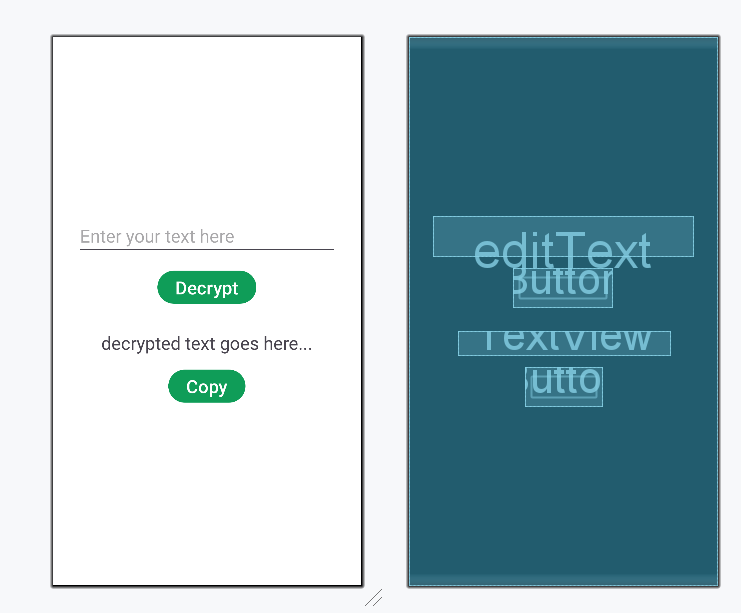
In the **Decoder.java file, we will call the function that we created in the Step 5 ****(Decode.java)** file. First, we will get the encrypted code from the **EditText and then pass the value in the decode function. That will return us the decrypted text of the string. After that, we will set the text to a **TextView, and if it's not empty we will allow the user to copy the code in the clipboard. To perform the Decryption function **onClick() method is used in the button. Similarly, we have also set the **onClick() function for copying the code in the clipboard for the button. Below is the code for the **Decoder.java file. Comments are added inside the code to understand the code in more detail.
In the **Decryption layout, we will have a TextView at top of the activity to display its title. Next, we will have a **View to create a margin line. Next, there will be **TextView and an **EditText to input the encrypted code that is to be decrypted. Below that we will have a **Button to decrypt the text. To display the decrypted code we have another TextView with a Button to copy it. Below is the XML code for the **activity_decoder.xml file.
Decoder.java `
package org.geeksforgeeks.demo;
import android.content.ClipData; import android.content.ClipboardManager; import android.os.Bundle; import android.widget.Button; import android.widget.EditText; import android.widget.TextView; import android.widget.Toast; import androidx.appcompat.app.AppCompatActivity;
public class Decoder extends AppCompatActivity { private EditText editText; private TextView textView; private Button decryptButton, copyButton; private ClipboardManager clipboardManager;
@Override
protected void onCreate(Bundle savedInstanceState) {
    super.onCreate(savedInstanceState);
    setContentView(R.layout.activity_decoder);

    // Link UI components with their respective IDs
    editText = findViewById(R.id.editText);
    textView = findViewById(R.id.decryptedTextView);
    decryptButton = findViewById(R.id.decryptButton);
    copyButton = findViewById(R.id.copyButton);

    // Initialize clipboard manager
    clipboardManager = (ClipboardManager) getSystemService(CLIPBOARD_SERVICE);

    decryptButton.setOnClickListener(v -> {
        // Get the string from the edit text
        String inputText = editText.getText().toString();
        // Call the decode function from the Decode class
        String decodedText = Decode.decode(inputText);
        // Set the decoded text to the text view for display
        textView.setText(decodedText);
    });

    copyButton.setOnClickListener(v -> {
        // Get the text from the text view
        String data = textView.getText().toString().trim();

        // Check if the text view is not empty
        if (!data.isEmpty()) {
            // Copy the text to the clipboard
            ClipData copiedTextClip = ClipData.newPlainText("text", data);
            clipboardManager.setPrimaryClip(copiedTextClip);

            // Display a toast message that the text has been copied
            Toast.makeText(this, "Copied", Toast.LENGTH_SHORT).show();
        }
    });
}
}
Decoder.kt
package org.geeksforgeeks.demo
import android.content.ClipData import android.content.ClipboardManager import android.os.Bundle import android.widget.Button import android.widget.EditText import android.widget.TextView import android.widget.Toast import androidx.appcompat.app.AppCompatActivity import org.geeksforgeeks.demo.Decode.decode
class Decoder : AppCompatActivity() { private lateinit var editText: EditText private lateinit var textView: TextView private lateinit var decryptButton: Button private lateinit var copyButton: Button
private lateinit var clipboardManager: ClipboardManager

override fun onCreate(savedInstanceState: Bundle?) {
    super.onCreate(savedInstanceState)
    setContentView(R.layout.activity_decoder)

    editText = findViewById(R.id.editText)
    textView = findViewById(R.id.decryptedTextView)
    decryptButton = findViewById(R.id.decryptButton)
    copyButton = findViewById(R.id.copyButton)

    // create a clipboard manager variable to copy text
    clipboardManager = getSystemService(CLIPBOARD_SERVICE) as ClipboardManager

    decryptButton.setOnClickListener {
        // get the string from the edit text
        val inputText = editText.text.toString()
        // call the decode function from the Decode class
        val decodedText = decode(inputText)
        // set the text to the edit text for display
        textView.text = decodedText
    }

    copyButton.setOnClickListener {
        // get the text from the textview
        val data = textView.text.toString().trim { it <= ' ' }

        // check if the textview is not empty
        if (data.isNotEmpty()) {
            // copy the text in the clip board
            val copiedTextClip = ClipData.newPlainText("text", data)
            clipboardManager.setPrimaryClip(copiedTextClip)

            // display message that the text has been copied
            Toast.makeText(this, "Copied", Toast.LENGTH_SHORT).show()
        }
    }
}
}
activity\_decoder.xml
<EditText
    android:id="@+id/editText"
    android:layout_width="match_parent"
    android:layout_height="wrap_content"
    android:hint="Enter your text here"
    android:textSize="24sp" />

<Button
    android:id="@+id/decryptButton"
    android:layout_width="wrap_content"
    android:layout_height="wrap_content"
    android:layout_marginTop="16dp"
    android:text="Decrypt"
    android:textSize="24sp" />

<TextView
    android:id="@+id/decryptedTextView"
    android:layout_width="wrap_content"
    android:layout_height="wrap_content"
    android:layout_marginTop="32dp"
    android:text="decrypted text goes here..."
    android:textSize="24sp" />

<Button
    android:id="@+id/copyButton"
    android:layout_width="wrap_content"
    android:layout_height="wrap_content"
    android:layout_marginTop="16dp"
    android:text="Copy"
    android:textSize="24sp" />
`
**Design UI:
**Refer to the following github repo for the entire code: **Encrypt_Decrypt_Text_Android