How to implement Dark (Night) mode in Android app (original) (raw)
Last Updated : 12 Jul, 2025
**Light-on-dark color scheme, also called **dark mode, is a supplemental mode that uses a color scheme in which content of a webpage is displayed on a dark background. Such a color scheme reduces the light emitted by screens and enhances readability. Switching to dark mode allows website users to move to an eye-friendly and resource-saving design whenever they want.
Dark mode or night mode has been getting a lot of buzz lately as Google has included it in their Latest Android version i.e. **Android Q (API Level 29) and following that more and more apps started supporting dark mode natively because it has many benefits:
- Reduces battery/power usage.
- Improves visibility for users with low vision and those who are sensitive to bright light.
- Makes it easier to use the device in a low-light.
Step by Step Implementation
Step 1: Create a New Project
To create a new project in Android Studio please refer to How to Create/Start a New Project in Android Studio.
Step 2: Create night theme colors.xml
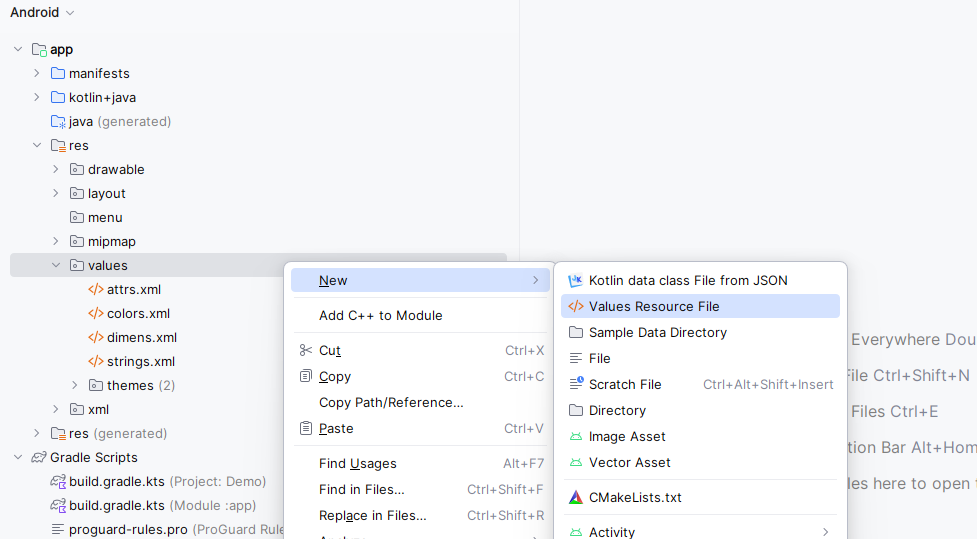
Navigate to **app > res > values, right click on the folder and select **New > Value Resource File.
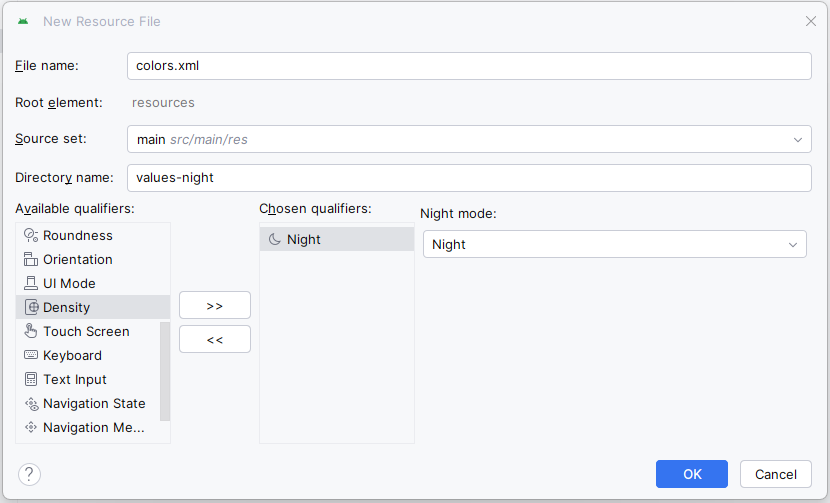
Now, a new dialog box will open. Set the file name as **colors.xml, in the section "**Available qualifiers:", choose **Night mode and click the ****">>"** button. Now, in the new "**Night mode:" drop down menu select **Night. Then, click **OK.
Step 3: Working with colors.xml
Now, there are two colors.xml files, one for light mode and other night mode. Let's customise for both light/dark mode. Add the following color attributes in both the files to setup dark mode.
colors.xml `
#FF000000 #FFFFFFFF #0f9d58 #006d2d #55cf86<!-- For Dark Mode -->
<color name="textColor">@color/black</color>
<color name="backgroundColor">@color/white</color>colors.xml (night)
`
Step 4: Working with activity_main.xml
Navigate to **app > res > activity_main.xml and add a button or switch to toggle On/Off Dark Mode and some texts and images. Now, add the colors to the views to make it toggle on switch click.
**activity_main.xml:
XML `
<ImageView
    android:layout_width="match_parent"
    android:layout_height="100dp"
    android:src="@drawable/gfg_logo" />

<TextView
    android:layout_width="match_parent"
    android:layout_height="wrap_content"
    android:layout_marginTop="24dp"
    android:text="GeeksforGeeks"
    android:textColor="@color/textColor"
    android:textAlignment="center"
    android:textSize="24sp" />

<TextView
    android:layout_width="match_parent"
    android:layout_height="wrap_content"
    android:layout_marginTop="16dp"
    android:textColor="@color/textColor"
    android:text="GeeksforGeeks is a leading platform that provides computer science resources and coding challenges for programmers and technology enthusiasts."
    android:textAlignment="center" />

<com.google.android.material.switchmaterial.SwitchMaterial
    android:id="@+id/darkModeSwitch"
    android:layout_width="wrap_content"
    android:layout_height="wrap_content"
    android:text="Dark Mode"
    android:textColor="@color/textColor"
    app:thumbTint="@color/textColor"
    app:trackTint="@color/colorPrimaryDark"
    android:textStyle="bold"
    android:padding="32dp"
    app:switchPadding="16dp"/>
`
Step 5: Working with MainActivity
In this file, simply use the **AppCompatDelegate.setDefaultMode() and the switch to toggle between light and dark mode.
**MainActivity File:
MainActivity.java `
package org.geeksforgeeks.demo;
import android.os.Bundle; import androidx.appcompat.app.AppCompatActivity; import androidx.appcompat.app.AppCompatDelegate; import com.google.android.material.switchmaterial.SwitchMaterial;
public class MainActivity extends AppCompatActivity { private SwitchMaterial darkModeSwitch;
@Override
protected void onCreate(Bundle savedInstanceState) {
    super.onCreate(savedInstanceState);
    setContentView(R.layout.activity_main);

    darkModeSwitch = findViewById(R.id.darkModeSwitch);

    darkModeSwitch.setOnClickListener(v -> {
        if (darkModeSwitch.isChecked()) {
            AppCompatDelegate.setDefaultNightMode(AppCompatDelegate.MODE_NIGHT_YES);
        } else {
            AppCompatDelegate.setDefaultNightMode(AppCompatDelegate.MODE_NIGHT_NO);
        }
    });
}
}
MainActivity.kt
package org.geeksforgeeks.demo
import android.os.Bundle import androidx.activity.enableEdgeToEdge import androidx.appcompat.app.AppCompatActivity import androidx.appcompat.app.AppCompatDelegate import androidx.core.view.ViewCompat import androidx.core.view.WindowInsetsCompat import com.google.android.material.switchmaterial.SwitchMaterial
class MainActivity : AppCompatActivity() { private lateinit var switch: SwitchMaterial
override fun onCreate(savedInstanceState: Bundle?) {
    super.onCreate(savedInstanceState)
    enableEdgeToEdge()
    setContentView(R.layout.activity_main)
    ViewCompat.setOnApplyWindowInsetsListener(findViewById(R.id.main)) { v, insets ->
        val systemBars = insets.getInsets(WindowInsetsCompat.Type.systemBars())
        v.setPadding(systemBars.left, systemBars.top, systemBars.right, systemBars.bottom)
        insets
    }

    switch = findViewById(R.id.darkModeSwitch)

    switch.setOnClickListener {
        if(switch.isChecked) {
            AppCompatDelegate.setDefaultNightMode(AppCompatDelegate.MODE_NIGHT_YES)
        } else {
            AppCompatDelegate.setDefaultNightMode(AppCompatDelegate.MODE_NIGHT_NO)
        }
    }
}
}
`
Step 6: Further - Save theme state locally
Save the state of the app so that, when the user reopens the app after applying Dark/Light Mode that mode retains. We will use SharedPreferences to save the state of the app.
MainActivity.java `
package org.geeksforgeeks.demo;
import android.content.SharedPreferences; import android.os.Bundle; import androidx.appcompat.app.AppCompatActivity; import androidx.appcompat.app.AppCompatDelegate; import com.google.android.material.switchmaterial.SwitchMaterial;
public class MainActivity extends AppCompatActivity { private SwitchMaterial darkModeSwitch; private SharedPreferences sharedPreferences; private SharedPreferences.Editor editor;
@Override
protected void onCreate(Bundle savedInstanceState) {
    super.onCreate(savedInstanceState);
    setContentView(R.layout.activity_main);

    darkModeSwitch = findViewById(R.id.darkModeSwitch);

    // Initialize SharedPreferences
    sharedPreferences = getSharedPreferences("sharedPrefs", MODE_PRIVATE);
    editor = sharedPreferences.edit();

    boolean isDarkModeOn = sharedPreferences.getBoolean("isDarkModeOn", false);

    // Apply the saved theme preference
    if (isDarkModeOn) {
        AppCompatDelegate.setDefaultNightMode(AppCompatDelegate.MODE_NIGHT_YES);
        darkModeSwitch.setChecked(true);
    } else {
        AppCompatDelegate.setDefaultNightMode(AppCompatDelegate.MODE_NIGHT_NO);
        darkModeSwitch.setChecked(false);
    }

    // Toggle theme when switch is clicked
    darkModeSwitch.setOnClickListener(v -> {
        boolean newDarkModeState = !isDarkModeOn; // Toggle state
        if (newDarkModeState) {
            AppCompatDelegate.setDefaultNightMode(AppCompatDelegate.MODE_NIGHT_YES);
        } else {
            AppCompatDelegate.setDefaultNightMode(AppCompatDelegate.MODE_NIGHT_NO);
        }
        // Save preference
        editor.putBoolean("isDarkModeOn", newDarkModeState);
        editor.apply();
    });
}
}
MainActivity.kt
package org.geeksforgeeks.demo
import android.os.Bundle import android.view.View import androidx.activity.enableEdgeToEdge import androidx.appcompat.app.AppCompatActivity import androidx.appcompat.app.AppCompatDelegate import androidx.core.view.ViewCompat import androidx.core.view.WindowInsetsCompat import com.google.android.material.switchmaterial.SwitchMaterial
class MainActivity : AppCompatActivity() { private lateinit var switch: SwitchMaterial
override fun onCreate(savedInstanceState: Bundle?) {
    super.onCreate(savedInstanceState)
    enableEdgeToEdge()
    setContentView(R.layout.activity_main)

    ViewCompat.setOnApplyWindowInsetsListener(findViewById(R.id.main)) { v, insets ->
        val systemBars = insets.getInsets(WindowInsetsCompat.Type.systemBars())
        v.setPadding(systemBars.left, systemBars.top, systemBars.right, systemBars.bottom)
        insets
    }

    switch = findViewById(R.id.darkModeSwitch)

    // Saving state of our app using SharedPreferences
    val sharedPreferences = getSharedPreferences("sharedPrefs", MODE_PRIVATE)
    val editor = sharedPreferences.edit()
    val isDarkModeOn = sharedPreferences.getBoolean("isDarkModeOn", false)

    // check for preferences
    if (isDarkModeOn) {

        // set to dark mode
        AppCompatDelegate.setDefaultNightMode(AppCompatDelegate.MODE_NIGHT_YES)
        switch.isChecked = true
    } else {
        // set to light mode
        AppCompatDelegate.setDefaultNightMode(AppCompatDelegate.MODE_NIGHT_NO)
        switch.isChecked = false
    }

    switch.setOnClickListener {

        // check for preferences
        if (isDarkModeOn) {

            // set to light mode
            AppCompatDelegate.setDefaultNightMode(AppCompatDelegate.MODE_NIGHT_NO)

            // set value of isDarkModeOn to false
            editor.putBoolean("isDarkModeOn", false)
            editor.apply()
        } else {

            // set to dark mode
            AppCompatDelegate.setDefaultNightMode(AppCompatDelegate.MODE_NIGHT_YES)

            // set value of isDarkModeOn to true
            editor.putBoolean("isDarkModeOn", true)
            editor.apply()
        }
    }
}
}
`
**Refer to the following github repo to get the entire code: Dark-Mode-Android