Introduction to Fragments | Android (original) (raw)
Last Updated : 30 Jan, 2025
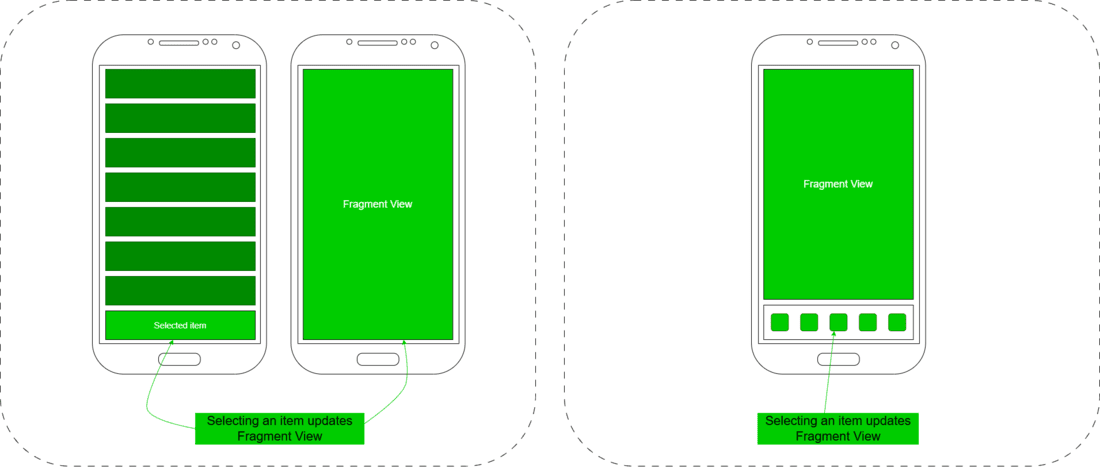
**Fragment is a piece of an activity that enables a more modular activity design. A fragment encapsulates functionality so that it is easier to reuse within activities and layouts. Android devices exist in a variety of screen sizes and densities. Fragments simplify the reuse of components in different layouts and their logic. You can build single-pane layouts for handsets (phones) and multi-pane layouts for tablets. You can also use fragments also to support different layouts for landscape and portrait orientation on a smartphone. The below image shows the use cases of fragments through navigations.
**Fragment Lifecycle
Android fragments have their own lifecycle very similar to an android activity.
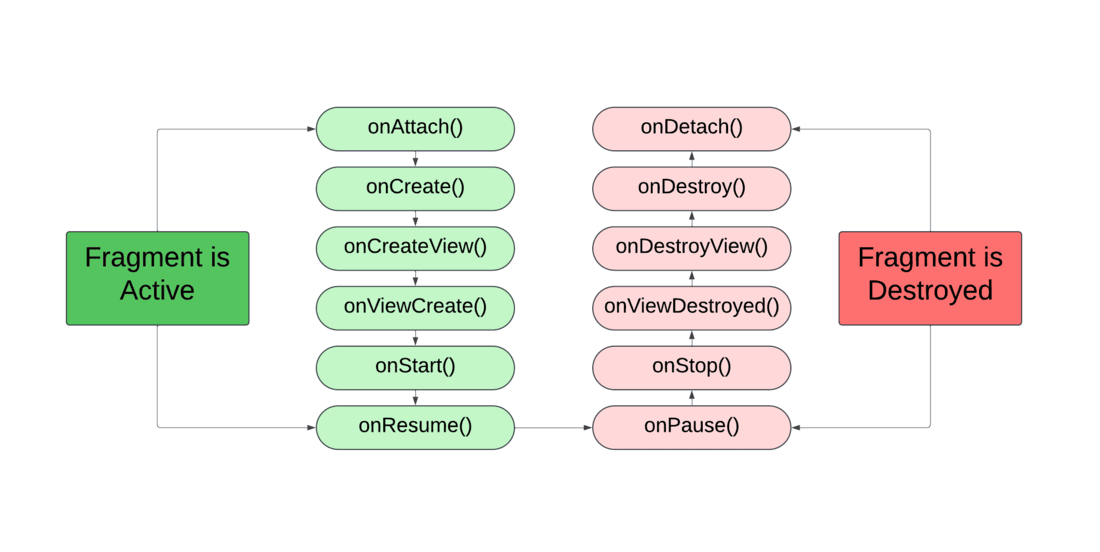
- **onAttach() : The fragment instance is associated with an activity instance. The fragment and the activity is not fully initialized. Typically you get in this method a reference to the activity which uses the fragment for further initialization work.
- **onCreate() : The system calls this method when creating the fragment. You should initialize essential components of the fragment that you want to retain when the fragment is paused or stopped, then resumed.
- **onCreateView() : The system calls this callback when it's time for the fragment to draw its user interface for the first time. To draw a UI for your fragment, you must return a View component from this method that is the root of your fragment's layout. You can return null if the fragment does not provide a UI.
- **onActivityCreated() : The onActivityCreated() is called after the onCreateView() method when the host activity is created. Activity and fragment instance have been created as well as the view hierarchy of the activity. At this point, view can be accessed with the findViewById() method. example. In this method you can instantiate objects which require a Context object
- **onStart() : The onStart() method is called once the fragment gets visible.
- **onResume() : Fragment becomes active.
- **onPause() : The system calls this method as the first indication that the user is leaving the fragment. This is usually where you should commit any changes that should be persisted beyond the current user session.
- **onStop() : Fragment going to be stopped by calling onStop()
- **onDestroyView() : Fragment view will destroy after call this method
- ****onDestroy() :**called to do final clean up of the fragment's state but Not guaranteed to be called by the Android platform.
**Types of Fragments
- **Single frame fragments : Single frame fragments are using for hand hold devices like mobiles, here we can show only one fragment as a view.
- **List fragments : fragments having special list view is called as list fragment
- **Fragments transaction : Using with fragment transaction. we can move one fragment to another fragment.
**Handling the Fragment Lifecycle
A Fragment exist in three states:
- **Resumed : The fragment is visible in the running activity.
- **Paused : Another activity is in the foreground and has focus, but the activity in which this fragment lives is still visible (the foreground activity is partially transparent or doesn't cover the entire screen).
- **Stopped : The fragment is not visible. Either the host activity has been stopped or the fragment has been removed from the activity but added to the back stack. A stopped fragment is still alive (all state and member information is retained by the system). However, it is no longer visible to the user and will be killed if the activity is killed.
**Defining and using fragments
To define a new fragment we either extend the **android.app.Fragment class or one of its subclasses.
BlankFragment File:
Java `
package org.geeksforgeeks.demo;
import android.os.Bundle; import android.view.LayoutInflater; import android.view.View; import android.view.ViewGroup; import androidx.fragment.app.Fragment;
public class BlankFragment extends Fragment { @Override public View onCreateView(LayoutInflater inflater, ViewGroup container, Bundle savedInstanceState) { return inflater.inflate(R.layout.fragment_blank, container, false); } }
Kotlin
package org.geeksforgeeks.demo
import android.os.Bundle import androidx.fragment.app.Fragment import android.view.LayoutInflater import android.view.View import android.view.ViewGroup
class BlankFragment : Fragment() { override fun onCreateView( inflater: LayoutInflater, container: ViewGroup?, savedInstanceState: Bundle? ): View? { return inflater.inflate(R.layout.fragment_blank, container, false) } }
`
**Fragment Transaction:
While for an dynamic activity we are set buttons for an interactive UI. If we are set after clicking the button the fragment should appear then we have to get help from Fragment Manager. It handle all the fragment in an activity. We need to set fragment transaction with the help of fragment manager and and begin transaction, and then simply replace the layout of the fragment with desired place. Below is the code that shows how to implement a fragment transaction.
MainActivity:
MainActivity.java `
package org.geeksforgeeks.demo;
import android.os.Bundle; import android.widget.Button; import androidx.appcompat.app.AppCompatActivity; import androidx.fragment.app.Fragment; import androidx.fragment.app.FragmentManager; import androidx.fragment.app.FragmentTransaction;
public class MainActivity extends AppCompatActivity {
@Override
protected void onCreate(Bundle savedInstanceState) {
    super.onCreate(savedInstanceState);
    setContentView(R.layout.activity_main);

    Button button = findViewById(R.id.button);

    button.setOnClickListener(v -> replaceFragment(new BlankFragment()));
}

private void replaceFragment(Fragment fragment) {
    // Get fragment manager
    FragmentManager fragmentManager = getSupportFragmentManager();

    // Begin fragment transaction
    FragmentTransaction fragmentTransaction = fragmentManager.beginTransaction();

    // Replace fragment and commit
    fragmentTransaction.replace(R.id.fragment_layout, fragment);
    fragmentTransaction.commit();
}
}
MainActivity.kt
package org.geeksforgeeks.demo
import android.os.Bundle import android.widget.Button import androidx.appcompat.app.AppCompatActivity import androidx.fragment.app.Fragment
class MainActivity : AppCompatActivity() { override fun onCreate(savedInstanceState: Bundle?) { super.onCreate(savedInstanceState) setContentView(R.layout.activity_main)
    val button = findViewById<Button>(R.id.button)
    button.setOnClickListener {
        replace(fragment = BlankFragment())
    }
}

private fun replace(fragment: Fragment) {
    // Get fragment manager
    val fragmentManager = supportFragmentManager

      // Begin fragment transaction
    val fragmentTransaction = fragmentManager.beginTransaction()

    // Replace fragment and commit
    fragmentTransaction.replace(R.id.fragment_layout, fragment)
    fragmentTransaction.commit()
}
}
`
activity_main.xml:
activity_main.xml `
<androidx.constraintlayout.widget.ConstraintLayout xmlns:android="http://schemas.android.com/apk/res/android" xmlns:app="http://schemas.android.com/apk/res-auto" xmlns:tools="http://schemas.android.com/tools" android:id="@+id/main" android:layout_width="match_parent" android:layout_height="match_parent" android:background="@color/white" android:gravity="center" android:orientation="vertical" tools:context=".MainActivity">
<FrameLayout
    android:id="@+id/fragment_layout"
    android:layout_width="match_parent"
    android:layout_height="0dp"
    android:layout_margin="24dp"
    app:layout_constraintBottom_toTopOf="@+id/textView"
    app:layout_constraintEnd_toEndOf="parent"
    app:layout_constraintStart_toStartOf="parent"
    app:layout_constraintTop_toTopOf="parent" />

<TextView
    android:id="@+id/textView"
    android:layout_width="wrap_content"
    android:layout_height="wrap_content"
    android:layout_marginBottom="24dp"
    android:text="This is MainActivity"
    android:textColor="@color/black"
    android:textSize="24sp"
    android:textStyle="bold"
    app:layout_constraintBottom_toTopOf="@+id/button"
    app:layout_constraintEnd_toEndOf="parent"
    app:layout_constraintStart_toStartOf="parent" />

<Button
    android:id="@+id/button"
    android:layout_width="wrap_content"
    android:layout_height="wrap_content"
    android:layout_marginBottom="32dp"
    android:backgroundTint="@color/green"
    android:text="Switch"
    app:layout_constraintBottom_toBottomOf="parent"
    app:layout_constraintEnd_toEndOf="parent"
    app:layout_constraintStart_toStartOf="parent" />
</androidx.constraintlayout.widget.ConstraintLayout>
`
fragment_blank.xml:
fragment_blank.xml `
<TextView
    android:layout_width="match_parent"
    android:layout_height="match_parent"
    android:textColor="@color/white"
    android:gravity="center"
    android:text="@string/hello_blank_fragment" />
`