MVC (Model View Controller) Architecture Pattern in Android with Example (original) (raw)
Last Updated : 23 Jul, 2025
Developing an android application by applying a software architecture pattern is always preferred by the developers. An architecture pattern gives modularity to the project files and assures that all the codes get covered in Unit testing. It makes the task easy for developers to maintain the software and to expand the features of the application in the future. There are some architectures that are very popular among developers and one of them is the **Model—View—Controller(MVC) Pattern.
The MVC pattern suggests splitting the code into 3 components. While creating the class/file of the application, the developer must categorize it into one of the following three layers:
- **Model: This component stores the application data. It has no knowledge about the interface. The model is responsible for handling the domain logic(real-world business rules) and communication with the database and network layers.
- **View: Itis theUI(User Interface) layer that holds components that are visible on the screen. Moreover, it provides the visualization of the data stored in the Model and offers interaction to the user.
- **Controller: This component establishes the relationship between the **View and the **Model. It contains the core application logic and gets informed of the user’s behavior and updates the Model as per the need.
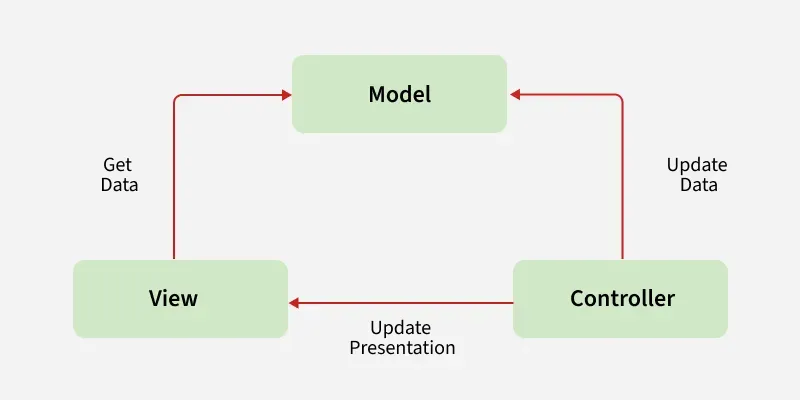
In spite of applying MVC schema to give a modular design to the application, code layers do depend on each other. In this pattern, **View and **Controller both depend upon the **Model. Multiple approaches are possible to apply the MVC pattern in the project:
- **Approach 1: Activities and fragments can perform the role of Controller and are responsible for updating the View.
- **Approach 2: Use activity or fragments as views and controller while Model will be a separate class that does not extend any Android class.
In **MVC architecture, application data is updated by the controller and View gets the data. Since the Model component is separated, it could be tested independently of the UI. Further, if the **View layer respects the **single responsibility principle then their role is just to update the Controller for every user event and just display data from the Model, without implementing any business logic. In this case, UI tests should be enough to cover the functionalities of the View.
Example of MVC Architecture
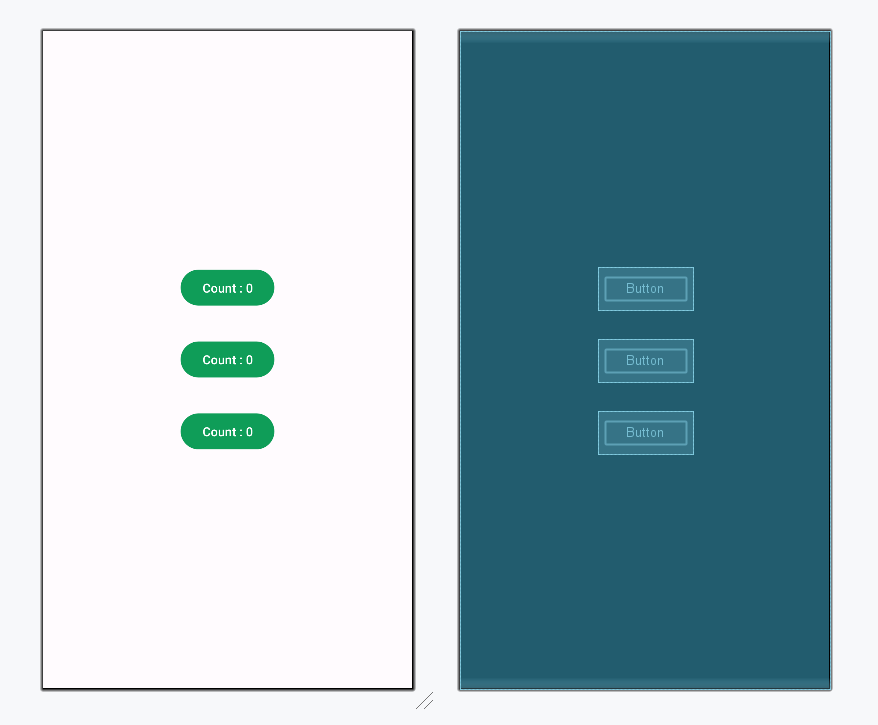
To understand the implementation of the MVC architecture pattern more clearly, here is a simple example of an android application. This application will have 3 buttons and each one of them displays the count that how many times the user has clicked that particular button. To develop this application the code has been separated in the following manner:
- **Controller and View will be handled by the Activity. Whenever the user clicks the buttons, activity directs the Model to handle the further operations. The activity will act as an **observer.
- The **Model will be a separate class that contains the data to be displayed. The operations on the data will be performed by functions of this class and after updating the values of the data this **Observable class notifies the **Observer(Activity) about the change.
Below is the complete step-by-step implementation of this android application using the MVC architecture pattern:
**Note: Following steps are performed on Android Studio version 4.0
**Step 1: Create a new project
- Click on File, then New > New Project.
- Choose Empty activity
- Select language as Java/Kotlin
- Select the minimum SDK as per your need.
**Step 2: Working with the activity_main.xml file
Open the activity_main.xml file and add 3 Buttons to it which will display the count values as per the number of times the user clicks it. Below is the code for designing a proper activity layout.
**activity_main.xml:
activity_main.xml `
<Button
    android:id="@+id/button"
    android:layout_width="wrap_content"
    android:layout_height="wrap_content"
    android:text="Count : 0"/>

<Button
    android:id="@+id/button2"
    android:layout_width="wrap_content"
    android:layout_height="wrap_content"
    android:layout_margin="32dp"
    android:text="Count : 0"/>

<Button
    android:id="@+id/button3"
    android:layout_width="wrap_content"
    android:layout_height="wrap_content"
    android:text="Count : 0" />
`
**Design UI:
**Step 3: Creating the Model class
Create a new class named Model to separate all data and its operations. This class will not know the existence of View Class.
**Model Class:
Model.java `
package org.geeksforgeeks.demo;
import java.util.ArrayList; import java.util.List; import java.util.Observable;
public class Model extends Observable { // Declaring a list of integers private final List list;
// Constructor to initialize the list
public Model() {
    list = new ArrayList<>(3);
    list.add(0);
    list.add(0);
    list.add(0);
}

// Function to return the count value at a specific index
public int getValueAtIndex(int index) throws IndexOutOfBoundsException {
    return list.get(index);
}

// Function to increment the count value and notify observers
public void setValueAtIndex(int index) throws IndexOutOfBoundsException {
    list.set(index, list.get(index) + 1);
    setChanged();
    notifyObservers();
}
}
Model.kt
package org.geeksforgeeks.demo
import java.util.Observable
class Model : Observable() { // declaring a list of integer // reserving the space for list elements private val list: MutableList = ArrayList(3)
// constructor to initialize the list
init {
    // adding elements into the list
    list.add(0)
    list.add(0)
    list.add(0)
}

// defining getter and setter functions
// function to return appropriate count
// value at correct index
@Throws(IndexOutOfBoundsException::class)
fun getValueAtIndex(index: Int): Int {
    return list[index]
}

// function to make changes in the activity button's
// count value when user touch it
@Throws(IndexOutOfBoundsException::class)
fun setValueAtIndex(index: Int) {
    list[index] = list[index] + 1
    setChanged()
    notifyObservers()
}
}
`
**Step 4: Define functionalities of View and Controller in the MainActivity file
This class will establish the relationship between View and Model. The data provided by the Model will be used by View and the appropriate changes will be made in the activity.
**MainActivity File:
MainActivity.java `
package org.geeksforgeeks.demo;
import android.os.Bundle; import android.view.View; import android.widget.Button; import androidx.appcompat.app.AppCompatActivity; import java.util.Observable; import java.util.Observer;
public class MainActivity extends AppCompatActivity implements Observer, View.OnClickListener {
// Creating object of Model class
private Model myModel;

// Creating Button objects
private Button button, button2, button3;

@Override
protected void onCreate(Bundle savedInstanceState) {
    super.onCreate(savedInstanceState);
    setContentView(R.layout.activity_main);

    // Creating relationship between the Observable Model and the Observer Activity
    myModel = new Model();
    myModel.addObserver(this);

    // Assigning button IDs to the objects
    button = findViewById(R.id.button);
    button2 = findViewById(R.id.button2);
    button3 = findViewById(R.id.button3);

    // Set click listeners for buttons
    button.setOnClickListener(this);
    button2.setOnClickListener(this);
    button3.setOnClickListener(this);
}

// Calling setValueAtIndex() method for different buttons
@Override
public void onClick(View v) {
    switch (v.getId()) {
        case R.id.button:
            myModel.setValueAtIndex(0);
            break;
        case R.id.button2:
            myModel.setValueAtIndex(1);
            break;
        case R.id.button3:
            myModel.setValueAtIndex(2);
            break;
    }
}

// Function to update the view after the values are modified by the model
@Override
@Deprecated
public void update(Observable o, Object arg) {
    // Updating button texts according to updated values
    button.setText("Count : " + myModel.getValueAtIndex(0));
    button2.setText("Count : " + myModel.getValueAtIndex(1));
    button3.setText("Count : " + myModel.getValueAtIndex(2));
}
}
MainActivity.kt
package org.geeksforgeeks.demo
import android.os.Bundle import android.view.View import android.widget.Button import androidx.appcompat.app.AppCompatActivity import java.util.*
class MainActivity : AppCompatActivity(), Observer, View.OnClickListener {
// creating object of Model class
private lateinit var myModel: Model

// creating object of Button class
private lateinit var button: Button
private lateinit var button2: Button
private lateinit var button3: Button

override fun onCreate(savedInstanceState: Bundle?) {
    super.onCreate(savedInstanceState)
    setContentView(R.layout.activity_main)

    // creating relationship between the
    // observable Model and the
    // observer Activity
    myModel = Model()
    myModel.addObserver(this)

    // assigning button IDs to the objects
    button = findViewById(R.id.button)
    button2 = findViewById(R.id.button2)
    button3 = findViewById(R.id.button3)


    // transfer the control to Onclick() method
    // when a button is clicked by passing
    // argument "this"
    button.setOnClickListener(this)
    button2.setOnClickListener(this)
    button3.setOnClickListener(this)
}

// calling setValueAtIndex() method
// by passing appropriate arguments
// for different buttons
override fun onClick(v: View) {
    when (v.id) {
        R.id.button -> myModel.setValueAtIndex(0)
        R.id.button2 -> myModel.setValueAtIndex(1)
        R.id.button3 -> myModel.setValueAtIndex(2)
    }
}

// function to update the view after
// the values are modified by the model
@Deprecated("Deprecated in Java")
override fun update(arg0: Observable, arg1: Any?) {

    // changing text of the buttons
    // according to updated values
    button.text = "Count : " + myModel.getValueAtIndex(0)
    button2.text = "Count : " + myModel.getValueAtIndex(1)
    button3.text = "Count : " + myModel.getValueAtIndex(2)
}
}
`
Output:
Advantages of MVC architecture pattern
- MVC pattern increases the code testability and makes it easier to implement new features as it highly supports the separation of concerns.
- Unit testing of Model and Controller is possible as they do not extend or use any Android class.
- Functionalities of the View can be checked through UI tests if the View respect the single responsibility principle(update controller and display data from the model without implementing domain logic)
Disadvantages of MVC architecture pattern
- Code layers depend on each other even if MVC is applied correctly.
- No parameter to handle UI logic i.e., how to display the data.