Quiz App using Angular (original) (raw)
Last Updated : 23 Jul, 2025
We will be creating a **Quiz application using the Angular framework. This app will allow users to answer multiple-choice questions and view their results interactively. We'll use Angular Material for a polished UI and implement responsive design to ensure it looks great on all devices. The application will include features like dynamic question rendering, real-time feedback, and score calculation.
**Project Preview
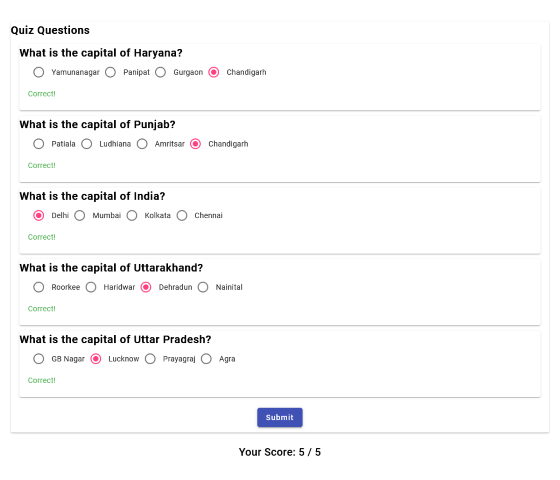
Project Preview
Prerequisites
Approach
- We will be initializing a Angular Project and making a Quiz App.
- We will be using Angular Material for CSS purpose.
- A random JSON data will be initialized for Quiz Questions.
Steps to Create Quiz App using Angular
**Step 1: Install Angular CLI
If you haven’t installed Angular CLI yet, install it using the following command
npm install -g @angular/cli
**Step 2: Create a New Angular Project
ng new quiz-app
cd quiz-app
**Step 3: Create Standalone Component
Create a standalone component. You can generate a standalone component using the Angular CLI:
ng generate component quiz
**Step 4: Install dependencies
Install Angular Material and Flex-Layout for better UI components:
ng add @angular/material @angular/flex-layout
**Dependencies
"dependencies": {
"@angular/animations": "^16.2.0",
"@angular/cdk": "^16.2.14",
"@angular/common": "^16.2.0",
"@angular/compiler": "^16.2.0",
"@angular/core": "^16.2.0",
"@angular/flex-layout": "^15.0.0-beta.42",
"@angular/forms": "^16.2.0",
"@angular/material": "^16.2.14",
"@angular/platform-browser": "^16.2.0",
"@angular/platform-browser-dynamic": "^16.2.0",
"@angular/router": "^16.2.0",
"rxjs": "7.8.0",0.13.0"
"tslib": "^2.3.0",
"zone.js": "
}
Project Structure
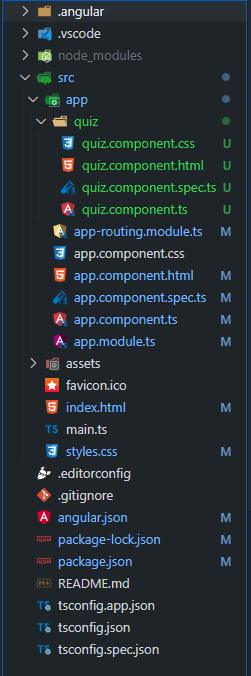
Project Structure
**Example: Create the required files as seen in the folder structure and add the following codes. We will be taking a JSON data for Quiz Questions.
HTML `
Correct!
Incorrect. Correct Answer: {{ q.answer }}
    <div *ngIf="showResults" class="score">
        <h2>Your Score: {{ score }} / {{ qBank.length }}</h2>
    </div>
</form>
HTML
CSS
/quiz.component.css/
.container { max-width: 1000px; margin: auto; padding: 20px; }
.quiz-card { margin: 20px 0; }
.question-card { margin: 10px 0; }
mat-card-title { font-weight: bold; }
.feedback { margin-top: 10px; }
.correct { color: #4caf50; }
.incorrect { color: #f44336; }
@media (max-width: 600px) { .container { padding: 10px; }
.quiz-card {
    margin: 10px 0;
}

.question-card {
    margin: 5px 0;
}
}
mat-card-content p { margin: 5px 0; }
mat-card-actions { display: flex; justify-content: center; padding: 10px 0; }
.score { text-align: center; margin-top: 20px; }
JavaScript
// quiz-component.ts
import { Component, OnInit } from '@angular/core'; import { FormGroup, FormControl, Validators, FormBuilder } from '@angular/forms';
@Component({ selector: 'app-quiz', templateUrl: './quiz.component.html', styleUrls: ['./quiz.component.css'] }) export class QuizComponent implements OnInit { qBank = [ { id: 1, question: "What is the capital of Haryana?", options: ["Yamunanagar", "Panipat", "Gurgaon", "Chandigarh"], answer: "Chandigarh", selected: '', correct: false }, { id: 2, question: "What is the capital of Punjab?", options: ["Patiala", "Ludhiana", "Amritsar", "Chandigarh"], answer: "Chandigarh", selected: '', correct: false }, { id: 3, question: "What is the capital of India?", options: ["Delhi", "Mumbai", "Kolkata", "Chennai"], answer: "Delhi", selected: '', correct: false }, { id: 4, question: "What is the capital of Uttarakhand?", options: ["Roorkee", "Haridwar", "Dehradun", "Nainital"], answer: "Dehradun", selected: '', correct: false }, { id: 5, question: "What is the capital of Uttar Pradesh?", options: ["GB Nagar", "Lucknow", "Prayagraj", "Agra"], answer: "Lucknow", selected: '', correct: false } ];
quizForm: FormGroup;
score: number = 0;
showResults: boolean = false;

constructor(private fb: FormBuilder) {
    this.quizForm = this.fb.group({});
}

ngOnInit() {
    this.qBank.forEach(q => {
        this.quizForm.addControl(q.id.toString(), new FormControl(''));
    });
}

onSubmit() {
    this.score = 0;
    this.qBank.forEach(q => {
        const controlValue = this.quizForm.get(q.id.toString())?.value;
        q.selected = controlValue;
        if (controlValue === q.answer) {
            q.correct = true;
            this.score++;
        } else {
            q.correct = false;
        }
    });

    this.showResults = true;
}
}
JavaScript
// quiz.component.spec.ts
import { ComponentFixture, TestBed } from '@angular/core/testing';
import { QuizComponent } from './quiz.component';
describe('QuizComponent', () => { let component: QuizComponent; let fixture: ComponentFixture;
beforeEach(() => {
    TestBed.configureTestingModule({
        declarations: [QuizComponent]
    });
    fixture = TestBed.createComponent(QuizComponent);
    component = fixture.componentInstance;
    fixture.detectChanges();
});

it('should create', () => {
    expect(component).toBeTruthy();
});
});
JavaScript
//app.module.ts
import { NgModule } from '@angular/core'; import { BrowserModule } from '@angular/platform-browser'; import { ReactiveFormsModule } from '@angular/forms'; import { BrowserAnimationsModule } from '@angular/platform-browser/animations'; import { RouterModule, Routes } from '@angular/router'; import { MatCardModule } from '@angular/material/card'; import { MatRadioModule } from '@angular/material/radio'; import { MatButtonModule } from '@angular/material/button'; import { FlexLayoutModule } from '@angular/flex-layout'; import { AppComponent } from './app.component'; import { QuizComponent } from './quiz/quiz.component';
const routes: Routes = [ { path: '', component: QuizComponent }, ];
@NgModule({ declarations: [ AppComponent, QuizComponent ], imports: [ BrowserModule, ReactiveFormsModule, BrowserAnimationsModule, MatCardModule, MatRadioModule, MatButtonModule, FlexLayoutModule, RouterModule.forRoot(routes) ], providers: [], bootstrap: [AppComponent] }) export class AppModule { }
JavaScript
// app.component.ts
import { Component } from '@angular/core';
@Component({ selector: 'app-root', templateUrl: './app.component.html', styleUrls: ['./app.component.css'] }) export class AppComponent { title = 'quiz-app'; }
` JavaScript ``
// app.component.spec.ts
import { TestBed } from '@angular/core/testing'; import { RouterTestingModule } from '@angular/router/testing'; import { AppComponent } from './app.component';
describe('AppComponent', () => { beforeEach(() => TestBed.configureTestingModule({ imports: [RouterTestingModule], declarations: [AppComponent] }));
it('should create the app', () => {
    const fixture = TestBed.createComponent(AppComponent);
    const app = fixture.componentInstance;
    expect(app).toBeTruthy();
});

it(`should have as title 'quiz-app'`, () => {
    const fixture = TestBed.createComponent(AppComponent);
    const app = fixture.componentInstance;
    expect(app.title).toEqual('quiz-app');
});

it('should render title', () => {
    const fixture = TestBed.createComponent(AppComponent);
    fixture.detectChanges();
    const compiled = fixture.nativeElement as HTMLElement;
    expect(compiled.querySelector('.content span')?.textContent).
    toContain('quiz-app app is running!');
});
});
`` JavaScript `
// app-routing.module.ts
import { NgModule } from '@angular/core'; import { RouterModule, Routes } from '@angular/router';
const routes: Routes = [];
@NgModule({ imports: [RouterModule.forRoot(routes)], exports: [RouterModule] }) export class AppRoutingModule { }
`
Steps to Run the Application
Open the terminal, run this command from your root directory to start the application
ng serve --open
Open your browser and navigate to **http://localhost:4200
**Output
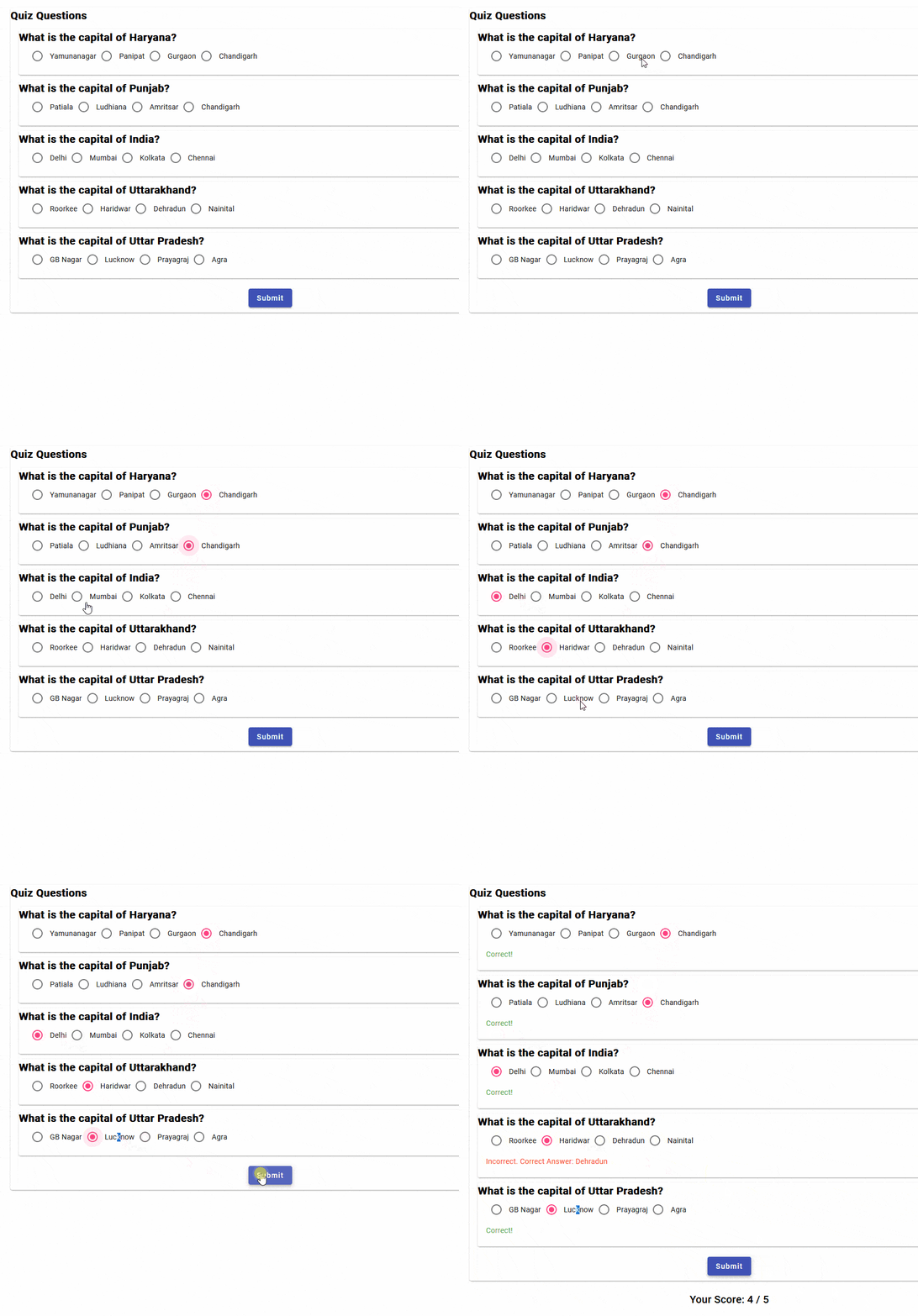
Quiz App using Angular