ALIGN: A Largescale ImaGe and Noisytext Model (original) (raw)
ALIGN: A Large-scale ImaGe and Noisy-text Model
Last Updated : 21 Aug, 2025
ALIGN (A Large-scale Image and Noisy-text) is a vision-language model developed to align images with their associated textual descriptions, even when those texts are noisy or sourced directly from the web. It uses a massive minimally-filtered dataset and a dual-encoder architecture to embed both images and texts in a shared semantic space, enabling robust cross-modal understanding and retrieval at unprecedented scale. Dual-Encoder Structure is adapted in the ALIGN Model,
- **Image Encoder: EfficientNet-based convolutional neural network transforms images into vector embeddings.
- **Text Encoder: BERT-large model converts the textual descriptions into dense vector representations.
- **Projection Layer: A fully connected layer harmonizes output dimensions for both encoders, so embeddings can be compared in the same space.
Step-by-Step Implementation
Let's see the step-by-step implementation of ALIGN,
Step 1: Import Libraries
Let's import all the required libraries,
- **PIL.Image: For reading and converting images.
- **AlignProcessor: Preprocesses (tokenizes, tensorizes) images and text.
- **AlignModel: Pretrained model to embed images and texts together.
- **torch: For tensor computation.
- **cosine_similarity (torch): Measures vector similarity.
- **requests: Downloads images from URLs.
- **BytesIO: Handles in-memory image data for PIL. Python `
from PIL import Image from transformers import AlignProcessor, AlignModel import torch from torch.nn.functional import cosine_similarity import requests from io import BytesIO
`
Step 2: Model and Processor Initialization
Let's initialize the model,
- **AlignProcessor: Preps images/text for model.
- **AlignModel: Loads pretrained weights/config for ALIGN. Python `
processor = AlignProcessor.from_pretrained("kakaobrain/align-base") model = AlignModel.from_pretrained("kakaobrain/align-base")
`
Step 3: Text and Image Inputs
Input the text and image URL's,
- **texts: List of captions.
- **image_urls: List of image links. Python `
texts = ["A cat sitting on a mat", "A dog playing with a ball"] image_urls = [ "https://i.postimg.cc/7hJL9KK4/fluffy-siberian-cat-sitting-on-600nw-2150187551.png", "https://i.postimg.cc/4xgzKc3y/images.jpg" ]

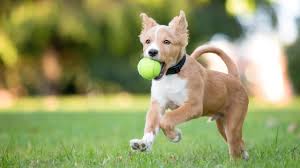
`
Step 4: Download and Prepare Images
The model downloads the image from the URL for further processing by converting to RGB,
Python `
images = [] for url in image_urls: resp = requests.get(url) if resp.status_code == 200: img = Image.open(BytesIO(resp.content)).convert("RGB") images.append(img)
`
Step 5: Preprocess Images and Texts along with Device Setup
The images are converted to padded PyTorch tensors since the neural networks require uniform and correctly typed batch input. Use GPU if available otherwise CPU.
Python `
inputs = processor( images=images, text=texts, return_tensors="pt", padding='max_length', max_length=128, truncation=True ) device = torch.device("cuda" if torch.cuda.is_available() else "cpu") model = model.to(device) inputs = {k: v.to(device) for k, v in inputs.items()}
`
Step 6: Compute Model Outputs and Extract Embeddings
- Passes inputs through ALIGN, creates modality embeddings.
- **image_embeds: Vector per input image.
- **text_embeds: Vector per caption. Python `
outputs = model(**inputs)
image_embeds = outputs.image_embeds text_embeds = outputs.text_embeds
`
Step 7: Calculate Cosine Similarity and Display Result
Compute the similarity for each image-text pair and display the results.
Python `
similarity = cosine_similarity(image_embeds, text_embeds)
for i, score in enumerate(similarity): print(f"Similarity score for pair {i+1}: {score.item():.4f}")
`
**Output:
Similarity score for pair 1: 0.2410
Similarity score for pair 2: 0.2758
Application of ALIGN
- **Zero-shot Image Classification: Classifies images using only text descriptions of categories, with no retraining for new classes.
- **Image-Text Retrieval: Finds relevant images for text queries (text-to-image search) or retrieves text based on an image (image-to-text search).
- **Multimodal Search: Supports complex queries involving both images and texts together, such as searching for “red electric car” with an example photo and description.
- **Cross-modal Embedding: Enables downstream tasks that require both visual and linguistic understanding, such as visual question answering or captioning.
Advantages
- **Massive Scale: Trained on over 1.8 billion image-text pairs, making it robust and generalizable to real-world data.
- **Minimal Data Cleaning: Handles noisy, web-sourced data with little filtering, enabling adaptability to uncontrolled environments.
- **Dual-Encoder Efficiency: Architected for fast similarity computation, making large-scale retrieval tasks practical.
- **Strong Zero-shot Capability: Performs well on unseen classes and tasks without the need for task-specific training.
Limitations
- **Sensitive to Noisy Data: While robust, excessive noise or irrelevant text-image pairings can still degrade performance.
- **Language and Domain Bias: May reflect biases present in large-scale, web-sourced data, impacting fairness and reliability.
- **Quality vs. Quantity Trade-off: Minimal filtering allows more data, but risks including more irrelevant or low-quality pairs.
- **Limited Fine-grained Localization: Focuses on global image-text correspondence; less effective at tasks needing detailed localization or fine object matching.