Building AI Agents using Autogen (original) (raw)
Last Updated : 28 Oct, 2025
AutoGen is a framework for building multi-agent AI systems where multiple agents collaborate, communicate and solve complex tasks autonomously. It allows developers to design intelligent agents that use large language models (LLMs) that can work together or interact with humans to complete dynamic workflows.
- It supports multi-agent communication and task coordination.
- It can integrate with APIs, tools and external systems for enhanced functionality.
- It allows creating custom roles and behaviors for each agent.
- It’s ideal for automation, data analysis and conversational AI applications.
In simple terms, building AI agents using AutoGen helps developers create interactive and intelligent systems that collaborate efficiently to perform end-to-end tasks with minimal human supervision.
Architecture of AutoGen Agents
The architecture of AutoGen follows a modular and role-based design, built around three main types of agents that collaborate to handle complex tasks efficiently. Each agent serves a distinct function within the communication and execution flow.
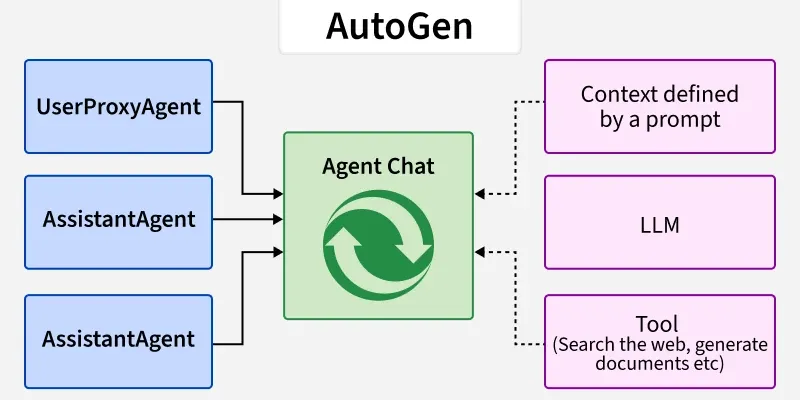
Architecture
- **User Proxy Agent: Represents the human or system that initiates a request. It serves as the **entry point for all queries and manages interactions with assistant agents.
- **Assistant Agent: Acts as the core problem solver, responsible for understanding queries, generating reasoning and coordinating task execution. It may call tools or delegate subtasks to other agents when needed.
- **Tool or Function Agent: Handles specialized operations such as data retrieval, visualization, computation or API interaction. It extends the assistant’s capabilities beyond simple text-based reasoning.
Working of AutoGen Agents
The working of AutoGen agents is organized into three key modules that enable intelligent perception, reasoning and execution. These modules work together to process inputs, make decisions and perform actions autonomously.
- **Perception Module: Receives input from the user or environment, processes it and converts it into a structured format that the reasoning component can interpret effectively.
- **Reasoning Module: Uses large language models (LLMs) to analyze inputs, make informed decisions and plan actions. It can also coordinate multiple agents to maintain logical task flow and consistency.
- **Action Module: Executes the planned actions, which may involve code generation, API calls, data summarization or visual output creation.
In essence, these three modules allow AutoGen agents to perceive their environment, reason intelligently and act effectively hence creating a smooth and automated workflow from input to execution.
Implementation
Step by step implementation of AI Agents using AutoGen:
Step 1: Install Packages
Installing required libraries such as autogen and openai.
Python `
!pip install autogen openai
`
Step 2: Import Libraries
Importing essential modules like autogen, openai and os library.
Python `
from autogen import AssistantAgent, UserProxyAgent import os from openai import OpenAI
`
Step 3: Environment Setup
Setting our OpenAI API key or another model access token for LLM based reasoning.
Python `
os.environ["OPENAI_API_KEY"] = "your-api-key" client = OpenAI(api_key=os.environ["OPENAI_API_KEY"])
`
Refer to this article: Fetching OpenAI API Key
Step 4: Create AssistantAgent
Creating Assistant Agent.
- name gives it an identity for logs or clarity.
- llm_config specifies which LLM it uses, we are using GPT-4o.
- This agent will handle reasoning and generate replies.
- It is a part of Reasoning Module. Python `
assistant = AssistantAgent( name="Assistant", llm_config={"model": "gpt-4o"} )
`
Step 5: Create UserProxyAgent
Creating User Proxy Agent.
- It represents the human user.
- It’s responsible for sending user messages and handling the chat flow.
- It behaves like messenger that talks to the Assistant. Python `
user_proxy = UserProxyAgent(name="UserProxy")
`
Step 6: Interact with the AI Agent
Interacting with the AI Agent.
- The UserProxyAgent starts a chat with the AssistantAgent.
- Taking user input is a part of Perception Module.
- It sends your message to the assistant and waits for the reply.
- The assistant processes our question using the model like GPT-4o and generates a response.
- The reply is saved in response. Printing response is a part of Action Module. Python `
user_input = input("Enter your query or data: ") response = user_proxy.initiate_chat(assistant, message=user_input)
print("\n===== AutoGen Agent Output =====") print(response)
`
**Output:
Applications
Some of the applications of AutoGen are:
- **Collaborative AI Systems: Used to build multi agent frameworks where different agents work together, handling planning, coding and execution tasks in a coordinated way.
- **Automated Research Assistants: Capable of generating research insights, literature summaries and detailed reports autonomously reducing manual effort.
- **Code Generation and Debugging: Helps automate software development workflows using specialized coder and reviewer agents that can write, test and refine code.
- **Data Analysis and Reporting: Enables agents to analyze datasets, extract meaningful insights and generate visual reports or trend summaries automatically.
- **AI Workflow Automation: Integrates APIs, reasoning models and custom logic to create complete end to end automation pipelines for complex workflows.
Advantages
Some of the advantages of AutoGen are:
- **Modular Architecture: It provides separate modules for perception, reasoning and action allowing greater flexibility, scalability and easier debugging.
- **Task Planning: The system uses advanced planning algorithms to break complex problems into smaller, more manageable steps for efficient execution.
- **Knowledge Integration: AutoGen can connect with LLMs, APIs and external databases to support informed and context aware decision making.
- **Autonomy and Adaptability: Its agents can learn, adapt and improve their performance based on ongoing interactions and dynamic environments.
- **Collaborative Reasoning: It enables multiple agents to communicate and share reasoning resulting in better coordination and higher quality outcomes.
Challenges
Despite its benefits, AutoGen also faces few challenges:
- **Requires API Access: The framework depends on access to OpenAI or other compatible LLM APIs which may not always be freely available.
- **Complex Setup: Configuring and managing a multi agent environment can be technically challenging especially for beginners.
- **Latency Issues: Communication between multiple agents can introduce delays leading to slower response times in some tasks.
- **Limited Offline Capability: Since AutoGen relies heavily on LLMs, it generally requires an internet connection for reasoning and information retrieval.
- **Resource Intensive: Running large scale multi agent systems can consume significant computational power and may lead to higher operational costs.