CrewAI Flow (original) (raw)
Last Updated : 8 Apr, 2026
CrewAI Flows enable structured, event driven AI workflows by combining tasks, Crews and code into multi step processes, with control over execution, state, logic and persistence for clarity and reproducibility.
- Orchestrate multi step workflows with tasks and agent Crews.
- Support event driven execution, branching and loops.
- Manage state and persistence across workflow steps.
- Ensure controlled, scalable and reproducible AI automation.
Working of CrewAI Flows
CrewAI Flows follow a structured process to manage multi-step workflows with coordination, state handling and conditional execution.
- **Start: The flow begins from a method marked with @start() as the entry point.
- **Task Execution: Executes tasks, Crews or direct LLM calls, each producing outputs.
- **Event Listening: Methods with @listen(...) wait for and respond to earlier steps.
- **Conditional Routing: Uses routers or logical conditions to branch based on outputs.
- **State Management: Maintains a shared state (dict or model) across steps with a unique ID.
- **Persistence: Optionally stores state to resume or reuse workflows.
- **Visualization: Supports viewing workflow structure and outputs for better understanding.
Components of CrewAI Flows
CrewAI Flows consist of key building blocks that enable structured, flexible and event-driven workflow execution.
1. Decorators
CrewAI Flows uses Python decorators to define how and when each part of our workflow runs.
- ****@start():** marks the entry method.
- ****@listen():** listens to outputs or completion of other methods.
- ****@router():** for conditional branching or routing based on state or outputs.
2. State
Flows maintain a state object that carries information between steps and helps us track execution
- Unstructured state (dictionary style) giving agility.
- Structured state (using Pydantic models) for type safety, schema validation, auto completion.
- Unique identifiers (UUIDs) assigned automatically to track each flow execution.
3. Event-Driven Execution
Methods can trigger other methods upon completion. Flows support logical composition like or_ / and_ to combine events.
4. Conditional Logic and Routing
Based on output or state, flows can take different execution paths. Useful for branches, error handling, multiple possible workflows.
5. Integration with Crews
Crews are groups of agents meant for collaborative tasks. Flows can orchestrate Crews, combining them with direct LLM calls and custom code.
6. Persistence and Resumption
Flows allow saving state, so workflows can resume or be inspected later.
7. Visualization Tools
Methods like plot() help us see the flow structure visually.
Implementation
We will be building a simple Flow using CrewAI to demonstrate how these components work in practice
1. Setting Up the Environment
Before working with Flows, we need to install CrewAI
!pip install crewai
We also need to set any LLM API keys if external LLMs are used
Python `
import os os.environ["OPENAI_API_KEY"] = "your-api-key-here"
`
2. Importing Required Libraries
First, we import the necessary classes to define Flows and interact with LLMs.
- **Flow: Base class for defining a Flow.
- **start: Decorator marking the entry point of a Flow.
- **listen: Decorator for methods that run after another method completes.
- **completion: Helper function to call the LLM with model and messages. Python `
from crewai.flow.flow import Flow, listen, start from litellm import completion
`
3. Defining Flow Class
- Create a Flow class to orchestrate the workflow steps.
- Specify the LLM model to be used for execution.
- Use self.state to store and manage intermediate and final results across steps. Python `
class DishFlow(Flow): model = "gemini/gemini-2.5-flash"
`
4. Start Method – Suggest a Cuisine
- Define the entry method using @start() to begin the Flow.
- Use completion(model, messages) to generate a response from the LLM.
- Store the result in self.state["cuisine"] for use in later steps. Python `
@start() def suggest_cuisine(self): response = completion( model=self.model, messages=[ {"role": "user", "content": "Suggest a cuisine for a meal."} ] ) cuisine = response["choices"][0]["message"]["content"] self.state["cuisine"] = cuisine print(f"Chosen cuisine: {cuisine}") return cuisine
`
5. Listener Method – Suggest Dish
This method runs after suggest_cuisine and produces a dish:
- Use @listen(suggest_cuisine) to run this method after the start step.
- Receive cuisine from the previous step as input.
- Generate a dish suggestion and store it in self.state["dish"]. Python `
@listen(suggest_cuisine) def suggest_dish(self, cuisine): response = completion( model=self.model, messages=[ {"role": "user", "content": f"Suggest a dish from {cuisine} cuisine."} ] ) dish = response["choices"][0]["message"]["content"] self.state["dish"] = dish print(f"Suggested dish: {dish}") return dish
`
6. Listener Method – Provide Cooking Tip
- Use @listen(suggest_dish) to run this method after the dish step.
- Receive dish from the previous step as input.
- Generate a cooking tip and store it in self.state["tip"] Python `
@listen(suggest_dish) def give_tip(self, dish): response = completion( model=self.model, messages=[ {"role": "user", "content": f"Give a cooking tip for making {dish}."} ] ) tip = response["choices"][0]["message"]["content"] self.state["tip"] = tip print(f"Cooking tip: {tip}") return tip
`
7. Running and Visualizing Flow
- Instantiate the Flow and visualize its structure using flow.plot().
- Execute the workflow using flow.kickoff().
- The result contains the final output from the last step. Python `
flow = DishFlow() flow.plot() result = flow.kickoff() print("Final output:", result)
`
**Output:
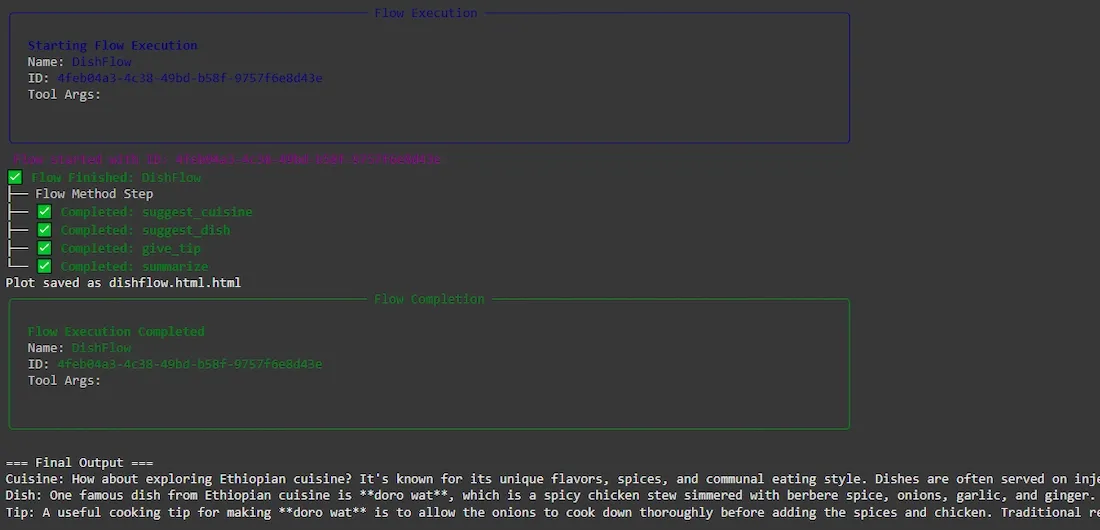
Output
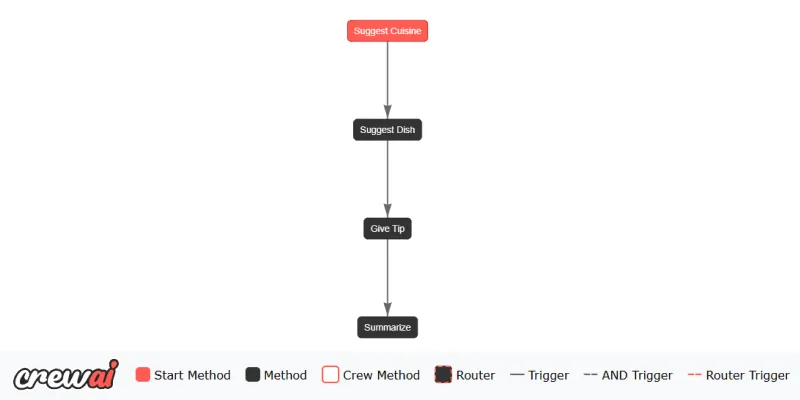
Flow Diagram
Download full code from here
Applications
- Enable content generation pipelines with steps like outlining, writing, reviewing and revising.
- Support automations with conditional branching for tasks like email handling and decision making.
- Facilitate document processing workflows such as OCR, extraction, analysis and reporting.
- Power chatbots with memory and decision logic based on user interactions.
- Integrate with external systems or APIs to trigger actions and handle responses dynamically.