Depth Limited Search for AI (original) (raw)
Last Updated : 11 Jun, 2026
Depth Limited Search (DLS) is an important algorithm in Artificial Intelligence used for searching within a problem space by limiting how deep the search can go. It is based on Depth First Search (DFS) but improves efficiency by restricting unnecessary deep exploration. Key concepts of DLS are:
- **Depth Limit Parameter: A predefined maximum depth that controls how far the search can expand in the tree or graph.
- **Node Depth Tracking: Each node keeps track of its current depth to ensure the search does not exceed the allowed limit.
- **Cutoff vs Failure Handling: Distinguishes between depth limit reached (cutoff) and no solution found (failure).
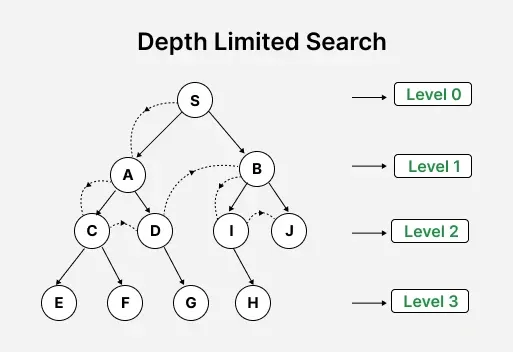
Depth Limited Search where Set Limit = Level 2
Pseudocode for Depth-Limited Search
Pseudocode for Depth-Limited Search is a structured representation of the algorithm that shows how the search explores nodes recursively while respecting a predefined depth limit and handling cutoff conditions.
Python `
def depth_limited_search(node, goal_test, limit): if goal_test(node): return node elif limit == 0: return "cutoff" else: cutoff_occurred = False for child in expand(node): result = depth_limited_search(child, goal_test, limit - 1) if result == "cutoff": cutoff_occurred = True elif result != "failure": return result return "cutoff" if cutoff_occurred else "failure"
`
**Explanation:
- The function takes node, goal_test, and limit as inputs.
- If the node satisfies the goal, it returns the solution node.
- If the depth limit is reached, it returns "cutoff".
- It expands the node and recursively explores each child with reduced depth.
- If any child returns "cutoff", it is recorded.
- If a valid solution is found, it is returned immediately.
- After exploring all children, it returns "cutoff" if any cutoff occurred, otherwise "failure".
Working
- **Initialization: Begin at the root node with a specified depth limit.
- **Exploration: Traverse the tree or graph, exploring each node's children.
- **Depth Check: If the current depth exceeds the set limit, stop exploring that path and backtrack.
- **Goal Check: If the goal node is found within the depth limit, the search is successful.
- **Backtracking: If the search reaches the depth limit or a leaf node without finding the goal, backtrack and explore other branches.
Implementation
Let’s consider a grid-based robotic environment where Depth Limited Search (DLS) is used for pathfinding. The robot moves from a start position to a goal position while avoiding obstacles, using a depth-limited recursive search strategy.
The environment is represented as a 5×5 grid where:
- 0 represents a free call
- 1 represents an obstacle
Step 1: Defining the grid environment
The grid environment is initialized using a 2D list to represent the search space in which the robot will navigate and plan its movement.
Python `
Define the grid environment with obstacles (1 indicates obstacle, 0 indicates free cell)
grid = [ [0, 0, 0, 0, 0], [0, 1, 1, 0, 0], [0, 0, 1, 0, 0], [0, 0, 0, 0, 1], [0, 0, 0, 0, 0] ]
`
Step 2: **Defining Initial and Goal Positions
The initial position of the robot is defined as (0, 0) and the goal position is set to (4, 4).
Python `
Define initial and goal positions
initial_position = (0, 0) goal_position = (4, 4)
`
Step 3: **Defining Problem Representation
Now, a Problem class is used to model the robot’s path planning task from the initial position to the goal state on the grid. It provides functions to check whether a state is the goal and to generate valid next moves from a given state.
Python `
Define problem representation
class Problem: def init(self, grid, initial, goal): self.grid = grid self.initial_state = initial self.goal_state = goal
def is_goal(self, state):
    return state == self.goal_state

def expand(self, state):
    # Define possible movements: up, down, left, right
    movements = [(0, -1), (0, 1), (-1, 0), (1, 0)]
    valid_moves = []
    for move in movements:
        new_x = state[0] + move[0]
        new_y = state[1] + move[1]
        # Check if the new position is within the grid and not an obstacle
        if 0 <= new_x < len(self.grid) and 0 <= new_y < len(self.grid[0]) and self.grid[new_x][new_y] == 0:
            valid_moves.append((new_x, new_y))
    return valid_moves
`
Step 4: **Defining Depth Limited Search (DLS) Algorithm
These functions implement the Depth Limited Search (DLS) algorithm.
depth_limited_searchis the main function that initiates the search with the given depth limit.recursive_dlsis a helper function that performs recursive search. It returns the path if the goal is found, “cutoff” if the depth limit is reached, and “failure” if no solution exists within the limit Python `
DLS algorithm
def depth_limited_search(problem, depth_limit): return recursive_dls(problem.initial_state, problem, depth_limit)
def recursive_dls(node, problem, depth_limit): if problem.is_goal(node): return [node] elif depth_limit == 0: return "cutoff" else: for child in problem.expand(node): result = recursive_dls(child, problem, depth_limit - 1) if result == "cutoff": continue elif result != "failure": return [node] + result return "failure"
`
Step 5: **Creating Problem Instance
An instance of the Problem class is created with the defined grid, initial position and goal position.
Python `
Create problem instance
problem = Problem(grid, initial_position, goal_position)
`
Step 6: **Finding Path using DLS
The DLS algorithm is used to find a path from the initial to the goal position within a depth limit of 10. The result is checked, and the path is printed if found; otherwise, an appropriate message is displayed.
Python `
Find path using DLS with depth limit 10
depth_limit = 10 path = depth_limited_search(problem, depth_limit)
Output path
if path == "failure": print("No path found within the depth limit.") elif path == "cutoff": print("Search terminated due to depth limit.") else: print("Path found:", path)
`
Step 7: Visualizing the Path
The functionvisualize_path visualizes the grid with the path found by the DLS algorithm highlighted in blue. It also marks the initial position in green and the goal position in red.
Python `
import matplotlib.pyplot as plt # Visualization code def visualize_path(grid, path): fig, ax = plt.subplots() # Create a grid with the same dimensions nrows, ncols = len(grid), len(grid[0]) ax.set_xticks([x - 0.5 for x in range(1, ncols)], minor=True) ax.set_yticks([y - 0.5 for y in range(1, nrows)], minor=True) ax.grid(which="minor", color="black", linestyle='-', linewidth=2) ax.imshow(grid, cmap='Greys', interpolation='none')
    # Highlight the path
    if path:
        for (x, y) in path:
            ax.add_patch(plt.Circle((y, x), radius=0.3, color='blue'))

    # Highlight initial and goal positions
    ax.add_patch(plt.Circle((initial_position[1], initial_position[0]), radius=0.3, color='green'))
    ax.add_patch(plt.Circle((goal_position[1], goal_position[0]), radius=0.3, color='red'))

    plt.gca().invert_yaxis()
    plt.title("Original Grid with DLS Path")
    plt.show()
`
**Output:
Path found: [(0, 0), (0, 1), (0, 0), (0, 1), (0, 2), (0, 3), (1, 3), (2, 3), (3, 3), (4, 3), (4, 4)]
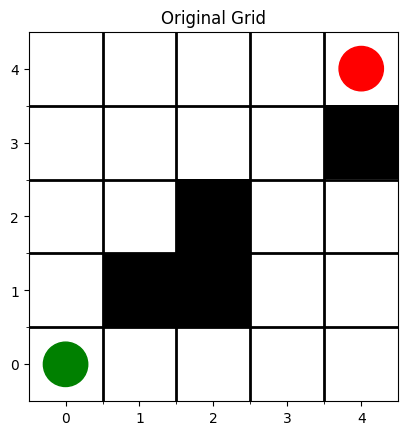
Original Grid Discussed in the Problem Statement
.png)
Resulting Grid After applying Depth Limit Search Algorithm
**Applications
- **Pathfinding in Robotics: Used for robot navigation in obstacle-filled environments by limiting search depth, preventing excessive or unnecessary exploration.
- **Network Routing: Helps compute paths between nodes while limiting hops, reducing the risk of loops.
- **Puzzle Solving: Applied in problems like the 8-puzzle or Sudoku by restricting move depth to control search complexity.
- **Game Playing: Used to evaluate a limited number of future moves, helping AI decide efficient strategies within constrained depth.
Advantages
- **Memory Efficient: Like DFS, it uses linear memory O(d) where d is the depth limit.
- **Prevents Infinite Loops: Especially helpful in infinite or cyclic graphs.
- **Simpler Than Other Methods: Easy to implement recursively.
- **Useful in Iterative Deepening: DLS is used repeatedly with increasing depth in Iterative Deepening Search (IDS).
Limitations
- **Incomplete: If the depth limit is too shallow, the goal won’t be found.
- **Not Optimal: It does not guarantee the shortest path if multiple goal states exist.
- **Requires Guessing the Right Depth: Choosing the correct depth limit is not always easy.
- **Performance Drops if Goal is Far: If the goal lies just beyond the limit, DLS won’t find it and will return a cutoff.