Knowledge Graphs for RAG (original) (raw)
Last Updated : 10 Nov, 2025
A Knowledge Graph in RAG (Retrieval-Augmented Generation) is a structured representation of information where entities (nodes) and their relationships (edges) are explicitly modeled. It allows a RAG system to retrieve relevant knowledge, understand context, and perform inferential reasoning, enabling the language model to generate more accurate, coherent, and explainable responses.
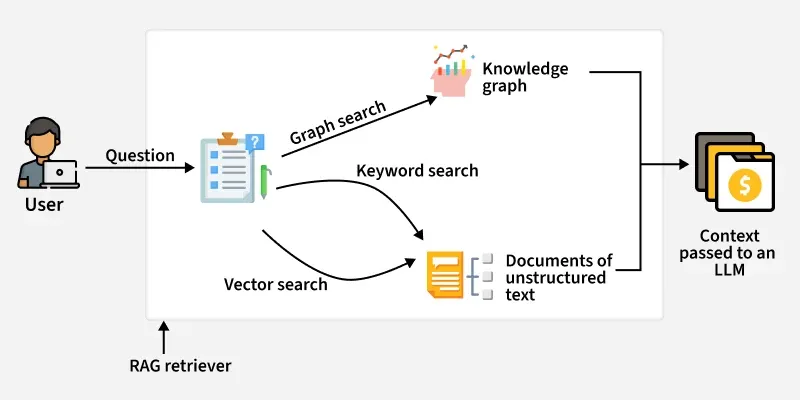
KG Rag
RAG applications rely on retrieving relevant information to improve the quality of generated responses. Knowledge graphs bring several advantages to this process.
- **Structured Knowledge Representation : Entities and relationships are explicitly model, making it easier to retrieve relevant information.
- **Contextual Understanding : Knowledge Graphs capture relationships between entities, providing deeper context for responses.
- **Inferential Reasoning : Traversing Knowledge Graphs enables RAG systems to infer information not explicitly stated.
- **Knowledge Integration : It can combine information from multiple sources into a unified, structured format.
- **Explainability and Transparency : The reasoning behind AI responses is clear, traceable to the graph structure.
How Knowledge Graphs Work in RAG Applications
- **Data Collection and Preprocessing : Data is collected from various sources, cleaned, and processed to identify key entities and relationships for graph creation.
- **Knowledge Graph Construction : Entities turn into nodes and relationships into edges, each with unique IDs and properties to enable efficient querying and reasoning.
- **Storage in a Graph Database : The graph is stored in databases like Neo4j, enabling fast searches and traversals, with indexes speeding up keyword and property-based queries.
- **Querying and Traversal : Queries explore the graph by following relationships, helping the system uncover hidden connections and infer new knowledge.
- **Integration with RAG : The knowledge graph gives structured context to the language model, which can be combined with embeddings or other data to improve answer accuracy.
- **Response Generation : Language model uses the retrieved knowledge to generate clear, fact-based responses, with the graph ensuring accuracy, context, and explainability.
Step-By-Step Implementation
Here load Wikipedia documents, split them into chunks, convert them into a knowledge graph in Neo4j, and then build a retrieval-augmented generation pipeline that queries both structured (graph) and unstructured (vector embeddings) data to answer questions.
Step 1: Environment Setup
- Set Neo4j connection details as environment variables.
- Ensures LangChain’s Neo4jGraph and Neo4jVector can connect automatically. Python `
import os from google.colab import userdata
GOOGLE_API_KEY = userdata.get("YOUR_API_KEY")
os.environ["GOOGLE_API_KEY"] = "GOOGLE_API_KEY" os.environ["NEO4J_URI"] = "YOUR_NEO4J_URI" os.environ["NEO4J_USERNAME"] = "YOURS_NEO4J_USERNAME" os.environ["NEO4J_PASSWORD"] = "YOUR_NEO4J_PASSWORD"
`
Step 2: Load and Split Documents
- Load Wikipedia articles as raw text.
- Split text into chunks to improve graph representation and embedding quality.
- Each chunk can later become a Neo4j node or vector. Python `
from langchain.document_loaders import WikipediaLoader from langchain.text_splitter import TokenTextSplitter
raw_docs = WikipediaLoader(query="Elizabeth I").load()
splitter = TokenTextSplitter(chunk_size=512, chunk_overlap=24) documents = splitter.split_documents(raw_docs[:3])
`
Step 3: Initialize LLM and Graph Transformer
- Use ChatGoogleGenerativeAI for all LLM operations.
- Convert document chunks into graph-compatible documents using LLMGraphTransformer.
- Graph documents will later be added to Neo4j. Python `
from langchain_google_genai import ChatGoogleGenerativeAI from langchain_experimental.graph_transformers import LLMGraphTransformer from langchain_community.graphs import Neo4jGraph
llm = ChatGoogleGenerativeAI( model="gemini-2.5-flash", temperature=0 )
llm_transformer = LLMGraphTransformer(llm=llm) graph_docs = llm_transformer.convert_to_graph_documents(documents)
graph = Neo4jGraph() graph.add_graph_documents(graph_docs, baseEntityLabel=True, include_source=True)
`
Step 4: Create Vector Index
- Build a hybrid semantic search index over the Neo4j graph using embeddings.
- This allows retrieval from both graph nodes and semantic similarity.
- Use GoogleGenerativeAIEmbeddings instead of OpenAI embeddings. Python `
from langchain_community.vectorstores import Neo4jVector from langchain_google_genai import GoogleGenerativeAIEmbeddings
vector_index = Neo4jVector.from_existing_graph( GoogleGenerativeAIEmbeddings(), search_type="hybrid", node_label="Document", text_node_properties=["text"], embedding_node_property="embedding" )
`
- Define structured output model to extract persons and organizations.
- Use ChatGoogleGenerativeAI via a prompt chain for extraction.
- Ensures consistent format for entities to use in structured queries. Python `
from langchain_core.pydantic_v1 import BaseModel, Field from langchain_core.prompts import ChatPromptTemplate
class Entities(BaseModel): names: list[str] = Field(..., description="Person/organization entities in text")
prompt = ChatPromptTemplate.from_messages([ ("system", "You are extracting organization and person entities from the text."), ("human", "Use the given format to extract info: {question}"), ])
entity_chain = prompt | llm.with_structured_output(Entities)
`
Step 6: Structured Retrieval
- Generate full-text search queries safely by removing special characters.
- Retrieve entities and their relationships from Neo4j graph using fulltext.queryNodes.
- Each entity is expanded with connections (!MENTIONS) for context. Python `
from langchain_community.vectorstores.neo4j_vector import remove_lucene_chars
def generate_full_text_query(input: str) -> str: words = [el for el in remove_lucene_chars(input).split() if el] return " AND ".join(f"{w}~2" for w in words)
def structured_retriever(question: str) -> str: result = "" entities = entity_chain.invoke({"question": question}).names for entity in entities: resp = graph.query(""" CALL db.index.fulltext.queryNodes('entity', $query, {limit:2}) YIELD node, score CALL { WITH node MATCH (node)-[r:!MENTIONS]->(neighbor) RETURN node.id + ' - ' + type(r) + ' -> ' + neighbor.id AS output UNION ALL WITH node MATCH (node)<-[r:!MENTIONS]-(neighbor) RETURN neighbor.id + ' - ' + type(r) + ' -> ' + node.id AS output } RETURN output LIMIT 50 """, {"query": generate_full_text_query(entity)}) result += "\n".join([el['output'] for el in resp]) return result
`
Step 7: Combined Retriever
- Combine structured graph results with unstructured vector search results.
- Provides complete context for the RAG model.
- Keeps results in a clear format for LLM consumption. Python `
def retriever(question: str): structured = structured_retriever(question) unstructured = [d.page_content for d in vector_index.similarity_search(question)] return f"Structured data:\n{structured}\nUnstructured data:\n{'#Document '.join(unstructured)}"
`
Step 8: Condense Follow-Up Questions
- Check if chat history exists.
- Convert follow-up questions into standalone questions using LLM.
- Ensures context is preserved for multi-turn conversations. Python `
from langchain_core.prompts.prompt import PromptTemplate from langchain_core.runnables import RunnableLambda, RunnableBranch, RunnablePassthrough from langchain_core.messages import HumanMessage, AIMessage from langchain_core.output_parsers import StrOutputParser
CONDENSE_QUESTION_PROMPT = PromptTemplate.from_template( """Given chat history and follow-up question, rewrite it as a standalone question. Chat History: {chat_history} Follow Up Input: {question} Standalone question:""" )
def _format_chat_history(chat_history): buffer = [] for human, ai in chat_history: buffer.append(HumanMessage(content=human)) buffer.append(AIMessage(content=ai)) return buffer
_search_query = RunnableBranch( (RunnableLambda(lambda x: bool(x.get("chat_history"))), RunnablePassthrough.assign(chat_history=lambda x: _format_chat_history(x["chat_history"])) | CONDENSE_QUESTION_PROMPT | llm | StrOutputParser()), RunnableLambda(lambda x: x["question"]) )
`
Step 9: RAG QA Chain
- Retrieve context using _search_query and combined retriever.
- Generate concise answer with ChatGoogleGenerativeAI.
- Supports multi-turn conversations with condensed questions. Python `
from langchain_core.prompts.prompt import ChatPromptTemplate from langchain_core.runnables import RunnableParallel
template = ChatPromptTemplate.from_template( """Answer the question based only on the following context: {context} Question: {question} Use natural language and be concise. Answer:""" )
chain = RunnableParallel({"context": _search_query | retriever, "question": RunnablePassthrough()}) | template | llm | StrOutputParser()
Example queries
print(chain.invoke({"question": "Which house did Elizabeth I belong to?"})) print(chain.invoke({ "question": "When was she born?", "chat_history": [("Which house did Elizabeth I belong to?", "House Of Tudor")] }))
`
**Output:

Output
You can download full code from here.
Applications
- **Question Answering Systems : Retrieve precise answers by traversing entities and relationships.
- **Context-Aware Summarization : Generate summaries that incorporate connected knowledge, not just isolated facts.
- **Inferential Reasoning : Deduce implicit information by analyzing relationships between nodes.
- **Explainable AI : Provide transparent reasoning paths for AI-generated responses.
- **Multi-Source Knowledge Integration : Combine information from different datasets into a unified graph.
- **Domain Specific Assistants : Support specialized applications like finance, healthcare, or legal systems by modeling entities and relationships relevant to the domain.
Challenges and Limitations
While integrating Knowledge Graphs into RAG has challenges:
- **Scalability: Managing large graphs can be resource-intensive.
- **Entity Disambiguation: Similar entity names cause confusion.
- **Graph Maintenance: Updating relationships in real time is complex.
- **Integration Complexity: Combining multiple databases and APIs can slow development.
- **LLM Alignment: Ensuring LLM correctly interprets graph structure remains an active research area.
Difference Between RAG and Knowledge Graph RAG
Here we compare Traditional RAG with Knowledge Graph RAG.
| Parameters | RAG (Retrieval-Augmented Generation) | Knowledge Graph Enhanced RAG |
|---|---|---|
| Core Approach | Retrieve information from unstructured text and generate responses | Combine Knowledge Graphs with RAG to enable structured |
| Knowledge Type | Works with unstructured documents or text chunks | Uses both structured and unstructured information |
| Retrieval Method | Performs vector similarity search using embeddings | Uses hybrid retrieval with graph queries and vector search |
| Data Representation | Stores text in chunks without explicit relationships | Represents data as nodes and edges |
| Context Understanding | Limited to text similarity and surface-level meaning | Captures deep semantic and relational context between entities. |
| Reasoning Capability | Retrieves facts but cannot infer new relationships | Enables multi-hop reasoning and logical inference across connected nodes |