Memory in CrewAI (original) (raw)
Last Updated : 14 Apr, 2026
Memory in CrewAI enables agents to retain past interactions, outputs and contextual information ensuring that tasks are carried out in a coherent and structured manner. In multi-agent workflows, agents must often build on previous work. Without memory, each agent would begin from scratch and lose context.
Working of Memory in CrewAI
When the memory parameter is set to True for an agent or a crew, it enables short-term, long-term and entity memory. Together, these components ensure that agents can retain context, recall past work and build structured knowledge.
- **Short-Term Memory: Uses ChromaDB with retrieval-augmented generation (RAG) to provide the current session’s context.
- **Long-Term Memory: Uses SQLite3 to store task results and knowledge across sessions.
- **Entity Memory: Uses RAG to capture and recall details about entities such as people, places and concepts.
- **Storage Location: Stored in a platform-specific directory determined by the app dirs package.
- **Custom Storage Directory: Can be set by defining the CREWAI_STORAGE_DIR environment variable.
Implementation of memory in CrewAI
We will be implementing memory in CrewAI by enabling it for agents and inspecting how it stores and retrieves information across tasks and sessions.
1. Defining Agents with Memory
We define three agents: a Writer, an Editor and a Publisher. The Writer has memory enabled to recall ideas and context while producing the manuscript.
- **role: The agent’s function in the workflow.
- **goal: The objective the agent aims to achieve.
- **backstory: Background information influencing agent behavior.
- **verbose: When set to True, provides detailed output during execution.
- **memory: Enables or disables memory for the agent. Python `
import os os.environ["OPENAI_API_KEY"]="Your_API_Key"
from crewai import Agent, Task, Crew, Process
writer = Agent( role='Writer', goal='Write a complete manuscript for a novel.', backstory="The writer has experience in fiction writing, specializing in fantasy novels. They craft captivating stories with deep characters.", verbose=True, memory=True )
editor = Agent( role='Editor', goal='Review and edit the manuscript to improve writing quality and clarity.', backstory="The editor has worked with multiple bestselling authors. They focus on improving the structure, grammar, and pacing of the manuscript.", verbose=True )
publisher = Agent( role='Publisher', goal='Manage the publishing and distribution of the book.', backstory="The publisher ensures that the manuscript is printed and distributed globally. They manage contracts and marketing.", verbose=True )
`
2. Defining Tasks
Each task specifies a description, an agent responsible for execution and expected output. Tasks can also depend on the results of previous tasks.
- **description: Explains what the task should accomplish.
- **agent: The agent responsible for completing the task.
- **expected_output: The expected result of the task.
- **context: Specifies dependencies by passing outputs of earlier tasks. Python `
write_manuscript_task = Task( description='Write the complete manuscript for a novel.', agent=writer, expected_output='A completed manuscript for the novel.', )
edit_manuscript_task = Task( description='Review and edit the manuscript for grammar, structure, and clarity.', agent=editor, expected_output='An edited version of the manuscript with improvements.', context=[write_manuscript_task] # Depends on the writer’s manuscript )
publish_book_task = Task( description='Oversee the publication and distribution of the book.', agent=publisher, expected_output='Printed and distributed copies of the book.', context=[edit_manuscript_task] # Depends on the edited manuscript )
`
3. Creating the Crew
The agents and tasks are grouped into a Crew. We specify a sequential process, meaning each task runs in order.
- **agents: List of agents participating in the crew.
- **tasks: List of tasks executed by the crew.
- **process: Defines the execution order (Process.sequential ensures tasks run in sequence).
- **verbose: Enables detailed logging.
- **kickoff(): starts the crew’s execution. Python `
publishing_crew = Crew( agents=[writer, editor, publisher], tasks=[write_manuscript_task, edit_manuscript_task, publish_book_task], process=Process.sequential, verbose=True )
publishing_crew.kickoff()
`
**Output:
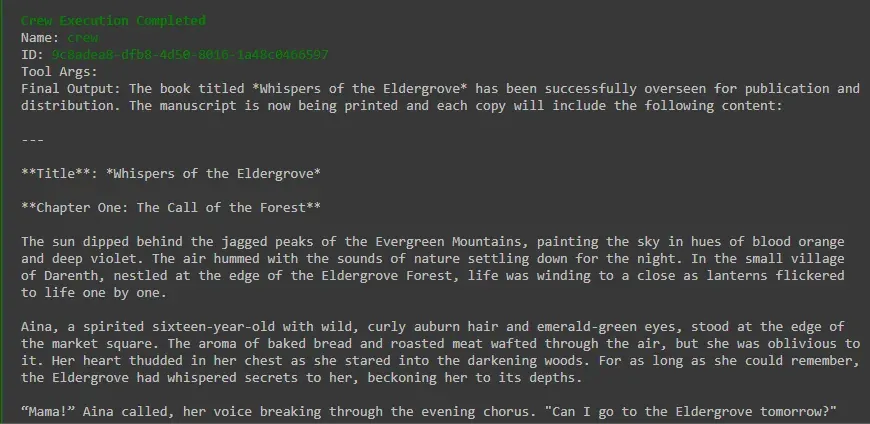
Sample Output
if **memory=True was not enabled, the Editor would not automatically recall the Writer’s manuscript and would start editing without any context. With memory enabled, the Editor receives the Writer’s output as part of its context, leading to meaningful edits instead of disconnected results.
4. Checking Memory Storage
CrewAI stores memory locally. The following code retrieves the storage path and lists stored files.
- **db_storage_path(): Returns the base directory where CrewAI stores memory.
- **os.listdir(): Lists files and subdirectories.
- **os.path.isdir(): Identifies directories within the storage path. Python `
from crewai.utilities.paths import db_storage_path import os
storage_path = db_storage_path() print(f"CrewAI storage location: {storage_path}")
if os.path.exists(storage_path): print("\nStored files and directories:") for item in os.listdir(storage_path): item_path = os.path.join(storage_path, item) if os.path.isdir(item_path): print(f"{item}/") if os.path.exists(item_path): for subitem in os.listdir(item_path): print(f" └── {subitem}") else: print(f"{item}") else: print("No CrewAI storage directory found yet.")
`
**Output:
CrewAI storage location: /root/.local/share/content
Stored files and directories:
latest_kickoff_task_outputs.db