Model Context Protocol (MCP) (original) (raw)
Last Updated : 1 May, 2026
Model Context Protocol (MCP) is a standardized framework by Anthropic that enables AI models to connect with external tools and data sources, providing secure, scalable and real time access without custom integrations.
- Standardizes communication between AI systems and data sources.
- Enables real time access to up to date information.
- Simplifies integration with minimal setup and faster deployment.
- Supports a wide range of use cases across different industries.
MCP Architecture
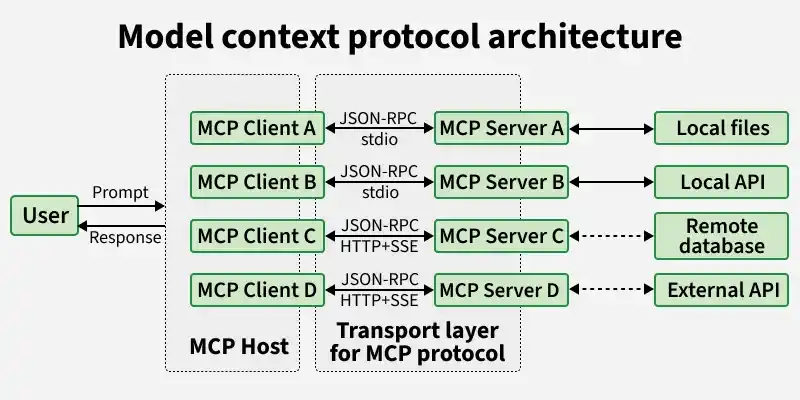
MCP Architecture
MCP is designed as a flexible system that connects AI models with external tools and data sources through three main components: servers, clients and hosts, enabling smooth and efficient interaction.
1. MCP Servers
- Handle data access and actions by connecting to databases, APIs or tools.
- Process requests and return results based on client queries.
- Provide resources (data), tools (actions) and prompts (structured workflows).
- Integrate with services like GitHub, Slack and cloud platforms.
2. MCP Clients
- Act as a communication bridge between the host and server.
- Convert user requests into structured protocol messages for processing.
- Maintain a 1:1 connection with servers while a host can have multiple clients.
- Manage sessions including timeouts, interruptions and reconnections.
- Handle responses, errors and ensure outputs remain contextually relevant.
3. MCP Hosts
- Provide the interface where users interact with the AI system.
- Coordinate communication between multiple clients and servers.
- Manage workflows and ensure smooth execution of requests.
- Handle orchestration logic for end to end task processing.
Use of MCP in Agent Workflow
MCP helps AI agents manage different types of context efficiently, enabling better coordination, memory handling and secure interactions across tasks. Agents typically handle three types of context:
- **Ephemeral Context: Temporary data from the current interaction, used only during the task.
- **Session Context: Short term information that persists across multiple steps in a workflow.
- **Long-Term Memory: Stored data that the agent can reuse over time for better personalization and continuity.
Implementation
This example shows how to set up a Hugging Face MCP server in VS Code to interact with models and datasets using a standardized API connection.
Step 1: Create a .vscode Folder
We stores your VS Code configuration files like settings.json, launch.json and mcp.json.
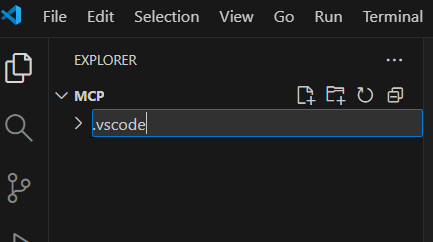
.vscode folder
Step 2: Configure the MCP Server
Create and set up the mcp.json file with details like server type, URL and API token to connect with the Hugging Face MCP server.
- Enable VS Code or Copilot to send requests such as model search and inference through the MCP protocol.
- Use the “Add Server” option in VS Code to load the configuration and connect automatically. Python `
{ "servers": [ { "Hf-mcp-server": { "type": "sse", "url": "https://huggingface.co/mcplogin", "headers": { "Authorization": "Bearer YOUR_HUGGINGFACE_API_KEY" } } } ] }
`
Step 3: Choose Command Mode
Selecting Command (stdio) lets you run a local MCP server script directly from your system.
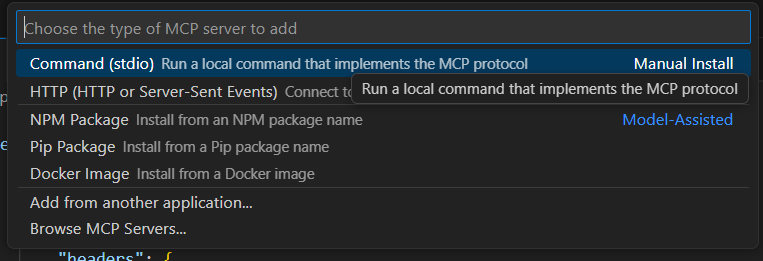
Local Command
Step 4: Select MCP Server in Copilot
Before moving to the next step, install Copilot in VS Code.
Refer to: How to Install GitHub Copilot on VSCode
- Open Copilot Tools in VS Code.
- Select “MCP Server: hf-mcp-server” from the available tools list.
- This connects Copilot to the Hugging Face MCP server for real time interaction.
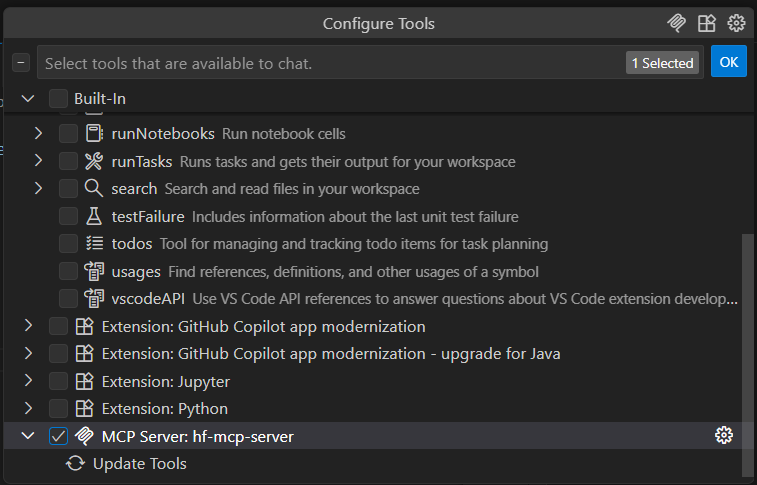
MCP Server Tool
**Step 5: Verify MCP Server Connection
- Check if the MCP server is properly connected and responding.
- Load configuration details from the mcp.json file.
- Send a test request to the MCP server to verify connectivity.
- If a 200 status code is returned, the connection is successful. Python `
import requests import json
def load_mcp_config(config_file_path): print(f"Loading configuration from {config_file_path}...") with open(config_file_path, "r") as f: config = json.load(f) server_config = config["servers"]["hf-mcp-server"] return { "url": server_config["url"], "headers": server_config.get("headers", {}) }
def check_mcp_server(mcp_server): response = requests.get(mcp_server["url"], headers=mcp_server.get("headers", {}), timeout=10) if response.status_code == 200: print("MCP server is reachable and working!") else: print(f"MCP server responded with status code: {response.status_code}") print(f"Response text: {response.text[:100]}...")
if name == "main": CONFIG_FILE = "mcp.json" mcp_server_config = load_mcp_config(CONFIG_FILE) check_mcp_server(mcp_server_config)
`
**Output:
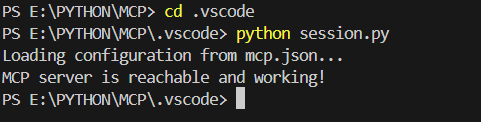
Configuration
Step 6: Verify Configuration via Copilot
- Use a Copilot command to validate the MCP server setup.
- Trigger a simple request (e.g., model list/search) from Copilot.
- Confirm the server responds correctly without errors.
- Successful response indicates the configuration is working properly.
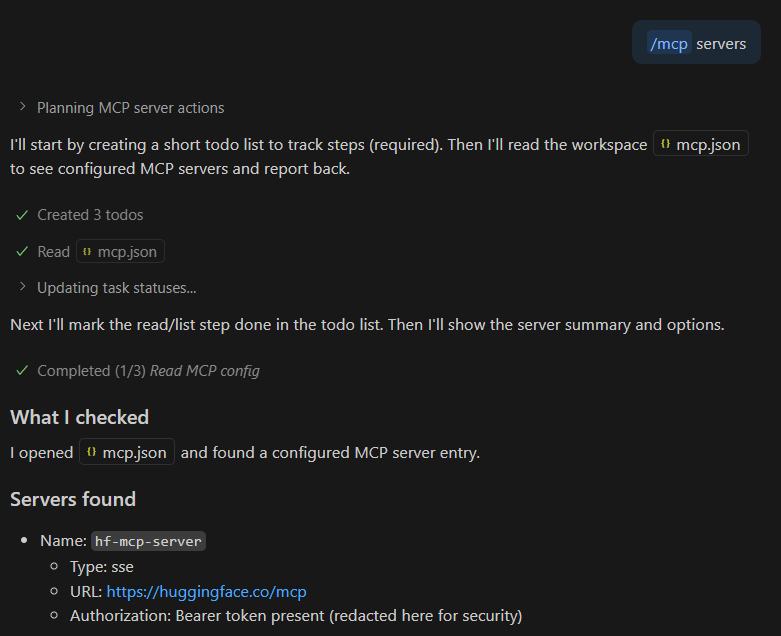
MCP Servers
Step 7: Run a Paper Search
- Use Copilot to send a research query to the MCP server.
- The server retrieves and displays the most relevant papers.
- This confirms the MCP setup is working and handling real time tasks successfully.
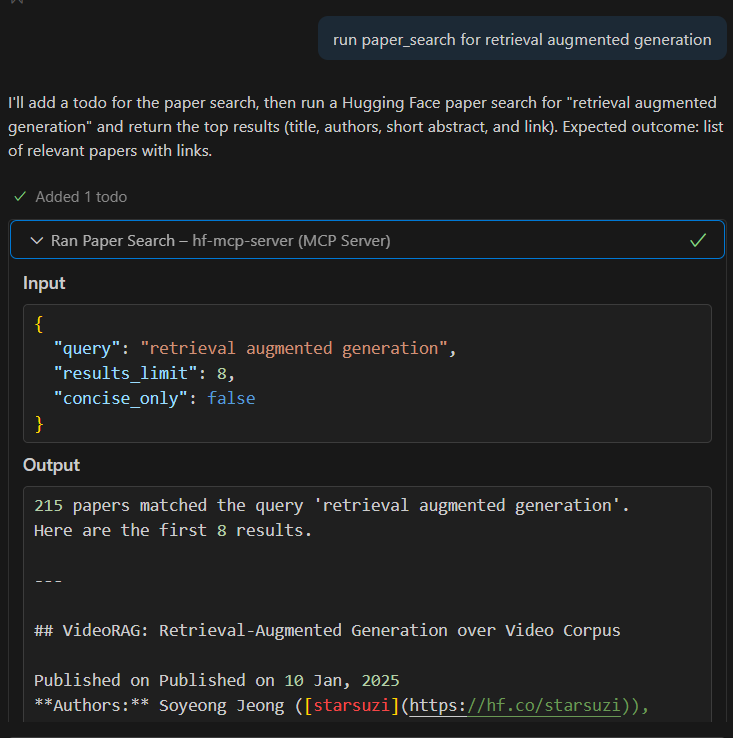
Text Generation Using MCP Server
Step 8: Generate Image
- Use Copilot to send a text prompt to the MCP server.
- The server processes the prompt using a text to image model.
- Returns a generated image based on the input.
- Confirms the MCP setup supports multimodal tasks like image generation.
Applications
- Connects AI with platforms like Google Drive, Slack and GitHub to automate workflows and data access.
- Enhances developer tools by automating tasks like code fixes, documentation and reviews.
- Improves customer support by integrating with CRM systems for real time, personalized responses.
- Supports healthcare by enabling access to patient data for better diagnosis and recommendations.
- Facilitates research by aggregating and searching information from multiple sources quickly.
Advantages
- Provides a unified standard, reducing the need for custom integrations.
- Enables smooth interaction with APIs and tools for complex task execution.
- Supports scalability by easily adding new data sources and services.
- Improves accuracy by providing relevant and real time context to AI models.
- Helps build intelligent, context aware and scalable AI systems.
Limitations
- Relies heavily on external APIs and platforms, making the system dependent on their availability and reliability.
- Raises security and privacy concerns when accessing sensitive data from connected systems.
- Can introduce latency due to real-time data fetching from multiple sources.
- Requires careful setup and configuration for integrating multiple tools and services.
- May produce inaccurate results if external data sources provide incorrect or outdated information.