How Does the Internet Work (original) (raw)
Last Updated : 14 Jan, 2026
The internet is a global network of interconnected computers and devices that share information, resources, and services. It enables instant data exchange worldwide and powers everyday activities like emailing, browsing, streaming, and online gaming.
- The Internet connects over 4.5 billion users and 1.8 billion websites using standard protocols like TCP/IP.
- Data is split into packets that travel through routers and switches, usually taking 20–200 ms for a round trip.
- Every device has a unique IP address; IPv4 supports about 4.3 billion addresses.
- IPv6 was introduced to overcome IPv4’s limitations by offering a much larger address space for future devices.
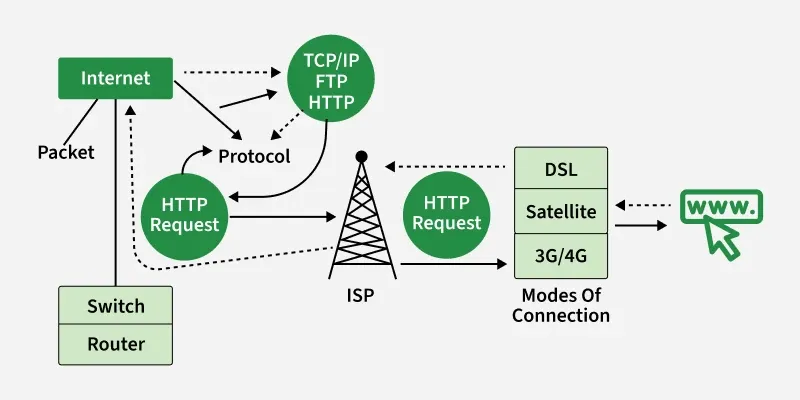
Working of internet
Components of the Internet
**Packets
Data sent over the Internet is split into small pieces called packets. Each packet has part of the data and information about where it’s going. Packets travel through devices like routers and switches and are reassembled at the destination. This method, called packet switching, makes sending large files fast, reliable, and efficient.
**Protocols
Protocols are rules that tell how data is sent, received, and understood over the Internet. They make sure packets arrive correctly and in order. Common protocols include:
- **TCP/IP – handles packet addressing and routing
- **HTTP/HTTPS – for web browsing
- **FTP – for file transfers
- **SMTP/IMAP/POP3 – for email communication
Example :
When you click an image online, it doesn’t load all at once. The image is broken into small packets that travel through the Internet via cables, Wi-Fi, or other connections. Once all packets reach your device, they are reassembled and the full image appears. Each packet is usually around 1000–1500 bytes depending on the network.
**Basic Infrastructure of the Internet
Connecting two devices over a network can be tricky, so protocols provide standard rules to ensure smooth communication. Key protocols include:
- **Ethernet – connects devices on the same local network
- **IP (Internet Protocol) – sends and receives packets between networks
- **TCP (Transmission Control Protocol) – ensures packets arrive correctly and in order
- **HTTP (HyperText Transfer Protocol) – formats data for websites and apps
- **UDP (User Datagram Protocol) – used for faster, real-time data like videos or games
Other protocols handle **testing, routing, encryption, and specialized tasks. With these protocols, any device can communicate over the Internet, no matter the connection type.
**How the Internet Works
- **Connect to the Internet
Your device connects to a **router or modem, which links you to the Internet. This is the foundation of your connection. - **Send a Request
When you type a URL (e.g.,www.google.com) in your browser, your device sends a query to your ISP (Internet Service Provider). The ISP communicates with servers that store the website’s data. - **Translate the URL
The browser converts the website address into a numeric IP address so the Internet knows exactly where to send the request. - **Receive Data Packets
The server sends the website data in small packets. These packets travel through routers, switches, and other networking devices to reach your device. - **Reassemble and Display
Your browser reassembles the packets like a puzzle to display the full website.
**Modes of Connecting to the Internet
To go online, you need an **ISP (Internet Service Provider). The type of connection depends on availability and services offered. Common modes include:
- **DSL (Digital Subscriber Line): Uses telephone lines for a broadband connection. Faster than old dial-up.
- **Dial-Up: Oldest method using telephone lines; very slow and requires multiple connections.
- **Cable Internet: Uses cable TV lines for broadband. Faster and more reliable than DSL or dial-up.
- **Satellite: Wireless connection via satellites. Available almost anywhere but can be slower and affected by weather.
- **3G/4G/5G: Wireless mobile networks, widely used on phones. Convenient but less stable and may have data limits.
Internet Connection Protocols
Standardized rules that decide how data is shared, formatted, transmitted, and received over the Internet. For both the sender and receiver must follow the same protocols. Without them, devices would not understand each other.
These protocols ensure reliable, secure, and efficient data transfer across networks.
**TCP/IP (Transmission Control Protocol / Internet Protocol)
- TCP/IP is the core protocol of the Internet.
- IP assigns a unique address to each device and routes data to the correct destination.
- TCP breaks data into packets, sends them, and reassembles them in the correct order at the receiver’s end.
**FTP (File Transfer Protocol)
- FTP is used for transferring files between computers over LAN or WAN.
- It uses two connections one for control commands and another for actual data transfer
- FTP ensures smooth and organized file sharing between systems.
**HTTP (HyperText Transfer Protocol)
- HTTP is the foundation of the World Wide Web.
- It delivers web content such as text, images, and videos.
- When a user opens a browser, it establishes an HTTP connection with a server.
- HTTP works on top of the TCP/IP network.
**Physical Infrastructures Acting as Pillars of the Internet
The Internet is built on various physical components that make global communication possible. These infrastructures form the backbone of the Internet and support data transmission across networks.
**1. Switches
Switches connect multiple devices within the same network. They use packet switching to send and receive data, analyze packet details, and forward data to the correct device. Switches have multiple ports and support both unicast and broadcast communication.
**2. Routers
Routers work at Layer 3 (Network Layer) of the OSI model. They handle the routing of data packets between different networks. Routers examine destination IP addresses, refer to routing tables, and forward packets along the best available path.
**How Websites and Applications Use the Internet
When you open a website or app, the content reaches your device as small data packets sent from a web server. These packets travel through routers and switches using cables or wireless signals. Once they arrive, your browser reassembles the packets into a complete file and displays the requested content.
This process involves several key steps:
**1. DNS Query
DNS works like a directory for the Internet. When you type a domain name such as www.geeksforgeeks.org, the browser asks DNS servers to find the correct IP address. Once resolved, the browser knows where to send the request.
**2. Handshaking (TCP & TLS)
Before data transfer begins, devices perform a handshake:
- TCP Handshake establishes a reliable connection and agrees on data transfer rules.
- TLS Handshake secures the connection by encrypting the data to protect it from attackers.
**3. HTTP Request & Response
The browser sends an HTTP request to the server. The server responds by sending HTML, CSS, and JavaScript files as packets. The browser processes these files and displays the website—usually within seconds.
Interesting Facts about Internet
- In 1969 the first message was sent over ARPANET between two computers at UCLA and Stanford. The message was supposed to be "LOGIN," but the system crashed after "LO."
- In 1971 the first email was sent by Ray Tomlinson, who also introduced the "@" symbol to separate the user’s name from the computer’s name.
- In 1989 Tim Berners-Lee, a British scientist, invented the WWW while working at CERN. He created the first web browser, web server, and HTML (Hypertext Markup Language).
- In the year 1998 Google was founded, revolutionizing how people search for information online.
**Also Read