Selecting a Linux Distribution Based on Your Requirements (original) (raw)
Last Updated : 2 May, 2026
Choosing the right Linux distribution is important because each distro is designed for different use cases and skill levels. It helps users select an operating system that matches their workflow, performance needs, and technical requirements.
- Determines the tools and software available for your tasks
- Affects system performance based on hardware capability
- Influences ease of installation and system management
- Impacts security features and update frequency
- Helps align the system with professional goals (development, security, servers)
Factors to Consider Before Choosing a Linux Distribution
1. Your Skill Level
Your comfort with Linux plays a major role in choosing a distribution. Different distros cater to different experience levels and learning needs.
- **Beginner: User-friendly, stable, well-supported distros
- **Intermediate: More customizable systems with moderate complexity
- **Advanced: Minimal, highly flexible distros requiring manual setup
2. Your Use Case
Your purpose determines the best Linux distribution for you. Different distros are tailored for specific types of work.
- Daily use / general computing
- Ethical hacking & penetration testing
- Server administration
- Development, DevOps & programming
- Lightweight use on old or low-spec hardware
- Enterprise needs long-term stability
A strong community ensures you get help, fixes, and documentation easily. Well-supported distros make troubleshooting and learning much smoother.
**Look For:
- Active, large user community
- Detailed official documentation
- LTS (Long-Term Support) releases for stability
4. Hardware Requirements
Different distributions have different system demands. Choose a distro that fits your system’s capability and performance needs.
- Some distros require modern hardware (e.g., Fedora, Pop!_OS)
- Lightweight distributions work well on older or low-end machines
- The choice of desktop environment also affects performance
Popular Linux Distributions
Widely used Linux operating systems, each designed with unique features, stability levels, and use-case advantages for different types of users.
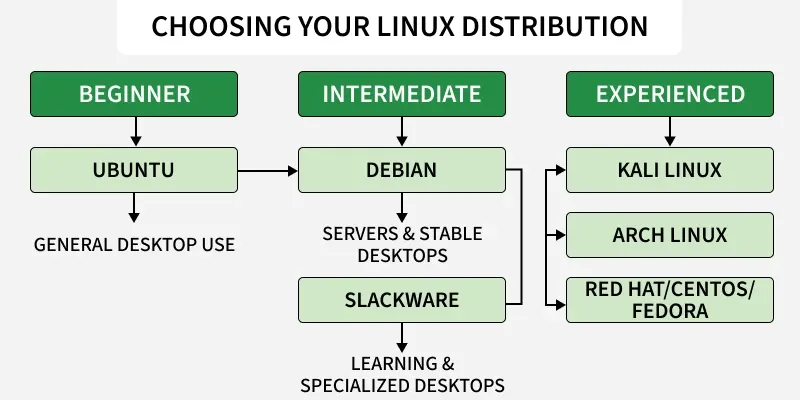
1. For Beginners & Everyday Use
Beginner-friendly distros focus on stability, ease of use, and smooth desktop experience. They require little configuration and come with intuitive user interfaces.
**Best Choices
- **Ubuntu: Widely recommended, very stable, large community, easy app installation
- **Linux Mint: Clean interface similar to Windows; extremely stable and lightweight
- **Zorin OS: Designed to make Windows users comfortable
**Why Choose These
- Simple installation and setup
- Great hardware compatibility
- Easy-to-use software stores (APT-based)
- Lots of help available online
2. For Ethical Hacking & Cybersecurity
Security-focused distros come preloaded with penetration testing and digital forensics tools. They are meant for learning cybersecurity or performing audits.
**Best Choices
- **Kali Linux: Comes with 600+ pentesting tools, widely used in security labs
- **Parrot Security OS: Lightweight, privacy-focused, great for ethical hacking
**Why Choose These
- Preinstalled security tools (Metasploit, Burp Suite, Nmap, etc.)
- Frequently updated with new security packages
- Perfect for CTF competitions, labs, and security training
3. For Developers & DevOps
Developer-focused distros include the latest compilers, libraries, and DevOps tools. They support containers, servers, and modern workflows.
**Best Choices
- **Fedora: Known for cutting-edge features and up-to-date development tools
- **Pop!_OS: Optimized for developers; excellent GPU support
- **Ubuntu: Industry-standard for cloud, CI/CD, and DevOps
**Why Choose These
- Excellent programming environment
- Built-in support for Docker, Kubernetes, and virtualization
- Stable, developer-rich ecosystems
4. For Servers & Enterprise Use
Server distros prioritize security, reliability, and long-term stability. They are used for hosting, cloud setups, and corporate systems.
**Best Choices
- **CentOS Stream / Rocky Linux / AlmaLinux: Enterprise-grade, RHEL-compatible
- **Debian: Exceptionally stable with long release cycles
- **Ubuntu Server: Popular for modern cloud deployments
**Why Choose These
- High uptime and predictable performance
- Support for thousands of server-grade packages
- Strong security and long-term updates
- Ideal for databases, websites, VMs, and cloud platforms
5. For Old or Low-End Hardware
Lightweight distros are optimized for older machines, offering good performance with minimal resource usage.
**Best Choices
- **Lubuntu: Extremely lightweight using LXQt desktop
- **Xubuntu: XFCE-based, good balance of speed and usability
- **Puppy Linux: Runs on very old or low-spec systems
**Why Choose These
- Fast performance on old computers
- Very low RAM/CPU requirements
- Simple and responsive desktop environments
6. For Advanced Users & Customization Lovers
Advanced distros provide full control over system components. They are ideal for individuals wanting to customize everything from the ground up.
**Best Choices
- **Arch Linux: Minimal base system; rolling-release; fully customizable
- **Gentoo: Source-based; optimized for maximum performance
**Why Choose These
- Learn Linux deeply by configuring everything manually
- Rolling updates keep your system always up to date
- Highly flexible, tailored to your needs