Garbage Collection in C# | .NET Framework (original) (raw)
Garbage Collection is the process of automatically freeing memory by removing objects that are no longer accessible by any part of the program. This ensures that unused objects do not consume memory indefinitely.
If no variable holds a reference to an object, that object becomes eligible for garbage collection.
**Note:
Garbage Collector (GC), a component of the Common Language Runtime (CLR) automatically reclaims memory occupied by objects that are no longer in use, so developers don’t need to manually free memory as in languages like C or C++
Features of Garbage Collection
- **Automatic memory management: no need for explicit free() or delete.
- **Optimized allocation: memory is managed in generations for better performance.
- **Prevents memory leaks: unused objects are removed.
- **Non-deterministic: the exact time of collection is not predictable.
Generations in Garbage Collection
To improve performance, the Garbage Collector (GC) organizes objects in the heap into generations. This strategy is based on the observation that most objects are short-lived, while a smaller portion live longer.
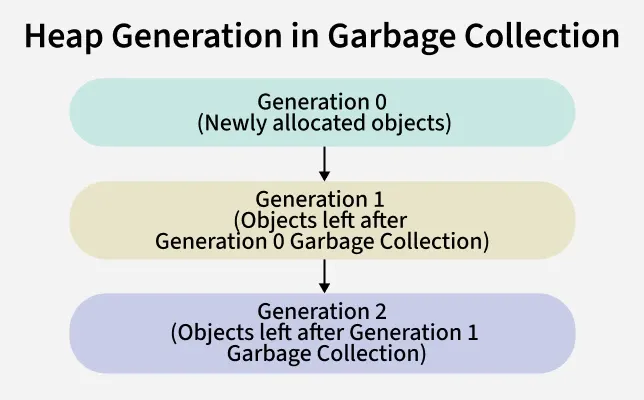
Generation in Garbage Collection
Generation 0 (Newly Allocated Objects)
- This is where all new objects are created.
- Examples include local variables, temporary objects like strings created inside a loop or lightweight helper objects.
- Since most objects die quickly, GC frequently collects Generation 0, reclaiming memory immediately.
- Objects that survive this collection are promoted to Generation 1.
Generation 1 (Survivors of Gen 0 Collection)
- Acts as a buffer zone between short-lived and long-lived objects.
- If an object survives one or more GC cycles in Generation 0, it is promoted here.
- This generation is collected less often than Generation 0, balancing performance and memory use.
- Typical objects in Gen 1 are those used beyond a single method call but not throughout the application’s lifetime.
Generation 2 (Long-Lived Objects)
- Contains objects that survived multiple collections.
- These are usually long-lived objects, such as static data, application caches or large objects that persist for the lifetime of the program.
- Collected least frequently because scanning this region is expensive.
- The runtime delays cleaning Gen 2 objects unless memory pressure is high.
- Phases of Garbage Collection in C#
**Example: Count of the number of Generations.
C# `
// Using MaxGeneration property of GC class to get the number of generations using System;
public class Geeks { public static void Main(string[] args) { Console.WriteLine("The number of generations are: " + GC.MaxGeneration); } }
`
Phases in Garbage Collection
Garbage collection runs in phases to clean memory in an organized and efficient way. These phases ensure that unused memory is reclaimed, references are updated and fragmentation is reduced.
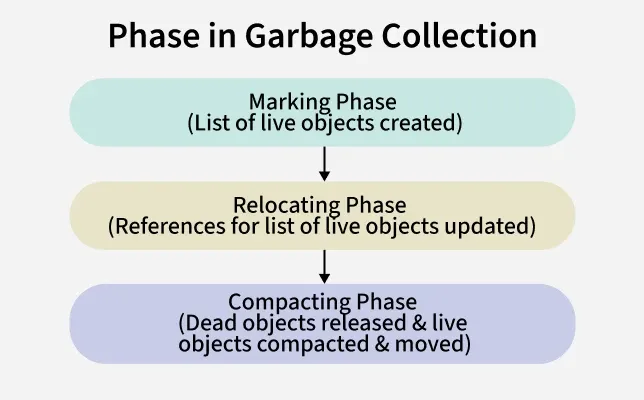
Phases in Garbage Collection
1. Marking Phase
- The GC scans objects in memory and identifies live (reachable) objects.
- A list of all live objects is created.
- Unreferenced objects are marked as garbage.
2. Relocating Phase (sometimes included within Mark & Compact)
- References of live objects are updated.
- This ensures that if objects are moved in memory later, all pointers still remain valid.
3. Compacting Phase
- The GC frees memory from dead objects.
- Remaining live objects are compacted (moved together) to eliminate gaps.
- This reduces fragmentation and makes new memory allocation faster.
Important Garbage Collection Methods
The System.GC class provides methods to interact with the garbage collector.
1. GC.Collect()
Forces garbage collection of all generations.
C# `
using System;
class Program { static void Main() { for (int i = 0; i < 1000; i++) { var obj = new object(); }
    GC.Collect(); // Forces garbage collection
    GC.WaitForPendingFinalizers();

    Console.WriteLine("Forced garbage collection completed.");
}
}
`
**Note: Not recommended in normal scenarios, as it can affect performance.
2. GC.GetTotalMemory()
Returns the number of bytes currently allocated in managed memory.
C++ `
using System;
class Program { static void Main() { long before = GC.GetTotalMemory(false); int[] arr = new int[1000]; long after = GC.GetTotalMemory(false);
    Console.WriteLine($"Memory before: {before}");
    Console.WriteLine($"Memory after: {after}");
}
}
`
3. GC.MaxGeneration
Returns the maximum generation supported by the system (usually 2).
C# `
Console.WriteLine("Maximum Generation: " + GC.MaxGeneration);
`
4. GC.GetGeneration(object obj)
Returns the generation in which a given object resides.
C# `
string name = "Hello"; Console.WriteLine("Generation of name: " + GC.GetGeneration(name));
`
5. GC.WaitForPendingFinalizers()
C# `
GC.Collect(); GC.WaitForPendingFinalizers();
`
Advantages of Garbage Collection
- Eliminates manual memory management.
- Protects against memory leaks.
- Optimizes memory allocation.
- Reduces fragmentation with compaction.
Limitations of Garbage Collection
- GC execution is non-deterministic, you can’t control exactly when it runs.
- Introducing GC cycles can cause performance overhead if objects are created and discarded frequently.
- Finalizers may delay object cleanup since they run on a separate thread.