Strings in C (original) (raw)
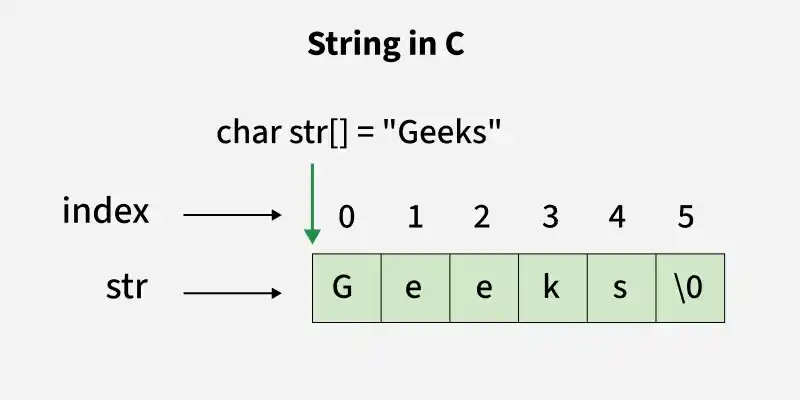
A string in C is an array of characters terminated by a null character '\0'.
- The null character '\0' marks the end of the string.
- C does not have a built-in string data type.
- Strings are implemented using arrays of char. C++ `
#include <stdio.h>
int main() {
// declaring and initializing a string
char str[] = "Geeks";

// printing the string
printf("The string is: %s\n", str);

return 0;
}
`
Output
The string is: Geeks
char str[] = "Geeks";This line declares a character arraystrand initializes it with the string"Geeks". Internally, this creates an array like:{ 'G', 'e', 'e', 'k', 's', '\0'}
The null character'\0'is automatically added at the end to terminate the string.printf("The string is: %s\n", str);%sis the format specifier used to print a string.printfstarts at the memory location ofstrand prints each character until it finds the terminating null character'\0'.
Accessing Characters
We can access any character of the string by providing the index (position) of the character, like in array.
C `
#include <stdio.h>
int main() {
char str[] = "Geeks";

// Access first character
// of string
printf("%c", str[0]);
return 0;
}
`
Update
We can change individual characters of a string using their index: str[0] = 'h'. Strings can also be updated using standard library functions like strcpy() to replace the entire string. Ensure the new string fits within the allocated array size to avoid memory issues.
C `
#include <stdio.h>
int main() { char str[] = "Geeks";
// Update the first
// character of string
str[0] = 'R';
printf("%c", str[0]);
return 0;
}
`
String Length
To find the length of a string in C, you need to iterate through each character until you reach the null terminator '\0', which marks the end of the string. This process is handled efficiently by the **strlen() function from the C standard library.
C `
#include <stdio.h>
int main() { char str[] = "Geeks";
printf("%d", strlen(str));
return 0;
}
`
In this example, **strlen() returns the length of the string "**Geeks", which is **5, excluding the null character.
C language also provides several other useful string library functions to perform operations like copying, comparing, and concatenating strings. You can refer to standard string functions for more details.
String Input
In C, reading a string from the user can be done using different functions, and depending on the use case, one method might be chosen over another. Below, the common methods of reading strings in C will be discussed, including how to handle whitespace, and concepts will be clarified to better understand how string input works.
Using scanf()
The simplest way to read a string in C is by using the scanf() function.
C `
#include<stdio.h>
int main() { char str[6];
// Read string
// from the user
scanf("%s",str);

// Print the string
printf("%s",str);
return 0;
}
`
**Output
Geeks _(Enter by user)
_Geeks
In the above program, the string is taken as input using the scanf() function and is also printed. However, there is a limitation with the scanf() function. scanf() will stop reading input as soon as it encounters a whitespace (space, tab, or newline).
Using scanf() with a Scanset
We can also use **scanf() to read strings with spaces by utilizing a **scanset. A scanset in scanf() allows specifying the characters to include or exclude from the input.
C `
#include <stdio.h>
int main() { char str[20];
// Using scanset in scanf
// to read until newline
scanf("%19[^\n]", str);

// Printing the read string
printf("%s", str);

return 0;
}
`
**Output
Geeks For Geeks _(Enter by user)
Geeks For Geeks
Using fgets()
If someone wants to read a complete string, including spaces, they should use the **fgets() function. Unlike scanf(), fgets() reads the entire line, including spaces, until it encounters a newline.
C `
#include <stdio.h>
int main() { char str[20];
// Reading the string
// (with spaces) using fgets
fgets(str, 20, stdin);

// Displaying the string using puts
printf("%s", str);
return 0;
}
`
Output
Geeks For Geeks _(Enter by user)
Geeks For Geeks
Passing Strings to Function
As strings are character arrays, we can pass strings to functions in the same way we **pass an array to a function. Below is a sample program to do this:
C `
#include <stdio.h>
void printStr(char str[]) { printf("%s", str); }
int main() { char str[] = "GeeksforGeeks";
// Passing string to a
// function
printStr(str);
return 0;
}
`
Strings and Pointers in C
Similar to arrays, In C, we can create a character pointer to a string that points to the starting address of the string which is the first character of the string. The string can be accessed with the help of pointers as shown in the below example.
C `
#include <stdio.h>
int main(){
char str[20] = "Geeks";

// Pointer variable which stores
// the starting address of
// the character array str
char* ptr = str;

// While loop will run till
// the character value is not
// equal to null character
while (*ptr != '\0') {
    printf("%c", *ptr);
    ptr++;
}
return 0;
}
`
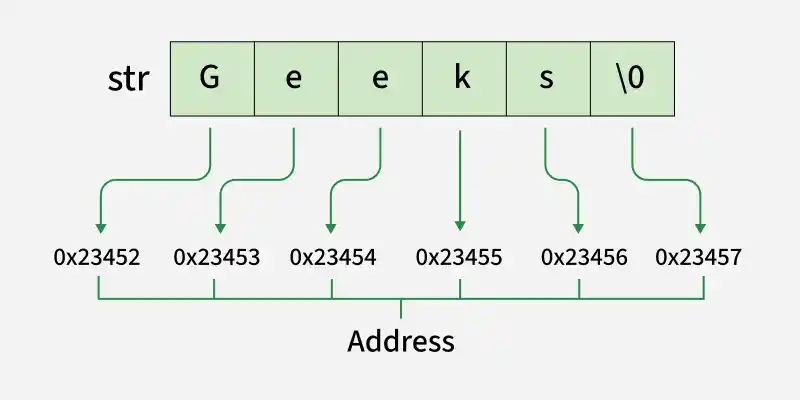
So far, we've seen how to declare and use strings as character arrays. But in C, strings can also be represented using **string literals, which offer a simpler way to initialize strings directly in the code. Let's understand what string literals are and how they work.
Strings Literals
A **string literal is a sequence of characters enclosed in double quotes, like "Hello" or "1234". Internally, it is stored as a constant character array terminated by a null character '\0'.
C++ `
#include <stdio.h>
int main() {
// pointer to a string literal
const char *str = "Hello World";

printf("%s\n", str);

return 0;
}
`