Azure Blob Storage (original) (raw)
Last Updated : 23 Jul, 2025
In today's world where everything revolves around data, managing and storing vast amounts of data is the priority of every business operation. Azure Blob Storage, is one of the services offered by Microsoft Azure's cloud computing platform, which is a scalable and cost-effective solution for storing and managing unstructured data, such as images, videos, documents, files, and backups.
What is Azure Blob Storage?
Azure Blob Storage is a cloud-based object storage service a part of Azure storage service provided by Microsoft Azure. It is designed to store and manage large amounts of unstructured data(Unstructured data are the data that do not align with any kind of data model such as binary data) making it ideal for a wide range of applications, including media storage, data backup, and log files. These are easily accessible through Azure storage API. Users can even access objects in Blob storage via HTTPS from any corner of the world. It is widely used for its benefits, which are discussed below.
Benefits of Azure Blob Storage
Some benefits of Azure blob storage are mentioned below:
- **Scalability: Azure blob storage provides high scalability, allowing to store and manage a maximum up to 200GB of data, which can be easily scaled up and down to meet your changing demands.
- Durability and Data Redundancy: Azure Blob Storage always stores multiple copies of your data so that it's protected from any uncertain events, including any hardware failures, outages, and massive natural disasters. Data Redundancy features ensure that data is always available and protected through multiple redundancy options such as Zone Redundant Storage (ZRS), and Local Redundant Storage (LRS).
- **Security: Azure Blob Storage provides security features, including encryption at rest and in transit. Azure Blob Storage along with Azure Active Directory(Azure AD) helps in authorizing requests to blob data. This allows to give permission-based access to users, groups, or any application service principals.
- **Access Tiers: You can choose from different access tiers based on your data's access patterns such as how frequently or infrequently you will need the data and cost considerations. These different access tiers are classified as Hot, Cool, Cold, and Archive each with different characteristics and pricing models.
- **Lifecycle Management: This helps to set up policies to move or delete the data as per requirement. For example, it can help to move the data from frequent access to infrequent access let say after five years when the access of data will get lower for our use.
- **Integration: Azure Blob Storage allows to integrate with other Azure services and tools, such as Azure Data Factory and Azure Functions.
How to use Azure Blob Storage to Store Data?
**Step 1: Go to Azure Account-->Search for Storage-->Click on "Create"

**Step 2: Now fill the configuration:
- Give it a name
- Choose performance and Redundancy, go to next
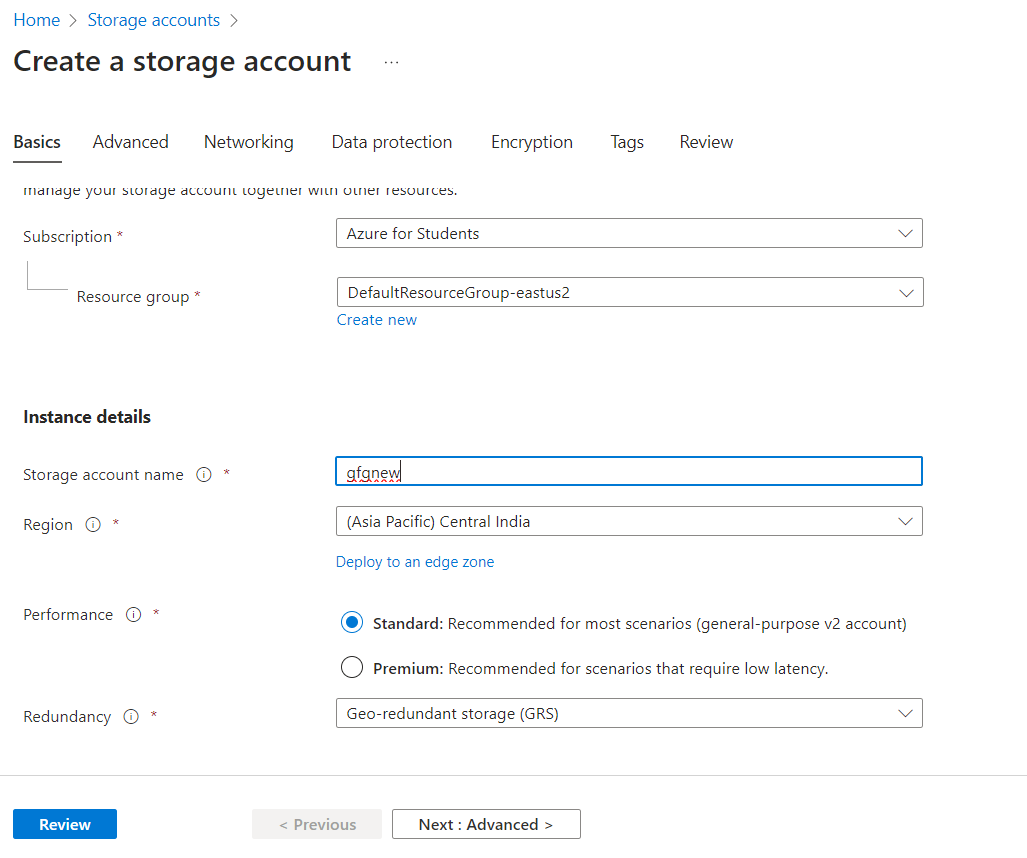
- In advanced section Choose your access tier

- In Networking- either or disable public access

- In data protection, Enable versioning and access control.

- In Encryption- I have taken Microsoft managed key(you can use your own key as well)
- Then give a tag and click on Review-> Create

**Step 3: In the newly created storage-->Click on Upload

**Step 4: In upload section Click on create new container if you do not have any
- Give it a name
- give access level to your container
- Click ok

- Choose your container and upload any file in the give box(Here I have selected a txt file)
- Click on "Upload"

Now you can see your container:

Different Types of Azure Blob Storage
| | USE-CASE | PRICING | PERFORMANCE | | | ------------------------- | ----------------------------------------------------------------------------------------------------------------------------------------------------------------------------------------------------- | ----------------------------------------------------------------------------------------------------------------------------------------------------------------------------------------------------------------------------------- | --------------------------------------------------------------------------------------------------------------------------------------------------------------------------------------------------- | | **HOT ACCESS TIER | This tier is suitable for frequently accessed data that requires low-latency access and high throughput. It can be used to store web app assets such as image and videos. | In Hot tier you pay a bit **higher for the **storage cost, that means more the data stored more will be the price. However, the **data retrieval cost are typically **lower and affordable than other tiers. | It provides low latency access and high read/write throughput making it ideal and preferred choice for scenarios where data is frequently accessed. | | **COOL ACCESS TIER | Cool tier is specifically designed for data which are not so frequently accessed but still readily available whenever required. Its best use case it storing historical financial records. | In Cool tier **storage cost is **lower as compared to Hot tier, making it cost effective for less frequently data access. **Data retrieval cost is **comparatively higher that Hot tier. | While the Cool access tier provides reasonable access times, it has slightly longer access latency(retrieving data from the Cool tier may take a little more time) compared to the Hot access tier. | | **COLD ACCESS TIER | Cold tier is suitable for data that has to be stored for long duration but rarely accessed. It is effective for organizations those want to archive large volume of data. | Cold tier charges **less for **storage of data and therefore suitable for preserving data for legal or regulatory requirements. **Data retrieval cost is **comparatively higher that Hot tier. | Data retrieval from the Cold tier may take longer time, making it less suitable for data that requires rapid access. | | **ARCHIVE ACCESS TIER | Archive tier is designed for data that is rarely accessed and can tolerate higher retrieval times. Storing data that doesn't need to be readily available but should be stored for future references. | Archive access tier charges **lowest storage costs but the **highest data retrieval costs. It is the most cost-effective option for data that may never need to be accessed. | Significantly higher access latency compared other tiers. Retrieval times can range from several hours to minutes. |
Security Features of Azure Blob Storage
- **Encryption at rest: Azure blob storage provides encryption of data by either Microsoft managed keys or Customer provided keys. These data are encrypted using 256 bit AES encryption process.
- **Encryption at Transit: This security feature makes sure that data during transit is securely encrypted and protected from any tampering. Allows transfer of data only with https traffic with REST API calls.
- **Secure Communication: Azure blob storage security allows to communicate on-premise networks by allowing access to approved and authorized subnet ranges or IP addressed.
- **Private Endpoints: This enables the user or client to connect to the storage account over virtual network and private link on Microsoft network. Also, enable storage firewall to block all connection over public endpoints.
- Authentication by **Azure Roles-Based Access Control(RBAC): Built-in and custom roles defining permissions can be set to access blob storage. Its scope can be Resource group, storage account or container.
- **Authorization by Attribute-Based Access Control(ABAC): In this access is controlled using role-assignment conditions based on principal, resources, environment attributes.
Best Practices for Using Azure Blob Storage
The best practice for using Azure blob storage includes best security measure we must take to ensure smooth functioning of it:
- It is important to choose the best tier for your storage, keeping into consideration about the access pattern and your budget.
- We will always wish to protect our data from any disaster(can be man-made or natural). It is necessary to use Zone redundancy or Geo redundancy or Local redundancy for durability of data.
- It is a best practice to enable versioning to keep different versions of the files in order to rollback in case of requirement or protect against accidental overwrites.
- It is important to enable immutability option to protect data from any kind intended or accidental modification/deletion of data.
- If the data is used for back-up or have any critical data make sure you do not enable public access.
- It is important to give specific access by policy based or role based permission.
- Make sure in encryption, you encrypt your data with customer managed keys or Microsoft managed keys.
- Give proper lifecycle policy to make sure your data is moved from one tier to another in specific period of time, and are deleted after specified period of time only.