Virtualization in Cloud Computing and Types (original) (raw)
Last Updated : 9 Jun, 2026
Virtualization is the fundamental technology that powers Cloud Computing. It allows you to create multiple simulated environments (Virtual Machines or VMs) from a single physical hardware system. Before virtualization, a physical server could only run one Operating System (OS) and often one task. This wasted massive amounts of resources if your app only used 10% of the CPU, the other 90% was idle.
- Better hardware utilization
- Reduced infrastructure costs
- Easy scalability and flexibility
- Improved isolation and security
- Faster deployment of servers
- Foundation for cloud services like AWS EC2, Azure VMs, and Google Compute Engine
Core Architecture
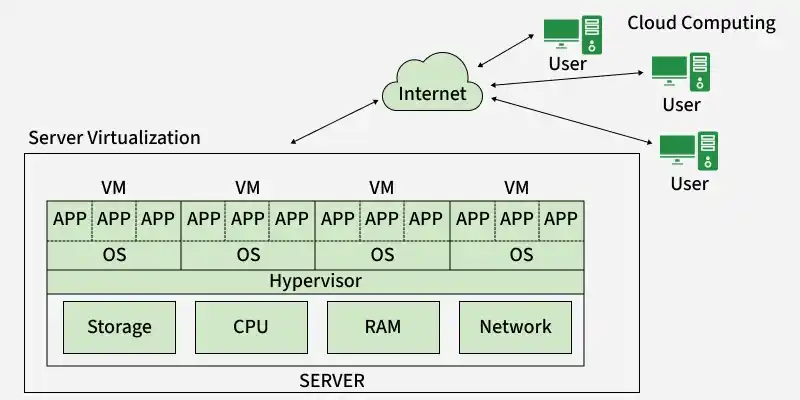
At the heart of virtualization is a piece of software called the Hypervisor.
- **Physical Hardware (Host): The actual server containing CPU, RAM, storage, and network resources.
- **Hypervisor: Software that creates and manages Virtual Machines by allocating hardware resources to them.
- **Virtual Machine (Guest): A software-based computer that runs its own Operating System, applications, and libraries independently of other VMs.
The hypervisor enables multiple VMs to share the same physical hardware while remaining isolated from each other.
Working of Virtualization
Virtualization uses a software layer called a Hypervisor to create multiple virtual computers, known as Virtual Machines (VMs), on a single physical computer. These virtual machines behave like independent computers while sharing the resources of the same physical machine.
Virtual Machines (Cloud Instances)
- After installing virtualization software, one or more virtual machines can be created on a physical computer.
- Virtual machines (VMs) operate like independent computers with their own operating systems and applications.
- The physical computer is known as the Host, while the virtual machines are called Guests.
- A single host can run multiple guest virtual machines simultaneously.
- Each guest VM can run its own operating system, which may be the same as or different from the host operating system.
- Every virtual machine has its own settings, applications, files, and configurations.
- VMs share the host's CPU, RAM, storage, and network resources through the hypervisor.
- Although resources are shared, each VM functions as if it has dedicated hardware.
- The hypervisor manages resource allocation and ensures isolation between virtual machines.
Types of Hypervisors
Understanding the difference between Type 1 and Type 2 hypervisors is critical for system architects.
Type 1: Bare-Metal Hypervisor
- **How it works: Installed directly on the physical hardware. There is no host Operating System.
- **Performance: High. Direct access to hardware resources.
- **Use Case: Enterprise Data Centers, Cloud Providers (AWS EC2, VMWare ESXi, Microsoft Hyper-V).
Type 2: Hosted Hypervisor
- **How it works: Installed as an application _on top of an existing OS (like Windows or macOS).
- **Performance: Lower. Requests must pass through the Host OS first.
- **Use Case: Personal use, testing labs (Oracle VirtualBox, VMWare Workstation).
Types of Virtualization
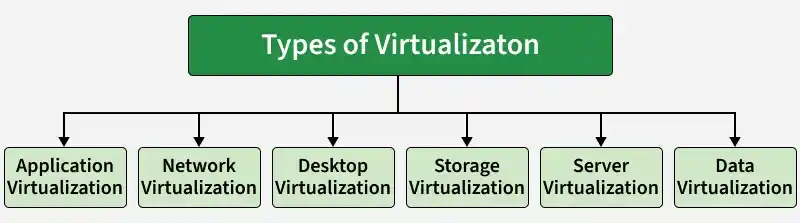
1. Application Virtualization
Application Virtualization allows applications to run independently of the underlying operating system. Users can access and use applications without installing them directly on their devices.
**Key Features
- Applications run on a remote server instead of the local device.
- No need for local installation.
- Simplifies software deployment and management.
- Allows access to applications from multiple devices.
**Example: Using Microsoft App-V or Citrix Virtual Apps, a user can run Microsoft Excel on an iPad. The application executes on a remote server, while the user interacts with it through their device.
**Use Cases
- Remote application access
- Enterprise software deployment
- Bring Your Own Device (BYOD) environments
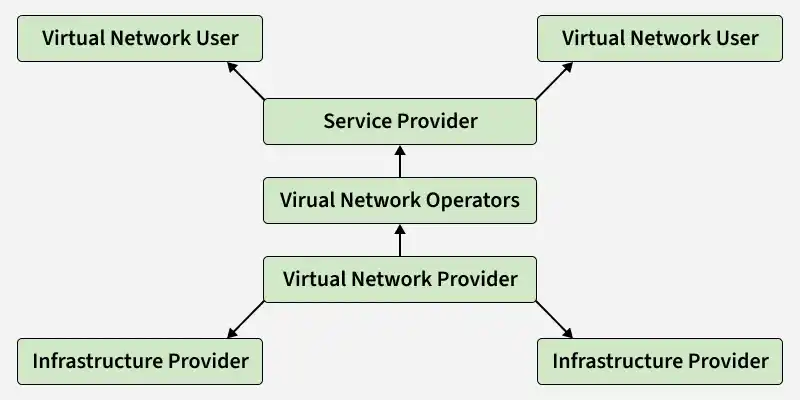
2. Network Virtualization
Network Virtualization separates network services such as routing, switching, and firewall management from the underlying physical network hardware. This enables networks to be managed and configured through software, forming a Software-Defined Network (SDN).
**Key Features
- Creates virtual networks independent of physical infrastructure.
- Simplifies network management and configuration.
- Improves scalability and flexibility.
- Enhances security through network segmentation.
**Example: AWS Virtual Private Cloud (VPC) allows users to create virtual networks, subnets, route tables, and security groups through software without configuring physical routers or switches.
**Use Cases
- Cloud networking
- Data centers
- Software-Defined Networking (SDN)
- Network segmentation and security
3. Desktop Virtualization
Desktop Virtualization is a technology that hosts a user's desktop environment on a centralized server instead of a local computer. Users access their desktops remotely through devices known as thin clients or other endpoint devices.
**Key Features
- Desktop operating systems run on centralized servers.
- Users can access their desktops from any device and location.
- Simplifies desktop management and maintenance.
- Improves security since data remains on the server.
- Enables remote work and flexible access.
**Example: Amazon WorkSpaces provides cloud-based virtual desktops. An employee can log in from a Chromebook, tablet, or laptop and access a full-featured Windows 11 desktop running in the AWS Cloud.
**Use Cases
- Remote workforce environments
- Educational institutions and computer labs
- Enterprise desktop management
- Secure access to corporate resources
4. Storage Virtualization
Storage Virtualization combines physical storage resources from multiple storage devices into a single virtual storage pool that can be managed centrally. Users see a single storage system, while the data may be distributed across many physical disks and servers.
**Key Features
- Combines multiple storage devices into one logical storage unit.
- Simplifies storage management through a central console.
- Improves storage utilization and scalability.
- Provides better data availability and reliability.
- Allows easy expansion without affecting users.
**Example: A Storage Area Network (SAN) or Amazon S3 presents storage as a single system. For example, when using an Amazon S3 bucket, users see one storage location, but the data is actually distributed across many physical servers and hard drives behind the scenes.
**Use Cases
- Cloud storage platforms
- Enterprise data centers
- Backup and disaster recovery systems
- Large-scale data management
5. Server Virtualization
Server Virtualization is the process of dividing a single physical server into multiple virtual servers, known as Virtual Machines (VMs). Each VM operates independently with its own operating system, applications, and resources.
**Key Features
- Multiple virtual servers run on a single physical server.
- Each VM is isolated from other VMs.
- Different operating systems can run on the same hardware.
- Resources such as CPU, RAM, and storage are shared efficiently.
- Simplifies server management and maintenance.
**Example: Using VMware vSphere, a company can run a Linux Web Server, a Windows Database Server, and a Linux Mail Server on the same physical machine.
**Use Cases
- Data centers
- Cloud computing platforms
- Enterprise server consolidation
- Development and testing environments
6. Data Virtualization
Data Virtualization is a technology that creates an abstract layer between users and data sources, allowing data from multiple systems to be accessed as if it were stored in a single location. The data remains in its original source and is not physically moved or copied.
**Key Features
- Provides a unified view of data from multiple sources.
- Eliminates the need for data replication or migration.
- Enables real-time access to distributed data.
- Simplifies data integration across different platforms.
- Improves data accessibility and decision-making.
**Example: Using Denodo or Oracle Data Service, a dashboard can retrieve Sales Data from both a SQL database and a cloud data lake, presenting it as a single dataset to the user.
**Use Case
- Business Intelligence (BI) and analytics
- Data integration projects
- Enterprise reporting
- Cloud and hybrid data environments
Virtualization vs. Cloud Computing
These terms are often confused, but they are not the same.
| Feature | Virtualization | Cloud Computing |
|---|---|---|
| Definition | Technology that creates virtual versions of hardware. | Service that delivers shared computing resources via the internet. |
| Relationship | The Tool. Virtualization is the software technology. | The Service. Cloud Computing is the result or service built using virtualization. |
| Ownership | You usually own/manage the hardware (unless using Cloud). | You rent resources; the provider owns the hardware. |
| Focus | Maximizing hardware efficiency. | Maximizing user agility and scalability. |