Data Backup and Disaster Recovery (original) (raw)
Last Updated : 28 Apr, 2026
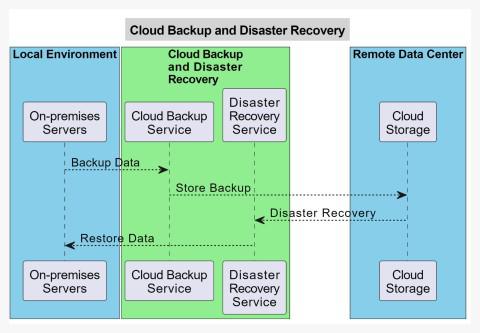
Data Backup involves creating secure copies of critical data, while Disaster Recovery ensures quick restoration and business continuity after failures. Modern cloud-based BDR solutions automate these processes using scalable, software-driven systems. They commonly follow the 3-2-1 strategy to ensure strong data protection and availability.
- Cloud-based BDR systems automatically back up data across multiple locations, reducing the risk of data loss and ensuring high availability.
- They use secure methods like encryption and replication to protect data and enable fast recovery during system failures.
**Example: An e-commerce application stores user and order data in the cloud. If a server fails, the system quickly restores data from backup and continues operations without major downtime.
Real-world examples
These examples demonstrate how data backup and recovery solutions protect critical data and ensure business continuity across different industries.
- **Small Business Data Protection: An accounting firm stores client financial records on local servers. Using cloud backup with continuous replication, they protect crucial data in real-time. When ransomware attacks, the firm restores from cloud backup and resumes services with minimal downtime, protecting client relationships.
- **E-commerce Website Resilience: An online retailer maintains customer information, product catalogs, and transaction histories. Using cloud disaster recovery with geo-redundant data centers, they create redundant database copies across multiple locations. If one data center fails, operations continue seamlessly.
- **Educational Institution Data Protection: Universities accumulate large volumes of student records, research materials, and administrative documents. Cloud backup services protect against data breaches and accidental deletion. Administrators can recover critical information within minutes, ensuring academic continuity.
Defining Success: RTO and RPO
Before setting up any backup or recovery system, organizations must define their tolerance for data loss and downtime using two key metrics.
Recovery Point Objective (RPO)
Defines the maximum amount of data loss a system can tolerate.
- Determines how frequently backups should be taken to minimize data loss
- **Example: An RPO of 4 hours means backups must occur at least every 4 hours
Recovery Time Objective (RTO)
Defines the maximum acceptable downtime after a failure.
- Determines how quickly systems and data must be restored
- **Example: An RTO of 1 hour means the system should be fully operational within 60 minutes after a failure
The Implementation Roadmap
This roadmap outlines the key phases to build a secure, scalable, and resilient Backup and Disaster Recovery (BDR) strategy.
Phase I: Strategy & Identification
Focuses on planning and defining what data to protect and how to back it up.
**Data Categorization: Classifies data based on its importance to business operations.
- Tier 1 (Mission Critical), Tier 2 (Essential), Tier 3 (Non-essential) for prioritized protection
- Helps allocate resources and define recovery priorities effectively
**Choose Backup Type: Selects the appropriate backup method based on speed, storage, and recovery needs.
- **Full Backup: Complete data copy; slow to perform but fastest to restore
- **Incremental & Differential: Save storage space; incremental backs up changes since last backup, differential since last full backup
Phase II: Execution & Security
Ensures secure backup implementation and protection against cyber threats.
**The "Golden Copy" Rule: Ensures data is securely stored and transmitted using encryption.
- Uses AES-256 encryption for data at rest and TLS/SSL during transfer
- Protects sensitive data from unauthorized access and breaches
**Immutable Backups: Prevents data from being modified or deleted after storage.
- Uses Object Lock technology to make backups tamper-proof
- Provides strong protection against ransomware attacks
Phase III: Testing & Maintenance
Ensures backups are reliable, up-to-date, and ready for recovery.
**Restoration Drills: Validates that backups can be successfully restored when needed.
- Perform sandbox restores in isolated environments to detect issues
- Ensures data integrity and recovery readiness
**Drift Management: Keeps backup systems aligned with infrastructure changes.
- Automatically deploy backup agents to new servers and applications
- Ensures continuous protection as systems evolve
Advanced Process Flow
This process explains how modern cloud backup systems efficiently store, verify, and recover data beyond simple copying.
1. Deduplication
Removes duplicate data before transfer to optimize storage and bandwidth usage.
- Identifies repeated data blocks and sends only unique data to the cloud
- Reduces storage costs and speeds up backup processes
2. Compression
Minimizes data size to save storage space and improve transfer efficiency.
- Compresses data before uploading to reduce bandwidth usage
- Helps lower storage costs while maintaining data integrity
3. Validation (Checksum)
Ensures data accuracy and integrity during transfer and storage.
- Compares original data with the cloud copy using checksum techniques
- Detects any data loss or corruption during transmission
4. Failover Vs Failback
Defines how systems handle failures and recovery operations.
- **Failover: Switches operations to a backup system or cloud site during a failure to maintain continuity
- **Failback: Restores operations back to the original system once it is fixed and stable
Use of Data Backup and Recovery
Data backup and recovery ensure data safety, system reliability, and business continuity in case of failures or disasters.
1. Data Protection and Redundancy
Ensures data is safely stored and protected against failures and threats.
- Stores multiple copies across data centers to prevent data loss from hardware failures or disasters
- Protects against cyberattacks and ensures extremely high data durability
2. Scalability
Allows storage capacity to grow or shrink based on needs.
- Easily expand or reduce storage without investing in new hardware
- Adapts to changing data requirements efficiently
3. Cost-Efficiency
Reduces overall infrastructure and operational costs.
- No need for expensive hardware or maintenance
- Pay only for the storage you actually use
4. Accessibility and Flexibility
Enables easy access to data from anywhere.
- Access files from any internet-enabled device and location
- Improves collaboration and remote work efficiency
5. Automated Backup and Recovery
Ensures consistent and reliable data protection with minimal effort.
- Automates backup schedules and reduces manual intervention
- Maintains accurate backups and prevents data loss
6. Disaster Recovery Capabilities
Helps restore systems quickly after unexpected failures.
- Enables fast data recovery and ensures business continuity
- Minimizes downtime and operational disruption