What is Public Cloud? (original) (raw)
Last Updated : 7 Mar, 2026
Cloud Computing mainly has three deployment models namely Private, Public, and Hybrid cloud. A public cloud is a cloud deployment model in which cloud resources are offered over the internet and open to all users and organizations. The public cloud is a major deployment model used today. Adopting the public cloud is more cost-effective as third-party providers manage the resources. Let us understand the public cloud in detail in this article.
Public Cloud Architecture & Global Infrastructure
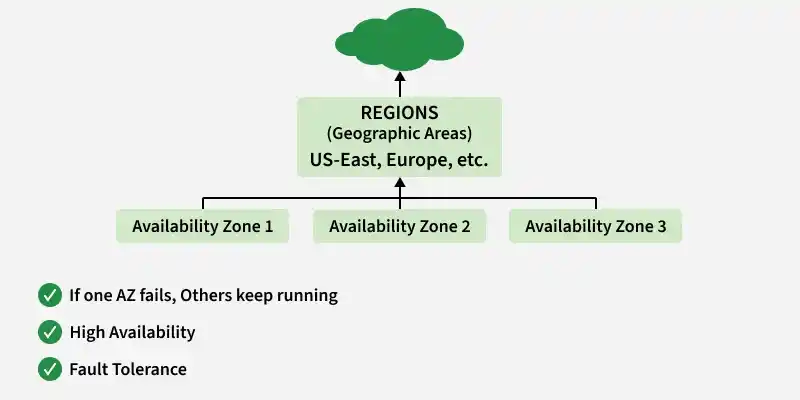
Top-tier providers like **AWS, Azure, and Google Cloud do not rely on a single server. Their architecture is built for **Fault Tolerance:
- **Regions: Geographic areas (e.g., US-East, Europe-West) containing multiple data centers.
- **Availability Zones (AZs): Isolated locations within a region. If one data center catches fire, your data instantly flips to another AZ in the same region.
- **Edge Locations: Small cache sites located near users to deliver content (like Netflix videos) faster.
Working Of Public Cloud
A **public cloud is a widely used cloud computing model where companies and individuals can access services like storage, applications, and virtual machines over the internet. These services are provided by third-party companies and are available to anyone who subscribes or pays for them. Here's an easy breakdown of how it works:
**1. Infrastructure and Ownership
- **Provider-Owned Systems: Companies like Amazon Web Services (AWS), Microsoft Azure, and Google Cloud own and manage the entire setup, which includes data centers, servers, networking equipment, and software.
- **Shared Resources: Users share the infrastructure (like servers and storage) with others, but their data and activities are securely separated. This shared setup, called multi-tenancy, ensures cost efficiency while maintaining privacy.
**2. Service Delivery
Public cloud services are delivered via the Internet and fall into three main categories:
- **Infrastructure as a Service (IaaS): Offers basic computing resources like virtual machines, storage, and networks. Users control the software they install on these virtual systems (e.g., AWS EC2, Google Compute Engine).
- **Platform as a Service (PaaS): Provides tools for developers to build and deploy apps without worrying about managing the underlying hardware or operating systems (e.g., Google App Engine, Azure App Service).
- **Software as a Service (SaaS): Ready-to-use software applications that are accessible online, like Google Workspace, Microsoft 365 or Salesforce.
A common misconception is that the "Cloud Provider handles all security." In reality, it is a partnership:
- **Security OF the Cloud (Provider’s Job): Protecting the physical servers, cables, and the software that runs the virtualization.
- **Security IN the Cloud (Your Job): Managing your passwords (IAM), encrypting your data, and configuring firewalls (Security Groups).
**Pro-Tip: Always implement **IAM (Identity and Access Management). It ensures that only the right people have the "keys" to specific parts of your cloud infrastructure.
Difference between Private, Public and Hybrid cloud
| Private Cloud | Public Cloud | Hybrid Cloud |
|---|---|---|
| Private cloud infrastructure is hosted by organization and it is isolated for outside access. | Public cloud infrastructure is hosted by third party service provider which can be access by any public user. | Hybrid cloud consists of infrastructure which is hosted in public and private cloud model. |
| Infrastructure is completely managed by organization recurring cost. | Infrastructure is managed by third party provider making users only pay for the resource usage. | Infrastructure is maintained by both organization and provider making flexible cost. |
| More security and control over data as infrastructure is isolated to organization. | Security is managed by third party provider and less control over data as data is stored as providers infrastructure. | Flexible for storing data and managing security. |
| More usage cost as resources has to be managed on own. | Less usage cost as users have to only pay for what they use. | Cost occurs for private infrastructure while public infrastructure is less costly. |
| Limited in terms of scalability as limited infrastructure. | Highly scalable as more resources are available. | Scalable due to implementation of both models. |
| Availability depends on infrastructure locality | More availability as infrastructure is mostly spread across various regions. | Allows high availability because of private and public infrastructure. |
Security Considerations in Public Cloud
Security in public cloud is shared responsibility for user and provider. To maintain the best security of data and infrastructure following methods can be used :
- Data can be segregated and isolated with the help of security policies to avoid unauthorized access.
- IAM can be implemented for roles, permissions and authorization is public cloud which provides granular security over infrastructure.
- Ensure Cloud service provider has good patch management and updating of cloud infrastructure allowing security from latest malware and viruses.
- Network security can be maintained by both CSP and User with the help of Security Groups, Firewalls and NACLs.
How can AWS supports public cloud requirements ?
AWS is one of the major cloud service provider which offers public cloud environments with high availability and scalability.
- Aws offers global infrastructure which is spread across globe. It is divided by regions which have multiple datacenters.
- AWS offers cost effective pricing for usage and allows nearly zero downtime infrastructure.
- It offers various Infrastructure services like Compute, Storage , Database , Networking and Other Services which can be used by user.
- It offers best security and fault tolerance by implementation of latest security standards and protocols within infrastructure.
Advantages of Public Cloud
- **No Maintenance: You never have to swap a broken hard drive or pay for electricity for a server room.
- **Agility: You can launch 1,000 servers in 5 minutes and turn them off 10 minutes later.
- **Reliability: Providers offer 99.99% (the "Four Nines") uptime guarantees.
Disadvantages of Public Cloud
- **Vendor Lock-in: Moving a massive database from AWS to Azure can be difficult and expensive.
- **Internet Dependency: If your internet goes down, your access to the "office" goes down.
- **Strict Regulation: Some industries (like high-level government) are legally forbidden from storing data on public hardware.
Common Use Cases
- **Software Development: Spinning up "disposable" environments for testing code.
- **Big Data Analytics: Using the cloud’s massive CPU power to analyze millions of records in seconds.
- **Backup & Disaster Recovery: Keeping a cheap copy of your data in a different geographic region.
- **Web Hosting: Running websites that can handle sudden spikes in traffic (like Black Friday sales).