Graph implementation using STL for competitive programming | Set 2 (Weighted graph) (original) (raw)
Last Updated : 23 Jul, 2025
In Set 1, unweighted graph is discussed. In this post, weighted graph representation using STL is discussed. The implementation is for adjacency list representation of weighted graph.
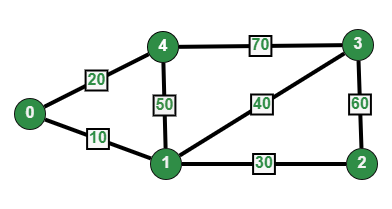
Undirected Weighted Graph
We use two STL containers to represent graph:
- vector : A sequence container. Here we use it to store adjacency lists of all vertices. We use vertex number as index in this vector.
- pair : A simple container to store pair of elements. Here we use it to store adjacent vertex number and weight of edge connecting to the adjacent.
The idea is to use a vector of pair vectors. Below code implements the same.
C++ `
// C++ program to represent undirected and weighted graph // using STL. The program basically prints adjacency list // representation of graph #include <bits/stdc++.h> using namespace std;
// To add an edge void addEdge(vector <pair<int, int> > adj[], int u, int v, int wt) { adj[u].push_back(make_pair(v, wt)); adj[v].push_back(make_pair(u, wt)); }
// Print adjacency list representation of graph void printGraph(vector<pair<int,int> > adj[], int V) { int v, w; for (int u = 0; u < V; u++) { cout << "Node " << u << " makes an edge with \n"; for (auto it = adj[u].begin(); it!=adj[u].end(); it++) { v = it->first; w = it->second; cout << "\tNode " << v << " with edge weight =" << w << "\n"; } cout << "\n"; } }
// Driver code int main() { int V = 5; vector<pair<int, int> > adj[V]; addEdge(adj, 0, 1, 10); addEdge(adj, 0, 4, 20); addEdge(adj, 1, 2, 30); addEdge(adj, 1, 3, 40); addEdge(adj, 1, 4, 50); addEdge(adj, 2, 3, 60); addEdge(adj, 3, 4, 70); printGraph(adj, V); return 0; }
Java
import java.util.*;
// Creation of Adjacency List // The adjacency List consist of an ArrayList within an // ArrayList. The inner ArrayList holds the HashMap of // (vertices,weight) public class Weighted_Graph { int v; ArrayList<ArrayList<HashMap<Integer, Integer> > > adj; Weighted_Graph(int v) { this.v = v; this.adj = new ArrayList<>();
    for (int i = 0; i < v; i++) {
        this.adj.add(new ArrayList<>());
    }
}
// Function to add an Edge
void addEdge(int u, int v, int weight)
{
    this.adj.get(u).add(new HashMap<>());
    this.adj.get(u)
        .get(this.adj.get(u).size() - 1)
        .put(v, weight);

    this.adj.get(v).add(new HashMap<>());
    this.adj.get(v)
        .get(this.adj.get(v).size() - 1)
        .put(u, weight);
}

// Function for printing the whole graph
// Stream API has been used
// to easily access the HashMap elements
// This code may not work in versions
// prior to java 8

void printGraph()
{
    for (int i = 0; i < this.v; i++) {
        System.out.println("\nNode " + i
                           + " makes an edge with ");
        for (HashMap<Integer, Integer> j :
             this.adj.get(i)) {
            j.entrySet().forEach(
                e
                -> System.out.println(
                    "\tNode " + e.getKey()
                    + " with edge weight "
                    + e.getValue() + " "));
        }
    }
}
// Main method
public static void main(String[] args)
{
    int v = 5;
    Weighted_Graph obj = new Weighted_Graph(v);
    obj.addEdge(0, 1, 10);
    obj.addEdge(0, 4, 20);
    obj.addEdge(1, 2, 30);
    obj.addEdge(1, 3, 40);
    obj.addEdge(1, 4, 50);
    obj.addEdge(2, 3, 60);
    obj.addEdge(3, 4, 70);
    obj.printGraph();
}
} // This code is submitted by Abhishek_Manna_HETC
Python3
Python3 program to represent undirected
and weighted graph. The program basically
prints adjacency list representation of graph
To add an edge
def addEdge(adj, u, v, wt):
adj[u].append([v, wt])
adj[v].append([u, wt])
return adj
Print adjacency list representation of graph
def printGraph(adj, V):
v, w = 0, 0
for u in range(V):
    print("Node", u, "makes an edge with")

    for it in adj[u]:
        v = it[0]
        w = it[1]
        print("\tNode", v, "with edge weight =", w)

    print()
Driver code
if name == 'main':
V = 5
adj = [[] for i in range(V)]

adj = addEdge(adj, 0, 1, 10)
adj = addEdge(adj, 0, 4, 20)
adj = addEdge(adj, 1, 2, 30)
adj = addEdge(adj, 1, 3, 40)
adj = addEdge(adj, 1, 4, 50)
adj = addEdge(adj, 2, 3, 60)
adj = addEdge(adj, 3, 4, 70)

printGraph(adj, V)
This code is contributed by mohit kumar 29
C#
using System; using System.Collections.Generic;
// Code Addition(C#) // C# contribution to existing topic // "Graph implementation using STL for // competitive programming | Set 2 (Weighted graph)" class WeightedGraph { private int V;
   private LinkedList<Tuple<int, int>>[] adj;

   public WeightedGraph(int v)
   {
       this.V = v;

       adj = new LinkedList<Tuple<int, int>>[v];

       for (int i=0;i < v; i++)
       {
           adj[i] = new LinkedList<Tuple<int, int>>();
       }
   }


   public void addEdge(int u, int v, int wt)
   {
       adj[u].AddLast(Tuple.Create(v, wt));
       adj[v].AddLast(Tuple.Create(u, wt));

   }

   public void printGraph()
   {
       for (int i=0; i< this.V;i++)
       {
           Console.WriteLine("\nNode " + i + " makes an edge with ");
           foreach (var j in adj[i])
           {
               Console.WriteLine("\tNode " + j.Item1 + " with edge weight " + j.Item2 + " ");
           }

       }
   }

   static void Main(string[] args)
   {

       int V = 5;
       WeightedGraph stl = new WeightedGraph(V);


       stl.addEdge(0, 1, 10);
       stl.addEdge(0, 4, 20);
       stl.addEdge(1, 2, 30);
       stl.addEdge(1, 3, 40);
       stl.addEdge(1, 4, 50);
       stl.addEdge(2, 3, 60);
       stl.addEdge(3, 4, 70);
       stl.printGraph();

       Console.ReadKey();

   }
}
// This code is contributed by realchid.
JavaScript
`
Output
Node 0 makes an edge with Node 1 with edge weight =10 Node 4 with edge weight =20
Node 1 makes an edge with Node 0 with edge weight =10 Node 2 with edge weight =30 Node 3 with edge weight =40 Node 4 with edge weight =50
Node 2 makes an edge with Node 1 with edge weight =30 Node 3 with edge weight =60
Node 3 makes an edge with Node 1 with edge weight =40 Node 2 with edge weight =60 Node 4 with edge weight =70
Node 4 makes an edge with Node 0 with edge weight =20 Node 1 with edge weight =50 Node 3 with edge weight =70
Complexity analysis :
Time complexity: O(1), as it takes a constant amount of time to add a new HashMap object to an ArrayList. The time complexity of printing the graph is O(V * E), as it takes O(E) time to print the edges for each vertex, and there are V vertices in the graph.
Auxiliary Space: O(V + E), where V is the number of vertices in the graph and E is the number of edges. This is because the adjacency list uses an ArrayList of ArrayLists to store the graph, and each ArrayList and HashMap object consumes a constant amount of space.
and improved by Kunal Verma