Developing a Linux based shell (original) (raw)
Last Updated : 11 Apr, 2026
**Shell
A shell is the user interface of an operating system that allows users to interact with the system by executing commands. It reads user input, interprets it, and performs the requested operations.
The execution process involves multiple stages: the input command is first processed by a lexical analyzer to generate tokens, then passed to a parser for syntax checking and command structuring. Finally, the processed command is executed.
The shell can be implemented using three main components, as shown in the architecture diagram.
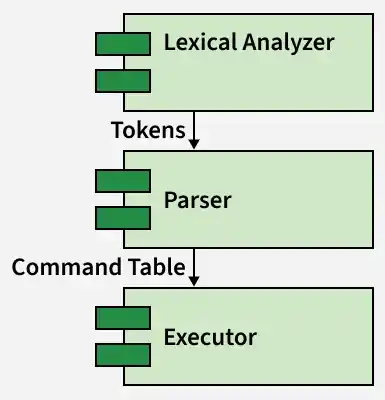
Architecture of Linux Shell
**1. Lexical Analyzer
The lexical analyzer is the first stage of input processing. It reads the command character by character and converts it into tokens based on predefined patterns (using tools like lex).
When a pattern matches, the corresponding token is generated and passed to the parser for syntax checking.
**Example:
Input: ls -al
Output: WORD OPTION
Common Tokens
- **WORD → command or arguments (e.g.,
ls) - **OPTION → flags starting with
-(e.g.,-al) - **PIPE →
| - **AMPERSAND →
& - **IO / IOR → input-output redirection (
>,>>,<, etc.)
Token Formation Rules
- Tokens are created based on matching patterns
- Options start with
-followed by characters - Special symbols like
|,&,>form separate tokens - Words include alphabets, numbers, and valid special characters
**2. Parser
After tokenization, the tokens are passed as a stream to the parser, which checks the syntax of the input using predefined grammar rules and performs the required semantic actions. The parser (implemented using tools like yacc) organizes tokens into a structured form and ensures that the command follows the correct syntax. It processes the input in a bottom-up manner and builds a command table that represents the parsed structure.
A command can consist of a command name, options, arguments, input/output redirection, and background execution (&). Multiple simple commands can be connected using pipes (|) to form a complex command. During parsing, the parser identifies these components and stores them in a table containing fields such as Command, Options, Arguments, Standard Input (stdin), Standard Output (stdout), and Standard Error (stderr). This structured representation is then passed to the executor for execution.
The grammar built allows the following syntax:

This syntax allows a command to include options, arguments, I/O redirection, and background execution. A command with these components is called a simple command. Multiple simple commands connected using pipes form a complex command.
**Example:
ls -al | sort -rThis command results in a table where each row represents a simple command. The table stores details such as command name, options, arguments, and input/output streams, which are later used during execution.
| Command | Option | Option2 | Arguments | StdIn | StdOut | StdError |
|---|---|---|---|---|---|---|
| ls | -al | null | null | null | null | null |
| sort | -r | null | null | null | null | null |
**3. Executor
After the command table is built, the executor is responsible for executing each command. It processes each row of the table, creates a new process using fork(), and executes the command using execvp(). The executor also handles input/output redirection and piping between commands.
For piped commands, the output of one command is passed as input to the next using pipes. If input or output redirection is specified, it overrides the default standard input (stdin) or standard output (stdout). The executor also checks for background execution (&) to decide whether to wait for the process or run it in the background.
ls -al | sort -r > file
The table that is built by the parser will look like this:
| Command | Option | Option2 | Arguments | StdIn | StdOut | StdError |
|---|---|---|---|---|---|---|
| ls | -al | null | null | null | pipe[1] | null |
| sort | -r | null | null | null | file | null |
The parser generates a command table where each row represents a simple command with its options, arguments, and I/O details. The executor iterates over this table, sets up pipes and redirections, and executes each command accordingly. After execution, the shell is ready to process the next command.