Flex (Fast Lexical Analyzer Generator) (original) (raw)
Last Updated : 11 Apr, 2026
Flex (Fast Lexical Analyzer Generator), or simply Flex, is a tool for generating lexical analyzers scanners or lexers. Written by Vern Paxson in C, circa 1987,
- Flex is designed to produce lexical analyzers that is faster than the original Lex program.
- It is often used along with Berkeley Yacc or GNU Bison parser generators. Both Flex and Bison are more flexible, and produce faster code, than their ancestors Lex and Yacc.
Role of Flex in Compiler Design
Flex takes a specification file (with extension ****.l**) containing regular expressions and actions, and automatically generates a C program that performs lexical analysis.
- Flex generates a function called
yylex() yylex()reads the input stream character by character- It identifies tokens based on the given rules
- These tokens are then passed to the **parser
**Installing Flex on Ubuntu:
sudo apt-get update
sudo apt-get install flex
**Note: If the update command has not been executed on the system for a long time, it is recommended to run it first. This ensures that the latest package versions are installed, since older versions may be incompatible with newly installed packages or may no longer be available in the repository.
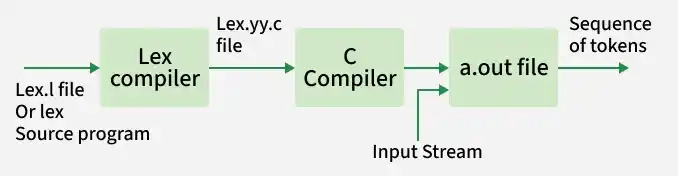
Workflow of Flex
How Flex Works (Workflow)
- Lexical specification file
lex.lis written using Flex syntax. - Flex compiler converts
lex.linto a C file namedlex.yy.c. - C compiler compiles
lex.yy.cinto an executable (usuallya.out). - Generated executable reads the input characters and converts them into a sequence of tokens.
**Structure of a Flex Program
**1. Definition Section: This section contains:
- Variable declarations
- Header files
- Macro definitions
Anything written inside %{ %} is copied directly into lex.yy.c.
**Syntax:
%{
// Definitions
%}
**2. Rules Section: This section defines patterns and actions.
- Each rule has the form:
pattern { action } - Patterns are written using regular expressions
- Actions are written in C code
- The section is enclosed between
%%
**Syntax:
%%
pattern action
%%
**Examples: Table below shows some of the pattern matches.
| Pattern | It can match with |
|---|---|
| [0-9] | all the digits between 0 and 9 |
| [0+9] | either 0, + or 9 |
| [0, 9] | either 0, ', ' or 9 |
| [0 9] | either 0, ' ' or 9 |
| [-09] | either -, 0 or 9 |
| [-0-9] | either - or all digit between 0 and 9 |
| [0-9]+ | one or more digit between 0 and 9 |
| [^a] | all the other characters except a |
| [^A-Z] | all the other characters except the upper case letters |
| a{2, 4} | either aa, aaa or aaaa |
| a{2, } | two or more occurrences of a |
| a{4} | exactly 4 a's i.e, aaaa |
| . | any character except newline |
| a* | 0 or more occurrences of a |
| a+ | 1 or more occurrences of a |
| [a-z] | all lower case letters |
| [a-zA-Z] | any alphabetic letter |
| w(x | y)z | wxz or wyz |
**3. User Code Section: This section contains:
main()function- Supporting C functions
yywrap()definition
Linked with the generated lexical analyzer.
Basic Program Structure:
%{
// Definitions
%}
%%
Rules
%%
User code section
**How to run the program:
First save the file with the extension .l or .lex. After saving the file, execute the following commands in the terminal to compile and run the program.
**Step 1: flex filename.l or flex filename.lex depending on the extension file is saved with
**Step 2: gcc lex.yy.c
**Step 3: ./a.out
**Step 4: Provide input to program if it is required
**Note: To stop the input, press **Ctrl + D (EOF) in the terminal, or define a rule in the program to terminate input. You can refer to the output examples of the programs below if you face difficulty while running them.
**Example 1: Count the number of characters in a string
C `
/*** Definition Section has one variable which can be accessed inside yylex() and main() ***/ %{ int count = 0; %}
/*** Rule Section has three rules, first rule matches with capital letters, second rule matches with any character except newline and third rule does not take input after the enter***/ %% [A-Z] {printf("%s capital letter\n", yytext); count++;} . {printf("%s not a capital letter\n", yytext);} \n {return 0;} %%
/*** Code Section prints the number of capital letter present in the given input***/ int yywrap(){} int main(){
// Explanation: // yywrap() - wraps the above rule section /* yyin - takes the file pointer which contains the input*/ /* yylex() - this is the main flex function which runs the Rule Section*/ // yytext is the text in the buffer
// Uncomment the lines below // to take input from file // FILE *fp; // char filename[50]; // printf("Enter the filename: \n"); // scanf("%s",filename); // fp = fopen(filename,"r"); // yyin = fp;
yylex(); printf("\nNumber of Capital letters " "in the given input - %d\n", count);
return 0; }
`
If the user enters:
GFG123gfg
**Output:
G capital letter
F capital letter
G capital letter
1 not capital letter
2 not capital letter
3 not capital letter
g not capital letter
f not capital letter
g not capital letter
Number of capital letters in the given input - 3
**Example 2: Count the number of characters and number of lines in the input
C `
/* Declaring two counters one for number of lines other for number of characters */ %{ int no_of_lines = 0; int no_of_chars = 0; %}
/rule 1 counts the number of lines, rule 2 counts the number of characters and rule 3 specifies when to stop taking input/ %% \n ++no_of_lines; . ++no_of_chars; end return 0; %%
/*** User code section***/ int yywrap(){} int main(int argc, char **argv) {
yylex(); printf("number of lines = %d, number of chars = %d\n", no_of_lines, no_of_chars );
return 0; }
`
**Input Given:
Geeks
for
Geeks
end
**Output:
number of lines = 3, number of chars = 13
**Advantages
- **Efficiency: Flex-generated lexical analyzers are very fast and efficient, which can improve the overall performance of the programming language.
- **Portability: Flex is available on many different platforms, making it easy to use on a wide range of systems.
- **Flexibility: Flex is very flexible and can be customized to support many different types of programming languages and input formats.
- **Easy to Use: Flex is relatively easy to learn and use, especially for programmers with experience in regular expressions.