Graphical User Interface (original) (raw)
Last Updated : 26 Jul, 2025
A **Graphical User Interface (GUI) enables users to interact with digital devices through graphical elements like icons and buttons. Replacing complex text-based commands, GUIs simplify tasks and enhance user experience. This article explores GUI’s components, features, benefits, and examples.
- **Function: Displays interactive graphics for user actions and information.
- **Accessibility: Standard in operating systems (e.g., Windows, macOS) and apps.
- **Goal: Makes computing easy, efficient, and visually engaging.
Components of GUI
A graphical user interface (GUI) comprises visual components like cursors, icons, and buttons, enriched with sound and visual effects. These elements enable users to interact with a computer without needing to know specific commands. Below are the components of a Graphical User Interface:
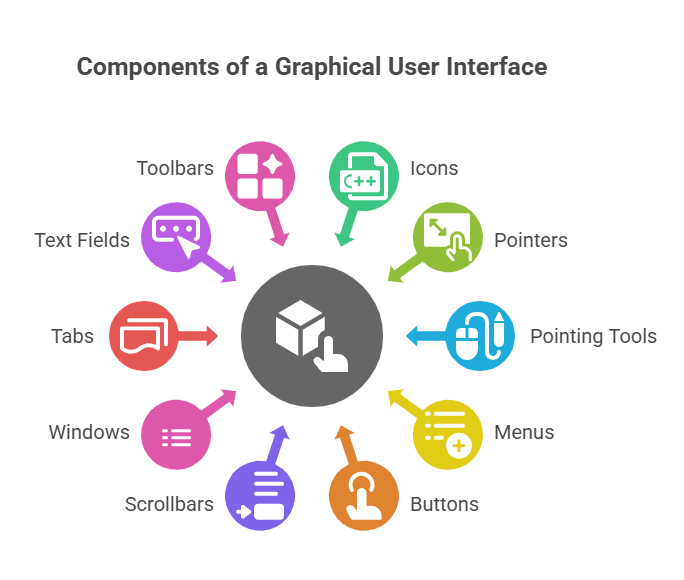
Components of a Graphical User Interface
- **Icons: Small images representing files, folders, or actions.
- **Pointers: Cursor symbols (e.g., arrows) for selecting items.
- **Pointing Tools: Mouse or trackpad to move pointers.
- **Menus: Lists of clickable options for navigation.
- **Buttons: Clickable elements to trigger actions.
- **Scrollbars: Enables navigation through content beyond the visible area.
- **Window: Contains applications or documents for user interaction.
- **Tab: Separates content or functions within a single window.
- **Text Fields: Input areas for typing data, such as search bars or form fields.
- **Toolbars: Rows of buttons or icons for quick access to common commands (e.g., "Bold" or "Undo" in a text editor).
These components, with added effects like hover animations or sounds for clicks, make the user experience more engaging and easy to use.
Design Principles of Effective GUIs
Explaining these principles helps understand what makes a user interface easy to use and why design choices matter.
**Key Points:
- **Consistency: Keep design elements, like buttons, the same across the interface.
- **Simplicity: Avoid clutter to make it easier for users to focus.
- **Feedback: Provide cues, like highlighting buttons on hover, to show the system is responding.
- **Accessibility: Ensure the interface works for everyone, including support for screen readers and keyboard navigation.
- **Responsiveness: Ensure the interface works quickly, even on slower devices.
Features of GUI
- The graphical user interface (GUI) is very easy to use and the user can modify and simplify the requirements.
- The required software, documents, or a few relevant programs are reflected in the icons on the user interface to control the overall processes properly.
- A graphical user interface (GUI) has several features as per requirement, such as tabs, a menu, pointers, and various other types of things to simplify and process smoothly.
Real-World Impact of GUIs
Showing how GUIs impact daily life helps readers relate and understand their importance.
- **Healthcare: Touch-based GUIs on medical devices make it easier and faster to enter patient data.
- **Gaming: GUIs provide immersive experiences, enhancing gameplay on consoles and PCs.
- **Education: Interactive GUIs in educational apps make learning fun and engaging for students.
GUIs simplify tasks across industries. They speed up data entry on medical devices. In gaming, they create engaging experiences. In education, they make learning interactive and accessible for students.
Comparison with Command-Line Interfaces (CLIs)
Comparing GUIs with CLIs helps highlight why GUIs are preferred for most users while recognizing the strengths of CLIs.
| **GUI (Graphical User Interface) | **CLI (Command-Line Interface) |
|---|---|
| Easier for beginners with visual elements like buttons and icons. | Requires technical knowledge and memorization of commands. |
| More resource-intensive (requires more memory and processing power). | Lightweight, uses fewer system resources. |
| Slower for advanced tasks, less precise control. | Faster and more precise, ideal for complex tasks or automation. |
Abstraction in GUIs
GUIs simplify complex code through abstraction, hiding technical details from users. For example, dragging a file to a trash icon deletes it without needing code, much like pressing a car’s gas pedal moves it without understanding the engine.
**Examples of GUIs:
- **Operating Systems: Windows, macOS, Linux (e.g., Ubuntu’s desktop).
- **Applications: Web browsers (Chrome), music apps (Spotify).
- **Devices: Smartphone interfaces (iOS, Android), smart TVs.
- **Layered GUIs: Spotify’s app within a browser on a Windows desktop.