Address Resolution in DNS (Domain Name Server) (original) (raw)
Last Updated : 12 Dec, 2025
DNS address resolution converts human-readable domain names into IP addresses that computers use to locate servers. It works like a digital phonebook, mapping names to numbers so websites can load correctly.
- Translates domain names (e.g., www.example.com) into IP addresses
- Essential for locating the correct server
- Enables browsers to connect to websites
- Functions like looking up a phone number in a contact list
- Critical for proper internet communication
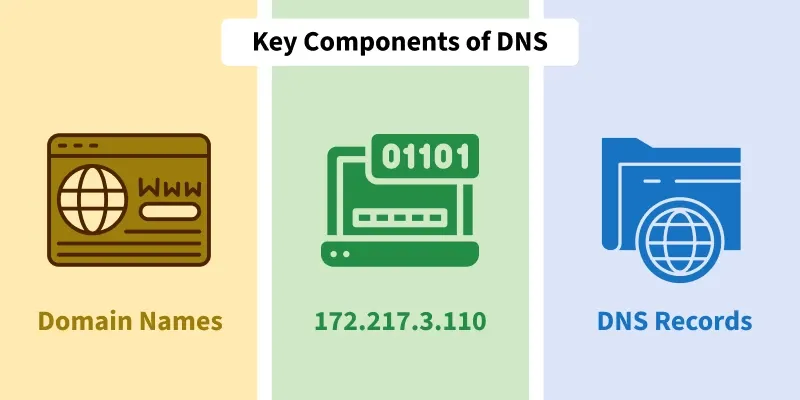
- **Domain Names: Human-readable addresses (e.g.,
www.google.com). - **IP Addresses: Numeric addresses used by computers to identify each other (e.g.,
172.217.3.110). - **DNS Records: Structured data that provides information about the domain name, such as IP address mappings
**The Role of DNS Resolver in Address Resolution
DNS operates as a **client-server application. A host that needs to map a domain name to an IP address (or vice versa) calls a DNS client called a **resolver. The resolver accesses the nearest DNS server with a mapping request. Here's how the process works:
**Step 1: The resolver sends a query to the nearest DNS server.
**Step 2: If the server has the required information, it returns the result. If not, it refers the resolver to other DNS servers.
**Step 3: The resolver checks if the response is correct and delivers it to the requesting application or user.
How Does Address Resolution Work in DNS?
Address resolution in DNS can be broken down into the following categories:
A) Mapping Domain Names to IP Addresses
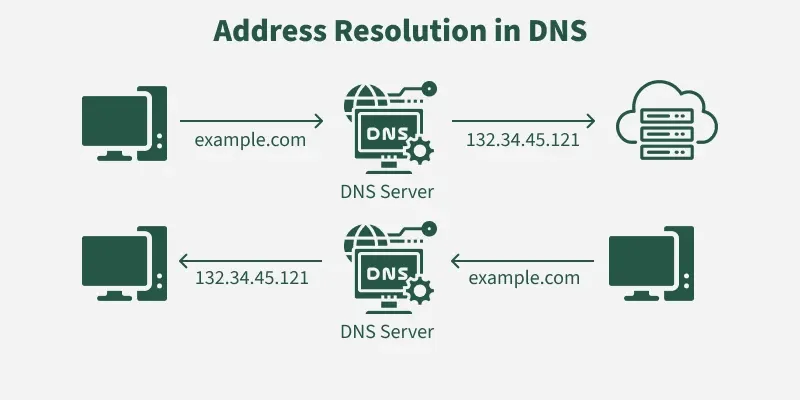
When a user types a domain name into their browser, the DNS system queries various DNS servers to find the corresponding IP address. The resolver checks different domain sections (e.g., generic or country domains) to determine the correct IP address for the given domain name.
B) Mapping IP Addresses to Domain Names
A client can send an IP address to a server to be mapped to a domain name. This is called a PTR query. To answer queries of this kind, DNS uses the inverse domain. However, in the request, the IP address is reversed and two labels, in-addr and arpa are appended to create a domain acceptable by the inverse domain section.
For example. if the resolver receives the IP address 132.34.45.121, the resolver first inverts the address and then adds the two labels before sending. the domain name sent is "121.45.34.132.in-addr.arpa", which is received by the local DNS and resolved.
To find a particular DNS requesting host place its query to the Local DNS Server with a mapping request. If it has the information, the resolver is satisfied else the resolver is referred to other servers or other servers are asked to provide the information. After the resolver, gets the response, it checks whether the response is correct or not. If the response is correct, the response is passed to the process that requested it, or else the name query fails.
**Types of DNS Resolution
**1. Recursive Resolution
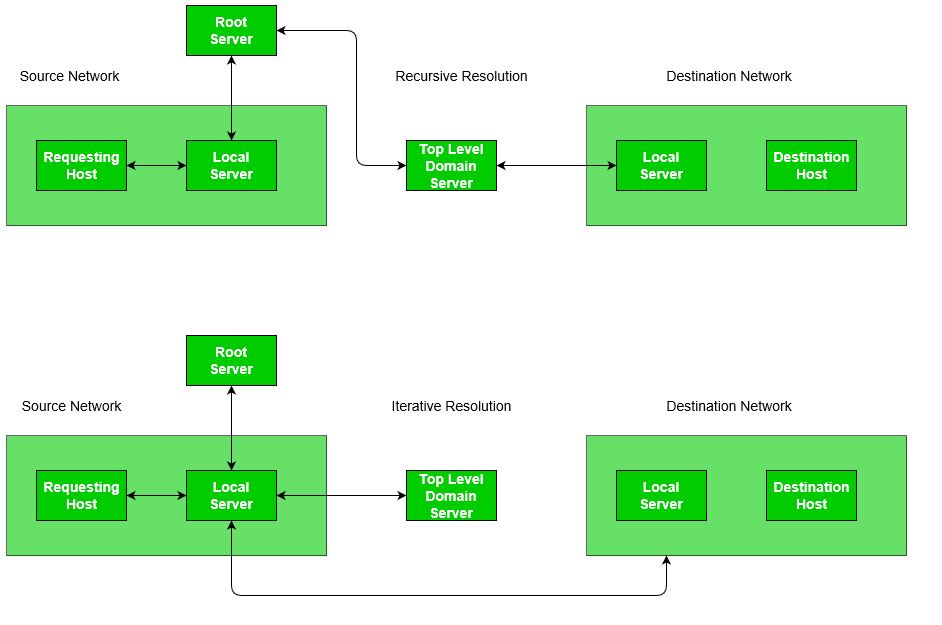
In **recursive DNS resolution, the client (resolver) asks the DNS server to return the **final answer—not referrals.
This means the server receiving the query becomes **responsible for completing the entire lookup, querying other servers on behalf of the client until the answer is found or an error is returned.
**How Recursive Resolution Works
**Step 1. Client Sends a Recursive Query
- An application (browser) generates a query for a domain name.
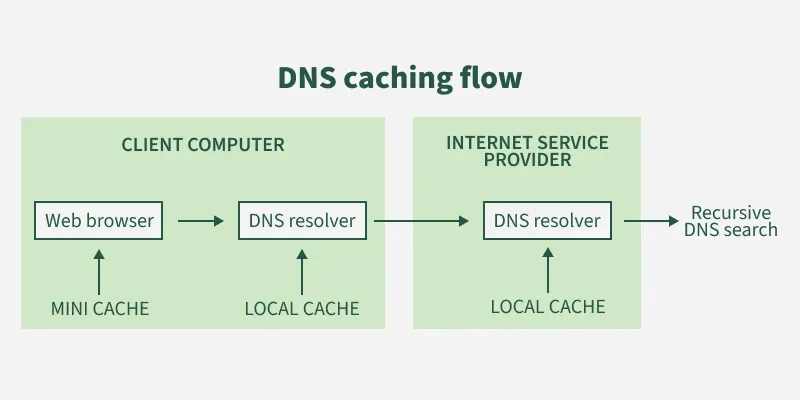
- This query is sent to the **local DNS resolver (usually ISP DNS or OS-configured resolver).
- The query explicitly requests a **recursive response.
**Step 2. Local DNS Resolver Searches Its Cache
- If the mapping exists in cache → return immediately (marked _unauthoritative).
- If not → the resolver must find the answer itself.
**Step 3. Resolver Queries the Root Name Server
- The root server does **not give the final IP.
- Instead, it returns the address of the **Top-Level Domain (TLD) server (e.g.,
.com,.org).
Even though root gives a referral, the resolver continues the recursion on behalf of the client, so recursion still applies.
**Step 4. Resolver Queries the TLD Server
- The TLD server returns the address of the **authoritative name server for the domain (e.g., for
example.com). - The authoritative server contains the actual DNS records (A, AAAA, CNAME, etc.).
- It returns the final IP address mapped to the domain name.
**Step 6. Resolver Returns the Response to the Client
- The resolver caches the result for future queries (following TTL).
- It sends the final answer back to the client.
**Key Property:
The client only sends **one query—the local resolver performs all subsequent steps.
**2. Iterative Resolution
Iterative Resolution is the DNS lookup process in which each DNS server returns the best possible answer it has, without performing further queries on behalf of the client. Instead, the client (resolver) is responsible for repeatedly querying the next server in the hierarchy.
This mechanism reduces the load on DNS servers and makes the client drive the entire resolution process.
**How Iterative Resolution Works
- **Client → Local DNS Resolver
The application sends a DNS query (e.g., _www.example.com) to the local DNS resolver. - **Local DNS Server Query to Root Server
If the local server does not have the record cached, it sends an iterative query to a Root DNS Server. - **Root Server Response (Referral)
The Root Server does _not resolve the domain.
Instead, it returns the IP address of the corresponding Top-Level Domain (TLD) serverfor example, the.comTLD server. - **Local Server → TLD Server
The local DNS server now queries the returned TLD server. - **TLD Server Response (Referral)
The TLD server also does not perform further lookups.
It returns the IP address of the Authoritative DNS Server for the domain. - **Local Server → Authoritative DNS Server
The local server queries the authoritative server, which finally returns the actual IP address of the domain. - **Response Returned to Client
The IP address is delivered back to the original requesting application.
**Key Characteristics of Iterative Resolution
- Each DNS server returns only the best information it knows (final answer or referral).
- The client or local DNS resolver continues querying additional servers.
- Reduces recursive workload on servers; increases resolver responsibility.
- Typically used between DNS servers due to efficiency and load distribution.
**Example
To resolve **www.example.com:
| Step | Server Contacted | Response Returned |
|---|---|---|
| 1 | Local DNS → Root Server | Returns IP of .com TLD server |
| 2 | Local DNS → .com TLD Server | Returns IP of authoritative server for example.com |
| 3 | Local DNS → Authoritative Server | Returns final IP of www.example.com |
This final answer is cached by the local server for future queries.
Caching Mechanism in DNS Resolution
DNS caching is a performance-enhancing mechanism used by DNS servers and client resolvers to temporarily store recently resolved domain-to-IP mappings. When a DNS server receives a response from another server during resolution, it stores this information in its **cache so future queries for the same domain can be answered quickly without repeating the entire lookup process.
**Why Caching Is Used
DNS resolution can involve multiple servers (Local DNS → Root → TLD → Authoritative server). This process is time-consuming and increases network traffic.
Caching reduces:
- Lookup time
- Load on upper-level DNS servers
- Overall network latency
**How DNS Caching Works
- A DNS server queries another server for a domain name.
- When it receives the response (IP address), it stores the mapping in its cache memory.
- The cached entry includes a TTL (Time-to-Live) value assigned by the authoritative DNS server.
- For subsequent requests: The server first checks its cache, if a valid (non-expired) entry exists, it returns that immediately, such a response is labeled “Non-authoritative”, indicating it came from cache, not from the authoritative server.
**Problems with DNS Caching
Although caching improves performance, it introduces a few challenges:
- **Stale/Outdated Records:
If a domain's IP address changes but the cached entry has not yet expired, the server may continue returning outdated information. - **Cache Poisoning:
Attackers may attempt to inject false DNS mappings into a server’s cache, redirecting users to malicious sites. - **TTL Dependency:
If TTL is too long → outdated data persists
If TTL is too short → caching benefits are reduced
**TTL and Cache Maintenance
- Each DNS record has a TTL, after which the cached entry must be deleted.
- DNS servers regularly inspect their cache and purge all entries whose TTL has expired.
- This ensures accuracy while preserving efficiency.
Comparison of Iterative and Recursive Resolution
| **Property | **Iterative Resolution | **Recursive Resolution |
|---|---|---|
| **Server Response | Returns the best match or a referral | Returns the requested mapping or an error message |
| **Query Propagation | Each server that does not know the mapping sends the IP address of the next server | Only the local server sends the query to the next server |
| **Server Load | Higher load on servers since each server in the chain must be queried | Lower load on servers since only the local server is queried |
| **Response Time | Longer response time since multiple servers may need to be queried | Shorter response time since only one or a few servers are queried |
| **Cache Usage | Lower cache hit rate since referrals are returned instead of mappings | Higher cache hit rate since mappings are returned directly |
| **Security | Lower security since each server in the chain may potentially modify the response. | Higher security since only the local server is trusted to return a valid response. |
Address Resolution Failures and Troubleshooting
Address resolution can occasionally fail due to various issues, such as:
- **DNS Server Unavailability: If the DNS resolver or authoritative server is down, the user may not be able to resolve the domain name.
- **DNS Cache Poisoning: Malicious actors may attempt to inject false DNS records into a cache, leading to misdirection to malicious websites.
- **Incorrect DNS Configuration: Misconfigured DNS records can result in incorrect resolution, making a website or service unreachable.
Common Troubleshooting Steps:
- **Clear DNS Cache: Clearing local DNS caches on the device or DNS resolver can resolve stale or corrupted records.
- **Use a Different DNS Resolver: Switching to a public DNS resolver, such as Google DNS or Cloudflare DNS, can often bypass issues with the ISP's DNS servers.
- **Check DNS Records: Ensure that the DNS records for the domain are correctly configured and propagated