File Transfer Protocol (FTP) in Application Layer (original) (raw)
Last Updated : 11 Jun, 2026
File Transfer Protocol (FTP) is an application-layer protocol that is used to transfer files between a client and a server over a TCP/IP network. It provides a standardized method for file exchange across different systems.
- Supports text, binary, image, and program files.
- Enables uploading, downloading, and remote file management.
- Uses TCP to ensure reliable communication.
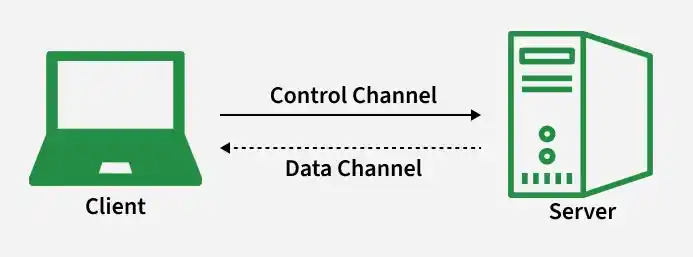
FTP
Working and Uses
FTP follows a client–server model and uses two connections:
- Control connection (Port 21) for commands
- Data connection (Port 20) for file transfer
- Users connect to the server using login credentials.
- Users navigate directories using commands ls and cd.
- For transferring files, it uses get and put.
- Supports both active and passive modes for communication.
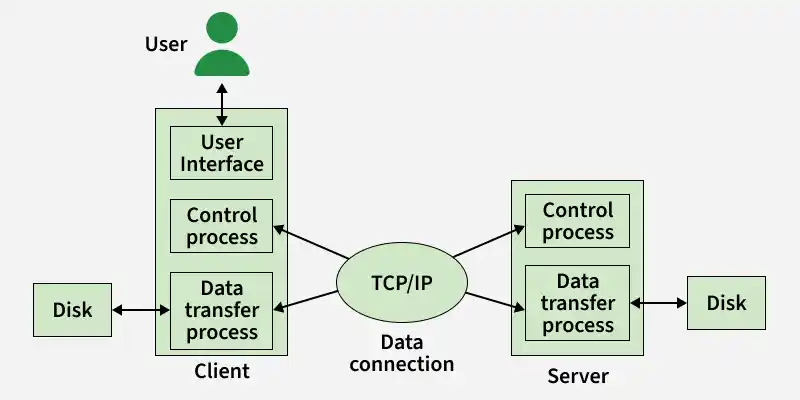
Types of Connection
FTP uses two separate TCP connections to handle communication—one dedicated to control information and another dedicated to actual data transfer. This separation makes FTP an out-of-band protocol.

1. Control Connection
This connection is used to exchange commands and responses between the client and server.
- Established on TCP port 21.
- Transfers user authentication details (username and password).
- Sends commands for directory navigation and file operations.
- Remains active for the entire FTP session.
2. Data Connection
This is used to transfer the actual file content and directory listings.
- Traditionally uses TCP port 20 (in active mode).
- Created separately for each file transfer.
- Transfers files and directory information.
- Closes automatically after data transmission completes.
FTP Data Types
FTP data types define how file contents are represented and transmitted between the client and server during file transfer.
- **ASCII: This data type is used for transferring text files with character encoding based on the ASCII standard.
- **EBCDIC: This data type is used for transferring text files encoded in IBM’s Extended Binary Coded Decimal Interchange Code.
- **Image (Binary): This data type transfers files as a continuous stream of bytes without any modification.
- **Local: This data type is used for transferring files that contain data stored in logical bytes of a specified bit length.
FTP Clients
An FTP client is a software application that enables a user to connect to an FTP server, authenticate, and perform file transfer operations over a network using the client–server model.
- Establishes a connection with the FTP server.
- Sends commands to retrieve or store files.
- Provides either command-line or graphical user interface (GUI) support.
Common FTP Commands
- **get filename – Downloads a single file from the server.
- **mget filename – Downloads multiple files from the server.
- **ls – Displays the list of files in the current server directory.
These are the three-digit status codes sent by the server to inform the client about the result of a command.
- **200 – Command executed successfully.
- **221 – Service closing control connection.
- **331 – Username accepted; password required.
- **502 – Command not implemented.
- **503 – Incorrect sequence of commands.
- **504 – Command not supported for that parameter.
- **530 – User not logged in (authentication failed).
- **551 – Requested action aborted: page type unknown.
Characteristics
FTP is a connection-oriented file transfer protocol that operates over TCP and supports reliable data transmission.
- Uses TCP as its transport layer protocol.
- Establishes separate control and data connections.
- Suitable for general-purpose file transfer over networks.
- Provides authentication-based access control.
Types of FTP
There are different ways through which a server and a client do a file transfer using FTP. Some of them are mentioned below:
1. Anonymous FTP
It is a file transfer method that allows users to access publicly available files on a server without requiring a personal user account.
- Users log in using the username “anonymous”.
- Usually provides read-only access.
- Does not allow modification of server directories.
- Commonly used for distributing public software and documents.
2. Password-Protected FTP
This is a secure access method that requires valid user credentials to access and manage files on an FTP server.
- Requires username and password authentication.
- Access permissions are controlled by the administrator.
- Supports file upload, download, and modification.
- Suitable for private or organizational file sharing.
3. FTPS (FTP Secure)
FTPS is an extension of FTP that adds SSL/TLS encryption to secure data transmission between client and server.
- Encrypts login credentials and transfers data.
- Operates over TCP (commonly port 21).
- Supports implicit and explicit encryption modes.
- Maintains compatibility with standard FTP commands.
4. SFTP (SSH File Transfer Protocol)
This is a secure file transfer protocol that operates over the SSH protocol and provides encrypted communication for file management.
- Uses port 22 for communication.
- Encrypts both authentication and file data.
- Uses a single secure connection (no separate data channel).
- Provides secure remote file access and management.
Security Issues
- Transmits data and credentials in plain text, making interception easy.
- Vulnerable to attacks such as sniffing, spoofing, brute force, and port scanning.
- Does not provide built-in encryption for secure communication.
- If intercepted, attackers can read or modify transferred data.
Major Security Weakness
- Passwords are sent in clear text (e.g., Jerry1992 appears exactly as typed).
- No hashing or encryption is applied during transmission.
- Attackers monitoring network traffic can capture login credentials.
- More secure alternatives include FTPS and SFTP, which use encryption protocols.
Configuration of FTP Port Numbers
- **Access Server Configuration – Open the FTP server control panel or configuration file.
- **Modify Port Settings – Change the default control port (21) and data port (20, if applicable).
- **Restart FTP Service – Restart the server to apply new port settings.
- **Update Client Configuration – Inform users to connect using the updated port number.
FTP vs SFTP
| **FTP | **SFTP |
|---|---|
| Does not provide built-in encryption. | Provides encrypted communication. |
| Operates on Port 21. | Operates on Port 22. |
| Transfers data in plain text. | Encrypts both data and credentials. |
| Uses separate control and data connections. | Uses a single secure connection. |
| Works directly over TCP. | Operates over SSH (which runs over TCP). |