Introduction of Single Sign On (SSO) (original) (raw)
Last Updated : 10 Apr, 2026
Single Sign On (SSO) is a session and user authentication service that allows a user to access various apps using a single set of login credentials, such as a username and password. SSO is used by every organization as well as individuals to manage multiple credentials more efficiently.
- Since one login provides access to many services, protecting credentials is very important.
- SSO is often combined with Multi-Factor Authentication (MFA) for stronger security.
- Additional authentication methods may include OTP, Smart cards or Biometric verification.
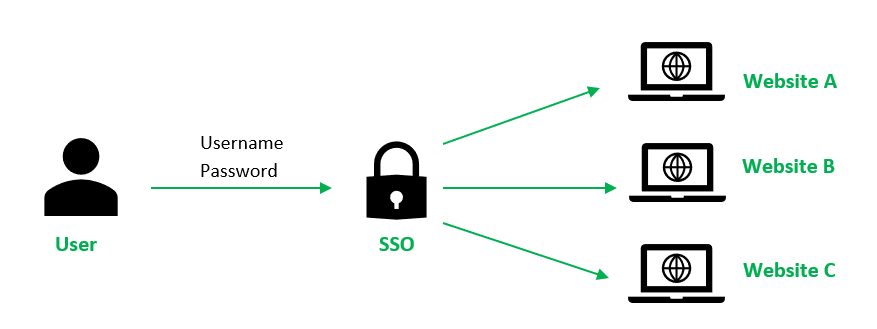
Working
There are the following steps in the working of SSO:
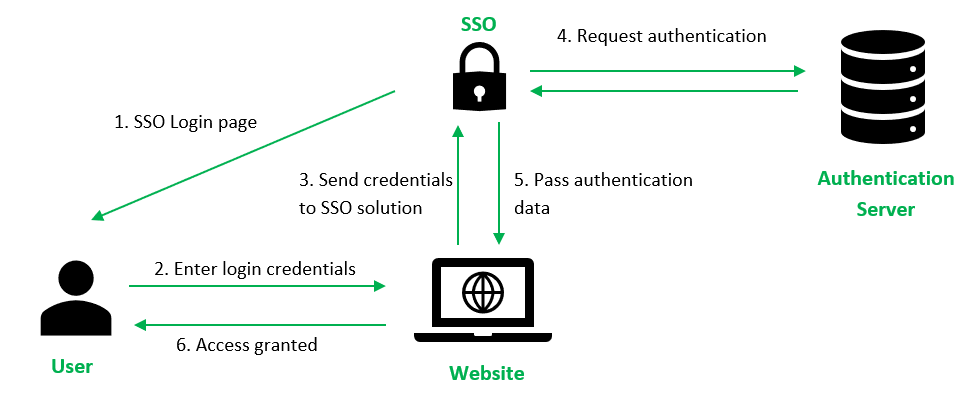
- The user tries to access a website or application. The website checks whether the user is already authenticated through the SSO system.
- If the user is not authenticated, the website redirects the user to the SSO login page.
- The user enters login credentials such as username and password on the SSO system.
- The credentials are sent to the SSO authentication server for verification.
- The SSO server contacts the Identity Provider (IdP) (for example, Active Directory) to verify the user’s identity.
- After successful verification, the Identity Provider confirms authentication to the SSO system.
- The SSO system sends authentication information to the requested website, allowing the user to access the application.
- When the user moves to another application, the SSO system provides authentication tokens, so the user does not need to log in again.
Types of SSO Configurations
1. Kerberos-Based Configuration
This is an authentication method that uses the Kerberos protocol and ticket system to allow users to access multiple services after a single login.
- A Ticket Granting Ticket (TGT) is generated after authentication.
- Provides secure access to multiple network services.
- Commonly implemented in organizational environments.
2. SAML-Based Configuration
This is a configuration that uses Security Assertion Markup Language to securely exchange authentication data between systems.
- Connects Identity Provider and Service Provider.
- Enables login across different domains.
- Widely used for web applications.
3. Smart Card-Based Configuration
This uses a physical card containing stored credentials to authenticate users.
- Requires inserting the smart card for first login.
- Removes the need to repeatedly type credentials.
- Stores certificates or passwords securely.
Allows authentication using existing social networking accounts.
- Uses accounts such as Google or Facebook.
- Simplifies login process for users.
- Risk increases if social account is compromised.
5. Enterprise-Level Configuration
This is used by organizations to centrally manage user authentication across multiple internal systems.
- Functions similar to a credential manager.
- Automatically logs users into applications.
- Reduces the burden of remembering multiple passwords.
SSO Token
These are digital piece of information created after a user successfully logs in through Single Sign-On (SSO). It acts as proof that the user is already authenticated, so the user can access multiple applications without logging in again.
- An SSO token is generated after successful login to verify the user’s identity.
- It allows access to multiple systems without re-entering username and password.
- The token is securely shared between applications for authentication.
- Tokens are valid only for a limited time to maintain security.
**Advantages
- The risk of access to third-party sites is mitigated as the website database does not store the user's login credentials.
- Increased convenience for users as they only need to remember and key in login information once.
- Increased security assurance for users as website owners do not store login credentials.
- Increase customer base and satisfaction as SSO provides a lower barrier to entry and seamless user experience.
- Reduce IT costs for managing customer’s usernames and passwords.
**Disadvantages
- If the SSO token is stolen, an attacker can access multiple applications without needing login credentials.
- A single point of failure occurs, meaning if the SSO system is compromised, many services become vulnerable.
- Token expiration or configuration errors may cause login problems for users.
- Implementing and managing SSO tokens can be complex for organizations.