Network Topology (original) (raw)
Last Updated : 26 Feb, 2026
Network Topology refers to the arrangement and organization of devices in a computer network. It defines how components are structured and how communication is established between them.
- Describes the overall structure of a network
- Helps in network design and planning
- Influences performance and reliability
- Includes Physical Topology, which shows the actual layout of devices and cables
- Includes Logical Topology, which defines how data moves between devices
Types of Network Topology
The arrangement of a network that comprises nodes and connecting lines via sender and receiver is referred to as Network Topology. Below are various network topologies that include:
**1. Mesh Topology
Mesh Topology is a network structure in which each device is connected to multiple other devices, creating several communication paths within the network. It provides high redundancy and reliability.
- Devices are interconnected with dedicated links
- Supports multiple paths for data transmission
- Can be full mesh or partial mesh
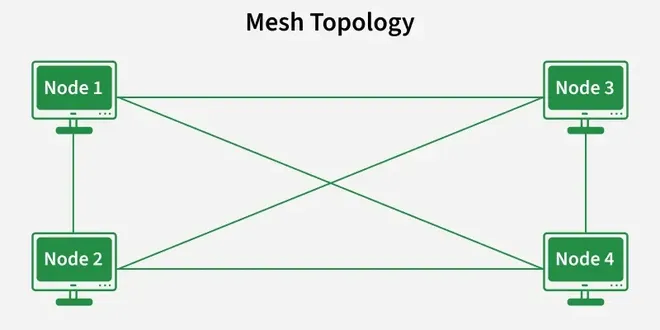
Mesh
There are two types of Mesh topologies:
**1. Full Mesh Topology:
In a full mesh network, every node is directly connected to all other nodes. If there are **N nodes, each node has ****(N − 1) connections**. This provides maximum redundancy and reliability.
**2. Partial Mesh Topology:
In a partial mesh network, only selected nodes are interconnected. Not every node is directly connected to all others. This approach reduces cost and complexity while still maintaining reasonable reliability.
Advantages
- High fault tolerance
- Reliable data delivery
- Enhanced security due to dedicated links
- Suitable for critical network systems
Disadvantages
- Expensive to implement
- Requires large amount of cabling
- Complex installation process
- Difficult to manage in large networks
**2. Star Topology
Star Topology is a network layout in which all devices are connected to a central device such as a switch or hub. All communication between devices passes through this central point.
- Each device has a dedicated connection to the central node
- Central device controls data transmission
- Commonly used in Local Area Networks (LANs)
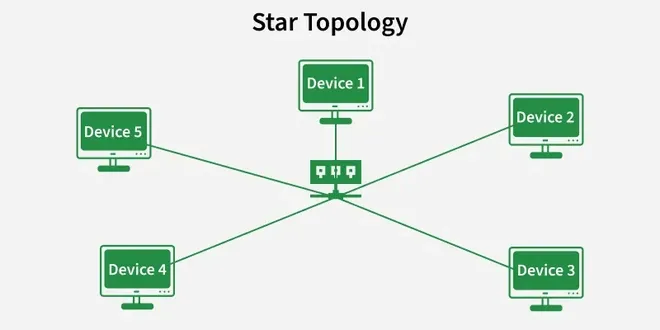
Star
Advantages
- Easy to install and manage
- Simple fault detection and troubleshooting
- Failure of one device does not affect others
- Easy to add or remove devices
Disadvantages
- Failure of central device stops the entire network
- Requires more cabling than bus topology
- Higher installation cost
- Performance depends on central device capacity
**3. Bus Topology
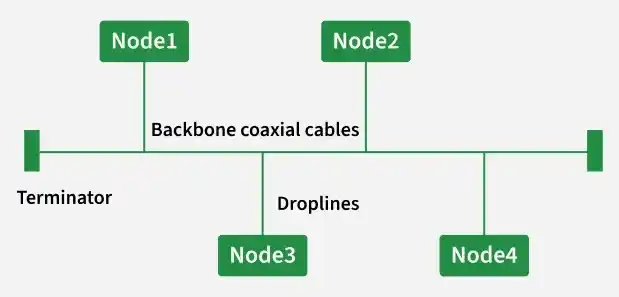
Bus Topology is a network structure in which all devices are connected to a single main communication cable called the backbone. Data sent by any device travels along this common cable and is received by the intended device.
- Uses a single backbone cable
- All devices share the same communication channel
- Terminators are placed at both ends of the cable
Advantages
- Simple and easy to implement
- Requires less cable compared to star topology
- Cost-effective for small networks
- Suitable for temporary network setups
Disadvantages
- Failure of backbone cable stops the entire network
- Difficult to troubleshoot issues
- Performance decreases with high traffic
- Limited scalability for large networks
**4. Ring Topology
Ring Topology is a network configuration in which each device is connected to two other devices, forming a closed circular path. Data travels around the ring in a fixed direction until it reaches its destination.
- Forms a continuous circular structure
- Each device acts as a repeater
- Data passes through intermediate devices
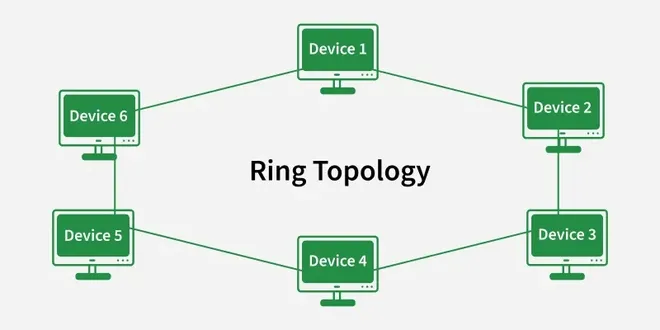
Ring
Advantages
- Reduces chances of data collision
- Provides equal access to all devices
- Performs well under consistent traffic load
- Suitable for orderly data transmission
Disadvantages
- Failure of one device can disrupt communication
- Troubleshooting can be difficult
- Adding or removing devices affects the network
- Slower compared to some modern topologies
5. Tree Topology
Tree Topology is a hierarchical network structure in which multiple star networks are connected to a central backbone cable. It combines features of both bus and star topologies and organizes devices in a parent–child arrangement.
- Follows a hierarchical structure
- Consists of root node and branch nodes
- Uses a backbone cable for connection
- Suitable for large networks
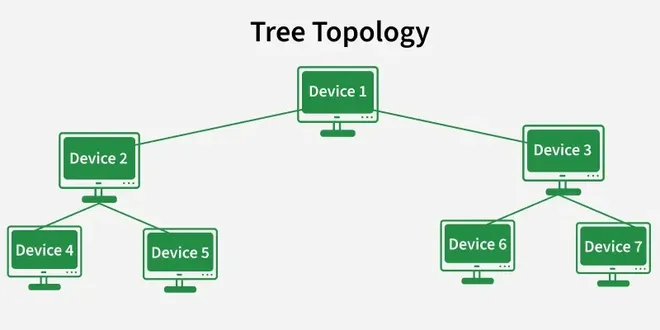
Tree
Advantages
- Easy to expand by adding new branches
- Supports structured network management
- Fault isolation is simpler
- Scalable for growing organizations
Disadvantages
- Backbone failure affects entire network
- Requires more cabling
- Configuration is complex
- Maintenance can be challenging
6. Hybrid Topology
Hybrid Topology is a network structure that combines two or more different types of topologies into a single system. It is designed to meet specific organizational requirements by integrating the strengths of multiple network layouts.
- Formed by combining different topologies
- Customized according to network needs
- Common in large enterprise environments
- Supports complex network structures
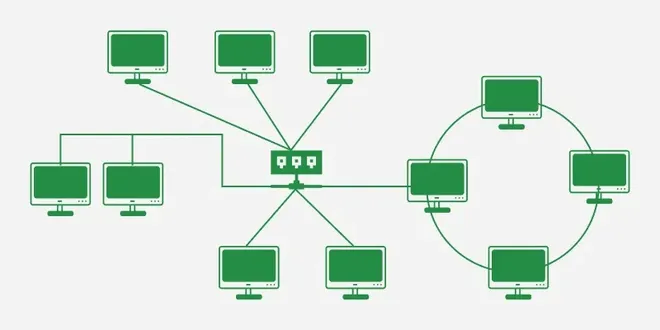
Hybrid
Advantages
- Flexible network design
- Scalable for future expansion
- Can improve reliability
- Allows optimization based on requirements
Disadvantages
- Expensive to implement
- Complex to design and manage
- Requires advanced hardware
- Maintenance can be difficult
7. Point to Point Topology
Point-to-Point Topology is a network configuration in which two devices are directly connected through a dedicated communication link. The connection is exclusive, meaning the entire bandwidth is used only between these two devices.
- Involves only two connected devices
- Uses a single dedicated link
- Data travels directly without intermediaries
- Simple network structure
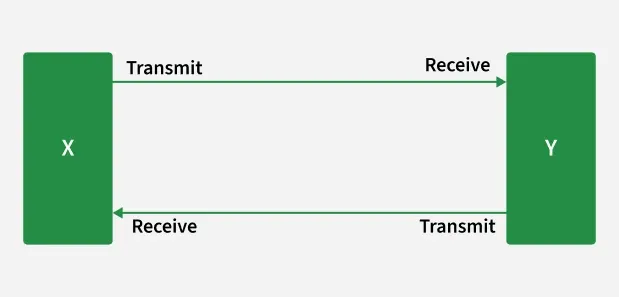
Point to Point
Advantages
- High data transfer speed
- Secure communication channel
- Easy to configure
- Low chances of data collision
Disadvantages
- Not suitable for large networks
- Limited scalability
- Link failure stops communication
- Inefficient for multiple device connections
**8. Daisy Chain Topology
Daisy Chain Topology is a network arrangement in which devices are connected sequentially, one after another, forming a linear chain. Each device is linked to the next device in the sequence.
- Devices are connected in series
- Data passes through intermediate devices
- Simple linear structure
- Often used in small or temporary networks
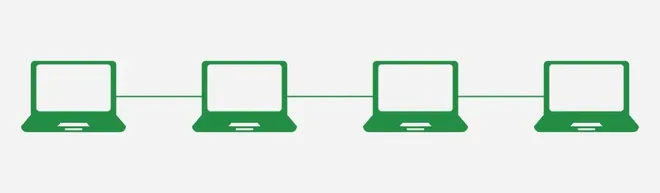
Daisy Chain
Advantages
- Easy to set up
- Requires less cabling than complex topologies
- Cost-effective for limited devices
- Simple expansion by adding devices at the end
Disadvantages
- Failure of one device can disrupt the chain
- Performance decreases as more devices are added
- Difficult to troubleshoot faults
- Not suitable for large-scale networks