POP Full Form (original) (raw)
Last Updated : 12 Jul, 2025
POP stands for **Point of Presence (or **Post Office Protocol). It refers to a connection point where many devices communicate and share a network. "**Point of presence" describes the separation point between a service provider's public network and the customer's private network. We can say that it is a man-made separation point. It consists of high-speed telecommunications equipment and technologies that help bring people from all over the internet together. This protocol is used to retrieve messages from a mail server. The Message Access Agent facilitates the transmission of the message from the receiving server to the host server. Both **POP and **POP3, they now become outdated and they are associated with email retrieval and now newer protocols like **IMAP, offering more flexibility. In this article we will see POP protocol in detail.
 **Characteristics of POP
- Post Office Protocol is an open protocol, defined by Internet RFCs.
- It allows access to new mail from a spread of client platform types.
- POP can handle email access only while the emails are sent by SMTP.
History of POP
The Internet Engineering Task Force published the POP (post office protocol) in 1984. The backend developers wanted to simplify the layout, therefore it underwent two updates after that.
POP2, or the second version of POP, was created in 1985 and requires the SMTP protocol to push emails. Subsequently, the SMTP protocol was not necessary for POP3, or the third version of POP, which was published in 1988. POP 3, or Post Office Protocol, is also included in well-known email programs like Outlook Express and Eudora. The POP3 has been the current version ever since 1988.
**Examples:
- **Carrier hotels : These buildings are extremely secure with size averaging around 54, 000 square feet. These hotels offer hardware and software installation, updation, and several other services.
- **Meet-me rooms : Meet-Me Rooms (MMRs) are small spaces inside carrier hotels, averaging around 5, 000 square feet. These small rooms house interconnect networking equipment owned by many telecommunication companies.
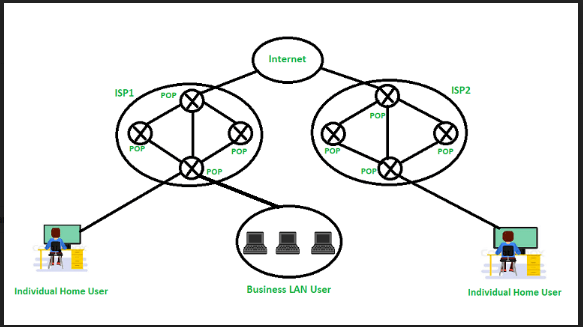
**Working of POP
Until the user logs in using an email client and downloads the message to their computer, all incoming messages are kept on the POP server. The message is removed from the server once it has been downloaded by the user.
Since SMTP is known to be the method used to move email messages from one server to another, POP essentially serves as a way to retrieve emails from servers using an email client; it does not offer a way to send messages.
A POP3 connection will be made on the server side whenever a user attempts to check all of their recent emails. To obtain the correct authentication, the user transmits the username and password to the server computer. Users can receive and keep all text-based emails on their local terminal (computer) after establishing a connection. They can subsequently delete any copies from the server and disconnect from the server. POP’s work is also based on below five important pieces of equipment:
- **Base stations - A central point of reference to an access point and bandwidth management to ensure even distribution of the connection speed of the customer.
- **Client equipment - Customers use client equipment to connect to base stations.
- **Network switches - Used for proper distribution
- **Routers - Provides multiple paths for the data to be shared in the network
- **Firewall - Used for securing the network from threats (internal and external)
**Advantages of POP
- The latest version of Post Office Protocol (POP3) is the most widely used protocol and is being supported by most email clients. It provides a convenient and standard way for users to access mailboxes and download messages. An important advantage of this is that the mail messages get delivered to the client's PC and they can be read with or without accessing the web.
- The creation of the latest messages is impossible without being logged onto the web.
- All messages get stored on the disc drive of your computer.
- Easy to use and configure.
- There isn't any maximum size on your mailbox, except as determined by the scale of your disc drive.
**Disadvantages of POP
- Consumes large memory as all the messages are stored on the disc drive
- Opening attachments may be a fast process unless the attachment contains a virus.
- Since all attachments get downloaded on your computer, there's a danger of a virus attack if they're not
scanned by antivirus software. - It is not easy to export a local mail folder to another physical machine or another mail client.
Commands Used in POP
There are basic commands used in Post Office Protocol, some of them are mentioned below:
- **LOGIN: To establish a connection, use this command.
- **STAT: This command shows all of the incoming and outgoing emails in the inbox.
- **DELE: To delete a message from the system, use this command.
- **RSET: This command is primarily used to set the session back to its initial configuration.
- **QUIT: This command ends the user's current session.
- **LIST: This command is mostly used to retrieve a message's summary, which is shown on the screen.
- **RETR: The primary purpose of this command is to select a mailbox from which to see messages.
Conclusion
**POP is a widely used way to download emails from a server to a computer for many years. It is served as an essential email retrieval protocol, specially with its latest version which is POP3. In spite being used for many years it has some limitations like often deleting emails from the server once download and not being able to access emails easily from multiple devices. These limitations makes is less popular than the newer protocols like IMAP. IMAP helps to overcome the limitation of POP by allowing users to view emails their emails from multiple devices without removing them from the server. But still, POP is useful in many Use cases where offline access of email is required by users.