Routing Information Protocol (RIP) (original) (raw)
Last Updated : 15 Jan, 2026
The Routing Information Protocol (RIP) is designed to help routers determine the best path for sending data packets across a network. It uses hop count as its routing metric and is primarily used in small to medium-sized networks due to its scalability limitations.
- RIP operates at the Network Layer (Layer 3) of the OSI model and maintains routing tables on each router.
- Every 30 seconds, routers exchange their complete routing tables with neighbours using periodic updates.
- The hop count metric defines the number of routers a packet must pass through to reach its destination.
**Note: RIP supports a maximum hop count of 15, which limits its use in larger networks. A hop count of 16 is considered unreachable.
**Hop Count
Hop count is a routing metric that represents the total number of routers a data packet must pass through to travel from the source device to the destination device.
- Each router crossed by a packet is counted as one hop.
- Used by routing protocols like RIP to determine the best path.
- RIP selects the route with the lowest hop count as the optimal route.
- The maximum hop count in RIP is 15; a hop count of 16 is considered unreachable.
- Limiting the hop count helps prevent routing loops.
- This limitation reduces RIP’s scalability, making it unsuitable for large networks.
Features of RIP
- Exchanges updates periodically (every 30 seconds).
- Broadcasts (RIPv1) or multicasts (RIPv2/RIPng) routing information.
- Sends entire routing tables in updates.
- Works on the principle of routing by rumour (trusting neighbours’ information).
- Uses route poisoning and split horizon to avoid routing loops.
How RIP Works
Routing Information Protocol (RIP) is a distance-vector routing protocol that determines the best path to a destination network based on hop count.
- Each router maintains a routing table containing distances to all known networks.
- Routers periodically exchange routing information with neighboring routers.
- Every 30 seconds, routers broadcast or multicast their entire routing table.
- If a router learns a shorter path, it updates its routing table accordingly.
- If a route is not updated within 180 seconds, it is marked as invalid.
- If the route remains unused for 240 seconds, it is removed (flushed) from the routing table.
- These timers help maintain accurate routing information and prevent stale routes.
Types of RIP Versions
| Feature | RIPv1 (1988) | RIPv2 (1993) | RIPng (1997) for IPv6 |
|---|---|---|---|
| Updates sent via | Broadcast (255.255.255.255) | Multicast (224.0.0.9) | Multicast (FF02::9) |
| Addressing | Classful (no subnet info) | Classless (includes subnet mask) | Classless (IPv6 only) |
| Authentication | Not supported | Supported | Supported |
| IP version supported | IPv4 only | IPv4 only | IPv6 only |
RIP Timers
- **Update Timer: Default 30 seconds (interval between updates).
- **Invalid Timer: 180 seconds (route not updated = marked invalid).
- **Hold-down Timer: 180 seconds (time to suppress unstable routes).
- **Flush Timer: 240 seconds (time before removing invalid routes).
**Note: Adjustable using the timers basic command.
RIP Configuration Example
Consider three routers (R1, R2, R3) connected in a network. Configuration on each router:
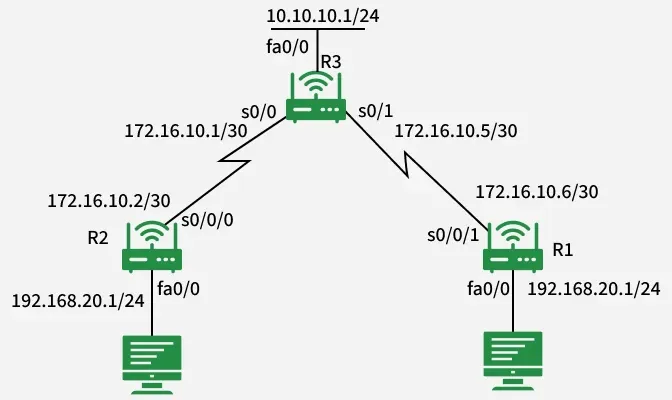
RIP Configuration
For R1
R2(config)# router rip
R2(config-router)# version 2
R2(config-router)# no auto-summary
R2(config-router)# network 192.168.10.0
R2(config-router)# network 172.16.10.0
For R2
R2(config)# router rip
R2(config-router)# version 2
R2(config-router)# no auto-summary
R2(config-router)# network 192.168.10.0
R2(config-router)# network 172.16.10.0
For R3
R3(config)# router rip
R3(config-router)# version 2
R3(config-router)# no auto-summary
R3(config-router)# network 10.10.10.0
R3(config-router)# network 172.16.10.0
R3(config-router)# network 172.16.10.4
Useful Commands
- debug ip rip -> Monitor RIP updates in real time.
- show ip route -> Display the routing table.
- show ip protocols -> Display routing protocols in use.
Where is RIP Used?
- Small to medium-sized networks with simple routing needs.
- Legacy networks that were built before OSPF/EIGRP became standard.
- Educational labs for training and learning routing basics.
- Backup routing protocol in case the primary protocol fails.