SAML Authentication (original) (raw)
Last Updated : 1 Jun, 2026
SAML is an XML-based open standard used to securely exchange authentication and authorization data between identity providers and service providers. It enables Single Sign-On (SSO), allowing users to authenticate once and access multiple applications without repeated logins.
- Uses standardized XML assertions to share identity and access information securely between parties.
- Eliminates multiple logins by supporting SSO across applications.
- Enables centralized authentication through an Identity Provider (IdP).
- Establishes a trust relationship where Service Providers rely on Identity Providers to authenticate users.
- Widely used in enterprise environments for secure access to multiple SaaS and internal applications.
Core Components of SAML
SAML works by defining clear roles for the parties involved in an authentication request:
- **The User (Principal): The person trying to access a service.
- **The Identity Provider (IdP): The system that manages and authenticates the user's identity. It is the "source of truth" for who the user is. Examples include Google, Okta, Microsoft Entra AD, and Auth0.
- **The Service Provider (SP): The application or service that the user wants to access. The SP trusts the IdP to handle authentication. Examples include Salesforce, Slack, and Gmail.
SAML Authentication Workflow
The most common SAML workflow is SP-initiated. Here is a step-by-step breakdown:
- **User Accesses Service: The user navigates to the Service Provider (e.g., gmail.com).
- **SP Crafts SAML Request: The SP detects that the user is not logged in and generates an XML-based SAML authentication request.
- **Browser Redirect to IdP: The SP redirects the user's browser to the Identity Provider (e.g., accounts.google.com), sending the SAML request along with the redirect.
- **IdP Authenticates User: The IdP receives the request and prompts the user to log in with their credentials (e.g., username, password, MFA). If the user already has an active session with the IdP, this step may be skipped.
- **IdP Generates SAML Response: After successful authentication, the IdP creates a SAML Response — an XML document containing a digitally signed Assertion that acts as proof of the user's identity and any relevant attributes (such as email or role).
- **Browser Sends Response to SP: The IdP sends the encoded SAML Response back to the user's browser, which automatically forwards it to the Service Provider's Assertion Consumer Service (ACS) URL.
- **SP Verifies and Logs In: The SP receives the SAML Response, uses a pre-configured public key from the IdP to verify the digital signature on the Assertion, creates a local session, and grants access.
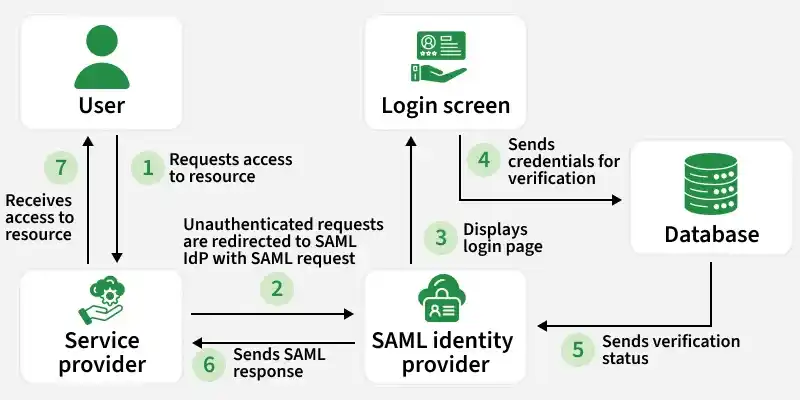
SAML Authentication Workflow
Key Elements of a SAML Request
A SAML request contains important data that ensures secure and correct authentication:
- **ID: A unique identifier for the SAML authentication request, used to match the request with the response.
- **Issuer: The name of the Service Provider (SP) that is initiating the request.
- **NameID: The user's identifier, often their email address or username.
- **AssertionConsumerServiceURL: The endpoint URL on the Service Provider where the IdP sends the authentication response.
SAML Response Structure
The SAML response is divided into two main parts:
- **Assertion: An XML document containing details about the user, such as the login event's timestamp and the authentication method used (e.g., password, MFA, or Kerberos).
- **Signature: A Base64-encoded digital signature value that ensures the integrity and authenticity of the assertion. If an attacker modifies the SAML response — for example, changing the NameID to impersonate another user — the signature check will detect the tampering.
Key Generation in SAML Authentication
The process of signing and verifying the SAML response involves asymmetric key generation:
- **Private Key: The Identity Provider (IdP) holds a private key used to digitally sign the SAML assertion.
- **Public Key: The Service Provider (SP) receives the IdP's corresponding public key, used to verify the authenticity of the SAML response before granting access.
This public/private key pair ensures that only valid, IdP-signed responses are accepted, providing a strong layer of security.
Vulnerabilities and Best Practices for SAML
While SAML is a mature and secure protocol, misconfigurations can lead to serious vulnerabilities.
1. Improper Signature Validation
- **Vulnerability: An SP might not check the digital signature at all, or only check it when it is present. This allows an attacker to modify the NameID in a captured SAML response, strip the invalid signature, and replay the response to impersonate another user.
- **Best Practice: Always require and validate the signature. The SP must reject any SAML assertion that is unsigned or whose signature does not match the IdP's public key.
2. SAML Replay Attacks
- **Vulnerability: An attacker could intercept a valid SAML response and "replay" it later to gain unauthorized access.
- **Best Practice: The SP must strictly enforce the "Conditions" element of the assertion, especially the "NotOnOrAfter" timestamp, to ensure expired assertions are always rejected.
- **Vulnerability: Some vulnerable XML parsers can be tricked by XML comments inside a NameID value. An attacker may craft a NameID that appears as their own account but is interpreted as a victim's account, allowing unauthorized login.
- **Best Practice: Use up-to-date, secure XML parsing libraries that correctly handle comments and other XML edge cases. This vulnerability class was demonstrated in CVE-2018-7340 (Duo Network Gateway).
**Note: XML comment injection exploits how different parsers read the same NameID value, not a registration bypass.
SAML vs. OAuth/OIDC
SAML, OAuth 2.0, and OpenID Connect are three widely used protocols that are often conflated. Each solves a distinct problem, verifying who the user is, deciding what they can access and combining both in a modern lightweight package.
| **Feature | **SAML 2.0 | **OAuth 2.0 | **OpenID Connect (OIDC) |
|---|---|---|---|
| **Primary Goal | **Authentication (IdP confirms user identity to an SP). | **Authorization (User grants app access to specific data). | **AuthN + AuthZ (Identifies user _and grants permissions). |
| **Data Format | **XML (Structured Assertions). | **Opaque Tokens or JSON (Access Tokens). | **JWT (JSON Web Tokens - ID Tokens). |
| **Transport | Browser-only (HTTP POST/Redirect). | API-centric (HTTP Headers/Back-channel). | API-centric + Browser redirects. |
| **Token Validity | Short-lived assertions (usually 5–10 mins). | Short-lived Access Tokens + **Refresh Tokens. | ID Token (session) + Refresh/Access Tokens. |
| **Trust Model | Pre-configured (XML Metadata Exchange). | Dynamic (Scopes and Consent screens). | Semi-dynamic (Discovery endpoints). |
| **Session Control | Managed by IdP (Single Log-Out is hard). | Managed by Auth Server (Token revocation). | Standardized "Logout" & "Check Session". |
| **User Info Access | Assertions contain all info at login. | Requires extra API call to Resource Server. | Standardized /userinfo endpoint. |
| **Mobile Suitability | **Poor (Hard to handle XML/Redirects). | **Excellent (Native app support). | **Excellent (Native/Web hybrid). |
When to Use SAML, OIDC, or OAuth
SAML, OAuth, and OIDC are not strict alternatives ; they are complementary technologies that can work together.
- **SAML: Best for enterprise SSO scenarios requiring centralized authentication across internal or SaaS applications, especially where legacy systems are involved.
- **OAuth 2.0: Best for delegating API access to third-party applications without sharing user credentials. Common in mobile apps and integrations.
- **OIDC: Best for modern web and mobile applications that need both authentication and secure API access. As a superset of OAuth 2.0, it combines identity verification with authorization in a lightweight, JSON-based flow.