Virtual LAN (VLAN) (original) (raw)
Last Updated : 9 Apr, 2026
A Virtual LAN (VLAN) is a logical grouping of devices within a network that allows them to communicate as if they are on the same local network, even if they are physically connected to different switches.
- It reduces unnecessary broadcast traffic, enhances security, and improves network performance, flexibility, and manageability.
- Traditionally, broadcast domains were separated using Layer 3 devices (routers).
- **Same VLAN: Devices communicate directly within the same broadcast domain.
- **Different VLANs: Communication requires Inter-VLAN Routing via a router or a Layer 3 switch (SVI).
VLAN ID Ranges (Cisco Standard)
- **VLAN 0 and VLAN 4095: Reserved VLAN IDs are defined by IEEE 802.1Q and used internally for protocol operations and cannot be configured or assigned to ports.
- **VLAN 1 (Default VLAN): The default VLAN on Cisco switches and all switch ports are assigned to VLAN 1 by default. It cannot be deleted and is commonly used for control and management protocols such as STP, CDP, and VTP.
- **VLAN 2 to VLAN 1001 (Normal VLAN Range): This range is used for regular VLAN configuration. VLANs in this range are fully configurable, editable, and delectable, and are stored in the switch’s VLAN database.
- **VLAN 1002 to VLAN 1005: Reserved VLANs for legacy network technologies such as FDDI and Token Ring. These VLANs are predefined and cannot be removed, even if the technologies are no longer in use.
- **VLAN 1006 to VLAN 4094 (Extended VLAN Range): Designed for large-scale networks requiring a high number of VLANs. VLANs in this range are stored in the **running configuration and typically require the switch to operate in VTP transparent mode.
VLAN Configuration Example
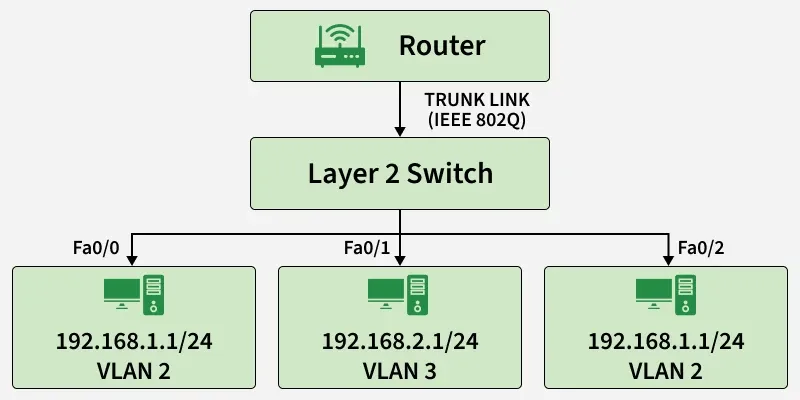
VLAN Configuration
**Create VLANs
Switch(config) vlan 2Switch(config-vlan) name Accounts
Switch(config) vlan 3
Switch(config-vlan) name HR
**Assign switch ports to VLANs
Switch(config) interface fa0/0Switch(config-if) switchport mode access
Switch(config-if) switchport access vlan 2
Switch(config) interface fa0/1
Switch(config-if) switchport mode access
Switch(config-if) switchport access vlan 3
Here, port Fa0/0 is assigned to VLAN 2 and port Fa0/1 is assigned to VLAN 3. Since these VLANs are separate broadcast domains, devices in different VLANs require inter-VLAN routing to communicate with each other.
Types of VLAN Links
- **Access Link: Connects a VLAN-unaware end device (such as a PC) to a VLAN-aware switch. Frames transmitted over an access link are untagged and belong to a single VLAN.
- **Trunk Link: Connects VLAN-aware devices such as switch-to-switch or switch-to-router links. It carries traffic from multiple VLANs using IEEE 802.1Q tagging.
- **Hybrid Link: Supports both tagged and untagged frames on the same link. It is typically vendor-specific and not part of the IEEE 802.1Q standard.
Features
- **VLAN Tagging (IEEE 802.1Q): Inserts a 4-byte VLAN tag into Ethernet frames to identify the VLAN to which the frame belongs.
- **VLAN Membership: Devices can be assigned to VLANs based on switch port, MAC address, or protocol type.
- **VLAN Trunking: Allows multiple VLANs to share a single physical link between VLAN-aware devices.
- **Dynamic VLANs: VLAN membership is automatically assigned to devices based on predefined policies or authentication mechanisms.
Real-Time Applications
- **VoIP (Voice over IP): Dedicated voice VLANs ensure Quality of Service (QoS) by prioritizing voice traffic.
- **Video Conferencing: VLAN prioritization helps reduce latency and jitter, improving call quality.
- **Cloud and Data Centers: VLANs provide logical isolation of tenant workloads for security and traffic separation.
- **IoT Networks: VLANs segment IoT devices to limit access and reduce security risks.
- **Gaming Networks: VLANs can prioritize gaming traffic to minimize lag and packet loss.
- **Remote Access: Secure VLANs support VPN users and external connections while maintaining network isolation.
Advantages
- **Improved Security: Sensitive traffic is isolated within separate VLANs.
- **Enhanced Performance: Limits broadcast and multicast traffic, reducing unnecessary network load.
- **Simplified Management: Logical grouping of users or departments (e.g., HR, Finance) simplifies administration.
- **Flexibility: Devices can be moved between VLANs without physical cable changes.
- **Cost Efficiency: Reduces the need for multiple physical networks and excessive routing hardware.
- **Scalability: Large networks can be divided into manageable segments.
Disadvantages
- **Increased Configuration Complexity: Requires careful planning and configuration.
- **VLAN ID Limitations: Standard VLAN IDs are limited, which can affect very large networks.
- **Security Risks: Misconfigurations may allow VLAN hopping attacks.
- **Interoperability Issues: Compatibility problems may arise with non-standard or legacy devices.
- **Troubleshooting Difficulty: Isolated traffic flows can make fault diagnosis more complex.