TimeToLive (TTL) (original) (raw)
Time-To-Live (TTL)
Last Updated : 13 Apr, 2026
Time-To-Live (TTL) defines how long data is considered valid in a network or system before it expires. It helps ensure that outdated information is automatically removed and refreshed when needed.
- Controls the lifespan of data to prevent outdated or stale information from being used.
- Helps improve network efficiency by limiting unnecessary data circulation.
- Commonly used in systems like DNS caching and content delivery networks (CDNs).
**Example: When you visit a website, its IP address is stored in your DNS cache with a TTL value. If you revisit the site before the TTL expires, the cached IP is used; otherwise, a new DNS lookup is performed to fetch updated information.
Working
TTL represents the hop limit, meaning how many routers a packet can pass through before being discarded.
- Sending host sets the initial TTL value as a 8 binary field in the packet header.
- Datagram's TTL field is set by the sender and reduced by each router along the path to its destination.
- The router reduces the TTL value by at least one while forwarding IP packets.
- When the packet TTL value hits 0, the router discards it and sends an ICMP message back to the originating host.
- This system ensures that a packet moving via the network is dropped after a set amount of time.
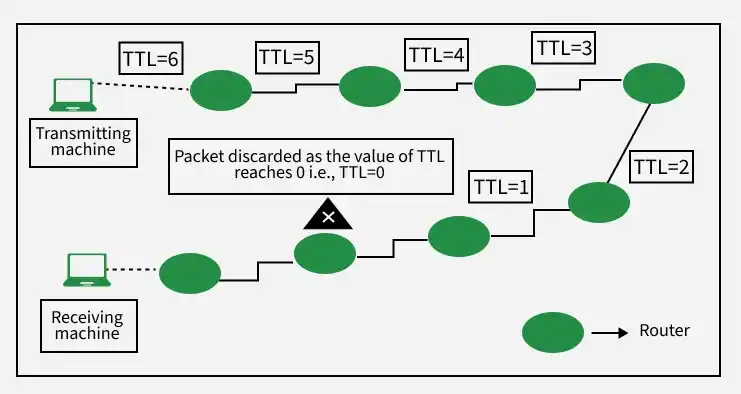
Working of TTL
Example
Host A sends a ping packet to Host B with an initial TTL value of 225.
- Host A sends a packet with an initial TTL value of 255.
- Router A decrements the TTL to 254 and forwards it to Router B.
- Router B reduces the TTL to 253 and sends it to Router C.
- Router C decreases the TTL to 252 and forwards it further.
- The packet reaches Host B with a TTL value of 252.
- If the TTL reaches 0 at any router, the packet is discarded.
- An ICMP Time Exceeded message is sent back to the originating host.
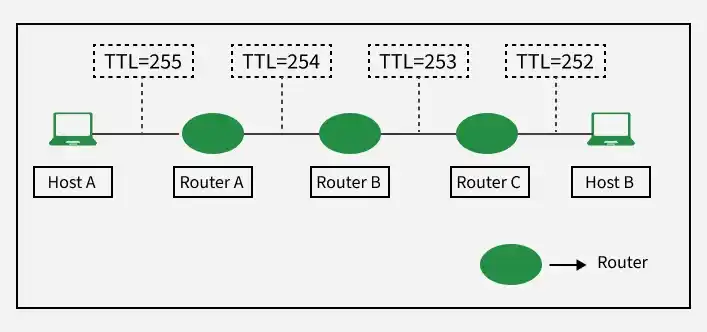
Example of TTL
TTL in DNS
TTL in DNS defines how long a DNS record is stored in cache before it is refreshed. It is a numerical value set in a DNS record on the domain's authoritative domain name server.
- Specifies the number of seconds the cache record can be used.
- After TTL expires, the cache server requests updated data from the authoritative server.
- Helps balance peformance and data freshness.
TTL in HTTP
Time-to-Live (TTL) in HTTP defines how long a resource can be cached before it must be refreshed.
- Measured in seconds and controlled using headers like Cache-Control
- Example: max-age=60 means the resource is cached for 60 seconds
- max-age=0 means the resource should not be cached
- Impacts page load speed (caching improves performance)
- Affects content freshness (long TTL may serve outdated data)
TTL Configuration Guidelines
- Static content (images, documents): use longer TTL as they rarely change
- Dynamic content (HTML, user-generated data): use short TTL or avoid caching
- Frequently changing sections (e.g., comments): caching is generally not recommended
TTL Exceeded
TTL Exceeded occurs when an IP packet’s TTL value reaches 0 before it reaches its destination.
- Each router decreases the TTL value by 1 at every hop
- When TTL becomes 0, the router discards the packet
- The router sends an ICMP Time Exceeded message back to the sender
- Helps identify network issues using tools like traceroute
Application of TTL
The TTL value is used in the network utilities such as ping, traceroute, and pathping.
1. The ping command is used to test the reachability of the destination computer. It verifies whether the communication can take place between the source and destination computer or a networked device.
2. It works by sending ICMP Echo request messages to the target computer and then waiting for the response.
3. The execution of the ping command gives two important pieces of information: how many responses are returned and how long it takes for them to return.

ping command
4. The **tracert/traceroute command is used to trace the path between two devices.
5. There are multiple routers in the path using which connection is established. So, it will provide the names or IP Addresses of routers existing in the path of two connecting devices.

tracert command
6. In Internet Protocol (IP) multicast, TTL may have control over the packet forwarding scope or range.
- TTL 0: restricted to the same host
- TTL 1: restricted to the same subnet0 is restricted to the same host
- TTL 32: restricted to the same site
- TTL 64: restricted to the same region
- TTL 128: restricted to the same continent
- TTL 255: unrestricted
7. TTL is also employed in caching for Domain Name Systems (DNS). TTL is a numerical value that refers to the duration used herein by the DNS Cache server for serving a DNS record before contacting the authoritative server to get a new copy.
Time Limit or Hop Limit in TTL
Time-To-Live (TTL) defines the maximum number of hops a packet can travel in a network, and in IPv6 it is referred to as the Hop Limit.
- In IPv4, the field is called TTL, while in IPv6 it is called Hop Limit.
- Each router decreases the value by at least 1 when forwarding a packet.
- When the value reaches 0, the packet is discarded and an ICMP message is sent.
- Prevents packets from looping indefinitely and causing network congestion.
- Helps maintain stability and efficient functioning of the network.
Common TTL Values
TTL values define how long DNS records are cached before being refreshed, helping balance performance and update frequency.
- Typical TTL value is 86400 seconds (24 hours)
- MX and CNAME records often have longer TTL as they change less frequently
- For critical services, a TTL of 3600 seconds (1 hour) is recommended
- Longer TTL improves performance but may delay propagation of changes
- TTL is often reduced before migrating services to minimize downtime
Additional Uses of TTL
- Used in IoT network to manage the lifespan of the messages to stop outdated message from circulating in the network.
- Prevent routing loops in routing protocols by using hop count limit which ensures that the information does not propagate indefinitely.
- It helps manage the network load in P2P network and prevents the requests from propagating endlessly.
- It is used to manage the duration of VPN sessions by terminating the connection after a predetermined time.
- It provides a set time limit for validation of transactions in blockchain.