What is WiFi? (original) (raw)
What is Wi-Fi?
Last Updated : 20 Apr, 2026
Wireless networking technology enables devices such as smartphones, laptops, and smart gadgets to connect to the internet and communicate with each other without the use of physical cables. It uses radio waves through a router to provide seamless internet access and local connectivity in homes, offices, and public spaces. This system is commonly known as Wi-Fi.
Wireless Internet Connection Diagram
Wireless Access Point
WAP means a wireless access point is the networking device that allows WiFi-enabled devices to connect to the wired network. It acts as the central hub broadcasting the Wi-Fi signal that devices can detect and join. Access points are commonly used to extend the range of existing networks, create separate network segments, or provide Wi-Fi connectivity in large spaces like offices, schools or public areas. They can be standalone devices or integrated into a router and they enable multiple devices to access network resources and the internet wirelessly within their coverage area.
Applications of Wi-Fi
- Wi-Fi enables wireless internet access on devices like smartphones, laptops, and tablets, allowing users to browse, stream, and communicate without cables. It also supports fast file sharing, data transfer, and wireless printing between devices.
- It is widely used in hotspots to provide temporary internet access in public areas such as cafes, airports, and campuses. Wi-Fi also enables point-to-point connections between distant locations where wired connections are not feasible.
- In modern communication, VoWi-Fi (Voice over Wi-Fi) allows users to make calls using internet networks instead of cellular networks, improving call quality. It is also extensively used in homes, offices, schools, and large organizations for seamless and flexible network connectivity.
Types of Wi-Fi
| Standards | Year of Release | Description |
|---|---|---|
| Wi-Fi-1 (802.11b) | 1999 | This version has a link speed from 2Mb/s to 11 Mb/s over a 2.4 GHz frequency band |
| Wi-Fi-2 (802.11a) | 1999 | After a month of release previous version, 802.11a was released and it provide up to 54 Mb/s link speed over 5 Ghz band |
| Wi-Fi-3 (802.11g) | 2003 | In this version the speed was increased up to 54 to 108 Mb/s over 2.4 GHz |
| 802.11i | 2004 | This is the same as 802.11g but only the security mechanism was increased in this version |
| 802.11e | 2004 | This is also the same as 802.11g, only Voice over Wireless LAN and multimedia streaming are involved |
| Wi-Fi-4 (802.11n) | 2009 | This version supports both 2.4 GHz and 5 GHz radio frequency and it offers up to 72 to 600 Mb/s speed |
| Wi-Fi-5 (802.11ac) | 2014 | It supports a speed of 1733 Mb/s in the 5 GHz band |
Types of Wi-Fi Connections
1. LAN (Local Area Network)
A LAN operates within a limited area like an office building or home, connecting various devices such as computers, printers, and storage devices. It uses components like switches, routers, and cables, with Wi-Fi being the most common wireless form of LAN. Think of it as a network that serves a single location.
2. PAN (Personal Area Network)
A PAN is the smallest network type, centered around one person's devices in a specific location, typically connecting personal gadgets like phones, computers, and gaming consoles. Bluetooth is the most well-known wireless PAN technology. These networks are perfect for personal use in homes or small offices.
3. MAN (Metropolitan Area Network)
A MAN covers a larger geographical area than a LAN, typically spanning across a city, college campus, or business complex. It's designed to connect multiple locations within a metropolitan area, making it ideal for organizations that need to manage systems across several buildings or facilities.
4. WAN (Wide Area Network)
A WAN is the largest network type, covering vast geographical areas like cities, countries, or even the entire globe - the Internet being the most famous example. It can encompass multiple smaller networks like LAN and MAN, and cellular networks are the most common type of wireless WAN.
Working of Wi-Fi
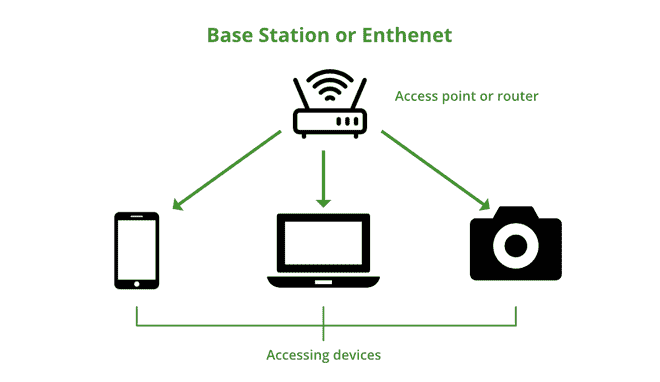
Wi-Fi is a wireless technology for networking, so it uses Electromagnetic waves to transmit networks. We know that there are many divisions of Electromagnetic waves according to their frequency such as X-ray, Gamma-ray, radio wave, microwave, etc, in Wi-Fi, the radio frequency is used. For transmitting Wi-Fi signal there is three medium,
- **Base Station Network or an Ethernet(802.3) Connection: It is the main host network from where the network connection is provided to the router.
- **Access Point or Router: it is a bridge between a wired network and a wireless network. It accepts a wired Ethernet connection and converts the wired connection to a wireless connection and spreads the connection as a radio wave.
- **Accessing Devices: It is our mobile, computer, etc from where we use the Wi-Fi and surfing internet.

Working of Wi-Fi
All the electronics devices read data in binary form, also router or our devices, here routers provide radio waves and those waves are receive by our devices and read the waves in binary form. We know how a wave looks like a upper pick of the wave is known as a 1 and the lower pick of the wave is known as the 0 in a binary as mentioned below :
- **SSID (Service Set Identifier): This 32 character name that identifies the Wi-Fi network and differentiates the one Wi-Fi from a another Wi-Fi. All the devices are attempting to connect a particular SSID. A SSID is the name of a wireless network.
- **WPA-PSK (Wi-Fi Protected Access- Pre-Shared Key): The program developed by Wi-Fi Alliance Authority to secure a wireless networks with a use of a Pre Shared Key authentication. The WPA has a 3 types such as WPA, WPA2 and a WPA3. It is a way of encrypting a Wi-Fi signal to protect from a unwanted users.
- Wi-Fi uses Ad-Hoc networks to transmit. It is a point-to-point network without any interface.

Data transmission
Setting Up a Home Wi-Fi Connection
Step 1: Choose a Reliable ISP
Research and compare major Internet Service Providers in your area like Jio Fiber, Airtel Xstream, BSNL Broadband, or ACT Fibernet. Check the available plans, speed options, and customer reviews for these providers in your locality. Visit their websites or local offices to verify coverage at your address and select a plan that suits your needs.
Step 2: Get the Right Equipment
Most Indian ISPs provide their own Wi-Fi router or ONT (Optical Network Terminal) as part of the connection package. If you're getting a fiber connection from providers like Jio or Airtel, they'll typically provide an ONT/modem and router combo device. For non-fiber connections, you may need a separate router, which your ISP can provide or you can purchase from brands like TP-Link or D-Link.
Step 3: Optimal Router Placement
Place your router in a central, elevated location in your home, away from metal objects, thick walls, and electronic devices. Avoid keeping it in closed spaces like cupboards or behind furniture for better signal strength. For multi-story homes, consider placing it on the middle floor for optimal coverage.
Step 4: Installation and Support
Most Indian ISP include free installation with their broadband plans, and a technician will visit your home to set up the connection. The technician will handle cable laying, router installation, and initial configuration of your Wi-Fi network. For post-installation support, you can contact your ISP's customer care (like Jio at 198, Airtel at 198, or BSNL at 1800-345-1500).
Advantages of Wi-Fi
- The Wi-Fi allows easy cable-free connection to the internet from multiple devices. Users can access the network from anywhere within a range enhancing mobility and flexibility.
- The Wi-Fi networks eliminate the need for extensive cabling, reducing installation and maintenance costs. It is particularly beneficial for the businesses and a large spaces.
- The Wi-Fi networks can be easily expanded to a accommodate more devices. Adding new devices does not require the additional infrastructure making it more scalable for the growing needs.
Disadvantages of Wi-Fi
- The WiFi networks are vulnerable to a hacking and unauthorized accesses if not secured. This can lead to the data breaches and a privacy concerns for all the users.
- The Wi-Fi signals can be affected by the physical obstacles and a interference from other devices. This can result in a slower speeds or dropped connections especially at a greater distances from the router.
- The Wi-Fi routers require a electricity to function. During the power outages the network becomes inaccessible potentially disrupting the important communications or work.