Computer (original) (raw)
Last Updated : 15 Jul, 2025
A computer is an electronic device that processes data using programmed instructions to perform tasks like calculations, data storage, and information management. It takes input (via keyboards, sensors, etc.), processes it, and delivers output (on screens, printers, etc.) to solve problems or complete activities.
**Where Does the Word 'Computer' Come From? (From Humans to Machines)
The word “computer” originally meant **a person (not a machine!) who did math calculations by hand. For example, in 1613, it was used to praise someone as a “calculator of time.” Back then, a “computer” was just a human doing math. Even by the 1940s, many “computers” were women, as they were hired for this work (often paid less than men).
The term evolved slowly:
- **1640s: It meant “someone who calculates.”
- **1897: It started being used for early _machines that calculate.
- **1940s: It finally meant the modern “programmable electronic computer” we know today.
So, the word shifted from describing _people doing math to _machines as technology advanced!
History of Computers
An overview of how computing has evolved over centuries, from ancient calculation tools to today’s cutting-edge AI-powered supercomputers.
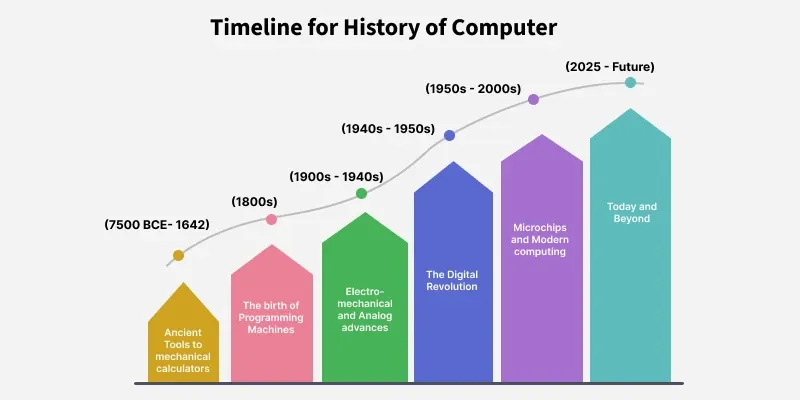
History of Computers
**Ancient Tools to Mechanical Calculators (7500 BCE - 1642)
Humans have used tools for calculations for millennia. Early aids included **tally sticks (prehistoric Africa’s Ishango bone) and **clay tokens (Fertile Crescent, 7500 BCE). The **abacus (2400 BCE) and devices like the **Antikythera mechanism (100 BCE, Greece)—an ancient astronomical “computer”—laid the groundwork. By the 17th century, innovations like **slide rules (1620s) and **mechanical calculators (Pascal’s Pascaline, 1642) emerged.
**The Birth of Programmable Machines (1800s)
In the 1800s, **Charles Babbage designed the first mechanical computer: the **Analytical Engine. Though never built, it featured concepts like loops, memory, and punch-card programming—a blueprint for modern computers. Meanwhile, **Ada Lovelace wrote the first algorithm, earning her the title of the first programmer.
**Electromechanical & Analog Advances (1900s - 1940s)
By the early 20th century, **electromechanical machines bridged mechanics and electronics:
- **Konrad Zuse’s Z3 (1941): The first programmable digital computer.
- **Colossus (1943): Britain’s WWII code-breaking machine, using vacuum tubes.
Analog computers like **differential analyzers (1920s) solved complex equations but were limited to specific tasks.
**The Digital Revolution (1940s - 1950s)
The **1940s–1950s saw the rise of fully electronic computers:
- **ENIAC (1945): The first general-purpose electronic computer, weighing 30 tons.
- **Manchester Baby (1948): The first stored-program computer, running software from memory.
**Transistors (1947) replaced bulky vacuum tubes, making computers smaller, faster, and more reliable.
**Microchips & Modern Computing (1950s - 2000s)
- **Integrated Circuits (1958): Jack Kilby and Robert Noyce’s microchips revolutionized electronics, enabling **microprocessors (Intel 4004, 1971).
- **Personal Computers (1970s–1980s): Devices like the IBM PC and Apple II brought computing to homes.
- **Mobile Revolution: **Smartphones (2000s) and **System-on-Chip (SoC) tech packed entire computers into pocket-sized devices.
**Today & Beyond (2025 - Future)
Modern computers—from laptops to AI-powered supercomputers—are built on **billions of transistors in chips smaller than a coin. Innovations like quantum computing and AI continue to redefine possibilities
**Types of Computers
Computers can be categorized in multiple ways based on their size, functionality, purpose, and design. Here’s a most common classifications:
**I) By Architecture
- **Analog Computer: Uses continuous physical data (e.g., thermometers, old mechanical calculators).
- **Digital Computer: Processes binary data (0s/1s) – _most modern devices.
- **Hybrid Computer: Combines analog and digital features (e.g., medical equipment).
- **Von Neumann Architecture: Common design with shared memory for data and programs.
- **Harvard Architecture: Uses separate memory for data and instructions (e.g., microcontrollers).
- **CISC/RISC: Processor types – Complex (CISC) vs. Simplified (RISC) instruction sets.
**II) By Size & Purpose
**Large-Scale Systems
- **Supercomputer: Solves massive calculations (climate modeling, AI).
- **Mainframe: Handles data for large organizations (banks, governments).
- **Server: Manages networks (rackmount, blade, or tower designs).
**Personal & Portable
- **Desktop PC: Tower, slimline, all-in-one, or gaming rigs.
- **Laptop: Standard, gaming, rugged, 2-in-1, or ultra-thin (Ultrabook/Chromebook).
- **Mobile Devices: Smartphones, tablets, wearables (smartwatches/glasses).
**Compact/Specialized
- **Embedded Systems: Built into appliances, cars, or IoT devices.
- **Single-Board Computers: Raspberry Pi, Arduino.
- **Stick PCs/Mini PCs: Tiny devices (e.g., Intel Compute Stick).
- **System-on-Chip (SoC): Entire computer on one chip (smartphones, APUs).
**III) By Use Case
- **Workstation: High-performance for tasks like 3D rendering.
- **Gaming PC/Laptop: Optimized for graphics and speed.
- **Industrial PCs: Rugged machines for factories or labs.
- **Thin Client/Netbook: Basic devices for web/cloud tasks.
Components of Computer
A computer system is built with **hardware (physical parts) and **software (programs) working together. At its core, it processes data through three key stages: **input → processing → output.
Let’s break down the main components:

Components of Computer
**1. Input Unit
The input unit acts as the bridge between the user and the computer. It includes devices like **keyboards, mice, scanners, or microphones that translate user actions (typing, clicking) into **binary code (0s/1s) the computer understands. For example, when you type a letter, the keyboard converts it into electrical signals sent to the CPU.
**2. Central Processing Unit (CPU)
The **CPU, often called the computer’s "brain," processes data from the input unit. It follows a cycle: **fetch instructions → decode → execute → store/display results. The CPU has three critical parts:
- **Arithmetic Logic Unit (ALU): Handles math (addition, subtraction) and logic (comparing values like "greater than" or "equal to").
- **Control Unit (CU): Acts like a traffic controller, managing data flow between the CPU, memory, and input/output devices. It fetches instructions, decodes them, and tells other components what to do.
- **Memory Registers: Tiny, ultra-fast storage units inside the CPU. For example, the **accumulator register temporarily holds numbers during calculations.
**3. Output Unit
After processing, the output unit translates the CPU’s binary results into **human-readable formats like text, images, or sound. Common devices include **monitors (display text/graphics), **printers (produce hard copies), and **speakers (play audio).
**4. Other Supporting Components
While input, CPU, and output form the core workflow, other hardware and software are essential:
- **Memory (RAM): Temporary storage for active programs and data.
- **Storage (HDD/SSD): Permanent storage for files and software.
- **Motherboard: The main circuit board connecting all components.
- **Software:
- **Operating System (OS): Manages hardware and runs applications (e.g., Windows, macOS).
- **Applications: Programs like web browsers or games.
**How Does a Personal Computer Works?
The Motherboard is the most essential part of the computer as it holds the CPU and many primary components together required for processing. A computer receives data through an input unit based on the instructions it is given and once it gets any form of input from the user and then stores all the data on to RAM, Random Access Memory is a computer component where data used by the operating system and software applications are being stored so that the CPU can process them quickly.
Everything stored on RAM is lost if the computer is shut off. There is a maximum limit of Random Access Memory(RAM) you will need for the computer to function properly. Now, the CPU will be fetching the data from the RAM process it with the specified instructions, and giving signals out to other components through BUS when the data is ready, it will be sent back through an output device which can be a monitor, speaker, printer, ports, etc.
**Features of Computer
Computers have emerged as one of the biggest innovations regarding technology. So, it should comprise all the features that boost the speed in terms of calculations and processing, below are some features of the computer:
- **Speed: Computers are very fast. They can analyze large amounts of data at very high speeds. In general, computers can connect to other devices and networks, allowing for faster data transfer and communication.
- **Accurate: Computers are very accurate. They use the binary system of 0s and 1s, which enables exact calculations and data processing. They also include error-correcting methods to ensure that data is correctly processed and stored.
- **Reliability: Reliability refers to the ability to execute set of functions without errors or failures. A reliable computer performs tasks efficiently under a wide range of conditions.
- **Consistency: Consistency refers to a computer's ability to perform reliably and consistently. Consistency enables the computer to operate at the same level of performance regardless of workload or usage conditions.
- **Multiprocessing: Computers are multiprocessing they execute a large number of tasks concurrently.
- **Multitasking: Multitasking is one of the important features of computers, it enables users to run multiple applications simultaneously.
- **Portability: Portability allows users to carry their computing power wherever they go.
- **Versatility: Versatility in a computer's features refers to its ability to accomplish a wide range of tasks and operations. A versatile computer can run several software applications, process and manipulate data in a variety of ways, and support a wide range of hardware components and peripherals.
**Applications of Computer
Any Computing device that reduces human effort and performs complex calculations in no time should possess a wide range of applications. At present time, not even a single field can be thought of where computer is not been used. Some of the basic application areas are:
- **Education: Computers are widely used in education for tasks such as creating and sharing educational resources, delivering online courses, and conducting research.
- **Business: Computers are used in business for tasks such as accounting, inventory management, data analysis, and customer relationship management.
- **Communication: Computers are used for communication, such as email, instant messaging, video conferencing, and social media.
- **Entertainment: Computers are used for entertainment purposes, such as playing video games, streaming movies and music, and creating digital art.
- **Science and Research: Computers are used extensively in science and research for tasks such as modeling and simulation, data analysis, and visualization.
- **Healthcare: Computers are used in healthcare for tasks such as electronic medical records, medical imaging, and drug discovery.
- **Engineering: Computers are used in engineering for tasks such as design and analysis, simulation, and testing.
- **Transportation: Computers are used in transportation for tasks such as traffic control, navigation, and vehicle design.
- **Aerospace: Computers are used in aerospace for tasks such as designing and testing aircraft and spacecraft.
- **Defense Internet: Computers are used in defense for tasks such as surveillance, intelligence gathering, and weapons systems.
- **Film and Television Production: Computers are used extensively in film and television production for tasks such as special effects, editing, and color correction.
- **Music Production: Computers are used in music production for tasks such as composing, recording, and mixing.
- **Animation: Computers are used in animation for tasks such as modeling, rigging, and rendering.
- **Virtual and Augmented Reality: Computers are used in virtual and augmented reality technologies for creating immersive experiences.
- **Internet Browsing: Computers are used for browsing the Internet, which allows access to various types of information, entertainment, and social networking.
- **Social Media: Computers are used for social media platforms, such as Facebook, Instagram, Twitter, and others.
- **Digital Media Consumption: Computers are used for consuming digital media, such as streaming videos, music, and podcasts.
- **Gaming: Computers are used for playing games, both online and offline.
- **Productivity: Computers are used for tasks such as creating and editing documents, managing calendars, and organizing data.
Advantages of Computer
- Speed, Accuracy perform Complex calculations.
- Large Amounts of data can be stored and accessed.
- Online Learning, Research.
- Increases in productivity.
- In Business usage.
**Disadvantages of Computer
- Health issues if excessively used, thinking ability decreases.
- A large amount of data is always affectionate to viruses and hacking.
- Lack of group activities regarding social activities.
- Online cybercrime.
- Data Violation
For more details about the Advantages and Disadvantages of Computer read the published article.
**Impact on New Technology
The innovation of this powerful computing device has an impact on the technical world. All the new technologies that are in the marketplace at present time are being developed on the compatibility factor concerning computers. It also has a tremendous impact on the communication process as the level of communication has gone to some other levels all around the globe.