Internet and its Services (original) (raw)
Last Updated : 24 Oct, 2025
The Internet provides many services for users to share and access information. We can upload or download files like software, videos, audio, or documents.
- These services make the Internet a major source of knowledge and communication.
- To connect and exchange data, we use Internet services such as FTP, Telnet, and VoIP.
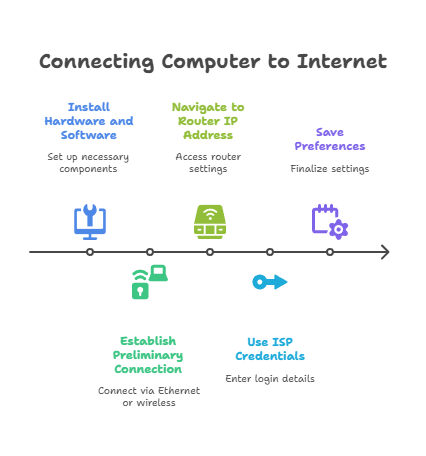
How to connect your computer to the Internet?
Before moving further, first of all, we will understand how to connect our computer to the internet. So to establish the connection, follow the following steps:
- **Step 1: Install the hardware, such as a modem and an Ethernet cable, as well as the important software like the LAN driver, etc.
- **Step 2: Use an Ethernet cable or a wireless link to establish a preliminary connection.
- **Step 3: Navigate to the router's default IP address.
- **Step 4: Use the login name and password provided by the ISP to connect to the internet.
- **Step 5: Save your preferences.
Internet services
To access/exchange a large amount of data such as software, audio clips, video clips, text files, other documents, etc., we need internet services. You must use an Internet service to connect to the Internet. Data can be sent from Internet servers to your machine via Internet service. Some of the commonly used internet services are :
- Communication Services
- Information Retrieval Services
- File Transfer
- World Wide Web Services
- Web Services
- Directory Services
- Automatic Network Address Configuration
- Network Management Services
- Time Services
- Usenet
- NewsGroup
- Ecommerce
Now let us discuss them one by one
**1. Communication Services: Toexchange data/information among individuals or organizations, we need communication services. Following are some of the common communication services:
- **IRC(Internet Relay Chat): Subscribers can communicate in real-time by connecting numerous computers in public spaces called channels.
- **VoIP: It stands for Voice over Internet Protocol, which describes how to make and receive phone calls over the internet. A larger number of people believe VoIP is a viable alternative to traditional landlines. VoIP (Voice over Internet Protocol) is a technique that helps us make voice calls via the Internet rather than over a traditional (or analog) phone line. Some VoIP services may let you call only other VoIP users, while others may let you call anyone with a phone number, including long-distance, mobile, and local/international lines. If you have an internet connection you can easily call anyone without using a local phone service because VoIP solutions are based on open standards, they can be used on any computer. More than just setting up calls is what VoIP service providers do. Outgoing and incoming calls are routed through existing telephone networks by them.
- **List Server (LISTSERV): Delivers a group of email recipients' content-specific emails.
- **E-Mail: Used to send electronic mail via the internet. It is a paperless method for sending text, images, documents, videos, etc from one person to another via the internet.
- **User Network (USENET): It hosts newsgroups and message boards on certain topics, and it is mostly run by volunteers.
- **Telnet: It's used to connect to a remote computer that's connected to the internet.
- **Video Conferencing: Video conferencing systems allow two or more people who are generally in different locations to connect live and visually. Live video conferencing services are necessary for simulating face-to-face talks over the internet. The system can vary from very simple to complex, depending on the live video conferencing vendors. A live video-based conference involves two or more individuals in separate locations utilizing video-enabled devices and streaming voice, video, text, and presentations in real-time via the internet. It allows numerous people to connect and collaborate face to face over large distances. Tools available for this purpose are Zoom, FreeConference, Google Hangouts, Skype, etc.
**2. Information Retrieval Services: It is the procedure for gaining access to information/data stored on the Internet. Net surfing or browsing is the process of discovering and obtaining information from the Internet. When your computer is linked to the Internet, you may begin retrieving data. To get data, we need a piece of software called a Web browser. A print or computer-based information retrieval system searches for and locates data in a file, database, or other collection of data. Some sites are:
- **www.geeksforgeeks.org: Free tutorials, millions of articles, live, online, and classroom courses, frequent coding competitions, industry expert webinars, internships, and job possibilities are all available. A computer-based system for searching and locating data in a file, database, or another source.
- **www.crayola.com: It includes advice for students, parents, and educators on how to be more creative.
**3. File Transfer: The exchange of data files across computer systems is referred to as file transfer. Using the network or internet connection to transfer or shift a file from one computer to another is known as file transfer. To share, transfer, or send a file or logical data item across several users and/or machines, both locally and remotely, we use file transfer. Data files include - documents, multimedia, pictures, text, and PDFs and they can be shared by uploading or downloading them. To retrieve information from the internet, there are various services available such as:
- **Gopher: A file retrieval application based on hierarchical, distributed menus that is simple to use.
- **FTP (File Transfer Protocol): To share, transfer, or send a file or logical data item across several users and/or machines, both locally and remotely.
- **Archie: A file and directory information retrieval system that may be linked to FTP
**4. Web services: Web services are software that uses defined messaging protocols and are made accessible for usage by a client or other web-based programs through an application service provider's web server. Web services allow information to be exchanged across web-based applications. Using Utility Computing, web services can be provided.
**5. World Wide Web: The internet is a vast network of interconnected computers. Using this network, you can connect to the world wide web (abbreviated as 'www' or 'web') is a collection of web pages. The web browser lets you access the web via the internet.
**6. Directory Services: A directory service is a set of software that keeps track of information about your company, customers, or both. Network resource names are mapped to network addresses by directory services. A directory service provides users and administrators with full transparent access to printers, servers, and other network devices. The directory services are :
- **DNS (Domain Number System): Thisserver provides DNS. The mappings of computer hostnames and other types of domain names to IP addresses are stored on a DNS server.
- **LDAP (Lightweight Directory Access Protocol): It is a set of open protocols that are used for obtaining network access to stored data centrally. It is a cross-platform authentication protocol for directory services and also allows users to interact with other directory services servers.
**7. Automatic Network Address Configuration: Automatic Network Addressing assigns a unique IP address to every system in a network. A DHCP Server is a network server that is used to assign IP addresses, gateways, and other network information to client devices. It uses Dynamic Host Configuration Protocol as a common protocol to reply to broadcast inquiries from clients.
**8. Network Management Services: Network management services are another essential internet service that is beneficial to network administrators. Network management services aid in the prevention, analysis, diagnosis, and resolution of connection problems. The two commands related to this are:
- **ping: The ping command is a Command Prompt command that is used to see if a source can communicate with a specific destination & get all the possible paths between them.
- **traceroute: To find the path between two connections, use the traceroute command.
**9. Time Services: Using facilities included in the operating system, you may set your computer clock via the Internet. Some services are :
- **Network Time Protocol (NTP): It is a widely used internet time service that allows you to accurately synchronize and adjust your computer clock.
- **The Simple Network Time Protocol (SNTP): It is a time-keeping protocol that is used to synchronize network hardware. When a full implementation of NTP is not required, then this simplified form of NTP is typically utilized.
**10. Usenet: The 'User's Network' is also known as Usenet. It is a network of online discussion groups. It's one of the first networks where users may upload files to news servers and others can view them.
**11. News Group: It is a lively Online Discussion Forum that is easily accessible via Usenet. Each newsgroup contains conversations on a certain topic, as indicated by the newsgroup name. Users can use newsreader software to browse and follow the newsgroup as well as comment on the posts. A newsgroup is a debate about a certain topic made up of notes posted to a central Internet site and distributed over Usenet, a global network of news discussion groups. It uses Network News Transfer Protocol (NNTP).
**12. E-commerce: Electronic commerce, also known as e-commerce or e-Commerce, is a business concept that allows businesses and individuals to buy and sell goods through the internet. Example: Amazon, Flipkart, etc. websites/apps.