What is a Mechanical Mouse? (original) (raw)
Last Updated : 23 Jul, 2025
A mechanical mouse (also known as a ball mouse) is a device used to control the cursor (pointer) on a computer screen. It has a small ball on its bottom that rolls when you move the mouse. This rolling moves the cursor on your screen. It was popular before modern optical mice took over.
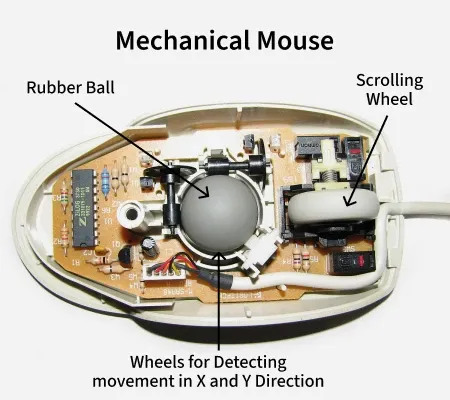
Uses a rubber ball to move the cursor on the screen.
Unlike today’s lightweight mice, mechanical mice are heavier and sturdier. They were a big part of early computers and helped shape how we use computers today.
Let’s explore how they work, their history, and why they’re still interesting!
History of the Mechanical Mouse
The mechanical mouse was first invented in **1964 by **Douglas Engelbart, an American engineer. He created it at the **Stanford Research Institute (SRI) to make computers easier to use. His early mouse had two metal wheels instead of a ball.
In the **1970s, **Bill English, a colleague of Engelbart, improved the design by adding a rolling ball. This **ball mouse could move in any direction and became super popular in the **1980s and **1990s when personal computers became common.
**Also check-
How does a Mechanical Mouse Work?
A mechanical mouse is simple but clever! Here’s how it moves the cursor:
- **Rolling Ball: A rubber or metal ball on the bottom rolls as you move the mouse.
- **Rollers Inside: The ball touches two rollers (one for up/down, one for left/right). These rollers spin when the ball moves.
- **Sensors: The rollers connect to sensors that detect their movement and send signals to the computer.
- **Cursor Movement: The computer uses these signals to move the cursor on the screen.
- **Buttons: The mouse has buttons (left and right) for clicking or selecting things.
For best results, use a mouse pad so the ball rolls smoothly.
Components of a Mechanical Mouse
The mechanical mouse is made up of various external and internal components. They are described below.
External Parts
- **Left and Right Buttons: For clicking and selecting.
- **Rubber or Metal Ball: Rolls to track movement.
- **Scroll Wheel: Helps scroll through pages (not on all models).
- **Sliders/Feet: Small pads for smooth gliding.
- **Cable: Connects the mouse to the computer (usually USB or PS/2).
- **Outer Shell: Protects the insides and feels comfy to hold.
Internal Parts
- **Switches: Send signals when buttons are clicked.
- **Rollers and Sensors: Detect the ball’s movement.
- **Scroll Wheel Mechanism: Tracks scrolling.
- **Circuit Board: Connects all parts and sends data to the computer.
- **Hardware Controller: Processes signals for the computer.
Advantages of a Mechanical Mouse
Mechanical mice have some cool benefits:
- **Works on Rough Surfaces: Unlike optical mice, they don’t need a smooth mouse pad.
- **Durable: Made with strong materials, they last a long time.
- **Affordable: Cheaper than modern optical or laser mice.
- **Simple Design: Easy to fix if something breaks.
- **Good Accuracy: Great for everyday tasks like browsing or schoolwork.
Disadvantages of a Mechanical Mouse
But they’re not perfect! Here are some downsides:
- **Needs Cleaning: The ball and rollers collect dust, so you must clean them often.
- **Heavier: They’re bulkier than modern mice, which can feel tiring.
- **Less Precise: Not as accurate as optical or laser mice for gaming or design.
- **Old Technology: Optical mice are faster and need less maintenance.
- **Fewer Features: Limited buttons compared to gaming mice.
Mechanical Mouse vs Trackball
The difference between a mechanical and a trackball is given below:
| **Mechanical Mouse | **Trackball |
|---|---|
| Moves across a surface using a rubber ball and rollers. | Stationary base with a movable ball controlled by fingers or thumb. |
| Requires a flat surface and space for movement. | Requires minimal desk space; stays in one place. |
| It can cause wrist strain with prolonged use. | Reduces wrist strain; promotes a more relaxed hand posture. |
| Generally less precise due to mechanical parts. | High precision, especially for tasks requiring fine cursor control. |
| Requires occasional cleaning of the ball and rollers. | Low maintenance; no moving parts to clean. |
| Familiar and easy to use for most users. | It may have a learning curve, especially for those new to trackballs. |
| Works best with a mouse pad; can be affected by surface irregularities. | Works on any surface; not affected by surface irregularities. |
| Limited customization options. | Various designs and button configurations are available. |
| General computing tasks and gaming. | Ergonomic benefits, ideal for users with wrist issues or limited desk space. |
**Read in Detail - Mouse vs Trackball
Conclusion
The mechanical mouse, while largely replaced by optical and laser mice, remains a durable and reliable input device. It offers benefits like accuracy, the ability to work on rough surfaces, and long-lasting durability. However, it requires more maintenance, including regular cleaning, and is heavier compared to modern alternatives. Despite being less common today, the mechanical mouse still serves as a robust choice for those who need a simple, cost-effective, and sturdy mouse for everyday use.