Bounding Box Prediction using PyTorch (original) (raw)
Last Updated : 4 Jul, 2025
PyTorch is an important framework for developing sophisticated models specially in the field of Computer Vision. An application within this field is bounding box prediction used for object detection.
What is Bounding Box Detection?
Bounding box detection is a fundamental computer vision task that involves identifying and localizing objects within an image. Instead of merely classifying objects, as in image classification, bounding box detection provides a more detailed understanding of the spatial extent of each object. This information is crucial for various applications, from autonomous vehicles to video surveillance.
Building a bounding box prediction model from scratch using PyTorch involves creating a neural network that learns to localize objects within images. This task typically uses a convolutional neural network (CNN) architecture to capture spatial hierarchies. The model is trained on a dataset with annotated bounding boxes. During training, the network refines its parameters through backpropagation, minimizing the difference between predicted and ground truth bounding boxes. Key components include image preprocessing, defining the neural network architecture with regression outputs for box coordinates and optimizing with a loss function. Implementing such models enhances computer vision applications, enabling accurate object localization and detection.
Implementation of Bounding Box Prediction from Scratch using PyTorch
1. Importing Libraries
We import pytorch for deep learning, torchvision for vision datasets and models, transforms for image preprocessing and cv2 (OpenCV) for general computer vision tasks.
Python `
import torch import torchvision from torchvision import transforms as T import cv2
`
2. Loading the pretrained model
- Here PyTorch and torchvision loads a pre-trained Single Shot Multibox Detector (SSD) model with a VGG16.
- The pretrained=True argument downloads and initializes the model with weights pre-trained on a large dataset.
- The model.eval() sets the model in evaluation mode, disabling features like dropout to ensure consistent behavior during inference.
- This pre-trained SSD300_VGG16 model is designed for object detection tasks and is ready for use in detecting objects within images. Python `
model = torchvision.models.detection.ssd300_vgg16(pretrained = True) model.eval()
`
3. Reading class names
- The script reads class names from a file named 'classes.txt' and stores them in the classnames list.
- splitlines() method is then used to separate the lines from the file and populate the list with class names. Python `
classnames = [] with open('/content/classes.txt','r') as f: classnames = f.read().splitlines()
`
4. Reading and Preprocessing the Image
**load_image(image_path) function:
- Takes a file path (image_path) as an argument.
- Uses OpenCV (cv2) to read the image from the specified path.
- Returns the loaded image.
**transform_image(image) function:
- Takes an image as input.
- Uses torchvision's ToTensor() transformation to convert the image to a PyTorch tensor.
- Returns the transformed image tensor. Python `
def load_image(image_path): image = cv2.imread(image_path) return image
def transform_image(image): img_transform = T.ToTensor() image_tensor = img_transform(image) return image_tensor
`
5. Making Predictions
- This function detect_objects takes a pre-trained object detection model (model) and an input image tensor (image_tensor).
- It performs inference with the model, filters the predicted bounding boxes, scores and labels based on a confidence threshold (default is 0.80) and returns the filtered results.
- The filtered results include bounding boxes (filtered_bbox), corresponding scores (filtered_scores) and class labels (filtered_labels).
- This allows for identifying objects in the image with confidence scores exceeding the specified threshold. Python `
def detect_objects(model, image_tensor, confidence_threshold=0.80): with torch.no_grad(): y_pred = model([image_tensor])
bbox, scores, labels = y_pred[0]['boxes'], y_pred[0]['scores'], y_pred[0]['labels']
indices = torch.nonzero(scores > confidence_threshold).squeeze(1)

filtered_bbox = bbox[indices]
filtered_scores = scores[indices]
filtered_labels = labels[indices]

return filtered_bbox, filtered_scores, filtered_labels
`
6. Drawing Bounding Boxes
**draw_boxes_and_labels(image, bbox, labels, class_names) function:
- Takes an image, bounding boxes, labels and class names as arguments.
- Creates a copy of the input image (img_copy) to avoid modifying the original image.
- Iterates over each bounding box in the provided list.
- Draws a rectangle around the object using OpenCV based on the bounding box coordinates.
- Retrieves the class index and corresponding class name from the provided lists.
- Adds text to the image indicating the detected class.
- Returns the modified image. Python `
def draw_boxes_and_labels(image, bbox, labels, class_names): img_copy = image.copy()
for i in range(len(bbox)):
    x, y, w, h = bbox[i].numpy().astype('int')
    cv2.rectangle(img_copy, (x, y), (w, h), (0, 0, 255), 5)

    class_index = labels[i].numpy().astype('int')
    class_detected = class_names[class_index - 1]

    cv2.putText(img_copy, class_detected, (x, y + 100), cv2.FONT_HERSHEY_SIMPLEX, 2, (0, 255, 0), 2, cv2.LINE_AA)

return img_copy
`
7. Displaying the Result
- Specifies the path to the image file (image_path).
- Calls load_image to load the image from the specified path.
- Calls transform_image to convert the image to a PyTorch tensor.
- Calls detect_objects to obtain filtered bounding boxes, scores and labels using the object detection model.
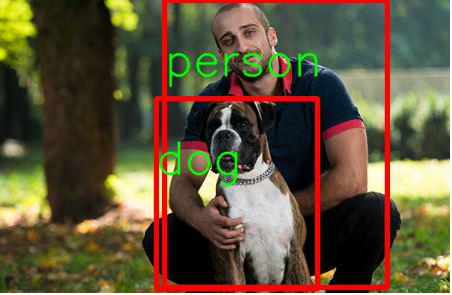
- Calls draw_boxes_and_labels to draw bounding boxes and labels on the original image.
- Displays the result using cv2_imshow. Python `
from google.colab.patches import cv2_imshow image_path = '/content/mandog.jpg' img = load_image(image_path)
Transform image
img_tensor = transform_image(img)
Detect objects
bbox, scores, labels = detect_objects(model, img_tensor)
Draw bounding boxes and labels
result_img = draw_boxes_and_labels(img, bbox, labels, classnames)
Display the result
cv2_imshow(result_img)
`
**Output:
Applications of Bounding Box Detection
Bounding box detection finds applications across diverse domains, revolutionizing how machines perceive and interact with visual data. Here are some key areas where bounding box detection plays a pivotal role:
- **Object Recognition in Autonomous Vehicles: Bounding box detection is crucial for identifying pedestrians, vehicles and other obstacles in the environment, contributing to the safety and efficiency of autonomous vehicles.
- **Security and Surveillance: In video surveillance systems, bounding box detection helps track and analyze the movement of objects or individuals hence enhancing security measures.
- **Retail Analytics: Bounding box detection is employed in retail settings for tracking and monitoring product movements, managing inventory and improving the overall shopping experience.
- **Medical Image Analysis: Within the field of medical imaging, bounding box detection aids in identifying and localizing abnormalities or specific structures within images, assisting in diagnoses.