Describe the concept of scaleinvariant feature transform (SIFT) (original) (raw)
Last Updated : 4 Sep, 2025
Scale-Invariant Feature Transform (SIFT) is an important algorithm in computer vision that helps detect and describe distinctive features in images. It is introduced by David Lowe in 1999, used for many important tasks in the field including object recognition, image stitching and 3D reconstruction. It stand out because it detect features that are stable and consistent even when the image undergoes transformations such as scaling, rotation and changes in lighting conditions. In this article, we will see more about SIFT algorithm, how it works and other core concepts.
Importance of SIFT
SIFT is important for various reasons:
- **Scale and Rotation Invariance: It works effectively even if the image is resized or rotated, making it ideal for recognizing objects in different orientations and sizes.
- **Robust Feature Matching: It generates detailed descriptors for each key point, allowing the matching of features across images even when they are taken under different conditions (e.g lighting or viewpoint changes).
- **Highly Distinctive Descriptors: The 128-dimensional descriptors are highly detailed and distinguishable, making it easier to match features accurately.
Key Steps of SIFT Algorithm
SIFT (Scale-Invariant Feature Transform) finds and matches unique points in images. The main steps are:
**1. Detection of Key Points: Key points are unique features in an image such as corners, blobs or edges. SIFT detects them using the Difference of Gaussians (DoG), where the image is blurred at different levels and successive versions are subtracted. The resulting differences highlight strong contrast areas, which are marked as stable key points.
**2. Scale-Space Construction: To make the algorithm scale-invariant, the image is represented at multiple levels of blur or resolution. This ensures that key points remain stable and consistent even when the image is resized.
**3. Localization of Key Points: Not every detected point is reliable. Weak, unstable or edge-based points are removed, while strong and stable ones like corners are kept. This filtering step ensures that only the most useful key points are retained.
**4. Orientation Assignment: Each key point is assigned a dominant orientation based on local image gradients. This allows the algorithm to handle rotations, as the key points remain consistent even if the image is turned in any direction.
**5. Descriptor Generation: For every key point, the nearby region is divided into smaller grids and gradient patterns are calculated. These are combined into a 128-dimensional descriptor, which is normalized to reduce the impact of lighting changes.
**6. Matching Key Points Across Images: Descriptors from different images are compared using measures like Euclidean distance. Key points with similar descriptors are matched and ratio testing is used to filter out false matches. This ensures accurate feature matching despite changes in scale, rotation or lighting.
Implementation
Let's see the implementation,
Step 1: Install the Packages
We will,
- Installs OpenCV including SIFT feature detector.
- Required as default OpenCV excludes patented algorithms. Python `
!pip install opencv-contrib-python==4.7.0.72
`
Step 2: Import Libraries
We will import the libraries that will be required such as cv2 and matplotlib.
Python `
import cv2 import matplotlib.pyplot as plt
`
Step 3: Load image and Convert to Greyscale
We will load the image and convert it to greyscale,
The used sample can be downloaded from here.

Python `
image_path = "/kaggle/input/your-dataset-name/your-image.jpg"
img = cv2.imread(image_path) if img is None: raise IOError("Image not loaded")
gray = cv2.cvtColor(img, cv2.COLOR_BGR2GRAY)
`
Step 4: Create SIFT detector and Detect Keypoints
- Initialize SIFT detector object.
- Detect distinctive points and extract descriptors. Python `
sift = cv2.SIFT_create() keypoints, descriptors = sift.detectAndCompute(gray, None)
`
Step 5: Draw Keypoints and Visualize the Image
- Overlay detected keypoints with scale and orientation markers.
- Display image with keypoints. Python `
img_with_keypoints = cv2.drawKeypoints( img, keypoints, None, flags=cv2.DRAW_MATCHES_FLAGS_DRAW_RICH_KEYPOINTS )
plt.figure(figsize=(12, 8)) plt.imshow(cv2.cvtColor(img_with_keypoints, cv2.COLOR_BGR2RGB)) plt.title("SIFT Keypoints") plt.axis("off") plt.show()
`
**Output:
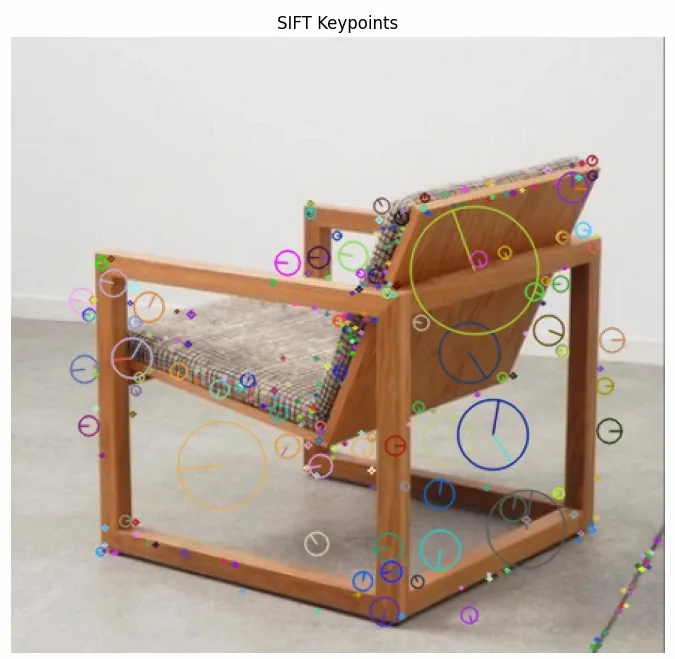
Result
Applications of SIFT
SIFT helps to detect and match key points across images makes it invaluable for a variety of practical applications:
- **Object Recognition: It helps identify objects in images by finding distinctive features that remain consistent under different conditions. This is important for recognizing objects in different orientations and sizes.
- **Image Stitching: It is used to stitch images together for panoramic photography. By finding matching key points between overlapping images, it enables the seamless alignment and blending of images.
- **3D Reconstruction: It is used to generate 3D models by finding corresponding key points in images taken from different angles. These matches help triangulate the positions of points in 3D space, helps in the creation of 3D scenes or objects.
- **Robot Navigation: Autonomous robots use SIFT to detect and match features in their environment, helping them navigate and build maps of the world around them.
Limitations of SIFT
Despite its many advantages, SIFT has a few limitations:
- **Computational Complexity: It can be slow when working with large images or in real-time applications as the process of detecting and describing key points is computationally demanding.
- **Patent Issues: It was patented for several years which limited its use in commercial applications. The patent expired in 2020, making SIFT more accessible for open-source and commercial projects.
- **Not Suitable for Real-Time Applications: Due to the complexity of its computations, it may not be the best choice for time-sensitive tasks that require quick responses such as live video tracking.
Refer to related article: SIFT Interest Point Detector