Swin Transformer (original) (raw)
Last Updated : 13 Aug, 2025
The Swin Transformer (Shifted Window Transformer) is a type of vision transformer model that processes images by dividing them into small, non-overlapping windows and computes self-attention within these localized regions. Unlike standard vision transformers which use global attention, Swin Transformer introduces a "shifted window" technique. This allows neighboring windows to interact with each other in subsequent layers, efficiently capturing both local and global features in an image.
Architecture and Working of Swin Transformer
The Swin Transformer’s architecture is built on a combination of hierarchical design and window-based self-attention for efficient working and feature extraction.
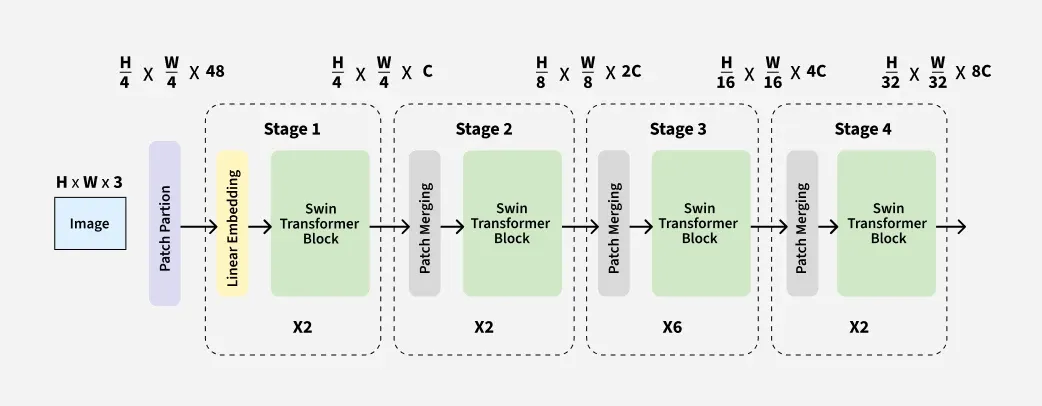
Hierarchical Design of Swin Transformer
**Here's how it works:
**Patch Splitting: The input image is divided into fixed-size patches like putting a grid over image and each square represent a patch. Each patch is then embedded into a feature vector to form input for the transformer.
**Window-Based Self-Attention: Instead of computing attention globally the model computes attention within local windows. These windows act as small focused regions capturing fine features while keeping computation manageable. Self-attention is applied within the window and captures local features.
**Shifted Windows for Cross-Region Interaction: The shifted window mechanism solve limitation of local windows attention and capture global context of image. This shifted window shifts the position of the windows by a small value and hence overlapping regions with next layer. This ensure cross-window communication and improve models ability to capture global context.
**Hierarchical Design: The Swin Transformer processes the image in stages:
- **Stage 1: The image is divided into non-overlapping patches for embedding of each level.
- **Stage 2: These patches are further split into windows and self-attention is applied locally in the window.
- **Stage 3: The windows are shifted over next layer for overlapping and self-attention is recomputed with shifted windows.
- **Stage 4: Hierarchical processing continues combining features to know fine details in each window without losing global context of image.
By combining local self-attention within windows and hierarchical processing makes it scalable for high-resolution image processing without excessive computing power. It can be used for various tasks like image classification, object detection and segmentation.
Implementation of Swin Transformer
Let's implement Swin Transformer step-by-step,
Step 1. Setup Environment
Install the necessary libraries:
- **transformers: provides access to state-of-the-art pre-trained models, including Swin Transformer.
- **datasets: allows easy loading of public datasets (like CIFAR-10).
- **torch (PyTorch): is the deep learning framework required for running the models.
- **torchvision: adds computer vision tools and datasets. Python `
!pip install transformers datasets torch torchvision
`
Step 2. Import Libraries
Import the following libraries:
- Imports the Swin Transformer model and its image processor from transformers.
- load_dataset loads datasets from the Hugging Face Hub.
- torch handles tensor operations and GPU acceleration. Python `
from transformers import AutoImageProcessor, SwinForImageClassification from datasets import load_dataset import torch
`
Step 3. Load Pre-Trained Model
Define the model name and load the pre-trained Swin Transformer model along with its image processor:
- Sets the model name for Swin Transformer (“swin-tiny” variant).
- Loads the Swin Transformer model, pre-trained on ImageNet.
- Loads the corresponding image processor, which will prepare images in the format expected by the model. Python `
model_name = "microsoft/swin-tiny-patch4-window7-224" image_processor = AutoImageProcessor.from_pretrained(model_name) model = SwinForImageClassification.from_pretrained(model_name)
`
**Output:

Loading Pre-trained Model
Step 4. Load Dataset
Load the CIFAR-10 dataset, focusing on a subset for testing:
Python `
dataset = load_dataset("cifar10", split="test[:8]")
`
**Output:
Loading Dataset
Step 5. Extract Images and Labels
Extract the images and corresponding true labels:
- Extracts the actual image data and corresponding ground truth labels from the dataset.
- These lists are used for input (images) and evaluation (labels). Python `
images = [item["img"] for item in dataset] labels = [item["label"] for item in dataset]
`
Step 6. Preprocess Images
Preprocess the images using the AutoImageProcessor to prepare them as tensors:
- Resizes, normalizes and converts images to PyTorch tensors.
- Ensures tensors are on the same device (CPU/GPU) as the model. Python `
inputs = image_processor(images, return_tensors="pt").to(model.device)
`
Step 7. Classify Images
Set the model to evaluation mode and classify the images:
- Sets the model to "evaluation" mode, which turns off training-specific behaviors like dropout.
- Context manager torch.no_grad() disables gradient calculation (saving memory and computation).
- Passes preprocessed images to the model; retrieves output logits (raw prediction scores for each class). Python `
model.eval() with torch.no_grad(): outputs = model(**inputs) logits = outputs.logits
`
Step 8. Process Predictions
Get the predicted labels from the model’s output logits:
- For each image, finds the class index with the highest predicted score (the model’s prediction).
- Converts PyTorch tensor to NumPy array for easy processing and display. Python `
predicted_labels = logits.argmax(dim=-1).cpu().numpy()
`
Step 9. Handle Label Mismatches
Handle cases where the model's label space does not match CIFAR-10’s labels:
- Checks if the model’s output classes match the CIFAR-10 labels (10 classes).
- If not, adjusts predicted labels to fit the CIFAR-10 class structure (simple modulo mapping).
- This is necessary because the pre-trained Swin model is usually trained on ImageNet, which has 1000 classes. Python `
num_classes = len(model.config.id2label) if num_classes != len(set(labels)): print("Warning: Model label space does not match CIFAR-10 labels. Mapping may be required.") class_mapping = {i: i % 10 for i in range(num_classes)} predicted_labels = [class_mapping[label] for label in predicted_labels]
`
Step 10. Map Predictions to Class Names
Map the predicted and true label indices to their human-readable class names:
Python `
class_names = [ "airplane", "automobile", "bird", "cat", "deer", "dog", "frog", "horse", "ship", "truck" ] predicted_class_names = [class_names[label] for label in predicted_labels] true_class_names = [class_names[label] for label in labels]
`
Step 11. Print Results
Display the results by comparing true and predicted class names for each image:
Python `
for i, (true_label, predicted_label) in enumerate(zip(true_class_names, predicted_class_names)): print( f"Image {i + 1}: True Label = {true_label}, Predicted Label = {predicted_label}")
`
**Output:
Image 1: True Label = cat, Predicted Label = cat
Image 2: True Label = ship, Predicted Label = ship
Image 3: True Label = ship, Predicted Label = ship
Image 4: True Label = airplane Predicted Label = bird
Image 5: True Label = frog, Predicted Label = frog
Image 6: True Label = frog, Predicted Label = ship
Image 7: True Label = automobile, Predicted Label = automobile
Image 8: True Label = frog, Predicted Label = frog
It shows use of Swin Transformer model for image classification without fine-tuning on the CIFAR-10 dataset. While the model accurately predicted common classes like "cat", "ship", "frog" and "automobile" there are some wrong predictions like confusing between "airplane" with "bird".
Applications of Swin Transformer
- **Image Classification: Uses a hierarchical structure and multi-scale feature extraction for highly accurate image recognition.
- **Object Detection: Detects multiple objects and fine details in an image by combining local and global context.
- **Image Segmentation: Segments an image into different regions using robust, multi-scale feature representations.
- **Medical Imaging: Identifies anomalies and features in high-resolution medical scans, aiding diagnostics.
- **Transfer to Natural Language Processing (NLP): Although primarily designed for vision tasks, with architectural modifications Swin Transformer can be adapted for certain NLP applications.
Advantages
- **Efficient on High-Resolution Images: Window-based and hierarchical design enables scalability and speed for large images.
- **Versatile: Can serve as a backbone for varied vision tasks such as classification, detection and segmentation without major architecture changes.
- **Reduced Computational Complexity: Achieves linear computational complexity (unlike the quadratic cost in standard transformers), making it practical for real-world, large-scale applications.
- **Strong Real-World Performance: Delivers robust results in practical applications, even with limited computational resources.
Limitations
- **Limited Global Context: Window-based attention can miss long-range dependencies unless many layers are stacked.
- **Increased Complexity: Hierarchical, shifted window design adds implementation and tuning complexity compared to standard CNNs or transformers.
- **Resource Demands for Large Models: Scaling Swin Transformers still requires significant computational resources and memory.
- **Weaker Local Inductive Bias: May underperform CNNs on tasks where highly localized features are important.