Loops in C++ (original) (raw)
In C++, there are situations where a task needs to be repeated multiple times. For example, to print "Hello World" 5 times, we would have to write the cout statement 5 times if done manually.
C++ `
#include using namespace std;
int main() {
cout << "Hello World\n";
cout << "Hello World\n";
cout << "Hello World\n";
cout << "Hello World\n";
cout << "Hello World";
return 0;
}
`
Output
Hello World Hello World Hello World Hello World Hello World
Writing it 20 times would take more effort, and writing it 100 times would be even more tedious, as the same statement must be repeated again and again.
In such cases, loops come into play, allowing users to repeatedly execute a block of statements any number of times.
C++ `
#include using namespace std;
int main() {
  for (int i = 0; i < 5; i++) {
    cout << "Hello World\n";
}
return 0;
}
`
Output
Hello World Hello World Hello World Hello World Hello World
In the above program, we have used one of the loops to write "Hello World" 5 times. You can see how much code is reduced. The same line of code can write "Hello World" 20 or even 100 times.
Different Types of Loops
C++ provides **three types of loops that work the same, but are preferred in different use cases:
for Loop
The **for loop is an **entry-controlled loop, which means that it checks whether the test condition is true before executing the statements inside it.
Syntax
C++ `
for (initialization; condition; updation) { // body of for loop }
`
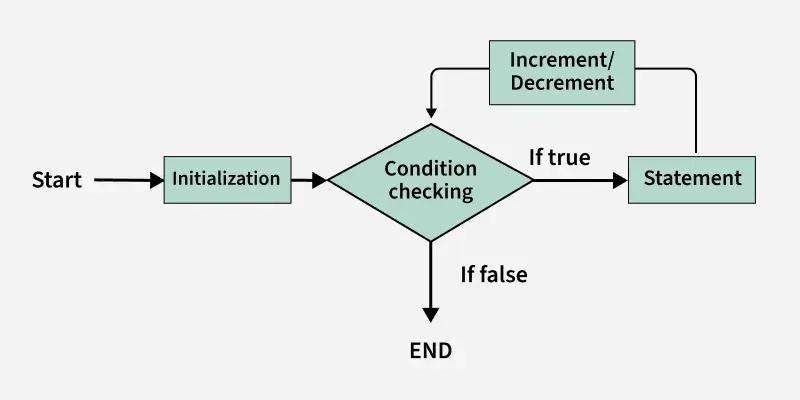
The various **parts of the for loop are:
- **Initialization: Initialize the variable to some initial value.
- **Test Condition: This specifies the test condition. If the condition evaluates to true, then body of the loop is executed. If it evaluated to false, the loop is terminated.
- **Update Expression: After the execution loop's body, this expression increments/decrements the loop variable by some value.
All these together are used to create a logic and flow of the loop.
C++ `
#include using namespace std;
int main() {
  // For loop that starts with i = 1 and ends
  // when i is greater than 5.
for (int i = 1; i <= 5; i++) {
    cout << i << " ";
}
return 0;
}
`
There is a type of for loop that does not need the condition and the updating statement. It is called **range-based for loop and it can only be used for iterable objects such as vector, set, etc.
**Flowchart of for Loop:
while Loop
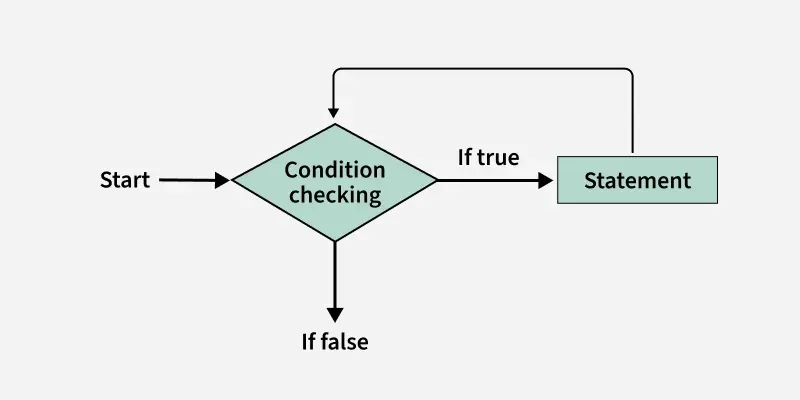
The**while loop is also an **entry-controlled loop which is used in situations where we do not know the exact number of iterations of the loop beforehand.
In for loop, we have seen that the number of iterations is **known beforehand, i.e. the number of times the loop body is needed to be executed is known to us and we create the condition on the basis of it. But while loops execution is solely based on the condition.
**Syntax
C++ `
while (condition) { // Body of the loop // update expression }
`
Only the **condition is part of the while loop syntax, we have to **initialize and **update loop variable manually.
C++ `
#include using namespace std;
int main() {
  // Initialization
  int i = 1;

  // while loop that starts with i = 1 and ends
  // when i is greater than 5.
while (i <= 5) {
    cout << i << " ";

      // Updation
      i++;
}
return 0;
}
`
**Flowchart for While Loop :
do while Loop
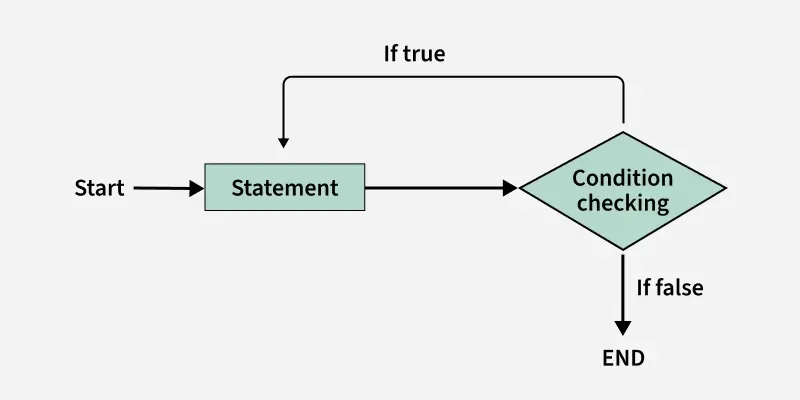
The **do-while loop is an **exit-controlled loop which means the condition is checked after executing the body of the loop. So, in a do-while loop, the loop body will **execute at least once irrespective of the test condition.
**Syntax
C++ `
do { // Body of the loop // Update expression } while (condition);
`
Like while loop, only the **condition is the part of do while loop syntax, we have to do the **initialization and **updation of loop variablemanually.
C++ `
#include using namespace std;
int main() {
  // Initialization
  int i = 1;

  // while loop that starts with i = 1 and ends
  // when i is greater than 5.
 do {
    cout << i << " ";

      // Updation
      i++;
}while (i <= 5);

return 0;
}
`
Remember the last semicolon at the end of the loop.
**Flowchart for do while Loop:
**For Each Loop
The for-each loop in C++ is a range-based for loop. It automatically iterates over each element of a container or array using the container's begin() and end() functions internally.
Use of Reference vs Value :
- By Value: for(auto it : arr), works on a copy, modifications won't affect the original.
- By Reference: for(auto &it : arr), you can modify elements directly. C++ `
#include #include using namespace std;
int main() {
int arr[] = {1, 2, 3, 4, 5};
// By value
cout << "Iterating by value" << endl;
for(auto it : arr){
    cout << it <<" ";
}
cout<< endl;

// By reference
cout << "Iterating with reference" << endl;
for(auto &it : arr){
    cout << it << " ";
}
cout<<endl;
return 0;
}
`
Output
Iterating by value 1 2 3 4 5 Iterating with reference 1 2 3 4 5
Infinite Loops
An **infinite loop (sometimes called an endless loop) is a piece of code that lacks a functional exit so that it repeats indefinitely. An infinite loop occurs when a condition is always evaluated to be true. Usually, this is an error. We can manually create an infinite loop using all three loops:
C++ `
#include using namespace std;
int main() {
// This is an infinite for loop as the condition
// expression is blank
for (;;) {
    cout << "This loop will run forever.\n";
}
return 0;
}
`
**Output
This loop will run forever.
This loop will run forever.
...................
Nesting of Loops
**Nesting of loops refers to placing one loop inside another. The inner loop is executed completely for each iteration of the outer loop. This is useful when you need to perform multiple iterations within each iteration of a larger loop, such as iterating over a two-dimensional array or performing operations that require more than one level of iteration.
C++ `
#include using namespace std;
int main() {
for (int i = 0; i < 3; i++) {

    // Outer loop runs 3 times
    for (int j = 0; j < 2; j++) {

        // Inner loop runs 2 times for each
        // outer loop iteration
        cout << "i = " << i << ", j = " << j << endl;
    }
}
return 0;
}
`
Output
i = 0, j = 0 i = 0, j = 1 i = 1, j = 0 i = 1, j = 1 i = 2, j = 0 i = 2, j = 1
Loop Control Statements
Generally, the normal flow of any loop is that it will repeat till its test condition is true. In each repetition, it will execute the given set of statements. But C++ provides ways to modify this normal flow. This can be done by using loop control statements shown below:
Break out of the Loop
The **break statement when encountered, terminates the loop regardless of its test condition. This is useful when the execution of loop is dependent on multiple conditions.
C++ `
#include using namespace std;
int main() { for (int i = 0; i < 5; i++) {
    // Terminating before reaching i = 4
    if (i == 2) break;
    cout << "Hi" << endl;
}
return 0;
}
`
Skip a Particular Iteration
The **continue statement, when encountered, skips the remaining code inside the current iteration of the loop and proceeds to the next iteration. This is useful when you want to skip specific iterations based on certain conditions but still want to continue the loop execution.
C++ `
#include using namespace std;
int main() { for (int i = 0; i < 5; i++) {
    // Skipping when i equals 2
    if (i == 2) continue;
    cout << "Hi" << endl;
}
return 0;
}
`