Deque in C++ STL (original) (raw)
A deque (Double-Ended Queue) is a sequence container in the C++ Standard Template Library (STL) that combines the advantages of both vectors and queues. It supports efficient operations at both ends while allowing direct access to elements.
- Provides random access to elements using indices.
- Can be used to implement both stacks and queues.
- Supports efficient insertion and deletion at both the front and the back.
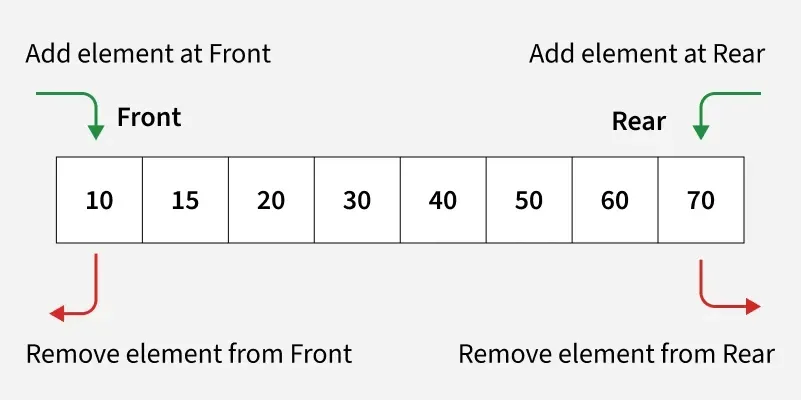
The above illustration shows that elements can be inserted and removed efficiently from both the front and back of a deque.
Creating a Deque
C++ `
#include #include using namespace std;
int main() {
// Declare an empty deque of integers
deque<int> d1;

// Declare and initialize a deque with some values
deque<int> d2 = {10, 20, 30, 40};
for (int val : d2) {
    cout << val << " ";
}
cout << endl;
return 0;
}
`
**Explanation
- d1 creates an empty deque of integers.
- d2 is initialized with four elements.
- The range-based loop prints all elements of the deque.
**Syntax
The **std::deque class template is defined inside the header file.
dequed;
**where,
- T: Data type of elements in the deque
- d: Name assigned to the deque
Basic Operations on Deque
The following are the most commonly used operations on a deque.
Inserting Elements
A deque supports insertion at both ends using:
**1. push_back()
The push_back() function inserts a new element at the end of the deque.
- Adds elements to the back of the deque.
- Time Complexity: O(1) C++ `
#include #include using namespace std;
int main() { deque d;
// Adding elements at the back
d.push_back(10);
d.push_back(20);
d.push_back(30);

// Displaying elements
cout << "Elements in deque (added using push_back): ";
for (int val : d) {
    cout << val << " ";
}
cout << endl;

return 0;
}
`
Output
Elements in deque (added using push_back): 10 20 30
**Explanation: The elements 10, 20, and 30 are inserted at the back of the deque in the same order.
**2. push_front()
The push_front() function inserts a new element at the front of the deque.
- Adds elements to the beginning of the deque.
- Time Complexity: O(1) C++ `
#include #include using namespace std;
int main() { deque d;
// Adding elements at the front
d.push_front(30);
d.push_front(20);
d.push_front(10);

// Displaying elements
cout << "Elements in deque (added using push_front): ";
for (int val : d) {
    cout << val << " ";
}
cout << endl;

return 0;
}
`
Output
Elements in deque (added using push_front): 10 20 30
**Explanation: Each element is inserted at the front, so the final order becomes 10 20 30.
Deletion Elements
A deque supports deletion from both ends using:
**1. pop_back()
The pop_back() function removes the last element from the deque.
- Deletes the element at the back.
- Time Complexity: O(1) C++ `
#include #include using namespace std;
int main() { deque d = {10, 20, 30, 40}; cout << "Original deque: "; for (int val : d) { cout << val << " "; } cout << endl;
// Removing the last element
d.pop_back();

cout << "Deque after pop_back(): ";
for (int val : d) {
    cout << val << " ";
}
cout << endl;

return 0;
}
`
Output
Original deque: 10 20 30 40 Deque after pop_back(): 10 20 30
**2. pop_front()
The pop_front() function removes the first element from the deque.
- Deletes the element at the front.
- Time Complexity: O(1) C++ `
#include #include using namespace std;
int main() { deque d = {10, 20, 30, 40}; cout << "Original deque: "; for (int val : d) { cout << val << " "; } cout << endl;
// Removing the first element
d.pop_front();

cout << "Deque after pop_front(): ";
for (int val : d) {
    cout << val << " ";
}
cout << endl;
return 0;
}
`
Output
Original deque: 10 20 30 40 Deque after pop_front(): 20 30 40
**Explanation: The first element (10) is removed, leaving 20 30 40.
Accessing Elements
Deque provides functions to access elements from both the front and the back without removing them.
**1. front()
The front() function returns a reference to the first element of the deque.
- Accesses the first element in constant time.
- Does not remove the element from the deque. C++ `
#include #include using namespace std;
int main() { deque d = {100, 200, 300};
// Accessing the front element
cout << "The first element (front) is: "
     << d.front() << endl;

return 0;
}
`
Output
The first element (front) is: 100
**Explanation: The front() function returns the first element of the deque, which is 100.
**2. back()
The back() function returns a reference to the last element of the deque.
- Accesses the last element in constant time.
- Does not remove the element from the deque. C++ `
#include #include
using namespace std;
int main() { deque d = {10, 20, 30, 40};
// Accessing the last element
cout << "The last element (back) is: "
     << d.back() << endl;
return 0;
}
`
Output
The last element (back) is: 40
**Explanation: The back() function returns the last element of the deque, which is 40.
Capacity Functions
The following functions are commonly used to check the size and state of a deque.
**1. size()
The size() function returns the number of elements currently stored in the deque.
- Returns the total number of elements.
- Useful for traversal and size-related checks. C++ `
#include #include using namespace std;
int main() { deque d = {5, 10, 15, 20};
// Get the size of the deque
cout << "The number of elements in the deque is: "
     << d.size() << endl;
return 0;
}
`
Output
The number of elements in the deque is: 4
**Explanation: The size() function returns the total number of elements present in the deque.
**2. empty()
The empty() function checks whether the deque contains any elements.
- Returns true if the deque is empty.
- Returns false otherwise. C++ `
#include #include using namespace std;
int main() { deque d; if (d.empty()) { cout << "Deque is empty." << endl; } else { cout << "Deque is not empty." << endl; }
// Add an element and check again
d.push_back(100);

if (d.empty()) {
    cout << "Deque is empty." << endl;
} else {
    cout << "Deque is not empty." << endl;
}
return 0;
}
`
Output
Deque is empty. Deque is not empty.
**Explanation: Initially the deque contains no elements, so empty() returns true. After inserting an element, it returns false.
**3. Clear()
The clear() function removes all elements from the deque.
- Erases all elements from the container.
- The size becomes 0 after the operation. C++ `
#include #include using namespace std;
int main() { deque d = {1, 2, 3, 4, 5}; cout << "Before clear(), size: " << d.size() << endl;
// Clear all elements from deque
d.clear();

cout << "After clear(), size: " << d.size() << endl;

if (d.empty()) {
    cout << "Deque is now empty." << endl;
}
return 0;
}
`
Output
Before clear(), size: 5 After clear(), size: 0 Deque is now empty.
**Explanation: The clear() function removes all elements from the deque, leaving it empty.
Time Complexity
The table below summarizes the time complexity of common deque operations.
| Operation | Time Complexity |
|---|---|
| Insert at back | **O(1) amortized |
| Insert at front | **O(1) amortized |
| Insert at arbitrary position | **O(n) |
| Remove from back | **O(1) amortized |
| Remove from front | **O(1) amortized |
| Remove from arbitrary position | **O(n) |
| Access elements at any position using index | **O(1) |
| Update elements at any position using index | **O(1) |
| Iterate the deque | **O(n) |
Queue Vs Deque
The following table highlights the key differences between a queue and a deque based on their structure, operations, and common use cases.
| Feature | Queue | Deque(Double-Ended Queue) |
|---|---|---|
| Definition | A linear data structure that follows FIFO (First-in-First-Out). | A generalized version of queue that allows insertion and deletion from both ends. |
| Operations Allowed | Enqueue (add to rear) and Dequeue (remove from front) | Insert Front, Insert Rear, Delete Front, Delete Rear |
| Access | Restricted: insertion at rear and deletion at front only. | More flexible: insertions and deletions at both front and rear. |
| Use Case | When you need strict FIFO ordering (e.g., task scheduling) | When you need both FIFO and LIFO behavior (e.g., sliding window problems, palindrome checking). |
| Efficiency | Simpler, but limited in functionality | Slightly more complex, but more powerful |
| Types | Simple Queue, Circular Queue, Priority Queue | Input-Restricted Deque (insert rear only) and Output-Restricted Deque (delete front only) |