Stack in C++ STL (original) (raw)
Last Updated : 9 Apr, 2026
Stack container follows LIFO (Last In First Out) order of insertion and deletion. It means that most recently inserted element is removed first and the first inserted element will be removed last. This is done by inserting and deleting elements at only one end of the stack which is generally called the top of the stack.
C++ `
#include #include using namespace std; int main(){ stack st; st.push(10); st.push(5);
// Accessing top element
cout << "Top element: " << st.top() << endl;

// Popping an element
st.pop();
cout << "Top element after pop: " << st.top() << endl;
return 0;
}
`
Output
Top element: 5 Top element after pop: 10
Syntax
Stack is defined as std::stack class template inside the header file.
stack st;
where,
- **T: DataType (int, char etc.) of elements in the stack.
- **st: Name assigned to the stack.
Basic Operations
Here are the basic operations that can be performed on a stack:
1. Inserting Elements
In stack, new elements can only be inserted at the top of the stack by using push() method.
C++ `
#include #include using namespace std;
int main(){ stack st;
// Inserting element top of the stack
st.push(10);
st.push(20);
st.push(30);
st.push(40);
return 0;
}
`
.webp)
Push operation in Stack
2. Accessing Elements
Only the top element of the stack can be accessed using top() method.
C++ `
#include #include using namespace std;
int main(){ stack st; st.push(10); st.push(20); st.push(30); st.push(40);
// Accessing the top element
cout << st.top();
return 0;
}
`
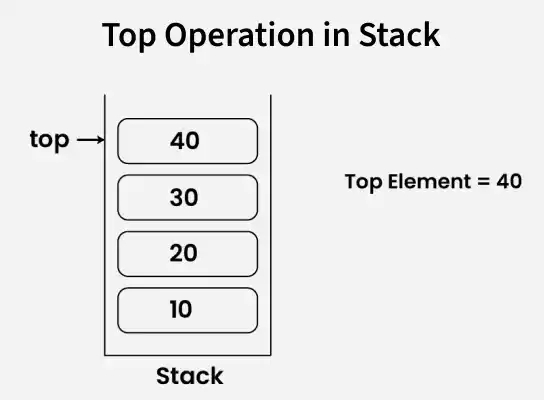
Top operation in stack
**Note: top() is used to only view the topmost element of the stack not print it.
3. Deleting Elements
In stack, only the top element of the stack can be deleted by using pop() method in one operation.
C++ `
#include #include using namespace std;
int main() { stack st; st.push(10); st.push(20); st.push(30); st.push(40);
// Deleting top element
st.pop();

while(!st.empty()) {
    cout << st.top() << " ";
    st.pop();
}
return 0;
}
`
.webp)
Pop Operation in Stack
4. empty()
This checks whether the stack is empty. It returns true if the stack has no elements, otherwise, it returns false.
C++ `
#include #include using namespace std;
int main() {
stack<int>st;
if(st.empty()){
    cout<<"Stack is empty "<<endl;
}
st.push(100);
if(!st.empty()){
    cout<<"Stack is not empty. Top element: "<<st.top()<<endl;
}
return 0;
}
`
Output
Stack is empty Stack is not empty. Top element: 100
5. Size of stack
The size() function in a stack returns the number of elements currently in the stack. It helps to determine how many items are stored without modifying the stack.
C++ `
#include #include using namespace std;
int main() {
stack<int> st;
st.push(10);
st.push(5);
cout << "Size of stack: " << st.size() << endl;
st.pop();
cout << "Size of stack:" << st.size() << endl;
return 0;
}
`
Output
Size of stack: 2 Size of stack:1
Pseudo Traversal
A stack cannot be directly traversed, but by creating a copy and repeatedly accessing and popping the top element, we can traverse it without modifying the original stack.
C++ `
#include #include using namespace std;
int main() { stack st; st.push(10); st.push(20); st.push(30); st.push(40);
// Create a copy
stack<int> temp(st);

while (!temp.empty())
{
    cout << temp.top() << " ";
    temp.pop();
}
return 0;
}
`

**Explanation: Pseudo-traversal is done by creating a copy of the "st" to avoid modifying the original stack. The while loop prints and removes elements from temp using "top()" and "pop()" until the stack becomes empty.