What is Dynamic Memory Allocation? (original) (raw)
Dynamic memory allocation in C++ refers to performing memory allocation manually by a programmer. Dynamically allocated memory is allocated on Heap, and non-static and local variables get memory allocated on Stack.
Dynamic Memory Allocation:
Dynamic memory allocation gives programmers the ability to:
- Allocate memory at runtime on the Heap.
- Deallocate memory when it's no longer needed.
Dynamic memory allocation is useful when the required memory size cannot be determined during compile time.
Key Functions for Dynamic Memory Allocation:
- new: Allocates memory in C++.
- delete: Deallocates memory in C++.
- malloc and calloc: Legacy C-style functions used for memory allocation.
**new operator
The new operator denotes a request for memory allocation on the Free Store. If sufficient memory is available, a new operator initializes the memory and returns the address of the newly allocated and initialized memory to the pointer variable.
**Syntax to use new operator
pointer-variable = new data-type;
**Initialize memory: We can also initialize the memory for built-in data types using a new operator. For custom data types, a constructor is required (with the data type as input) for initializing the value. Here’s an example of the initialization of both data types :
pointer-variable = new data-type(value);
**Allocate a block of memory: a new operator is also used to allocate a block(an array) of memory of type _data type.
pointer-variable = new data-type[size];
where size(a variable) specifies the number of elements in an array.
**Example1: Allocating and Accessing Memory
C++ `
#include using namespace std;
int main() {
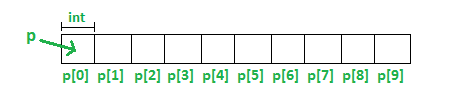
int *ptr = new int[10];
return 0;
}
`
**Explanation:
- Heap Allocation: Memory is allocated on the heap for 10 integers. The pointer ptr stores the address of the first element.
Example 2: Accessing Uninitialized Memory
C++ `
#include using namespace std;
int main() { int *ptr = new int[5]; cout << *(ptr + 2); // Access the third element in the array return 0; }
`
**Explanation: The value at *(ptr + 2) is uninitialized and may contain garbage data.
Example 3: Initializing and Accessing Dynamic Memory
C++ `
#include using namespace std;
int main() {
int *ptr = new int[5];
*(ptr + 2) = 10;
cout << *(ptr + 2);
return 0;
}
`
**Explanation: The third element of the allocated array (*(ptr + 2)) is initialized to 10.
Example 4: Deallocating Memory
C++ `
#include using namespace std;
int main() {
int *ptr = new int[5];
*(ptr + 2) = 10;
delete[] ptr;
ptr = NULL;
}
`
**Explanation:
- After delete[] ptr, the allocated memory is returned to the system.
- Setting ptr = NULL ensures it does not point to invalid memory.
Example 5: Returning Address of Local Variable
C++ `
#include using namespace std;
int *fun() {
int a = 10;
int *ptr = &a;
return ptr;
}
int main() { cout << *fun(); // Undefined behavior return 0; }
`
**Explanation: The function returns the address of a local variable that is destroyed after the function ends, so the output is undefined or a garbage value.
Example 6: Returning Dynamically Allocated Memory
C++ `
#include using namespace std;
int *fun() {
int *ptr = new int;
*ptr = 10;
return ptr;
}
int main() { cout << *fun(); // Access dynamically allocated value return 0; }
`
**Explanation: Memory allocated inside fun persists even after the function ends since it is allocated on the Heap.
Example 7: Proper Deallocation After Function Call
C++ `
#include using namespace std;
int *fun() { int *ptr = new int; *ptr = 10; return ptr; }
int main() {
int *ptr = fun();
cout << *ptr;
delete ptr; // Deallocate memory
ptr = NULL; // Set pointer to NULL
return 0;
}
`
**Note: Always deallocate memory using
deleteto avoid memory leaks.
Common Mistakes with Dynamic Memory Allocation
- **Memory Leaks: Forgetting to deallocate memory results in unused memory occupying the heap.
- **Dangling Pointers: Accessing memory after it has been deallocated leads to undefined behavior.
delete ptr;
cout << *ptr; // Undefined behavior - **Accessing Invalid Memory: Returning the address of a local variable (stack memory) is invalid because the variable is destroyed when the function ends, leading to undefined or garbage values.